1
2
3
4
5
6
7
8
9
10
11
12
13
14
15
16
17
18
19
20
21
22
23
24
25
26
27
28
29
30
31
32
33
34
35
36
37
38
39
40
41
42
43
44
45
46
47
48
49
50
51
52
53
54
55
56
57
58
59
60
61
62
63
64
65
66
67
68
69
70
71
72
73
74
75
76
77
78
79
80
81
82
83
84
85
86
87
88
89
90
91
92
93
94
95
96
97
98
99
100
101
102
103
104
105
106
107
108
109
110
111
112
113
114
115
116
117
118
119
120
121
122
123
124
125
126
127
128
129
130
131
132
133
134
135
136
137
138
139
140
141
142
143
144
145
146
147
148
149
150
151
152
153
154
155
156
157
158
159
160
161
162
163
164
165
166
167
168
169
170
171
172
173
174
175
176
177
178
179
180
181
182
183
184
185
186
187
188
189
190
191
192
193
194
195
196
197
198
199
200
201
202
203
204
205
206
207
208
209
210
211
212
213
214
215
216
217
218
219
220
221
222
223
|
# Microsoft Azure CLI
[](https://pypi.python.org/pypi/azure-cli)
[](https://dev.azure.com/azure-sdk/public/_build/latest?definitionId=246&branchName=dev)
[](https://azurecli.slack.com)
A great cloud needs great tools; we're excited to introduce *Azure CLI*, our next generation multi-platform command line experience for Azure.
Take a test run now from [Azure Cloud Shell](https://portal.azure.com/#cloudshell)!
## Installation
Please refer to the [install guide](https://learn.microsoft.com/cli/azure/install-azure-cli) for detailed install instructions.
A list of common install issues and their resolutions are available at [install troubleshooting](https://github.com/Azure/azure-cli/blob/dev/doc/install_troubleshooting.md).
### Developer installation (see below)
- [Docker](#docker)
- [Edge Builds](#edge-builds)
- [Developer Setup](#developer-setup)
## Usage
```bash
$ az [ group ] [ subgroup ] [ command ] {parameters}
```
### Get Started
Please refer to the ["get started" guide](https://learn.microsoft.com/cli/azure/get-started-with-az-cli2) for in-depth instructions.
For usage and help content, pass in the `-h` parameter, for example:
```bash
$ az storage -h
$ az vm create -h
```
### Highlights
Here are a few features and concepts that can help you get the most out of the Azure CLI.
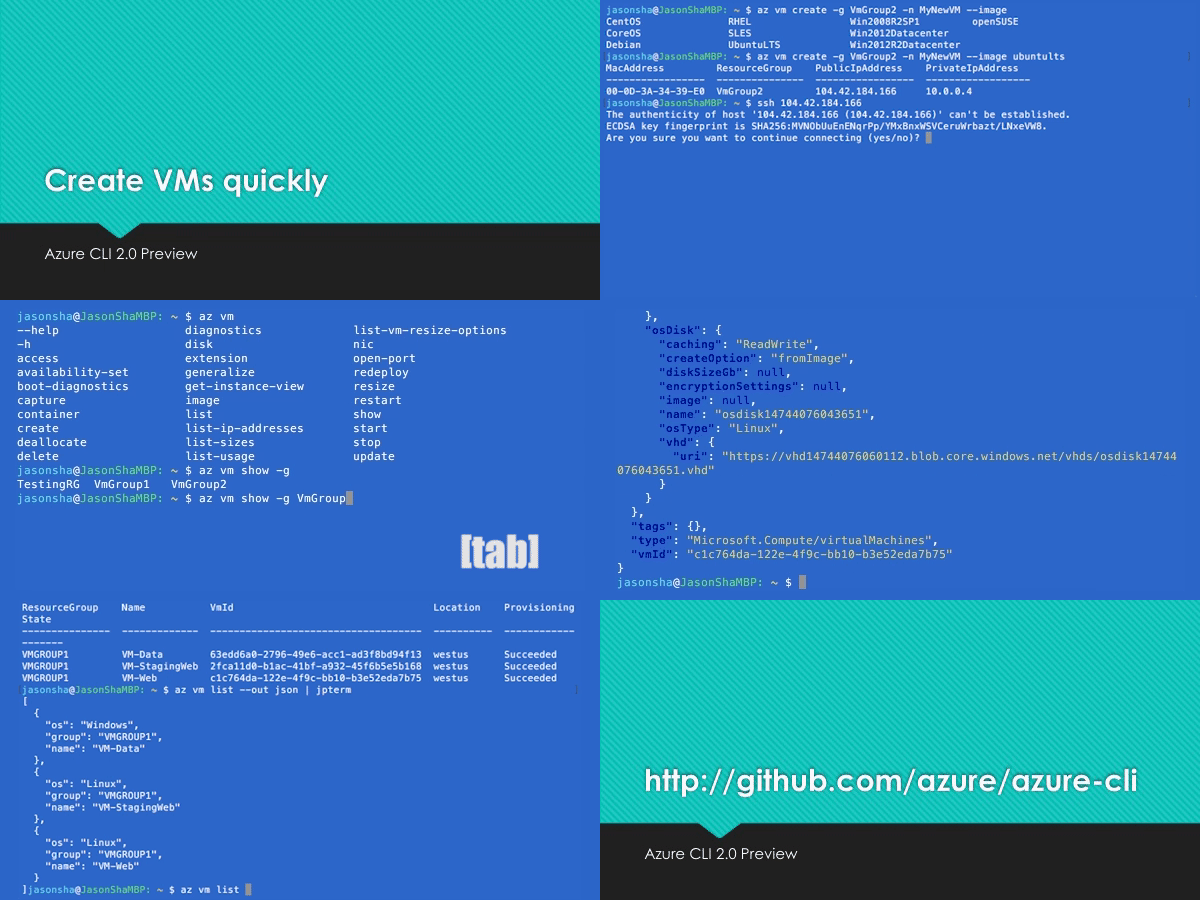
The following examples are showing using the `--output table` format, you can change your default using the `az configure` command.
#### Tab completion
We support tab-completion for groups, commands, and some parameters
```bash
# looking up resource group and name
$ az vm show -g [tab][tab]
AccountingGroup RGOne WebPropertiesRG
$ az vm show -g WebPropertiesRG -n [tab][tab]
StoreVM Bizlogic
$ az vm show -g WebPropertiesRG -n Bizlogic
```
#### Query
You can use the `--query` parameter and the [JMESPath](http://jmespath.org/) query syntax to customize your output.
```bash
$ az vm list --query "[?provisioningState=='Succeeded'].{ name: name, os: storageProfile.osDisk.osType }"
Name Os
---------------------- -------
storevm Linux
bizlogic Linux
demo32111vm Windows
dcos-master-39DB807E-0 Linux
```
#### Exit codes
For scripting purposes, we output certain exit codes for differing scenarios.
|Exit Code |Scenario |
|---|---|
|0 |Command ran successfully. |
|1 |Generic error; server returned bad status code, CLI validation failed, etc. |
|2 |Parser error; check input to command line. |
|3 |Missing ARM resource; used for existence check from `show` commands. |
### Common scenarios and use Azure CLI effectively
Please check [Tips for using Azure CLI effectively](https://learn.microsoft.com/en-us/cli/azure/use-cli-effectively). It describes some common scenarios:
- [Output formatting (json, table, or tsv)](https://learn.microsoft.com/en-us/cli/azure/use-cli-effectively#output-formatting-json-table-or-tsv)
- [Pass values from one command to another](https://learn.microsoft.com/en-us/cli/azure/use-cli-effectively#pass-values-from-one-command-to-another)
- [Async operations](https://learn.microsoft.com/en-us/cli/azure/use-cli-effectively#async-operations)
- [Generic update arguments](https://learn.microsoft.com/en-us/cli/azure/use-cli-effectively#generic-update-arguments)
- [Generic resource commands - `az resource`](https://learn.microsoft.com/en-us/cli/azure/use-cli-effectively#generic-resource-commands---az-resource)
- [REST API command - `az rest`](https://learn.microsoft.com/en-us/cli/azure/use-cli-effectively#rest-api-command---az-rest)
- [Quoting issues](https://learn.microsoft.com/en-us/cli/azure/use-cli-effectively#quoting-issues)
- [Work behind a proxy](https://learn.microsoft.com/en-us/cli/azure/use-cli-effectively#work-behind-a-proxy)
- [Concurrent builds](https://learn.microsoft.com/en-us/cli/azure/use-cli-effectively#concurrent-builds)
### More samples and snippets
For more usage examples, take a look at our [GitHub samples repo](http://github.com/Azure/azure-cli-samples) or [https://learn.microsoft.com/cli/azure/overview](https://learn.microsoft.com/cli/azure/overview).
### Write and run commands in Visual Studio Code
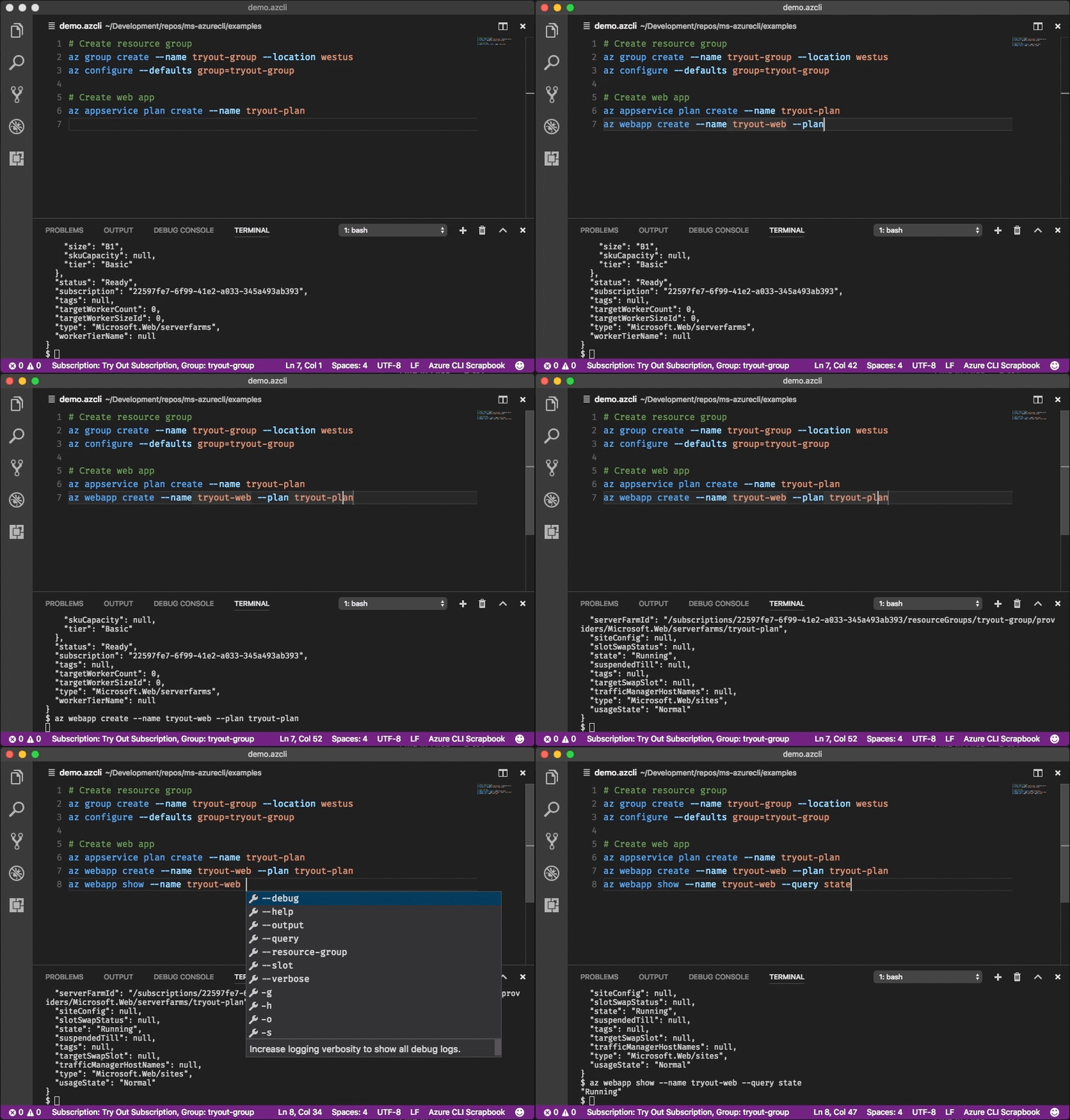
With the [Azure CLI Tools](https://marketplace.visualstudio.com/items?itemName=ms-vscode.azurecli) Visual Studio Code extension, you can create `.azcli` files and use these features:
- IntelliSense for commands and their arguments.
- Snippets for commands, inserting required arguments automatically.
- Run the current command in the integrated terminal.
- Run the current command and show its output in a side-by-side editor.
- Show documentation on mouse hover.
- Display current subscription and defaults in status bar.
- To enable IntelliSense for other file types like `.ps1` or `.sh`, see [microsoft/vscode-azurecli#48](https://github.com/microsoft/vscode-azurecli/issues/48).
## Data Collection
The software may collect information about you and your use of the software and send it to Microsoft. Microsoft may use this information to provide services and improve our products and services. You may turn off the telemetry as described in the repository. There are also some features in the software that may enable you and Microsoft to collect data from users of your applications. If you use these features, you must comply with applicable law, including providing appropriate notices to users of your applications together with a copy of Microsoft's privacy statement. Our privacy statement is located at https://go.microsoft.com/fwlink/?LinkID=824704. You can learn more about data collection and use in the help documentation and our privacy statement. Your use of the software operates as your consent to these practices.
### Telemetry Configuration
Telemetry collection is on by default. To opt out, please run `az config set core.collect_telemetry=no` to turn it off.
## Reporting issues and feedback
If you encounter any bugs with the tool please file an issue in the [Issues](https://github.com/Azure/azure-cli/issues) section of our GitHub repo.
To provide feedback from the command line, try the `az feedback` command.
\[Microsoft internal] You may contact the developer team via azpycli@microsoft.com.
## Developer installation
### Docker
We maintain a Docker image preconfigured with the Azure CLI.
See our [Docker tags](https://mcr.microsoft.com/v2/azure-cli/tags/list) for available versions.
```bash
$ docker run -u $(id -u):$(id -g) -v ${HOME}:/home/az -e HOME=/home/az --rm -it mcr.microsoft.com/azure-cli:<version>
```
### Edge builds
If you want to get the latest build from the `dev` branch, you can use our "edge" builds.
You can download the latest builds by following the links below:
| Package | Link |
|:-----------------:|:-------------------------------------------|
| MSI | https://aka.ms/InstallAzureCliWindowsEdge |
| Homebrew Formula | https://aka.ms/InstallAzureCliHomebrewEdge |
| Ubuntu Bionic Deb | https://aka.ms/InstallAzureCliBionicEdge |
| Ubuntu Focal Deb | https://aka.ms/InstallAzureCliFocalEdge |
| Ubuntu Jammy Deb | https://aka.ms/InstallAzureCliJammyEdge |
| RPM el8 | https://aka.ms/InstallAzureCliRpmEl8Edge |
On Windows, you need to uninstall the official version before installing the edge build. (See https://github.com/Azure/azure-cli/issues/25607#issuecomment-1452855212)
You can easily install the latest Homebrew edge build with the following command:
```bash
# You need to uninstall the stable version with `brew uninstall azure-cli` first
curl --location --silent --output azure-cli.rb https://aka.ms/InstallAzureCliHomebrewEdge
brew install --build-from-source azure-cli.rb
```
You can install the edge build on Ubuntu Jammy with the following command:
```bash
curl --location --silent --output azure-cli_jammy.deb https://aka.ms/InstallAzureCliJammyEdge && dpkg -i azure-cli_jammy.deb
```
And install the edge build with rpm package on RHEL 8 or CentOS Stream 8:
```bash
dnf install -y $(curl --location --silent --output /dev/null --write-out %{url_effective} https://aka.ms/InstallAzureCliRpmEl8Edge)
```
Here's an example of installing edge builds with pip3 in a virtual environment. The `--upgrade-strategy=eager` option will install the edge builds of dependencies as well.
```bash
$ python3 -m venv env
$ . env/bin/activate
$ pip3 install --pre azure-cli --extra-index-url https://azurecliprod.blob.core.windows.net/edge --upgrade-strategy=eager
```
To upgrade your current edge build pass the `--upgrade` option. The `--no-cache-dir` option is also recommended since
the feed is frequently updated.
```bash
$ pip3 install --upgrade --pre azure-cli --extra-index-url https://azurecliprod.blob.core.windows.net/edge --no-cache-dir --upgrade-strategy=eager
```
The edge build is generated for each PR merged to the `dev` branch as a part of the Azure DevOps Pipelines.
### Get builds of arbitrary commit or PR
If you would like to get builds of arbitrary commit or PR, see:
[Try new features before release](doc/try_new_features_before_release.md)
## Developer setup
If you would like to setup a development environment and contribute to the CLI, see:
[Configuring Your Machine](https://github.com/Azure/azure-cli/blob/dev/doc/configuring_your_machine.md)
[Authoring Command Modules](https://github.com/Azure/azure-cli/tree/dev/doc/authoring_command_modules)
[Code Generation](https://github.com/Azure/aaz-dev-tools)
## Contribute code
This project has adopted the [Microsoft Open Source Code of Conduct](https://opensource.microsoft.com/codeofconduct/).
For more information see the [Code of Conduct FAQ](https://opensource.microsoft.com/codeofconduct/faq/) or contact [opencode@microsoft.com](mailto:opencode@microsoft.com) with any additional questions or comments.
If you would like to become an active contributor to this project please
follow the instructions provided in [Microsoft Open Source Guidelines](https://opensource.microsoft.com/collaborate).
|
