1
2
3
4
5
6
7
8
9
10
11
12
13
14
15
16
17
18
19
20
21
22
23
24
25
26
27
28
29
30
31
32
33
34
35
36
37
38
39
40
41
42
43
44
45
46
47
48
49
50
51
52
53
54
55
56
57
58
59
60
61
62
63
64
65
66
67
68
69
70
71
72
73
74
75
76
77
78
79
80
81
82
83
84
85
86
87
88
89
90
91
92
93
94
95
96
97
98
99
100
101
102
103
104
105
106
107
108
109
110
111
112
113
114
115
116
117
118
119
120
121
122
123
124
125
126
127
128
129
130
131
132
133
134
135
136
137
138
139
140
141
142
143
144
145
146
147
148
149
150
151
152
153
154
155
156
157
158
159
160
161
162
163
164
165
166
167
168
169
170
171
172
173
174
175
176
177
178
179
180
181
|
# dasel
[](https://daseldocs.tomwright.me)
[](https://goreportcard.com/report/github.com/TomWright/dasel/v2)
[](https://pkg.go.dev/github.com/tomwright/dasel/v2)


[](https://codecov.io/gh/TomWright/dasel)
[](https://github.com/avelino/awesome-go)


[](https://github.com/TomWright/dasel/releases/latest)
[](https://formulae.brew.sh/formula/dasel)
Dasel (short for data-selector) allows you to query and modify data structures using selector strings.
Comparable to [jq](https://github.com/stedolan/jq) / [yq](https://github.com/kislyuk/yq), but supports JSON, YAML, TOML, XML and CSV with zero runtime dependencies.
## One tool to rule them all
Say good bye to learning new tools just to work with a different data format.
Dasel uses a standard selector syntax no matter the data format. This means that once you learn how to use dasel you immediately have the ability to query/modify any of the supported data types without any additional tools or effort.

## Table of contents
- [Dasel](#dasel)
- [One tool to rule them all](#one-tool-to-rule-them-all)
- [Quickstart](#quickstart)
- [Completion](#completion)
- [Issue vs discussion](#issue-vs-discussion)
- [Features](#features)
- [Table of contents](#table-of-contents)
- [Documentation](#documentation)
- [Playground](#playground)
- [Benchmarks](#benchmarks)
- [Pre-Commit](#pre-commit)
## Quickstart
Dasel is available on [homebrew](https://daseldocs.tomwright.me/installation#homebrew), [ASDF](https://daseldocs.tomwright.me/installation#asdf), [scoop](https://daseldocs.tomwright.me/installation#scoop), [docker](https://daseldocs.tomwright.me/installation#docker), [Nix](https://daseldocs.tomwright.me/installation#nix) or as [compiled binaries](https://daseldocs.tomwright.me/installation#manual) from the [latest release](https://github.com/TomWright/dasel/releases/latest).
```bash
brew install dasel
```
You can also install a [development version](https://daseldocs.tomwright.me/installation#development-version) with:
```bash
go install github.com/tomwright/dasel/v2/cmd/dasel@master
```
For more information see the [installation documentation](https://daseldocs.tomwright.me/installation).
### Select
```bash
echo '{"name": "Tom"}' | dasel -r json 'name'
"Tom"
```
See [select documentation](https://daseldocs.tomwright.me/commands/select).
### Convert json to yaml
```bash
echo '{"name": "Tom"}' | dasel -r json -w yaml
name: Tom
```
See [select documentation](https://daseldocs.tomwright.me/commands/select).
### Put
```bash
echo '{"name": "Tom"}' | dasel put -r json -t string -v 'contact@tomwright.me' 'email'
{
"email": "contact@tomwright.me",
"name": "Tom"
}
```
See [put documentation](https://daseldocs.tomwright.me/commands/put).
### Delete
```bash
echo '{
"email": "contact@tomwright.me",
"name": "Tom"
}' | dasel delete -r json '.email'
{
"name": "Tom"
}
```
See [delete documentation](https://daseldocs.tomwright.me/commands/delete).
## Completion
If you want to use completion from the terminal you can do the following (using zsh in this example):
Add the following to `~/.zshrc` and reload your terminal.
```bash
export fpath=(~/zsh/site-functions $fpath)
mkdir -p ~/zsh/site-functions
dasel completion zsh > ~/zsh/site-functions/_dasel
compinit
```
## Pre-Commit
Add `dasel` hooks to `.pre-commit-config.yaml` file
```yaml
- repo: https://github.com/TomWright/dasel
rev: v1.25.1
hooks:
- id: dasel-validate
```
for a native execution of dasel, or use:
- `dasel-validate-docker` pre-commit hook for executing dasel using the official [Docker images](https://daseldocs.tomwright.me/installation#docker)
- `dasel-validate-bin` pre-commit hook for executing dasel using the official [binary](https://daseldocs.tomwright.me/installation)
## Issue vs Discussion
I have enabled [discussions](https://github.com/TomWright/dasel/discussions) on this repository.
I am aware there may be some confusion when deciding where you should communicate when reporting issues, asking questions or raising feature requests so this section aims to help us align on that.
Please [raise an issue](https://github.com/TomWright/dasel/issues) if:
- You find a bug.
- You have a feature request and can clearly describe your request.
Please [open a discussion](https://github.com/TomWright/dasel/discussions) if:
- You have a question.
- You're not sure how to achieve something with dasel.
- You have an idea but don't quite know how you would like it to work.
- You have achieved something cool with dasel and want to show it off.
- Anything else!
## Features
- [Query/select data from structured data files](https://daseldocs.tomwright.me/commands/select).
- [Update data in structured data files](https://daseldocs.tomwright.me/commands/put).
- Create data files.
- [Supports multiple data formats/types](https://daseldocs.tomwright.me/supported-file-formats).
- [Convert between data formats/types](https://daseldocs.tomwright.me/examples/change-file-format).
- Uses a [standard query/selector syntax](https://daseldocs.tomwright.me/functions/selector-overview) across all data formats.
- Zero runtime dependencies.
- [Available on Linux, Mac and Windows](https://daseldocs.tomwright.me/installation).
- Available to [import and use in your own projects](https://pkg.go.dev/github.com/tomwright/dasel/v2).
- [Run via Docker](https://daseldocs.tomwright.me/installation#docker).
- [Faster than jq/yq](#benchmarks).
- [Pre-commit hooks](#pre-commit).
## Documentation
The official dasel docs can be found at [daseldocs.tomwright.me](https://daseldocs.tomwright.me).
## Playground
You can test out dasel commands using the [playground](https://dasel.tomwright.me).
Source code for the playground can be found at [github.com/TomWright/daselplayground](https://github.com/TomWright/daselplayground).
## Benchmarks
In my tests dasel has been up to 3x faster than jq and 15x faster than yq.
See the [benchmark directory](./benchmark/README.md).
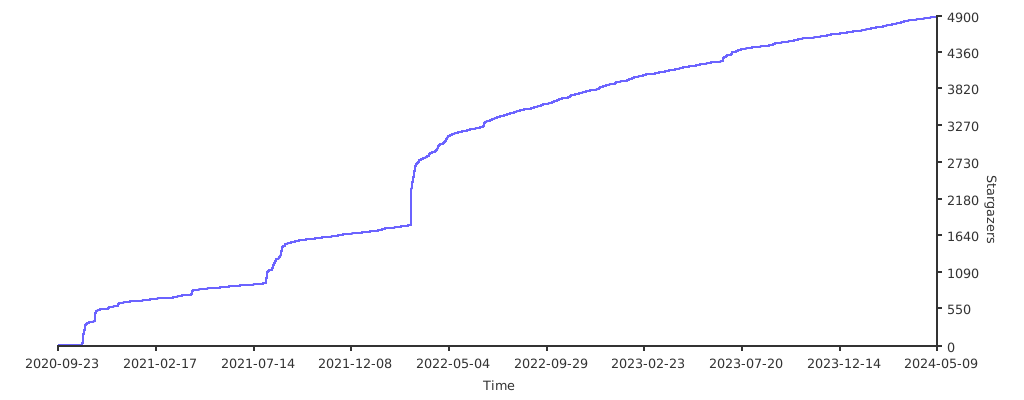
## Stargazers over time
[](https://starchart.cc/TomWright/dasel)
|
