1
2
3
4
5
6
7
8
9
10
11
12
13
14
15
16
17
18
19
20
21
22
23
24
25
26
27
28
29
30
31
32
33
34
35
36
37
38
39
40
41
42
43
44
45
46
47
48
49
50
51
52
53
54
55
56
57
58
59
60
61
62
63
64
65
66
67
68
69
70
71
72
73
74
75
76
77
78
79
80
81
82
83
84
85
86
87
88
89
90
91
92
93
94
95
96
97
98
99
100
101
102
103
104
105
106
107
108
109
110
111
112
113
114
115
116
117
118
119
120
121
122
123
124
125
126
127
128
129
130
131
132
133
134
135
136
137
138
139
140
141
142
143
144
145
146
147
148
149
150
151
152
153
154
155
156
157
158
159
160
161
162
163
164
165
166
167
168
169
170
171
172
173
174
175
176
177
178
179
180
181
182
183
184
185
186
187
188
189
190
191
192
193
194
195
196
197
198
199
200
201
202
203
204
205
206
207
208
209
210
211
212
213
214
215
216
217
218
219
220
221
222
223
224
225
226
227
228
229
230
231
232
233
234
235
236
237
238
239
240
241
242
243
244
245
246
247
248
249
250
251
252
253
254
255
256
257
258
259
260
261
262
263
264
265
266
267
268
269
270
271
272
273
274
275
276
277
278
279
280
281
282
283
284
285
286
287
288
289
290
291
292
293
294
295
296
297
298
299
300
301
302
303
304
305
306
307
308
309
310
311
312
313
314
315
316
317
318
319
320
321
322
323
324
325
326
327
328
329
330
331
332
333
334
335
336
337
338
339
340
341
342
343
344
345
346
347
348
349
350
351
352
353
354
355
356
357
358
359
360
361
362
363
364
365
366
367
368
369
370
371
372
373
374
375
376
377
378
379
380
381
382
383
384
385
386
387
388
389
390
391
392
393
394
395
396
397
398
399
400
401
402
403
404
405
406
407
408
409
410
411
412
413
414
415
416
417
418
419
420
421
422
423
424
425
426
427
428
429
430
431
432
433
434
435
436
437
438
439
440
441
442
443
444
445
446
447
448
449
450
451
452
453
454
455
456
457
458
459
460
461
462
463
464
465
466
467
468
469
470
471
472
473
474
475
476
477
478
479
480
481
482
483
484
485
486
487
488
489
490
491
492
493
494
495
496
497
498
499
500
501
502
503
504
505
506
507
508
509
510
511
512
513
514
|
# Deft for Emacs [![MELPA badge][melpa-badge]][melpa-link] [![MELPA stable badge][melpa-stable-badge]][melpa-stable-link] [![Travis CI Build Status][travis-badge]][travis-link]
[melpa-link]: https://melpa.org/#/deft
[melpa-stable-link]: https://stable.melpa.org/#/deft
[melpa-badge]: https://melpa.org/packages/deft-badge.svg
[melpa-stable-badge]: https://stable.melpa.org/packages/deft-badge.svg
[travis-link]: https://travis-ci.org/jrblevin/deft
[travis-badge]: https://travis-ci.org/jrblevin/deft.svg?branch=master
<!-- Automatically generated from comments in deft.el. -->
Deft is an Emacs mode for quickly browsing, filtering, and editing
directories of plain text notes, inspired by Notational Velocity.
It was designed for increased productivity when writing and taking
notes by making it fast and simple to find the right file at the
right time and by automating many of the usual tasks such as
creating new files and saving files.
Obtaining Deft
--------------
Deft is open source software and may be freely distributed and
modified under the BSD license. The latest stable release is
version 0.8, released on January 12, 2018.
**Installation via MELPA Stable**
The recommended way to install Deft is to obtain the stable version
from [MELPA Stable](https://stable.melpa.org/#/deft) using
`package.el`. First, configure `package.el` and the MELPA Stable
repository by adding the following to your `.emacs`, `init.el`, or
equivalent startup file:
(require 'package)
(add-to-list 'package-archives
'("melpa-stable" . "https://stable.melpa.org/packages/"))
(package-initialize)
Then, after restarting Emacs or evaluating the above statements, issue
the following command: <kbd>M-x package-install RET deft RET</kbd>.
[MELPA Stable]: http://stable.melpa.org/
**Direct Download**
Alternatively you can manually download and install Deft.
First, download the latest stable version of and save the file
where Emacs can find it---a directory in your `load-path`:
* [deft.el](https://jblevins.org/projects/deft/deft.el)
Then, add the following line to your startup file:
(require 'deft)
**Development Version**
To follow or contribute to Deft development, you can browse or
clone the Git repository [on GitHub](https://github.com/jrblevin/deft):
git clone https://github.com/jrblevin/deft.git
If you prefer to install and use the development version, which may
become unstable at some times, you can either clone the Git
repository as above or install Deft from
[MELPA](https://melpa.org/#/deft).
If you clone the repository directly, then make sure that Emacs can
find it by adding the following line to your startup file:
(add-to-list 'load-path "/path/to/deft/repository")
Overview
--------
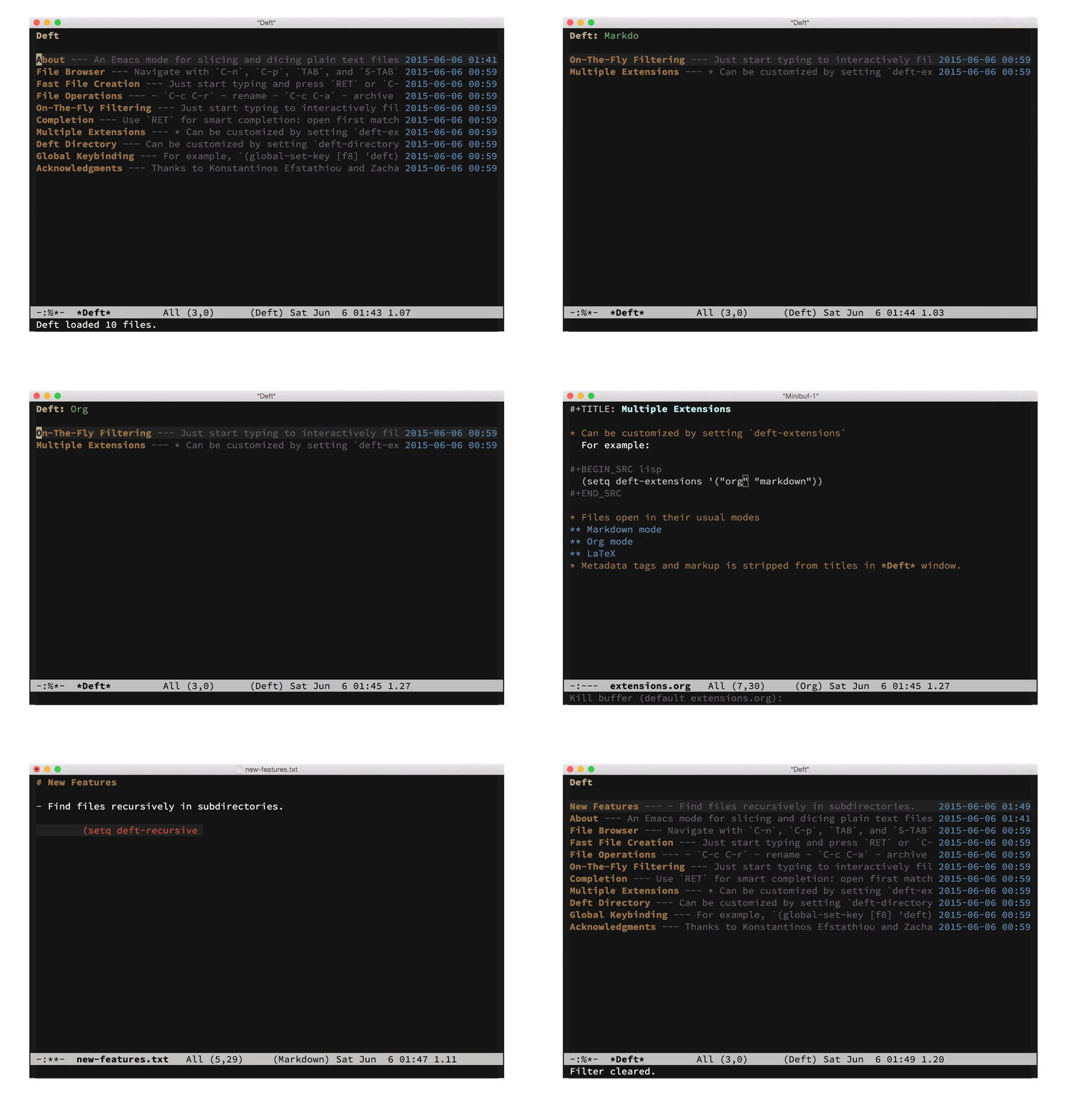
The Deft buffer is simply a file browser which lists the titles of
all text files in the Deft directory followed by short summaries
and last modified times. The title is taken to be the first line
of the file and the summary is extracted from the text that
follows. Files are, by default, sorted in terms of the last
modified date, from newest to oldest.
All Deft files or notes are simple plain text files where the first
line contains a title. As an example, the following directory
structure generated the screenshot above.
% ls ~/.deft
about.txt browser.txt directory.txt operations.txt
ack.txt completion.txt extensions.org
binding.txt creation.txt filtering.txt
% cat ~/.deft/about.txt
# About
An Emacs mode for slicing and dicing plain text files.
Deft's primary operation is searching and filtering. The list of
files can be limited or filtered using a search string, which will
match both the title and the body text. To initiate a filter,
simply start typing. Filtering happens on the fly. As you type,
the file browser is updated to include only files that match the
current string.
To open the first matching file, simply press <kbd>RET</kbd>. If no files
match your search string, pressing <kbd>RET</kbd> will create a new file
using the string as the title. This is a very fast way to start
writing new notes. The filename will be generated automatically.
If you prefer to provide a specific filename, use <kbd>C-RET</kbd> instead.
To open files other than the first match, navigate up and down
using <kbd>C-p</kbd> and <kbd>C-n</kbd> and press <kbd>RET</kbd> on the file you want to open.
When opening a file, Deft searches forward and leaves the point
at the end of the first match of the filter string.
You can also press <kbd>C-o</kbd> to open a file in another window, without
switching to the other window. Issue the same command with a prefix
argument, <kbd>C-u C-o</kbd>, to open the file in another window and switch
to that window.
To edit the filter string, press `DEL` (backspace) to remove the
last character or <kbd>M-DEL</kbd> to remove the last "word". To yank
(paste) the most recently killed (cut or copied) text into the
filter string, press <kbd>C-y</kbd>. Press <kbd>C-c C-c</kbd> to clear the filter
string and display all files and <kbd>C-c C-g</kbd> to refresh the file
browser using the current filter string.
For more advanced editing operations, you can also edit the filter
string in the minibuffer by pressing <kbd>C-c C-l</kbd>. While in the
minibuffer, the history of previous edits can be cycled through by
pressing <kbd>M-p</kbd> and <kbd>M-n</kbd>. This form of static, one-time filtering
(as opposed to incremental, on-the-fly filtering) may be preferable
in some situations, such as over slow connections or on systems
where interactive filtering performance is poor.
By default, Deft filters files in incremental string search mode,
where "search string" will match all files containing both "search"
and "string" in any order. Alternatively, Deft supports direct
regexp filtering, where the filter string is interpreted as a
formal regular expression. For example, `^\(foo\|bar\)` matches
foo or bar at the beginning of a line. Pressing <kbd>C-c C-t</kbd> will
toggle between incremental and regexp search modes. Regexp
search mode is indicated by an "R" in the mode line.
Common file operations can also be carried out from within Deft.
Files can be renamed using <kbd>C-c C-r</kbd> or deleted using <kbd>C-c C-d</kbd>.
New files can also be created using <kbd>C-c C-n</kbd> for quick creation or
<kbd>C-c C-m</kbd> for a filename prompt. You can leave Deft at any time
with <kbd>C-c C-q</kbd>.
Unused files can be archived by pressing <kbd>C-c C-a</kbd>. Files will be
moved to `deft-archive-directory`, which is a directory named
`archive` within your `deft-directory` by default.
Files opened with deft are automatically saved after Emacs has been
idle for a customizable number of seconds. This value is a floating
point number given by `deft-auto-save-interval` (default: 1.0).
Getting Started
---------------
Once you have installed Deft following one of the above methods,
you can simply run <kbd>M-x deft</kbd> to start Deft. It is useful
to create a global keybinding for the `deft` function (e.g., a
function key) to start it quickly (see below for details).
When you first run Deft, it will complain that it cannot find the
`~/.deft` directory. You can either create a symbolic link to
another directory where you keep your notes or run <kbd>M-x deft-setup</kbd>
to create the `~/.deft` directory automatically.
One useful way to use Deft is to keep a directory of notes in a
Dropbox folder. This can be used with other applications and
mobile devices, for example, [nvALT][], [Notational Velocity][], or
[Simplenote][] on OS X or [Editorial][], [Byword][], or [1Writer][]
on iOS.
[nvALT]: http://brettterpstra.com/projects/nvalt/
[Notational Velocity]: http://notational.net/
[Simplenote]: http://simplenote.com/
[Editorial]: https://geo.itunes.apple.com/us/app/editorial/id673907758?mt=8&uo=6&at=11l5Vs&ct=deft
[Byword]: https://geo.itunes.apple.com/us/app/byword/id482063361?mt=8&uo=6&at=11l5Vs&ct=deft
[1Writer]: https://geo.itunes.apple.com/us/app/1writer-note-taking-writing/id680469088?mt=8&uo=6&at=11l5Vs&ct=deft
Basic Customization
-------------------
You can customize items in the `deft` group to change the default
functionality.
By default, Deft looks for notes by searching for files with the
extensions `.txt`, `.text`, `.md`, `.markdown`, or `.org` in the
`~/.deft` directory. You can customize both the file extension and
the Deft directory by running <kbd>M-x customize-group</kbd> and typing
`deft`. Alternatively, you can configure them in your `.emacs`
file:
(setq deft-extensions '("txt" "tex" "org"))
(setq deft-directory "~/Dropbox/notes")
The first element of `deft-extensions` (or in Lisp parlance, the
car) is the default extension used to create new files.
By default, Deft only searches for files in `deft-directory` but
not in any subdirectories. All files in `deft-directory` with one
of the specified extensions will be included except for those
matching `deft-ignore-file-regexp`. Set `deft-recursive` to a
non-nil value to enable searching for files in subdirectories
(those not matching `deft-recursive-ignore-dir-regexp`):
(setq deft-recursive t)
You can easily set up a global keyboard binding for Deft. For
example, to bind it to F8, add the following code to your `.emacs`
file:
(global-set-key [f8] 'deft)
If you manage loading packages with [use-package][], then you can
configure by adding a declaration such as this one to your init
file:
(use-package deft
:bind ("<f8>" . deft)
:commands (deft)
:config (setq deft-directory "~/Dropbox/notes"
deft-extensions '("md" "org")))
[use-package]: https://github.com/jwiegley/use-package
Reading Files
-------------
The displayed title of each file is taken to be the first line of
the file, with certain characters removed from the beginning. Hash
characters, as used in Markdown headers, and asterisks, as in Org
Mode headers, are removed. Additionally, Org mode `#+TITLE:` tags,
MultiMarkdown `Title:` tags, LaTeX comment markers, and
Emacs mode-line declarations (e.g., `-*-mode-*-`) are stripped from
displayed titles. This can be customized by changing
`deft-strip-title-regexp`.
More generally, the title post-processing function itself can be
customized by setting `deft-parse-title-function`, which accepts
the first line of the file as an argument and returns the parsed
title to display in the file browser. The default function is
`deft-strip-title`, which removes all occurrences of
`deft-strip-title-regexp` as described above.
For compatibility with other applications which use the filename as
the title of a note (rather than the first line of the file), set the
`deft-use-filename-as-title` flag to a non-`nil` value. Deft will then
use note filenames to generate the displayed titles in the Deft
file browser. To enable this, add the following to your `.emacs` file:
(setq deft-use-filename-as-title t)
Finally, the short summary that is displayed following the file
title can be customized by changing `deft-strip-summary-regexp`. By
default, this is set to remove certain org-mode metadata statements
such as `#+OPTIONS:` and `#+AUTHOR:`.
Creating Files
--------------
Filenames for newly created files are generated by Deft automatically.
The process for doing so is determined by the variables
`deft-use-filename-as-title` and `deft-use-filter-string-for-filename`
as well as the rules in the `deft-file-naming-rules` alist.
The possible cases are as follows:
1. **Default** (`deft-use-filename-as-title` and
`deft-use-filter-string-for-filename` are both `nil`):
The filename will be automatically generated using an short,
ISO-like timestamp as in `2016-05-12T09:00.txt`. The format
can be customized by setting the variable
`deft-new-file-format`. The filter string will be inserted as
the first line of the file (which is also used as the display
title). In case of file name conflicts, an underscore and a
numerical suffix (e.g., `_2`) will be appended before the
extension.
2. **Filenames as titles** (`deft-use-filename-as-title` is non-`nil`):
When `deft-use-filename-as-title` is non-`nil`, the filter string
will be used as the filename for new files (with the appropriate
file extension appended to the end). An example of new file creation
in this case:
* Filter string: "My New Project"
* File name: "My New Project.txt"
* File contents: [empty]
3. **Readable filenames** (`deft-use-filename-as-title` is
`nil` but `deft-use-filter-string-for-filename` is non-`nil`):
In this case you can choose to display the title as parsed from
the first line of the file while also generating readable
filenames for new files based on the filter string. The
variable `deft-use-filter-string-for-filename` controls this
behavior and decouples the title display
(`deft-use-filename-as-title`) from the actual filename. New
filenames will be generated from the filter string and
processed according to the rules defined in the
`deft-file-naming-rules` alist. By default, slashes are removed
and replaced by hyphens, but many other options are possible
(camel case, replacing spaces by hyphens, and so on). See the
documentation for `deft-file-naming-rules` for additional
details.
As an example, with the following value for
`deft-file-naming-rules`, Deft will replace all slashes and
spaces with hyphens and will convert the file name to
lowercase:
(setq deft-file-naming-rules
'((noslash . "-")
(nospace . "-")
(case-fn . downcase)))
Below is an example in this case, with the above file naming
rules. Notice that the filter string is inserted as the first
line of the file but it is also used to generate a "readable"
file name.
* Filter string: "My New Project"
* File name: "my-new-project.txt"
* File contents: "My New Project"
Titles inserted into files from the filter string can also be
customized for two common modes, `markdown-mode` and `org-mode`, by
setting the following variables:
* `deft-markdown-mode-title-level` - When set to a positive
integer, determines how many hash marks will be added to titles
in new Markdown files. In other words, setting
`deft-markdown-mode-title-level` to <kbd>2</kbd> will result in new files
being created with level-2 headings of the form `## Title`.
* `deft-org-mode-title-prefix` - When non-nil, automatically
generated titles in new `org-mode` files will be prefixed with
`#+TITLE:`.
Other Customizations
--------------------
Deft, by default, lists files from newest to oldest. You can set
`deft-current-sort-method` to 'title to sort by file titles, case
ignored. Or, you can toggle sorting method using
`deft-toggle-sort-method`.
Incremental string search is the default method of filtering on
startup, but you can set `deft-incremental-search` to nil to make
regexp search the default.
Deft also provides a function for opening files without using the
Deft buffer directly. Calling `deft-find-file` will prompt for a
file to open, much like `find-file`, but limits consideration to
files in `deft-directory` that are known to Deft (i.e., those files
matching `deft-extensions`). Unlike `find-file`, a list of all
such files is provided and the desired file name can be completed
using `completing-read` (and, as a result, `deft-find-file` will
read/complete filenames using ido, helm, etc. when enabled). If
the selected file is in `deft-directory`, it is opened with the
usual Deft features (automatic saving, automatic updating of the
Deft buffer, etc.). Otherwise, the file will be opened by
`find-file` as usual. Therefore, you can set up a global
keybinding for this function to open Deft files anywhere. For
example, to use <kbd>C-x C-g</kbd>, a neighbor of <kbd>C-x C-f</kbd>, use the
following:
(global-set-key (kbd "C-x C-g") 'deft-find-file)
The faces used for highlighting various parts of the screen can
also be customized. By default, these faces inherit their
properties from the standard font-lock faces defined by your current
color theme.
Deft also provides several hooks: `deft-mode-hook`,
`deft-filter-hook`, and `deft-open-file-hook`. See the
documentation for these variables for further details.
Acknowledgments
---------------
Thanks to Konstantinos Efstathiou for writing simplenote.el, from
which I borrowed liberally, and to Zachary Schneirov for writing
Notational Velocity, whose functionality and spirit I wanted to
bring to Emacs.
History
-------
Version 0.8 (2018-01-12):
* Limit `deft-find-file` to files known to Deft and support
completing-read.
* Keep subdirectory portion when displaying filenames.
* New variable `deft-width-offset` for custom summary line width
offset.
* Attempt to restore point after refreshing browser and preserve
position while filtering.
* Add hooks: `deft-filter-hook` for filter string changes and
`deft-open-file-hook` which runs after opening a file.
* Prevent spurious Deft browser refreshes, which fixes an issue
with `sublimity-mode`.
* More reliable browser updates when window size changes.
* Only update width when buffer is visible.
* Lazily update the Deft buffer after saving files.
* Close open buffer when deleting a file.
* Initialize width even when started in background.
* Omit files generated from org or markdown.
* Custom format string `deft-new-file-format` for new file names.
* Reduce summary line width when there is no fringe.
* Support Org links.
* Option `deft-filter-only-filenames` to filter only on file names.
Version 0.7 (2015-12-21):
* Add custom regular expression `deft-strip-summary-regexp` for
stripping extraneous text for generating the summary line. Strip
all `org-mode` metadata by default.
* New customizable regular expressions for ignoring files and
directories. See `deft-recursive-ignore-dir-regexp` and
`deft-ignore-file-regexp`.
* Bug fix: Prevent lines from wrapping in console mode.
* Bug fix: Setup `deft-extensions` and `deft-default-extension` at
load time.
* Bug fix: Try to prevent false title matches in org-mode notes
where the string `#+TITLE:` might also appear in the body.
* Bug fix: Use `with-current-buffer` instead of `save-excursion`
while auto-saving files since we do not want to save the point.
* Bug fix: Don't escape quotes in `deft-file-naming-rules`.
Version 0.6 (2015-06-26):
* Recursive search in subdirectories (optional). Set
`deft-recursive` to a non-nil value to enable.
* Support for multiple extensions via the `deft-extensions` list.
As such, `deft-extension` is now deprecated.
* New variable `deft-create-file-from-filter-string` can enable
generation of new filenames based on the filter string. This decouples
the title display (`deft-use-filename-as-title`) from the actual filename
generation.
* New variable `deft-file-naming-rules` allows customizing generation
of filenames with regard to letter case and handling of spaces.
* New variables `deft-markdown-mode-title-level` and
`deft-org-mode-title-prefix` for automatic insertion of title markup.
* Archiving of files in `deft-archive-directory`.
* Ability to sort by either title or modification time via
`deft-current-sort-method`.
* Update default `deft-strip-title-regexp` to remove the following:
- org-mode `#+TITLE:` tags
- MultiMarkdown `Title:` tags
- LaTeX comment markers
- Emacs mode-line declarations (e.g., `-*-mode-*-`)
* Remove leading and trailing whitespace from titles.
* Disable visual line mode to prevent lines from wrapping.
* Enable line truncation to avoid displaying truncation characters.
* Show the old filename as the default prompt when renaming a file.
* Call `hack-local-variables` to read file-local variables when
opening files.
* Fixed several byte-compilation warnings.
* Bug fix: more robust handling of relative and absolute filenames.
* Bug fix: use width instead of length of strings for calculations.
* Bug fix: fix `string-width` error with empty file.
Version 0.5.1 (2013-01-28):
* Bug fix: creating files with <kbd>C-c C-n</kbd> when both the filter string and
`deft-use-filename-as-title` are non-nil resulted in an invalid path.
* Bug fix: killed buffers would persist in `deft-auto-save-buffers`.
Version 0.5 (2013-01-25):
* Implement incremental string search (default) and regexp search.
These search modes can be toggled by pressing <kbd>C-c C-t</kbd>.
* Default search method can be changed by setting `deft-incremental-search`.
* Support custom `deft-parse-title-function` for post-processing titles.
* The default `deft-parse-title-function` simply strips occurrences of
`deft-strip-title-regexp`, which removes Markdown and Org headings.
* Open files in another window with <kbd>C-o</kbd>. Prefix it with <kbd>C-u</kbd> to
switch to the other window.
* For symbolic links, use modification time of taget for sorting.
* When opening files, move point to the end of the first match of
the filter string.
* Improved filter editing: delete (`DEL`), delete word (<kbd>M-DEL</kbd>),
and yank (<kbd>C-y</kbd>).
* Advanced filter editing in minibuffer (<kbd>C-c C-l</kbd>).
Version 0.4 (2011-12-11):
* Improved filtering performance.
* Optionally take title from filename instead of first line of the
contents (see `deft-use-filename-as-title`).
* Dynamically resize width to fit the entire window.
* Customizable time format (see `deft-time-format`).
* Handle `deft-directory` properly with or without a trailing slash.
Version 0.3 (2011-09-11):
* Internationalization: support filtering with multibyte characters.
Version 0.2 (2011-08-22):
* Match filenames when filtering.
* Automatically save opened files (optional).
* Address some byte-compilation warnings.
Deft was originally written by [Jason Blevins](https://jblevins.org/).
The initial version, 0.1, was released on August 6, 2011.
|
