1
2
3
4
5
6
7
8
9
10
11
12
13
14
15
16
17
18
19
20
21
22
23
24
25
26
27
28
29
30
31
32
33
34
35
36
37
38
39
40
41
42
43
44
45
46
47
48
49
50
51
52
53
54
55
56
57
58
59
60
61
62
63
64
65
66
67
68
69
70
71
72
73
74
75
76
77
78
79
80
81
82
83
84
85
86
87
88
89
90
91
92
93
94
95
96
97
98
99
100
101
102
103
104
105
106
107
108
109
110
111
112
113
114
115
116
117
118
119
120
121
122
123
124
125
|
# eXaDrums
## Software drum module
ExaDrums is a software drum module that allows drummers to play with custom-made drum kits.
It is user-friendly and combines high quality stereo sound with low latency.
Each drum kit provides individual sliders (faders) in order to control the volume of its drum pads.
A built-in metronome can be synchronized with a rhythm coach to make practice sessions easiy and efficient.
The drum triggers can be adjusted so that their response feels as natural as possible, and different sensor interfaces include a virtual (on-screen) multi pad and external sensors can be used.
Although eXaDrums is usable as a drum module, it is still an experimental project and some features are not yet implemented.
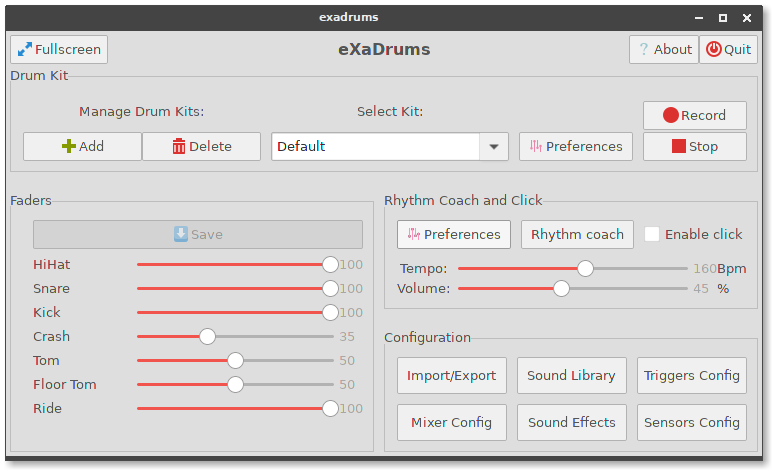
*A screenshot of eXaDrums' user interface running on a Raspberry Pi.*
This repository holds the official graphical user interface of the eXaDrums software.
To use it, you will have to install [libeXaDrums](https://github.com/SpintroniK/libeXaDrums), and follow the instructions below.
## Table of content
- [Simplified Installation](#simplified-installation)
- [Installation and configuration](#installation-and-configuration)
- [Dependencies](#dependencies)
- [Building eXaDrums](#building-exadrums)
- [Installation](#installation)
- [Configuration](#configuration)
- [Usage](#usage)
## Simplified Installation
If you are using Debian Bullseye or newer, or Ubuntu >=19.10, you can install exadrums using apt:
```shell
sudo apt install exadrums
```
If that does not work, there is another way to install official releases.
Simply copy and paste the following lines in a terminal:
```shell
wget https://github.com/SpintroniK/eXaDrums/releases/download/debian%2F0.4.1-1/libexadrums0_0.4.2-1_armhf.deb
wget https://github.com/SpintroniK/eXaDrums/releases/download/debian%2F0.4.1-1/exadrums_0.4.1-1_armhf.deb
```
These lines will download the packages for libexadrums and exadrums.
You can install them by running the following two commands:
```shell
sudo apt install ./libexadrums0_0.4.2-1_armhf.deb
sudo apt install ./exadrums_0.4.1-1_armhf.deb
```
That is all. After the installation completes, you will have a working version of exadrums.
You can check that everything is installed and running properly by typing `exadrums` in your terminal.
## Installation and configuration
Both libexadrums and exadrums are available in the Debian unstable and testing distributions, as well as Ubuntu >=19.10.
If you wish to use the latest versions, you can build the packages from the Github repositories.
### Dependencies
Exadrums depends on [libexadrums](https://github.com/SpintroniK/libeXaDrums), so make sure you have it installed first.
Both `libexadrums0` and `libexadrums-dev` packages need to be installed, as well as their dependencies:
```shell
sudo apt install libasound2-dev libtinyxml2-dev libminizip-dev libgtkmm-3.0-dev
```
In order to build eXadrums, you will need build-essential, autotools and pkg-config:
```shell
sudo apt install autoconf automake libtool build-essential pkg-config
```
If you wish to build the Debian packages (which is the recommended way to install
this software), you will need to install debhelper:
```shell
sudo apt install debhelper
```
You will also need to install git, so that you can clone this repository:
```shell
sudo apt install git
git clone https://github.com/SpintroniK/eXaDrums.git
```
### Building eXaDrums
Now that you have all dependencies, you can build the Debian packages.
Make sure you have dehelper installed, and then checkout the debian branch
from your cloned repository:
```shell
cd eXaDrums
git checkout debian
```
Then you can build the package:
```shell
dpkg-buildpackage -b -uc -us
```
If you have multiple cores/threads, you can speed up the build process by appending the option -jn to dpkg-buildpackage, where n is the number of threads that you want to use for the compilation.
Example, for four threads type: `dpkg-buildpackage -b -uc -us -j4`.
### Installation
The Debian packages are built in the parent directory, so you should be able to install them by using dpkg (don't forget to install them as root):
```shell
cd ..
sudo apt install ./exadrums_[...].deb
```
### Configuration
## Usage
|
