1
2
3
4
5
6
7
8
9
10
11
12
13
14
15
16
17
18
19
20
21
22
23
24
25
26
27
28
29
30
31
32
33
34
35
36
37
38
39
40
41
42
43
44
45
46
47
48
49
50
51
52
53
54
55
56
57
58
59
60
61
62
63
64
65
66
67
68
69
70
71
72
73
74
75
76
|
# Release
To release a new version of plex, the following steps can be taken:
## Setup
1. Clone and open the plex repo folder in finder
1. Create a new release branch with the version to be released `release/v6.x.x`
1. Ensure you're using the correct version of node by running `nvm use`
1. Run `yarn` to install
## Gather new files
1. Download the new/updated source files from box and open in a second finder window
1. Unzip the new source files
1. Observe the file structure. The structure within box does not always map 1:1 to the structure of the repository.
## Copy/replace files
1. Open two finder windows and drag and drop or copy and paste the new versions into the repo folder structure.
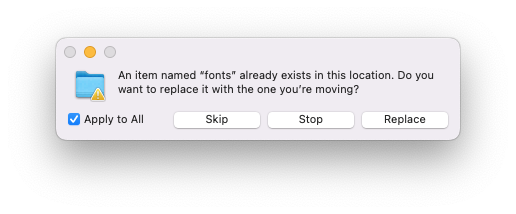
1. When presented with the prompt to skip, stop, or replace - choose "Replace" and check "Apply to All"
1. 
1. Repeat the previous steps one by one for each family - sans, serif, mono, etc.
1. Double check the changeset with `git status`. Make sure there are no unintended changes.
1. Ensure families are separate and contain only the intended files. `IBMPlexSans-*` source files should only be within the `IBM-Plex-Sans` folder, for instance.
1. If in doubt, or you see unexpected file changes, reach out to Bold Monday.
## Test
1. Run `yarn test`
1. Use the firefox dev tools to inspect and ensure the proper font families are being used on the test site.
1. Do any additional testing required to validate the changes
## Create release PR
1. Commit and push changes
1. Make a PR titled "Release v6.x.x"
## Release
Once the PR has been approved and merged, you can follow these steps to release:
1. Switch branch to `master`, pull down latest `git pull`
1. Run `git log` the most recent commit should be the commit for your changes just merged in.
1. Run `prepare` to clean and build files
1. Run `yarn build:zip` to build zip files
1. Run `npm version <version>`
1. Replace `<version>` with the intended semver bump depending on the type of release you want to publish(major, minor, patch). In most cases the release will be `npm version minor` or `npm version patch`.
1. Run `npm publish`
1. This can take a while as it's uploading the large amount of source files.
1. Once finished, make sure the release is present at https://www.npmjs.com/package/@ibm/plex
1. Run `git push --tags`
1. Make a new release on GitHub for the new tag that was created for the release.
1. Copy over changelog from the box folder
1. This file contains the entire changelog since the initial release, so remove everything except the most recent change(s) included in this release.
1. Check the box to open a discussion for this release
1. In Finder, within the `/zip` directory, select all the `.zip` files. Drag them from Finder to the GitHub release page to upload the assets to the release. These files are large and the upload will take some time.
1. Save/publish the GitHub release
## Close related issues
Oftentimes the changelog will contain a link to an issue as reference for a particular change. Each issue needs a comment posted.
Open all related issues in different tabs, then for each tab repeat this process:
1. Scroll to the bottom and post the following comment
1. Replace `v6.x.x` with the current release in both the link text and the url.
1. Replace the `###` in the release discussion url with the discussion issue number
```
Hey there! [v6.x.x](https://github.com/IBM/plex/releases/tag/v6.x.x) was just released that references this issue.
Comment here or join the [release discussion](https://github.com/IBM/plex/discussions/###) to provide feedback or voice concerns. Thanks!
```
2. Close the issue if it's not already closed. If the issue is not complete, it can be reopened.
|
