1
2
3
4
5
6
7
8
9
10
11
12
13
14
15
16
17
18
19
20
21
22
23
24
25
26
27
28
29
30
31
32
33
34
35
36
37
38
39
40
41
42
43
44
45
46
47
48
49
50
51
52
53
54
55
56
57
58
59
60
61
62
63
64
65
66
67
68
69
70
71
72
73
74
75
76
77
78
79
80
81
82
83
84
85
86
87
88
89
90
91
92
93
94
|
# Combine with Markdown
Several `fpdf2` methods allow Markdown syntax elements:
* [`FPDF.cell()`](https://py-pdf.github.io/fpdf2/fpdf/fpdf.html#fpdf.fpdf.FPDF.cell) has an optional `markdown=True` parameter that makes it possible to use `**bold**`, `__italics__`, `~~strikethrough~~` or `--underlined--` Markdown markers
* [`FPDF.multi_cell()`](https://py-pdf.github.io/fpdf2/fpdf/fpdf.html#fpdf.fpdf.FPDF.multi_cell) & [`FPDF.table()`](Tables.md) methods have a similar feature
But `fpdf2` also allows for basic conversion **from HTML to PDF** (_cf._ [HTML](HTML.md)).
This can be combined with a Markdown-rendering library
in order to generate **PDF documents from Markdown**:
## mistletoe
The [mistletoe](https://github.com/miyuchina/mistletoe) library follows the [CommonMark specification](https://spec.commonmark.org):
```
pip install mistletoe
```
```python
{% include "../tutorial/md2pdf_mistletoe.py" %}
```
<!-- Code blocks can also be rendered, but currently break mkdocs-include-markdown-plugin:
```python
msg = "This is some Python code in a fenced code block"
print(msg)
```
msg = "This is some code in an indented code block"
print(msg)
-->
The library can be easily extended: [Creating a custom token and renderer](https://github.com/miyuchina/mistletoe/blob/master/dev-guide.md#creating-a-custom-token-and-renderer).
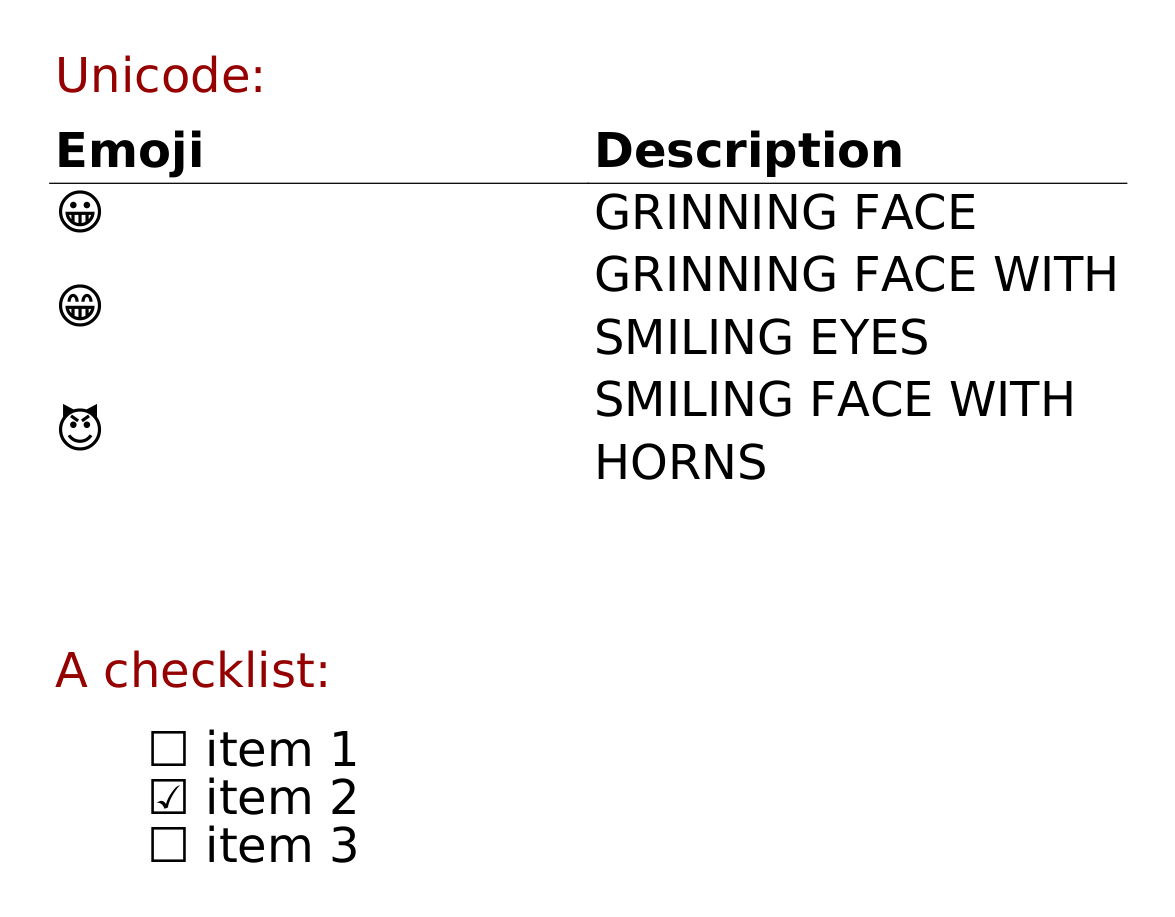
### Rendering unicode characters
```python
{% include "../tutorial/md2pdf_mistletoe_unicode.py" %}
```
Result:
## markdown-it-py
The [markdown-it-py](https://markdown-it-py.readthedocs.io) library also follows the [CommonMark specification](https://spec.commonmark.org):
```
pip install markdown-it-py
```
```python
{% include "../tutorial/md2pdf_markdown_it.py" %}
```
[Plugin extensions](https://markdown-it-py.readthedocs.io/en/latest/plugins.html):
the `strikethrough` & `table` plugins are embedded within the core package,
and many other plugins are then available via the [mdit-py-plugins package](https://mdit-py-plugins.readthedocs.io), including:
* Footnotes
* Definition lists
* Task lists
* Heading anchors
* LaTeX math
* Containers
* Word count
## mistune
There is also the [mistune](https://mistune.lepture.com) library,
that may be the fastest,
but it does not follow the CommonMark spec:
```
pip install mistune
```
```python
{% include "../tutorial/md2pdf_mistune.py" %}
```
## Python-Markdown
There is also the [Python-Markdown](https://python-markdown.github.io/) library,
which is the oldest Markdown rendering Python lib still active,
but it does not follow the CommonMark spec:
```
pip install markdown
```
```python
{% include "../tutorial/md2pdf_markdown.py" %}
```
## Text styling, fonts, etc.
Please refer to the dedicated [HTML](HTML.md) page for information on how to style HTML tags (`<a>`, `<blockquote>`, `<code>`, `<pre>`, `<h1>`...) when using [`FPDF.write_html()`](https://py-pdf.github.io/fpdf2/fpdf/fpdf.html#fpdf.fpdf.FPDF.write_html), how to configure fonts, the known limitations, etc.
|
