1
2
3
4
5
6
7
8
9
10
11
12
13
14
15
16
17
18
19
20
21
22
23
24
25
26
27
28
29
30
31
32
33
34
35
36
37
38
39
40
41
42
43
44
45
46
47
48
49
50
51
52
53
54
55
56
57
58
59
60
61
62
63
64
65
|
# Fragments
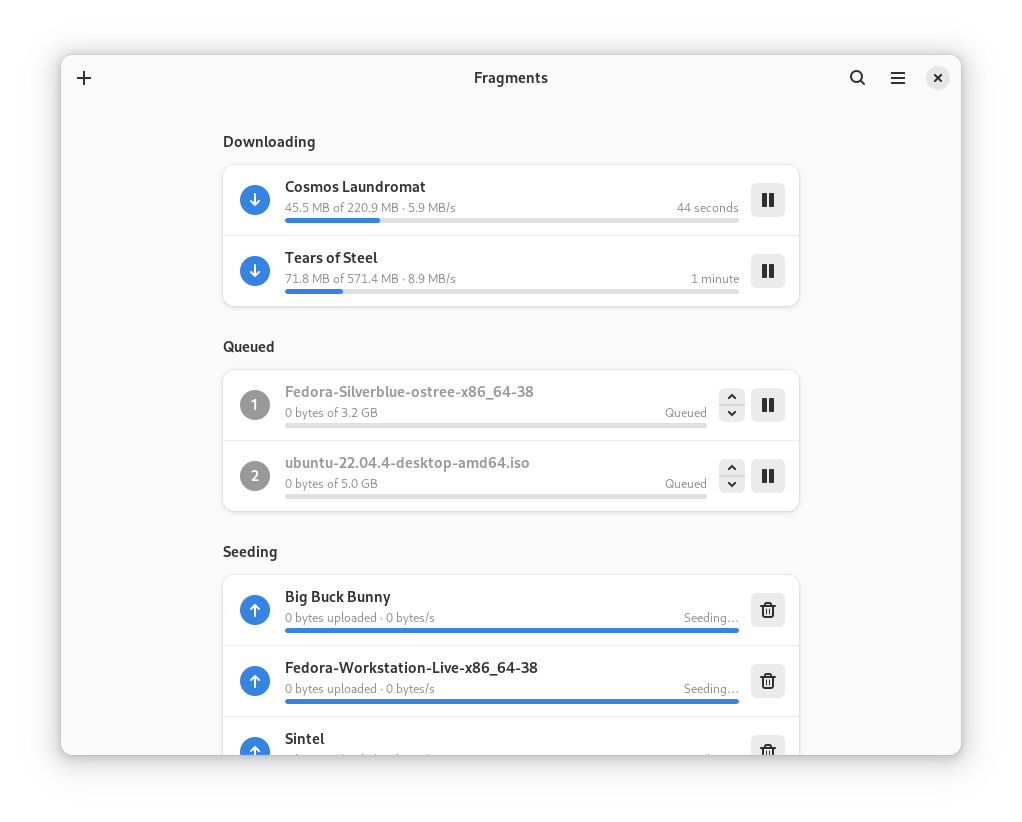
An easy to use BitTorrent client. Fragments can be used to transfer files via the BitTorrent peer-to-peer file-sharing protocol, such as videos, music or installation images for Linux distributions.
## Getting in Touch
If you have any questions regarding the use or development of Fragments,
want to discuss design or simply hang out, please join us on our [#fragments:gnome.org](https://matrix.to/#/#fragments:gnome.org) matrix room.
## Installation
The recommended way of installing Fragments is using the Flatpak package. If you don't have Flatpak installed yet, you can get it from [here](https://flatpak.org/setup/). You can install stable builds of Fragments from Flathub by using this command:
`flatpak install https://flathub.org/repo/appstream/de.haeckerfelix.Fragments.flatpakref`
Or by clicking this button:
<a href="https://flathub.org/apps/details/de.haeckerfelix.Fragments"><img src="https://flathub.org/assets/badges/flathub-badge-en.png" width="200"/></a>
#### Nightly Builds
Development builds of Fragments are available from the `gnome-nightly` Flatpak repository:
```
flatpak remote-add --if-not-exists gnome-nightly https://nightly.gnome.org/gnome-nightly.flatpakrepo
flatpak install gnome-nightly de.haeckerfelix.Fragments.Devel
```
## FAQ
- **What BitTorrent engine does Fragments use?**
Fragments is built on top of [Transmission](https://transmissionbt.com/), and thus supports more or less all the features that Transmission also supports. Fragments can also be used to control other remote Transmission instances.
- **How I can get debug information?**
Run Fragments using `RUST_BACKTRACE=1 RUST_LOG=fragments=debug flatpak run de.haeckerfelix.Fragments` (`.Devel`).
- **Why does Fragments take so long to start?**
When starting, Fragments tries to set up automatic port sharing (using UPNP/NAT-PMP). With some networks/gateways this takes longer or fails completely (timeout). If this is the case, you can disable automatic port forwarding feature in the preferences. Fragments should then start much faster.
## Translations
Translation of this project takes place on the GNOME translation platform,
[Damned Lies](https://l10n.gnome.org/module/fragments). For further
information on how to join a language team, or even to create one, please see
[GNOME Translation Project wiki page](https://wiki.gnome.org/TranslationProject).
## Building
### Building with Flatpak + GNOME Builder
Fragments can be built and run with [GNOME Builder](https://wiki.gnome.org/Apps/Builder).
Just clone the repo and hit the run button!
You can get Builder from [here](https://wiki.gnome.org/Apps/Builder/Downloads).
### Building it manually
1. `git clone https://gitlab.gnome.org/World/Fragments.git`
2. `cd Fragments`
3. `meson --prefix=/usr build`
4. `ninja -C build`
5. `sudo ninja -C build install`
To learn more about the required dependencies, please check the [Flatpak manifest](build-aux/flatpak/de.haeckerfelix.Fragments.Devel.json).
In order to run Fragments, `transmission-daemon` must be installed.
## Code Of Conduct
We follow the [GNOME Code of Conduct](/CODE_OF_CONDUCT.md).
All communications in project spaces are expected to follow it.
|
