1
2
3
4
5
6
7
8
9
10
11
12
13
14
15
16
17
18
19
20
21
22
23
24
25
26
27
28
29
30
31
32
33
34
35
36
37
38
39
40
41
42
43
44
45
46
47
48
49
50
51
52
53
54
55
56
57
58
59
60
61
62
63
64
65
66
67
68
69
70
71
72
73
74
75
76
77
78
79
80
81
82
83
84
85
86
87
88
89
90
91
92
93
94
95
96
97
98
99
100
101
102
103
104
105
106
107
108
109
110
111
112
113
114
115
116
117
118
119
120
121
122
123
124
125
126
127
128
129
130
131
132
133
134
135
136
137
138
139
140
141
142
143
144
145
146
147
148
149
150
151
152
153
154
155
156
157
158
|
[](https://github.com/LanguageMachines/frog/actions/)
[](https://frognlp.readthedocs.io/?badge=latest)
[](http://applejack.science.ru.nl/languagemachines/)
[](https://zenodo.org/badge/latestdoi/20526435) [](https://GitHub.com/LanguageMachines/frog/releases/)
[](https://www.repostatus.org/#active)
# Frog - A Tagger-Lemmatizer-Morphological-Analyzer-Dependency-Parser for Dutch
Copyright 2006-2020
Ko van der Sloot, Maarten van Gompel, Antal van den Bosch, Bertjan Busser
Centre for Language and Speech Technology, Radboud University Nijmegen
Induction of Linguistic Knowledge Research Group, Tilburg University
KNAW Humanities Cluster
**Website:** https://languagemachines.github.io/frog
Frog is an integration of memory-based natural language processing (NLP)
modules developed for Dutch. All NLP modules are based on Timbl, the Tilburg
memory-based learning software package. Most modules were created in the 1990s
at the ILK Research Group (Tilburg University, the Netherlands) and the CLiPS
Research Centre (University of Antwerp, Belgium). Over the years they have been
integrated into a single text processing tool, which is currently maintained
and developed by the Language Machines Research Group and the Centre for
Language and Speech Technology at Radboud University Nijmegen. A dependency
parser, a base phrase chunker, and a named-entity recognizer module were added
more recently. Where possible, Frog makes use of multi-processor support to run
subtasks in parallel. Frog offers a command-line interface (that can also run
as a daemon) and a C++ library.
Various (re)programming rounds have been made possible through funding by NWO,
the Netherlands Organisation for Scientific Research, particularly under the
CGN project, the IMIX programme, the Implicit Linguistics project, the
CLARIN-NL programme and the CLARIAH programme.
## Demo
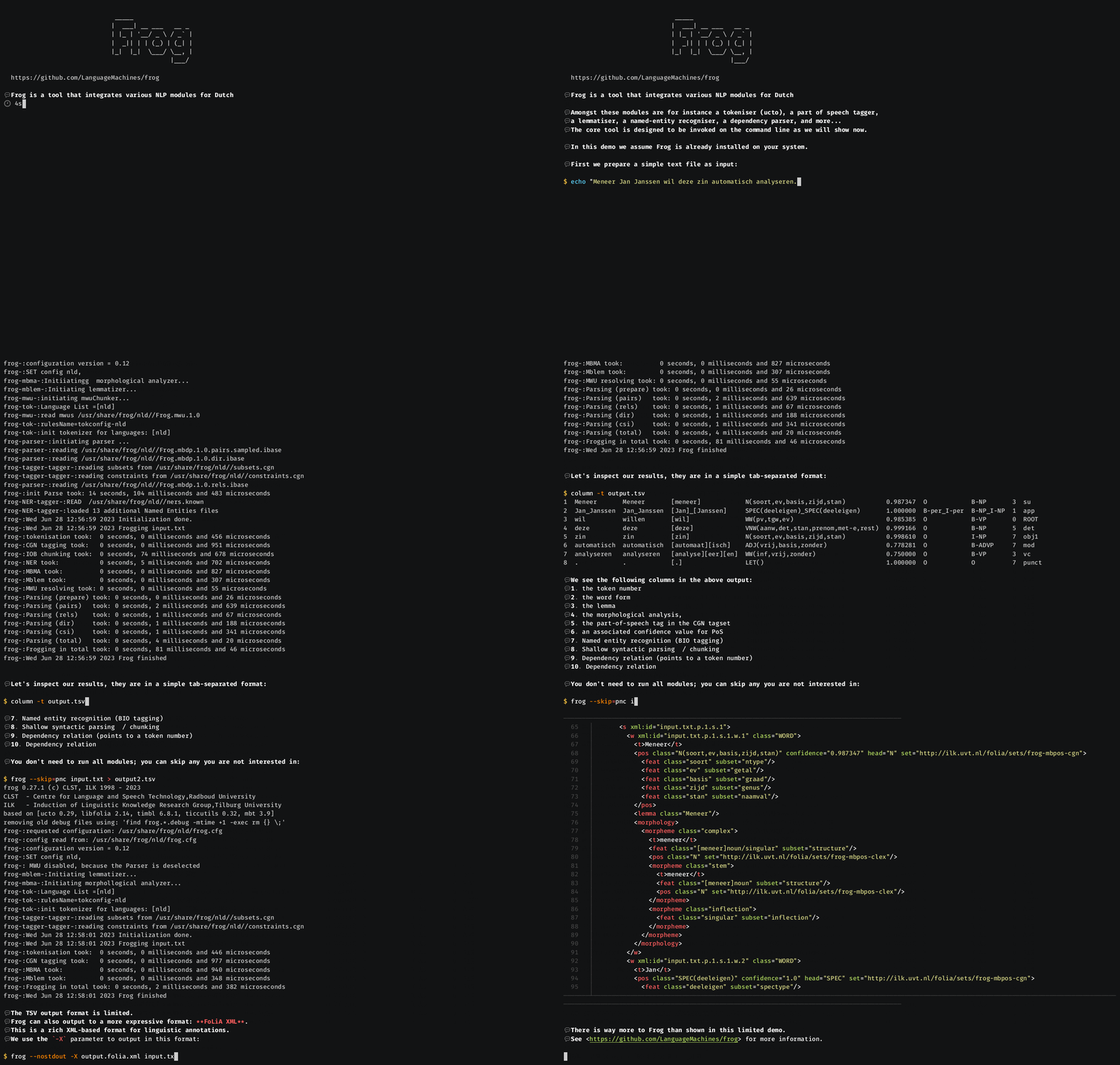
## License
Frog is free software; you can redistribute it and/or modify it under the terms
of the GNU General Public License as published by the Free Software Foundation;
either version 3 of the License, or (at your option) any later version (see the file COPYING)
frog is distributed in the hope that it will be useful, but WITHOUT ANY
WARRANTY; without even the implied warranty of MERCHANTABILITY or FITNESS FOR A
PARTICULAR PURPOSE. See the GNU General Public License for more details.
Comments and bug-reports are welcome at our [issue tracker](https://github.com/LanguageMachines/frog/issues) or by mailing
lamasoftware (at) science.ru.nl.
Updates and more info may be found on https://languagemachines.github.io/frog .
## Installation
To install Frog, first consult whether your distribution's package manager has
an up-to-date package:
* Alpine Linux users can do `apk install frog`.
* Debian/Ubuntu users can do `apt install frog` but this version will likely be significantly out of date!
* Arch Linux users can install Frog via the [AUR](https://aur.archlinux.org/packages/frog).
* macOS users with [homebrew](https://brew.sh/) can do: `brew tap fbkarsdorp/homebrew-lamachine && brew install frog`
* An OCI container image is also available and can be used with Docker: `docker pull proycon/frog`. Alternatively, you can build an OCI container image yourself using the provided `Dockerfile` in this repository.
To compile and install manually from source instead, do the following:
$ bash bootstrap.sh
$ ./configure
$ make
$ make install
and optionally:
$ make check
If you want to automatically download and install the latest stable versions of
the required dependencies, then run `./build-deps.sh` prior to the above. You
can pass a target directory prefix as first argument and you may need to
prepend `sudo` to ensure you can install there. The dependencies are:
* [ticcutils](https://github.com/LanguageMachines/ticcutils)
* [libfolia](https://github.com/LanguageMachines/libfolia)
* [uctodata](https://github.com/LanguageMachines/uctodata)
* [ucto](https://github.com/LanguageMachines/ucto)
* [timbl](https://github.com/LanguageMachines/timbl)
* [mbt](https://github.com/LanguageMachines/mbt)
* [frogdata](https://github.com/LanguageMachines/frogdata)
You will still need to take care to install the following 3rd party
dependencies through your distribution's package manager, as they are not
provided by our script:
* ``icu`` - A C++ library for Unicode and Globalization support. On Debian/Ubuntu systems, install the package libicu-dev.
* ``libxml2`` - An XML library. On Debian/Ubuntu systems install the package libxml2-dev.
* ``libexttextcat`` - A language detection package.
* A sane build environment with a C++ compiler (e.g. gcc 4.9 or above or clang), make, autotools, libtool, pkg-config
This software has been tested on:
* Intel platforms running several versions of Linux, including Ubuntu, Debian, Arch Linux, Fedora (both 32 and 64 bits)
* Apple platform running macOS
Contents of this distribution:
* Sources
* Licensing information ( COPYING )
* Installation instructions ( INSTALL )
* Build system based on GNU Autotools
* Container build file ( Dockerfile )
* Example data files ( in the demos directory )
* Documentation ( in the docs directory and on https://frognlp.readthedocs.io )
## Usage
Run ``frog --help`` for basic usage instructions.
## Documentation
The Frog documentation can be found on <https://frognlp.readthedocs.io>
## Container Usage
A pre-made container image can be obtained from Docker Hub as follows:
``docker pull proycon/frog``
You can also build a container image yourself as follows, make sure you are in the root of this repository:
``docker build -t proycon/frog .``
This builds the latest stable release, if you want to use the latest development version
from the git repository instead, do:
``docker build -t proycon/frog --build-arg VERSION=development .``
Run the frog container interactively as follows, you can pass any additional arguments that ``frog`` takes.
``docker run -t -i proycon/frog``
Add the ``-v /path/to/your/data:/data`` parameter if you want to mount your data volume into the container at `/data`.
## Python Binding
If you are looking to use Frog from Python, please see <https://github.com/proycon/python-frog> instead for the python binding. It is not included in this repository.
## Webservice
If you are looking to run Frog as a webservice yourself, please see <https://github.com/proycon/frog_webservice> . It is not included in this repository.
## Credits
Many thanks go out to the people who made the developments of the Frog
components possible: Walter Daelemans, Jakub Zavrel, Ko van der Sloot, Sabine
Buchholz, Sander Canisius, Gert Durieux, Peter Berck and Maarten van Gompel.
Thanks to Erik Tjong Kim Sang and Lieve Macken for stress-testing the first
versions of Tadpole, the predecessor of Frog
|
