1
2
3
4
5
6
7
8
9
10
11
12
13
14
15
16
17
18
19
20
21
22
23
24
25
26
27
28
29
30
31
32
33
34
35
36
37
38
39
40
41
42
43
44
45
46
47
48
49
50
51
52
53
54
55
56
57
58
59
60
61
62
63
64
65
66
67
68
69
70
71
72
73
74
75
76
77
78
79
80
81
82
83
84
85
86
87
88
89
90
91
92
93
94
95
96
97
98
99
100
101
102
103
104
105
106
107
108
109
110
111
112
113
114
115
116
117
118
119
120
121
122
123
124
125
126
127
128
129
130
131
132
133
134
135
136
137
138
139
140
141
142
143
144
145
146
147
148
149
150
151
152
153
154
155
156
157
158
159
160
161
162
163
164
165
166
167
168
169
170
171
172
173
174
175
176
177
178
179
180
181
182
183
184
185
186
187
188
189
190
191
192
193
194
195
196
197
198
199
200
201
202
203
204
205
206
207
208
209
210
211
212
213
214
215
216
217
218
219
220
221
222
223
224
225
226
227
228
229
|
Text.Pretty.Simple
==================
[](https://github.com/cdepillabout/pretty-simple/actions)
[](https://hackage.haskell.org/package/pretty-simple)
[](http://stackage.org/lts/package/pretty-simple)
[](http://stackage.org/nightly/package/pretty-simple)

`pretty-simple` is a pretty printer for Haskell data types that have a `Show`
instance.
For example, imagine the following Haskell data types and values:
```haskell
data Foo = Foo { foo1 :: Integer , foo2 :: [String] } deriving Show
foo :: Foo
foo = Foo 3 ["hello", "goodbye"]
data Bar = Bar { bar1 :: Double , bar2 :: [Foo] } deriving Show
bar :: Bar
bar = Bar 10.55 [foo, foo]
```
If you run this in `ghci` and type `print bar`, you'll get output like this:
```haskell
> print bar
Bar {bar1 = 10.55, bar2 = [Foo {foo1 = 3, foo2 = ["hello","goodbye"]},Foo {foo1 = 3, foo2 = ["hello","goodbye"]}]}
```
This is pretty hard to read. Imagine if there were more fields or it were even
more deeply nested. It would be even more difficult to read.
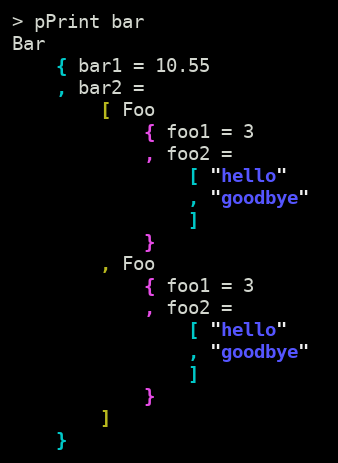
`pretty-simple` can be used to print `bar` in an easy-to-read format:
## Usage
`pretty-simple` can be easily used from `ghci` when debugging.
When using `stack` to run `ghci`, just append the `--package` flag to
the command line to load `pretty-simple`:
```sh
$ stack ghci --package pretty-simple
```
Or, with cabal:
```sh
$ cabal repl --build-depends pretty-simple
```
Once you get a prompt in `ghci`, you can use `import` to get `pretty-simple`'s
[`pPrint`](https://hackage.haskell.org/package/pretty-simple/docs/Text-Pretty-Simple.html#v:pPrint)
function in scope.
```haskell
> import Text.Pretty.Simple (pPrint)
```
You can test out `pPrint` with simple data types like `Maybe` or tuples.
```haskell
> pPrint $ Just ("hello", "goodbye")
Just
( "hello"
, "goodbye"
)
```
If for whatever reason you're not able to incur a dependency on the `pretty-simple` library, you can simulate its behaviour by using `process` to call out to the command line executable (see below for installation):
```hs
pPrint :: Show a => a -> IO ()
pPrint = putStrLn <=< readProcess "pretty-simple" [] . show
```
There's also a [web app](https://cdepillabout.github.io/pretty-simple), compiled with GHCJS, where you can play around with `pretty-simple` in your browser.
## Features
- Easy-to-read
- Complex data types are simple to understand.
- Color
- Prints in color using ANSI escape codes.
- It is possible to print without color by using the
[`pPrintNoColor`](https://hackage.haskell.org/package/pretty-simple/docs/Text-Pretty-Simple.html#v:pPrintNoColor)
function.
- Rainbow Parentheses
- Easy to understand deeply nested data types.
- Configurable
- Indentation, compactness, colors and more are configurable with the
[`pPrintOpt`](https://hackage.haskell.org/package/pretty-simple-1.0.0.6/docs/Text-Pretty-Simple.html#v:pPrintOpt)
function.
- Fast
- No problem pretty-printing data types thousands of lines long.
- Works with any data type with a `Show` instance
- Some common Haskell data types have a `Show` instance that produces
non-valid Haskell code. `pretty-simple` will pretty-print even these
data types.
## Why not `(some other package)`?
Other pretty-printing packages have some combination of these defects:
- No options for printing in color.
- No options for changing the amount of indentation
- Requires every data type to be an instance of some special typeclass (instead
of just `Show`).
- Requires all `Show` instances to output valid Haskell code.
## Other Uses
### Pretty-print all GHCi output
The `pPrint` function can be used as the default output function in GHCi.
All you need to do is run GHCi with a command like one of these:
```sh
$ stack ghci --ghci-options "-interactive-print=Text.Pretty.Simple.pPrint" --package pretty-simple
```
```sh
$ cabal repl --repl-options "-interactive-print=Text.Pretty.Simple.pPrint" --build-depends pretty-simple
```
Now, whenever you make GHCi evaluate an expression, GHCi will pretty-print the
result using `pPrint`! See
[here](https://downloads.haskell.org/%7Eghc/latest/docs/html/users_guide/ghci.html#using-a-custom-interactive-printing-function)
for more info on this neat feature in GHCi.
### Pretty-printing JSON
`pretty-simple` can be used to pretty-print any `String` that is similar to
Haskell data types. The only requirement is that the `String` must correctly
use brackets, parenthese, and braces to indicate nesting.
For example, the
[`pString`](https://hackage.haskell.org/package/pretty-simple/docs/Text-Pretty-Simple.html#v:pString)
function can be used to pretty-print JSON.
Recall our example from before.
```haskell
data Foo = Foo { foo1 :: Integer , foo2 :: [String] } deriving Show
foo :: Foo
foo = Foo 3 ["hello", "goodbye"]
data Bar = Bar { bar1 :: Double , bar2 :: [Foo] } deriving Show
bar :: Bar
bar = Bar 10.55 [foo, foo]
```
You can use [`aeson`](https://hackage.haskell.org/package/aeson) to turn these
data types into JSON. First, you must derive
[`ToJSON`](https://hackage.haskell.org/package/aeson/docs/Data-Aeson.html#t:ToJSON)
instances for the data types. It is easiest to do this with Template Haskell:
```haskell
{-# LANGUAGE TemplateHaskell #-}
$(deriveJSON defaultOptions ''Foo)
$(deriveJSON defaultOptions ''Bar)
```
If you run this in `ghci` and type `encode bar`, you'll get output like this:
```haskell
> import Data.Aeson (encode)
> putLazyByteStringLn $ encode bar
{"bar1":10.55,"bar2":[{"foo1":3,"foo2":["hello","goodbye"]},{"foo1":3,"foo2":["hello","goodbye"]}]}
```
Just like Haskell's normal `print` output, this is pretty hard to read.
`pretty-simple` can be used to pretty-print the JSON-encoded `bar` in an
easy-to-read format:
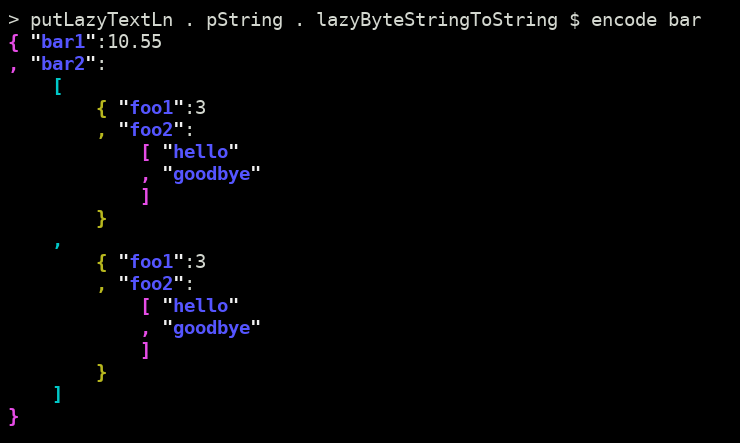
(You can find the `lazyByteStringToString`, `putLazyByteStringLn`,
and `putLazyTextLn` in the [`ExampleJSON.hs`](example/ExampleJSON.hs)
file.)
### Pretty-printing from the command line
`pretty-simple` includes a command line executable that can be used to
pretty-print anything passed in on stdin.
It can be installed to `~/.local/bin/` with the following command.
```sh
$ stack install pretty-simple
```
When run on the command line, you can paste in the Haskell datatype you want to
be formatted, then hit <kbd>Ctrl</kbd>-<kbd>D</kbd>:
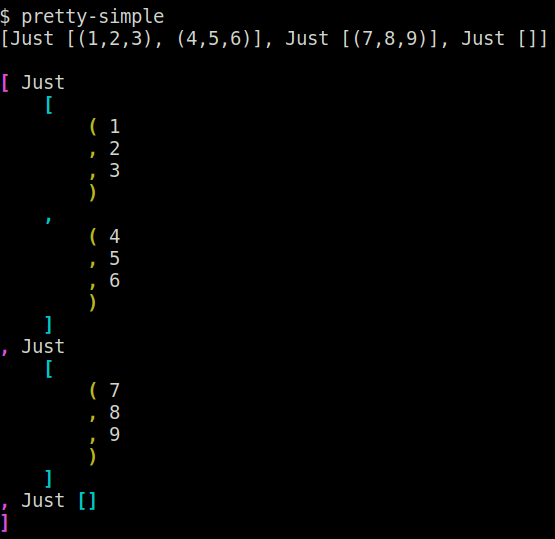
This is very useful if you accidentally print out a Haskell data type with
`print` instead of `pPrint`.
## Contributions
Feel free to open an
[issue](https://github.com/cdepillabout/pretty-simple/issues) or
[PR](https://github.com/cdepillabout/pretty-simple/pulls) for any
bugs/problems/suggestions/improvements.
### Testing
To run the test suite locally, one must install the executables `doctest` and
`cabal-doctest`, e.g. with
`cabal install --ignore-project doctest --flag cabal-doctest`.
Then run the command `cabal doctest`.
## Maintainers
- [@cdepillabout](https://github.com/cdepillabout)
- [@georgefst](https://github.com/georgefst)
|
