1
2
3
4
5
6
7
8
9
10
11
12
13
14
15
16
17
18
19
20
21
22
23
24
25
26
27
28
29
30
31
32
33
34
35
36
37
38
39
40
41
42
43
44
45
46
47
48
49
50
51
52
53
54
55
56
57
58
59
60
61
62
63
64
65
66
67
68
69
70
71
72
73
74
75
76
77
78
79
80
81
82
83
84
85
86
87
88
89
90
91
92
93
94
95
96
97
98
99
100
101
102
103
104
105
106
107
108
109
110
111
112
113
114
115
116
117
118
119
120
121
122
123
124
125
126
127
128
129
130
131
132
133
134
135
136
137
138
139
140
141
142
143
144
145
146
147
148
149
150
151
152
153
154
155
156
157
158
159
160
161
162
163
164
165
166
167
168
169
170
171
172
173
174
175
176
|
# Dragonboard 410c (fastboot)
This guide covers setting up devices that use the fastboot protocol for
deployment and booting in LAVA, such as the DragonBoard 410c.
LAVA uses `fastboot` to deploy images to the device partitions and to boot the
device. LAVA supports running fastboot directly from the worker host or within a
Docker container. The Docker option is recommended as it allows using custom
fastboot binaries and provides better isolation.
## Hardware setup
Ensure your device is connected to the LAVA worker properly and prepared for
fastboot deployment and booting.
1. [Setup power control](common.md#power-control).
2. [Setup serial console](common.md#serial-console).
Connect the USB to serial adapter adapter to the DB410c's Low Speed
Expansion Connector UART1:
| DB410c Pin | Signal | USB-Serial Adapter |
|------------|--------|--------------------|
| Pin 1 | GND | GND |
| Pin 11 | TXD | RXD |
| Pin 13 | RXD | TXD |
A picture of the FTDI cable connected to the DragonBoard 410c is shown below:
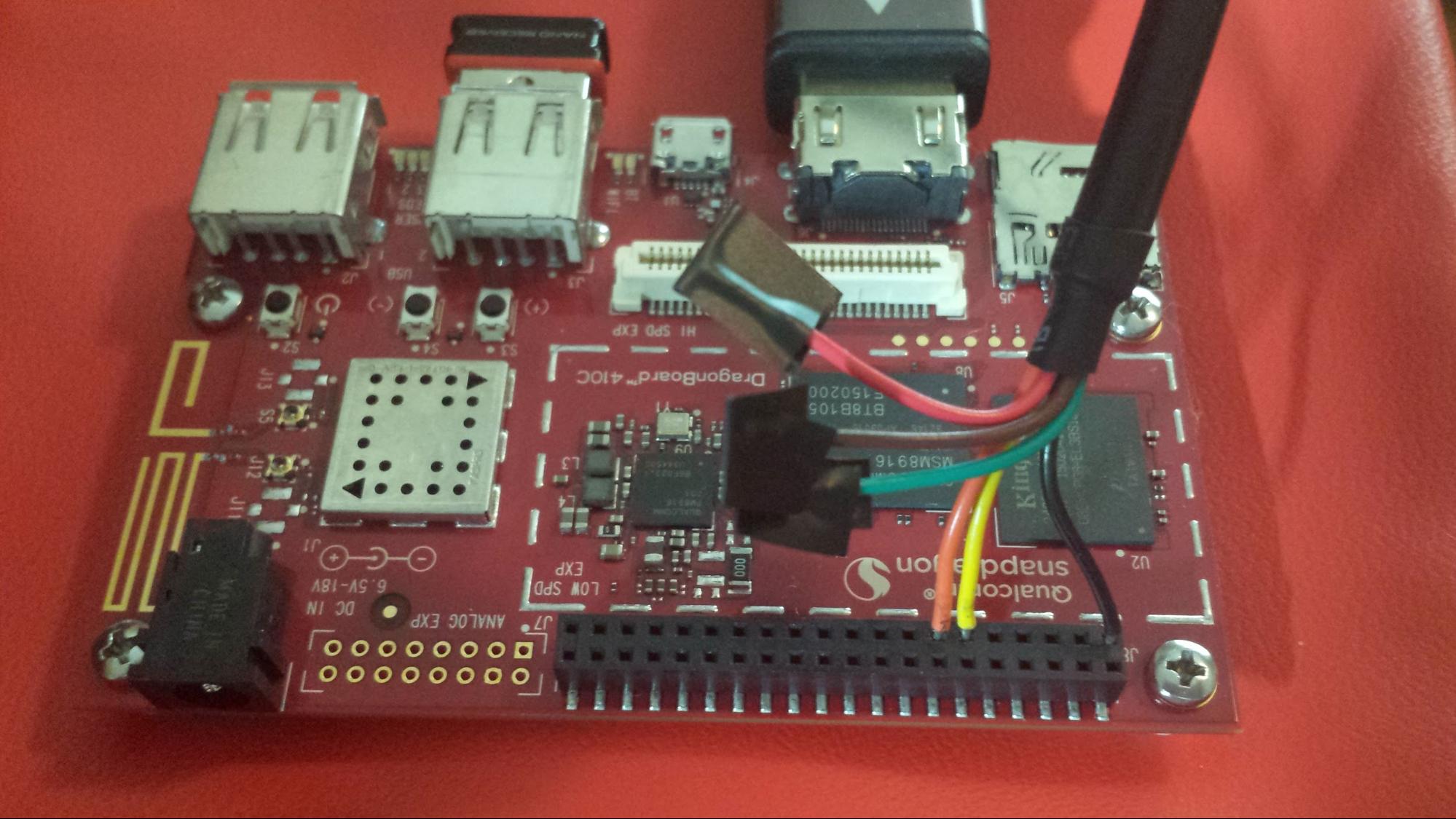
3. Connect the device's micro USB OTG port to your LAVA worker USB port.
4. Setup USB Ethernet.
The board does not have an Ethernet port. If you want to use a USB Ethernet
adapter, additional setup is required.
The DragonBoard 410c hardware design prevents simultaneous use of the micro
USB (device mode) and USB Type A (host mode) ports; they are mutually
exclusive.
To support both fastboot (device mode) and USB Ethernet (host mode), you
must be able to toggle the OTG connection. This is typically achieved by connecting
the OTG port to the LAVA worker through a controllable smart USB hub. The
commands for the switches can be provided via the `pre_power_command` and
`pre_os_command` variables in device dictionary. In the job definition, you
can use the variable names in the
[`command`](../../../technical-references/job-definition/actions/command.md)
action to issue the commands.
5. Set dip switch 2 to ON position for booting from SD card or eMMC.
6. If needed, flash or upgrade device FW and partition table. These
[artifacts](https://storage.lavacloud.io/artifacts/dragonboard-410c/) can be used.
7. Ensure that the device boots to fastboot mode on every power-on. For additional
instructions and troubleshooting, see
[dragonboard 41c guides](https://github.com/96boards/documentation/tree/master/consumer/dragonboard/dragonboard410c/guides).
In general, setting up a fastboot device with an LAA is much simpler. It is
essentially plug-and-play. For an example, see the
[DragonBoard 410c](https://docs.lavacloud.io/devices/dragonboard-410c.html#dragonboard-410c)
guide.
## Creating device type
[Create the device type](common.md#create-device-type) using the name
`dragonboard-410c`.
## Creating device
1. [Add the device](common.md#add-device) using the following settings:
* **Device Type:** `dragonboard-410c`
* **Hostname:** A unique name (e.g., `dragonboard-410c-01`)
2. [Add the device configuration](common.md#add-device-configuration).
Device dictionary example for a DragonBoard 410c:
```jinja
{% extends 'dragonboard-410c.jinja2' %}
{% set adb_serial_number = 'a2c22e48' %}
{% set fastboot_serial_number = 'a2c22e48' %}
{% set device_info = [{'board_id': 'a2c22e48'}] %}
{% set connection_command = 'telnet localhost 2002' %}
{% set hard_reset_command = ['usbrelay 1_2=0', 'sleep 1', 'usbrelay 1_2=1'] %}
{% set power_off_command = 'usbrelay 1_2=0' %}
{% set power_on_command = 'usbrelay 1_2=1'%}
{% set pre_power_command = 'usbrelay 1_3=1' %}
{% set pre_os_command = 'usbrelay 1_3=0' %}
{% set flash_cmds_order = ['update', 'ptable', 'partition', 'hyp', 'modem',
'rpm', 'sbl1', 'sbl2', 'sec', 'tz', 'aboot',
'boot', 'rootfs', 'vendor', 'system', 'cache',
'userdata', ] %}
```
!!! note
Update the example to use your device's actual serial number, serial
connection and power control commands.
Another device dictionary example for
[dragonboard-410c](../../../technical-references/configuration/device-dictionary.md#dragonboard-410c).
For more about fastboot device configures, see the
[fastboot configurations](../../../technical-references/configuration/device-dictionary.md#fastboot).
## Sample job definition
```yaml
device_type: dragonboard-410c
job_name: db410c fastboot example
timeouts:
job:
minutes: 30
priority: medium
visibility: public
actions:
- command:
name: pre_power_command
timeout:
minutes: 1
- deploy:
to: fastboot
docker:
image: linaro/noble-adb-fastboot
local: true
images:
boot:
url: https://storage.lavacloud.io/health-checks/dragonboard-410c/boot-linaro-buster-359.img.gz
compression: gz
rootfs:
url: https://storage.lavacloud.io/health-checks/dragonboard-410c/rootfs-linaro-buster-359.img.gz
compression: gz
apply-overlay: true
timeout:
minutes: 15
- command:
name: pre_os_command
timeout:
minutes: 1
- boot:
method: fastboot
docker:
image: linaro/noble-adb-fastboot
local: true
prompts:
- 'root@linaro-developer:~#'
timeout:
minutes: 5
- test:
definitions:
- from: inline
repository:
metadata:
format: Lava-Test Test Definition 1.0
name: test-definition-example
run:
steps:
- lava-test-case run-uname-a --shell uname -a
- lava-test-case check-os-id --shell 'cat /etc/os-release | grep "ID=debian"'
path: inline/test-definition-example.yaml
name: test-suite-example
timeout:
minutes: 5
```
--8<-- "refs.txt"
|
