1
2
3
4
5
6
7
8
9
10
11
12
13
14
15
16
17
18
19
20
21
22
23
24
25
26
27
28
29
30
31
32
33
34
35
36
37
38
39
40
41
42
43
44
45
46
47
48
49
50
51
52
53
54
55
56
57
58
59
60
61
62
63
64
65
66
67
68
69
70
71
72
73
74
75
76
77
78
79
80
81
82
83
84
85
86
87
88
89
90
91
92
93
94
95
96
97
98
99
100
101
102
103
104
105
106
107
108
109
110
111
112
113
114
115
116
117
118
119
120
121
122
123
124
125
126
127
128
129
130
131
132
133
134
135
136
137
138
139
140
141
142
143
144
145
146
147
148
149
150
151
152
153
154
155
156
157
158
159
160
161
162
163
164
165
166
167
168
169
170
171
172
173
174
175
176
177
178
179
180
181
182
183
184
185
186
187
188
189
190
191
192
193
194
195
196
197
198
199
200
201
202
203
204
205
206
207
208
209
210
211
212
213
214
215
216
217
218
219
220
221
222
223
224
225
226
227
228
229
230
231
232
233
234
235
236
237
238
239
240
241
|
# logzero

[](https://logzero.readthedocs.io/en/latest/?badge=latest)
[](https://pypi.python.org/pypi/logzero)
[](https://anaconda.org/conda-forge/logzero)
[](https://pepy.tech/project/logzero)
Robust and effective logging for Python 2 and 3.
* Documentation: https://logzero.readthedocs.io
* GitHub: https://github.com/metachris/logzero
Features
--------
* Easy logging to console and/or (rotating) file.
* Provides a fully configured standard [Python logger object](https://docs.python.org/2/library/logging.html#module-level-functions>).
* JSON logging (with integrated [python-json-logger](https://github.com/madzak/python-json-logger))
* Pretty formatting, including level-specific colors in the console.
* No dependencies
* Windows color output supported by [colorama](https://github.com/tartley/colorama)
* Robust against str/bytes encoding problems, works with all kinds of character encodings and special characters.
* Multiple loggers can write to the same logfile (also across multiple Python files and processes).
* Global default logger with [logzero.logger](https://logzero.readthedocs.io/en/latest/#i-logzero-logger) and custom loggers with [logzero.setup_logger(..)](https://logzero.readthedocs.io/en/latest/#i-logzero-setup-logger).
* Compatible with Python 2 and 3.
* All contained in a [single file](https://github.com/metachris/logzero/blob/master/logzero/__init__.py).
* Licensed under the MIT license.
* Heavily inspired by the [Tornado web framework](https://github.com/tornadoweb/tornado).
Installation:
```shell
python -m pip install logzero
```
Example Usage
-------------
```python
from logzero import logger
logger.debug("hello")
logger.info("info")
logger.warning("warn")
logger.error("error")
# This is how you'd log an exception
try:
raise Exception("this is a demo exception")
except Exception as e:
logger.exception(e)
# JSON logging
import logzero
logzero.json()
logger.info("JSON test")
# Start writing into a logfile
logzero.logfile("/tmp/logzero-demo.log")
# Set a minimum loglevel
logzero.loglevel(logzero.WARNING)
```
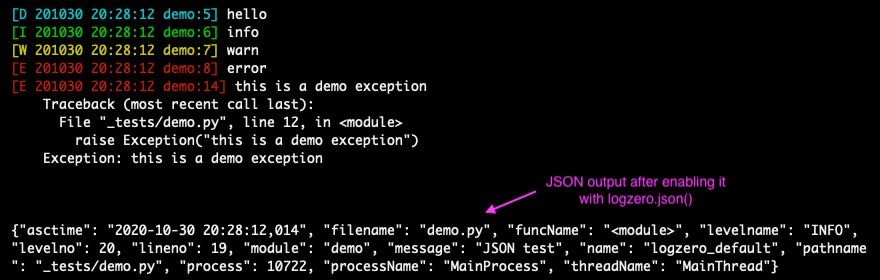
This is the output:
Note: You can find more examples in the documentation: https://logzero.readthedocs.io
### JSON logging
JSON logging can be enabled for the default logger with `logzero.json()`, or with `setup_logger(json=True)` for custom loggers:
```python
>>> logzero.json()
>>> logger.info("test")
{"asctime": "2020-10-21 10:42:45,808", "filename": "<stdin>", "funcName": "<module>", "levelname": "INFO", "levelno": 20, "lineno": 1, "module": "<stdin>", "message": "test", "name": "logzero_default", "pathname": "<stdin>", "process": 76179, "processName": "MainProcess", "threadName": "MainThread"}
>>> my_logger = setup_logger(json=True)
>>> my_logger.info("test")
{"asctime": "2020-10-21 10:42:45,808", "filename": "<stdin>", "funcName": "<module>", "levelname": "INFO", "levelno": 20, "lineno": 1, "module": "<stdin>", "message": "test", "name": "logzero_default", "pathname": "<stdin>", "process": 76179, "processName": "MainProcess", "threadName": "MainThread"}
```
The logged JSON object has these fields:
```json
{
"asctime": "2020-10-21 10:43:40,765",
"filename": "test.py",
"funcName": "test_this",
"levelname": "INFO",
"levelno": 20,
"lineno": 9,
"module": "test",
"message": "info",
"name": "logzero",
"pathname": "_tests/test.py",
"process": 76204,
"processName": "MainProcess",
"threadName": "MainThread"
}
```
Exceptions logged with `logger.exception(e)` have these additional JSON fields:
```json
{
"levelname": "ERROR",
"levelno": 40,
"message": "this is a demo exception",
"exc_info": "Traceback (most recent call last):\n File \"_tests/test.py\", line 15, in test_this\n raise Exception(\"this is a demo exception\")\nException: this is a demo exception"
}
```
Take a look at the documentation for more information and examples:
* Documentation: https://logzero.readthedocs.io.
Installation
------------
Install `logzero` with [pip](https://pip.pypa.io):
```shell
python -m pip install logzero
```
Here's how you setup a virtualenv and download and run the demo:
```shell
# Create and activate a virtualenv in ./venv/
python3 -m venv venv
. venv/bin/activate
# Install logzero
python -m pip install logzero
# Download and run demo.py
wget https://raw.githubusercontent.com/metachris/logzero/master/examples/demo.py
python demo.py
```
If you don't have [pip](https://pip.pypa.io) installed, this [Python installation guide](http://docs.python-guide.org/en/latest/starting/installation/) can guide
you through the process.
Alternatively, if you use the [Anaconda distribution](https://www.anaconda.com/download/):
```shell
$ conda config --add channels conda-forge
$ conda install logzero
```
You can also install `logzero` from the public [Github repo](https://github.com/metachris/logzero):
```shell
$ git clone https://github.com/metachris/logzero.git
$ cd logzero
$ python setup.py install
```
Contributors
------------
* [Chris Hager](https://github.com/metachris)
* [carlodr](https://github.com/carlodri)
* [Brian Lenz](https://github.com/brianlenz)
* [David Martin](https://github.com/dmartin35)
* [Zakaria Zajac](madzak) (creator of [python-json-logger](https://github.com/madzak/python-json-logger))
---
Development
-----------
**Getting started**
```shell
$ git clone https://github.com/metachris/logzero.git
$ cd logzero
# Activate virtualenv
$ python3 -m venv venv
$ . venv/bin/activate
# Install main and dev dependencies
$ pip install -e .
$ pip install -r requirements_dev.txt
# Run the tests
$ make test
# Run the linter
$ make lint
# Generate the docs (will auto-open in Chrome)
$ make docs
# You can enable watching mode to automatically rebuild on changes:
$ make servedocs
```
To test with Python 2.7, you can use Docker:
```shell
docker run --rm -it -v /Users/chris/stream/logzero:/mnt python:2.7 /bin/bash
```
Now you have a shell with the current directory mounted into `/mnt/` inside the container.
**Notes**
* [pytest](https://docs.pytest.org/en/latest/) is the test runner
* CI is run with [Github actions](https://github.com/metachris/logzero/tree/master/.github/workflows).
* Download stats: https://pepy.tech/project/logzero
---
Changelog
---------
See the changelog here: https://github.com/metachris/logzero/blob/master/HISTORY.md
Feedback
--------
All kinds of feedback and contributions are welcome.
* [Create an issue](https://github.com/metachris/logzero/issues/new)
* Create a pull request
* [@metachris](https://twitter.com/metachris)

|
