1
2
3
4
5
6
7
8
9
10
11
12
13
14
15
16
17
18
19
20
21
22
23
24
25
26
27
28
29
30
31
32
33
34
35
36
37
38
39
40
41
42
43
44
45
46
47
48
49
50
51
52
53
54
55
56
57
58
59
60
61
62
63
64
65
66
67
68
69
70
71
72
73
74
75
76
77
78
79
80
81
82
83
84
85
86
87
88
89
90
91
92
93
94
95
96
97
98
99
|
<h1 align="center">
<img src="https://raw.githubusercontent.com/pyapp-kit/magicgui/main/resources/logo_long.png" alt="magicgui" />
</h1>
<p align="center">
<a href="https://github.com/pyapp-kit/magicgui/blob/main/LICENSE">
<img src="https://img.shields.io/github/license/pyapp-kit/magicgui" alt="magicgui is released under the MIT license." />
</a>
<a href="https://pypi.python.org/pypi/magicgui">
<img src="https://img.shields.io/pypi/v/magicgui.svg" alt="magicgui on PyPI" />
</a>
<a href="https://anaconda.org/conda-forge/magicgui">
<img src="https://img.shields.io/conda/vn/conda-forge/magicgui" alt="magicgui on conda-forge" />
</a>
<a href="https://python.org">
<img src="https://img.shields.io/pypi/pyversions/magicgui.svg?color=green" alt="magicgui python version support" />
</a>
</p>
<p align="center">
<a href="https://github.com/pyapp-kit/magicgui/actions/workflows/test_and_deploy.yml">
<img src="https://github.com/pyapp-kit/magicgui/actions/workflows/test_and_deploy.yml/badge.svg" alt="magicgui build status" />
</a>
<a href="https://codecov.io/gh/pyapp-kit/magicgui">
<img src="https://codecov.io/gh/pyapp-kit/magicgui/branch/main/graph/badge.svg" alt="magicgui code coverage" />
</a>
<a href="https://zenodo.org/badge/latestdoi/238805437">
<img src="https://zenodo.org/badge/238805437.svg" alt="cite magicgui" />
</a>
</p>
<p align="center">
<em>build GUIs from type annotations, using magic.</em>
</p>
## 📖 Docs
[https://pyapp-kit.github.io/magicgui/](https://pyapp-kit.github.io/magicgui/)
## Installation
`magicgui` uses `qtpy` to support both `pyside2` and `pyqt5` backends. However, you
must have one of those installed for magicgui to work.
install with pip
```bash
pip install magicgui[pyqt5]
# or
pip install magicgui[pyside2]
```
or with conda:
```bash
conda install -c conda-forge magicgui pyqt # or pyside2 instead of pyqt
```
> :information_source: If you'd like to help us extend support to a different backend,
> please open an [issue](https://github.com/pyapp-kit/magicgui/issues).
## Basic usage
```python
from magicgui import magicgui
from enum import Enum
class Medium(Enum):
Glass = 1.520
Oil = 1.515
Water = 1.333
Air = 1.0003
# decorate your function with the @magicgui decorator
@magicgui(call_button="calculate", result_widget=True)
def snells_law(aoi=30.0, n1=Medium.Glass, n2=Medium.Water, degrees=True):
import math
aoi = math.radians(aoi) if degrees else aoi
try:
result = math.asin(n1.value * math.sin(aoi) / n2.value)
return math.degrees(result) if degrees else result
except ValueError:
return "Total internal reflection!"
# your function is now capable of showing a GUI
snells_law.show(run=True)
```
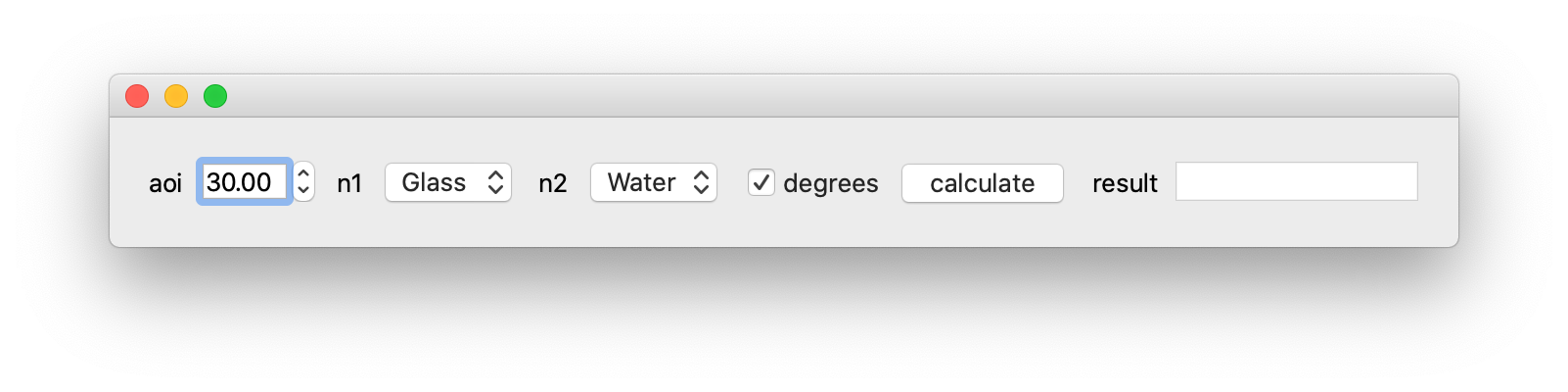
But that's just the beginning! Please see [Documentation](https://pyapp-kit.github.io/magicgui/) for many more details
and usage examples.
## Contributing
Contributions are welcome!
See contributing guide [here](https://github.com/pyapp-kit/magicgui/blob/main/docs/CONTRIBUTING.md).
|
