1
2
3
4
5
6
7
8
9
10
11
12
13
14
15
16
17
18
19
20
21
22
23
24
25
26
27
28
29
30
31
32
33
34
35
36
37
38
39
40
41
42
43
44
45
46
47
48
49
50
51
52
53
54
55
56
57
58
59
60
61
62
63
64
65
66
67
68
69
70
71
72
73
74
75
76
77
78
79
80
81
82
83
84
85
86
87
88
89
90
91
92
93
94
95
|
mgitstatus
==========
Show uncommitted, untracked and unpushed changes in multiple Git
repositories. Scan for .git dirs up to **DEPTH** directories deep.
The default is 2. If **DEPTH** is 0, the scan is infinitely deep.
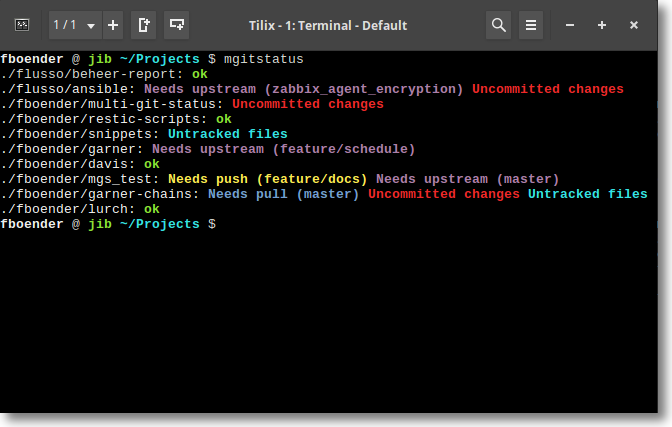
mgitstatus shows:
* **Uncommitted changes** if there are unstaged or uncommitted changes on the
checked out branch.
* **Untracked files** if there are untracked files which are not ignored.
* **Needs push (BRANCH)** if the branch is tracking a (remote) branch which is
behind.
* **Needs upstream (BRANCH)** if a branch does not have a local or remote
upstream branch configured. Changes in the branch may otherwise never be
pushed or merged.
* **Needs pull (BRANCH)** if the branch is tracking a (remote) branch which is
ahead. This requires that the local git repo already knows about the remote
changes (i.e. you've done a `fetch`), or that you specify the `-f` option.
mgitstatus does NOT contact the remote by default.
* **X stashes** if there are stashes.
Since there are a lot of different states a git repository can be in,
mgitstatus makes no guarantees that *all* states are taken into account.
mgitstatus can also list dirs that are not a repo, if given the `-w`
switch. To ignore certain repos, set the `mgitstatus.ignore` git config flag
for that repo to `true`. (See "usage" below for an example).
# Usage
Usage: mgitstatus [--version] [-w] [-e] [-f] [--throttle SEC] [-c] [-d/--depth=2] [--flatten] [--no-X] [DIR [DIR]...]
mgitstatus shows uncommitted, untracked and unpushed changes in multiple Git
repositories. By default, mgitstatus scans two directories deep. This can be
changed with the -d (--depth) option. If DEPTH is 0, the scan is infinitely
deep.
--version Show version
-w Warn about dirs that are not Git repositories
-e Exclude repos that are 'ok'
-f Do a 'git fetch' on each repo (slow for many repos)
--throttle SEC Wait SEC seconds between each 'git fetch' (-f option)
-c Force color output (preserve colors when using pipes)
-d, --depth=2 Scan this many directories deep
--flatten Show only one status per line
You can limit output with the following options:
--no-push
--no-pull
--no-upstream
--no-uncommitted
--no-untracked
--no-stashes
--no-ok (same as -e)
The following example scans all directories under the current dir, with a
depth of 2. That means the current dir and all directories directly under it.
~/Projects/fboender $ mgitstatus
./mgitstatus: ok
./mdpreview: ok
./snippets: ok
./boxes: ok
./ansible-cmdb: Uncommitted changes Untracked files
./scriptform: Uncommitted changes
For more examples, see the [manual page](mgitstatus.1.md).
# Installation
mgitstatus requires make.
The following steps will install mgitstatus:
# Clone the repo
$ git clone https://github.com/fboender/multi-git-status.git
$ cd multi-git-status
# Install globally (all users)
$ sudo make install
# Install locally (only your user)
$ PREFIX=~/.local make install
# License
Copyright 2016-2022, Ferry Boender (et al).
Licensed under the MIT license. For more information, see the LICENSE.txt file.
|
