File: DeveloperConsole.md

package info (click to toggle)
mumble 1.5.735-6
  • links: PTS, VCS
  • area: main
  • in suites: forky, sid
  • size: 90,008 kB
  • sloc: cpp: 556,921; ansic: 81,662; python: 3,606; sh: 659; makefile: 506; asm: 371; cs: 306; sql: 228; javascript: 143; perl: 80; xml: 13
file content (14 lines) | stat: -rw-r--r-- 535 bytes parent folder | download | duplicates (2)
1
2
3
4
5
6
7
8
9
10
11
12
13
14
# Developer console

The _Developer console_ shows information logged by Mumble that can be of interest to developers. This is usually used to find the cause
of certain bugs.

## How to open the Developer console?

1. Make sure the developer menu is enabled in the settings (checkbox in the "User interface" section)

![User interface settings](./media/images/Mumble_Settings_DeveloperMenu.png)

2. Open the Developer console from the new menu entry in the main window
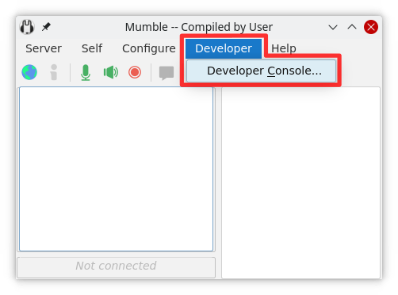
![Developer console](./media/images/Mumble_DeveloperConsole.png)