1
2
3
4
5
6
7
8
9
10
11
12
13
14
15
16
17
18
19
20
21
22
23
24
25
26
27
28
29
30
31
32
33
34
35
36
37
38
39
40
41
42
43
44
45
46
47
48
49
50
51
52
53
54
55
56
57
58
59
60
61
62
63
64
65
66
67
68
69
70
71
72
73
74
75
76
77
78
79
80
81
82
83
84
85
86
87
88
89
90
91
92
93
94
95
96
97
98
99
100
101
102
103
104
105
106
107
108
109
110
111
112
113
114
115
116
117
118
119
120
121
122
123
124
125
126
127
128
129
130
131
132
133
134
135
136
137
138
139
140
141
142
143
144
145
146
147
148
149
150
151
152
153
154
155
156
157
158
159
160
161
162
163
164
165
166
167
168
169
170
171
172
173
174
175
176
177
178
179
180
181
182
183
184
185
186
187
188
189
190
191
192
193
194
195
196
197
198
199
200
201
202
203
204
205
206
207
208
209
210
211
212
213
214
215
216
217
218
219
220
221
222
223
224
225
226
227
228
229
230
231
232
233
234
235
236
237
238
239
240
241
242
243
244
245
246
247
248
249
250
251
252
253
254
255
256
257
258
259
260
261
262
263
264
265
266
267
268
269
270
271
272
273
274
275
276
277
278
279
280
281
282
283
284
285
286
287
288
289
290
291
292
293
294
295
296
297
298
299
300
301
302
303
304
305
306
307
308
309
310
311
312
313
314
315
316
317
318
319
320
321
322
323
324
325
326
327
328
329
330
331
332
333
334
335
336
337
338
339
340
341
342
343
344
345
346
347
348
349
350
351
352
353
354
355
356
357
358
359
360
361
362
363
364
365
366
367
368
369
370
371
372
373
374
375
376
377
378
379
380
381
382
383
384
385
386
387
388
389
390
391
392
393
394
395
396
397
398
399
400
401
402
403
404
405
406
407
408
409
410
411
412
413
414
415
416
417
418
419
420
421
422
423
424
425
426
427
428
429
430
431
432
433
434
435
436
437
438
439
440
441
442
443
444
445
446
447
448
449
450
451
452
453
454
455
456
457
458
459
460
461
462
463
464
465
466
467
468
469
470
471
472
473
474
475
476
477
478
479
480
481
482
483
484
485
486
487
488
489
490
491
492
493
494
495
496
497
498
499
500
501
502
503
504
505
506
507
508
509
510
511
512
513
514
515
516
517
518
519
520
521
522
523
524
525
526
527
528
529
530
531
532
533
534
535
536
537
538
539
540
541
542
543
544
545
546
547
548
549
550
551
552
553
554
555
556
557
558
559
560
561
562
563
564
565
566
567
568
569
570
571
572
573
574
575
576
577
578
579
580
581
582
583
584
585
586
587
588
589
590
591
592
593
594
595
596
597
598
599
600
601
602
603
604
605
606
607
608
609
610
611
612
613
614
615
616
617
618
619
620
621
622
623
624
625
626
627
628
629
630
631
|

[](https://www.buymeacoffee.com/jmrenouard)
[](https://opensource.box.com/badges)
[](https://github.com/anuraghazra/github-readme-stats/)
[](https://isitmaintained.com/project/jmrenouard/MySQLTuner-perl "Average time to resolve an issue")
[](https://isitmaintained.com/project/jmrenouard/MySQLTuner-perl "Percentage of issues still open")
[](https://opensource.org/licenses/GPL-3.0/)
**MySQLTuner** is a script written in Perl that allows you to review a MySQL installation quickly and make adjustments to increase performance and stability. The current configuration variables and status data is retrieved and presented in a brief format along with some basic performance suggestions.
**MySQLTuner** supports ~300 indicators for MySQL/MariaDB/Percona Server in this latest version.
**MySQLTuner** is actively maintained supporting many configurations such as [Galera Cluster](https://galeracluster.com/), [TokuDB](https://www.percona.com/software/mysql-database/percona-tokudb), [Performance schema](https://github.com/mysql/mysql-sys), Linux OS metrics, [InnoDB](https://dev.mysql.com/doc/refman/5.7/en/innodb-storage-engine.html), [MyISAM](https://dev.mysql.com/doc/refman/5.7/en/myisam-storage-engine.html), [Aria](https://mariadb.com/docs/server/server-usage/storage-engines/aria/aria-storage-engine), ...
You can find more details on these indicators here:
[Indicators description](https://github.com/jmrenouard/MySQLTuner-perl/blob/master/INTERNALS.md).

Useful Links
==
* **Active Development:** [https://github.com/jmrenouard/MySQLTuner-perl](https://github.com/jmrenouard/MySQLTuner-perl)
* **Releases/Tags:** [https://github.com/jmrenouard/MySQLTuner-perl/tags](https://github.com/jmrenouard/MySQLTuner-perl/tags)
* **Changelog:** [https://github.com/jmrenouard/MySQLTuner-perl/blob/master/Changelog](https://github.com/jmrenouard/MySQLTuner-perl/blob/master/Changelog)
* **Docker Images:** [https://hub.docker.com/repository/docker/jmrenouard/mysqltuner/tags](https://hub.docker.com/repository/docker/jmrenouard/mysqltuner/tags)
MySQLTuner needs you
===
**MySQLTuner** needs contributors for documentation, code and feedback:
* Please join us on our issue tracker at [GitHub tracker](https://github.com/jmrenouard/MySQLTuner-perl/issues).
* Contribution guide is available following [MySQLTuner contributing guide](https://github.com/jmrenouard/MySQLTuner-perl/blob/master/CONTRIBUTING.md)
* Star **MySQLTuner project** at [MySQLTuner Git Hub Project](https://github.com/jmrenouard/MySQLTuner-perl/)
* Paid support for LightPath here: [jmrenouard@lightpath.fr](jmrenouard@lightpath.fr)
* Paid support for Releem available here: [Releem App](https://releem.com/)

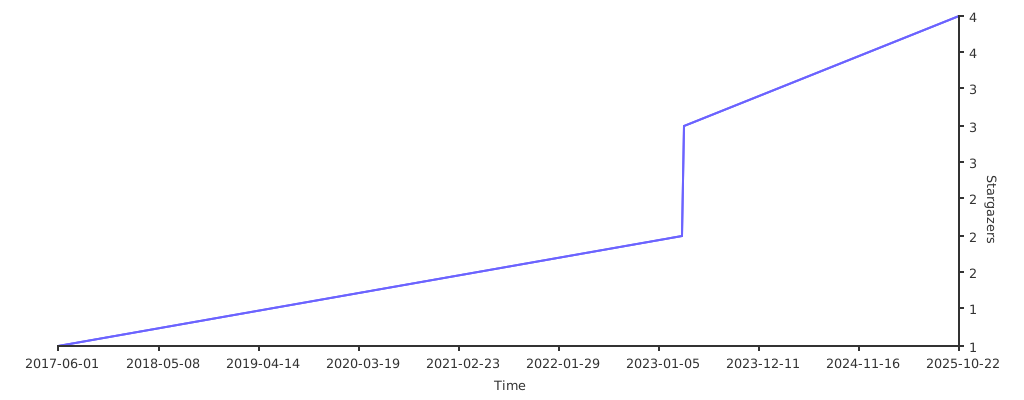
## Stargazers over time
[](https://starchart.cc/jmrenouard/MySQLTuner-perl)
Compatibility
====
Test result are available here for LTS only:
* MySQL (full support)
* Percona Server (full support)
* MariaDB (full support)
* Galera replication (full support)
* Percona XtraDB cluster (full support)
* MySQL Replication (partial support, no test environment)
Thanks to [endoflife.date](endoflife.date)
* Refer to [MariaDB Supported versions](https://github.com/jmrenouard/MySQLTuner-perl/blob/master/mariadb_support.md).
* Refer to [MySQL Supported versions](https://github.com/jmrenouard/MySQLTuner-perl/blob/master/mysql_support.md).
***Windows Support is partial***
* Windows is now supported at this time
* Successfully run MySQLtuner across WSL2 (Windows Subsystem Linux)
* [https://docs.microsoft.com/en-us/windows/wsl/](https://docs.microsoft.com/en-us/windows/wsl/)
***UNSUPPORTED ENVIRONMENTS - NEED HELP WITH THAT***
* Cloud based is not supported at this time (Help wanted! GCP, AWS, Azure support requested)
***Unsupported storage engines: PRs welcome***
--
* NDB is not supported feel free to create a Pull Request
* Archive
* Spider
* ColummStore
* Connect
Unmaintenained stuff from MySQL or MariaDB
--
* MyISAM is too old and no longer active
* RockDB is not maintained anymore
* TokuDB is not maintained anymore
* XtraDB is not maintained anymore
* CVE vulnerabilities detection support from [https://cve.mitre.org](https://cve.mitre.org)
***MINIMAL REQUIREMENTS***
* Perl 5.6 or later (with [perl-doc](https://metacpan.org/release/DAPM/perl-5.14.4/view/pod/perldoc.pod) package)
* Unix/Linux based operating system (tested on Linux, BSD variants, and Solaris variants)
* Unrestricted read access to the MySQL server
OS root access recommended for MySQL < 5.1
***WARNING***
--
It is **important** for you to fully understand each change
you make to a MySQL database server. If you don't understand portions
of the script's output, or if you don't understand the recommendations,
**you should consult** a knowledgeable DBA or system administrator
that you trust. **Always** test your changes on staging environments, and
always keep in mind that improvements in one area can **adversely affect**
MySQL in other areas.
It's **also important** to wait at least 24 hours of uptime to get accurate results. In fact, running
**mysqltuner** on a fresh restarted server is completely useless.
**Also review the FAQ section below.**
Security recommendations
--
Hi directadmin user!
We detected that you run mysqltuner with da_admin's credentials taken from `/usr/local/directadmin/conf/my.cnf`, which might bring to a password discovery!
Read link for more details [Issue #289](https://github.com/jmrenouard/MySQLTuner-perl/issues/289).
What is MySQLTuner checking exactly ?
--
All checks done by **MySQLTuner** are documented in [MySQLTuner Internals](https://github.com/jmrenouard/MySQLTuner-perl/blob/master/INTERNALS.md) documentation.
Download/Installation
--
Choose one of these methods:
1) Script direct download (the simplest and shortest method):
```bash
wget http://mysqltuner.pl/ -O mysqltuner.pl
wget https://raw.githubusercontent.com/jmrenouard/MySQLTuner-perl/master/basic_passwords.txt -O basic_passwords.txt
wget https://raw.githubusercontent.com/jmrenouard/MySQLTuner-perl/master/vulnerabilities.csv -O vulnerabilities.csv
```
1) You can download the entire repository by using `git clone` or `git clone --depth 1 -b master` followed by the cloning URL above.
Optional Sysschema installation for MySQL 5.6
--
Sysschema is installed by default under MySQL 5.7 and MySQL 8 from Oracle.
By default, on MySQL 5.6/5.7/8, performance schema is enabled.
For previous MySQL 5.6 version, you can follow this command to create a new database sys containing very useful view on Performance schema:
Sysschema for MySQL old version
--
```bash
curl "https://codeload.github.com/mysql/mysql-sys/zip/master" > sysschema.zip
# check zip file
unzip -l sysschema.zip
unzip sysschema.zip
cd mysql-sys-master
mysql -uroot -p < sys_56.sql
```
Sysschema for MariaDB old version
--
```bash
curl "https://github.com/FromDual/mariadb-sys/archive/refs/heads/master.zip" > sysschema.zip
# check zip file
unzip -l sysschema.zip
unzip sysschema.zip
cd mariadb-sys-master
mysql -u root -p < ./sys_10.sql
```
Performance schema setup
--
By default, performance_schema is enabled and sysschema is installed on latest version.
By default, on MariaDB, performance schema is disabled (MariaDB<10.6).
Consider activating performance schema across your my.cnf configuration file:
```ini
[mysqld]
performance_schema = on
performance-schema-consumer-events-statements-history-long = ON
performance-schema-consumer-events-statements-history = ON
performance-schema-consumer-events-statements-current = ON
performance-schema-consumer-events-stages-current=ON
performance-schema-consumer-events-stages-history=ON
performance-schema-consumer-events-stages-history-long=ON
performance-schema-consumer-events-transactions-current=ON
performance-schema-consumer-events-transactions-history=ON
performance-schema-consumer-events-transactions-history-long=ON
performance-schema-consumer-events-waits-current=ON
performance-schema-consumer-events-waits-history=ON
performance-schema-consumer-events-waits-history-long=ON
performance-schema-instrument='%=ON'
max-digest-length=2048
performance-schema-max-digest-length=2018
```
Sysschema installation for MariaDB < 10.6
--
Sysschema is not installed by default under MariaDB prior to 10.6 [MariaDB sys](https://mariadb.com/kb/en/sys-schema/)
You can follow this command to create a new database sys containing a useful view on Performance schema:
```bash
curl "https://codeload.github.com/FromDual/mariadb-sys/zip/master" > mariadb-sys.zip
# check zip file
unzip -l mariadb-sys.zip
unzip mariadb-sys.zip
cd mariadb-sys-master/
mysql -u root -p < ./sys_10.sql
```
Errors & solutions for performance schema installation
--
ERROR 1054 (42S22) at line 78 in file: './views/p_s/metrics_56.sql': Unknown column 'STATUS' in 'field list'
--
This error can be safely ignored
Consider using a recent MySQL/MariaDB version to avoid this kind of issue during sysschema installation
In recent versions, sysschema is installed and integrated by default as sys schema (SHOW DATABASES)
ERROR at line 21: Failed to open file './tables/sys_config_data_10.sql -- ported', error: 2
Have a look at #452 solution given by @ericx
--
Fixing sysctl configuration (/etc/sysctl.conf)
--
It is a system wide setting and not a database setting: [Linux FS Kernel settings](https://www.kernel.org/doc/html/latest/admin-guide/sysctl/fs.html#id1)
You can check its values via:
```bash
$ cat /proc/sys/fs/aio-*
65536
2305
```
For example, to set the aio-max-nr value, add the following line to the /etc/sysctl.conf file:
```bash
fs.aio-max-nr = 1048576
```
To activate the new setting:
```bash
sysctl -p /etc/sysctl.conf
```
Specific usage
--
**Usage:** Minimal usage locally
```bash
perl mysqltuner.pl --host 127.0.0.1
```
Of course, you can add the execute bit (`chmod +x mysqltuner.pl`) so you can execute it without calling Perl directly.
**Usage:** Minimal usage remotely
In previous version, --forcemem shoud be set manually, in order to be able to run an MySQLTuner analysis
Since 2.1.10, memory and swap are defined to 1Gb by default.
If you want a more accurate value according to your remote server, feel free to setup --forcemem and --forceswap to real RAM value
```bash
perl mysqltuner.pl --host targetDNS_IP --user admin_user --pass admin_password
```
**Usage:** Enable maximum output information around MySQL/MariaDb without debugging
```bash
perl mysqltuner.pl --verbose
perl mysqltuner.pl --buffers --dbstat --idxstat --sysstat --pfstat --tbstat
```
**Usage:** Enable CVE vulnerabilities check for your MariaDB or MySQL version
```bash
perl mysqltuner.pl --cvefile=vulnerabilities.csv
```
**Usage:** Write your result in a file with information displayed
```bash
perl mysqltuner.pl --outputfile /tmp/result_mysqltuner.txt
```
**Usage:** Write your result in a file **without outputting information**
```bash
perl mysqltuner.pl --silent --outputfile /tmp/result_mysqltuner.txt
```
**Usage:** Using template model to customize your reporting file based on [Text::Template](https://metacpan.org/pod/Text::Template) syntax.
```bash
perl mysqltuner.pl --silent --reportfile /tmp/result_mysqltuner.txt --template=/tmp/mymodel.tmpl
```
**Important**: [Text::Template](https://metacpan.org/pod/Text::Template) module is mandatory for `--reportfile` and/or `--template` options, because this module is needed to generate appropriate output based on a text template.
**Usage:** Dumping all information_schema and sysschema views as csv file into results subdirectory
```bash
perl mysqltuner.pl --verbose --dumpdir=./result
```
**Usage:** Enable debugging information
```bash
perl mysqltuner.pl --debug
```
**Usage:** Update MySQLTuner and data files (password and cve) if needed
```bash
perl mysqltuner.pl --checkversion --updateversion
```
Cloud Support
--
MySQLTuner now has experimental support for cloud-based MySQL services.
* `--cloud`: Enable cloud mode. This is a generic flag for any cloud provider.
* `--azure`: Enable Azure-specific support.
* `--ssh-host <hostname>`: The SSH host for cloud connections.
* `--ssh-user <username>`: The SSH user for cloud connections.
* `--ssh-password <password>`: The SSH password for cloud connections.
* `--ssh-identity-file <path>`: The path to the SSH identity file for cloud connections.
HTML reports based on Python Jinja2
--
HTML generation is based on Python/Jinja2
**HTML generation Procedure**
* Generate mysqltuner.pl report using JSON format (--json)
* Generate HTML report using j2 python tools
**Jinja2 Templates are located under templates sub directory**
A basic example is called basic.html.j2
**Installation Python j2**
```bash
python -mvenv j2
source ./j2/bin/activate
(j2) pip install j2
```
**Using Html report generation**
```bash
perl mysqltuner.pl --verbose --json > reports.json
cat reports.json j2 -f json MySQLTuner-perl/templates/basic.html.j2 > variables.html
```
or
```bash
perl mysqltuner.pl --verbose --json | j2 -f json MySQLTuner-perl/templates/basic.html.j2 > variables.html
```
HTML reports based on AHA
--
HTML generation is based on AHA
**HTML generation Procedure**
* Generate mysqltuner.pl report using standard text reports
* Generate HTML report using aha
**Installation Aha**
Follow instructions from Github repo
[GitHub AHA main repository](https://github.com/theZiz/aha)
**Using AHA Html report generation**
perl mysqltuner.pl --verbose --color > reports.txt
aha --black --title "MySQLTuner" -f "reports.txt" > "reports.html"
or
perl mysqltuner.pl --verbose --color | aha --black --title "MySQLTuner" > reports.html
FAQ
--
**Question: What are the prerequisites for running MySQL tuner ?**
Before running MySQL tuner, you should have the following:
* A MySQL server installation
* Perl installed on your system
* Administrative access to your MySQL server
**Question: Can MySQL tuner make changes to my configuration automatically ?**
**No.**, MySQL tuner only provides recommendations. It does not make any changes to your configuration files automatically. It is up to the user to review the suggestions and implement them as needed.
**Question: How often should I run MySQL tuner ?**
It is recommended to run MySQL tuner periodically, especially after significant changes to your MySQL server or its workload.
For optimal results, run the script after your server has been running for at least 24 hours to gather sufficient performance data.
**Question: How do I interpret the results from MySQL tuner ?**
MySQL tuner provides output in the form of suggestions and warnings.
Review each recommendation and consider implementing the changes in your MySQL configuration file (usually 'my.cnf' or 'my.ini').
Be cautious when making changes and always backup your configuration file before making any modifications.
**Question: Can MySQL tuner cause harm to my database or server ?**
While MySQL tuner itself will not make any changes to your server, blindly implementing its recommendations without understanding the impact can cause issues.
Always ensure you understand the implications of each suggestion before applying it to your server.
**Question: Can I use MySQL tuner for optimizing other database systems like PostgreSQL or SQL Server ?**
MySQL tuner is specifically designed for MySQL servers.
To optimize other database systems, you would need to use tools designed for those systems, such as pgTune for PostgreSQL or SQL Server's built-in performance tools.
**Question: Does MySQL tuner support MariaDB and Percona Server ?**
Yes, MySQL tuner supports MariaDB and Percona Server since they are derivatives of MySQL and share a similar architecture. The script can analyze and provide recommendations for these systems as well.
**Question: What should I do if I need help with MySQL tuner or have questions about the recommendations ?**
If you need help with MySQL tuner or have questions about the recommendations provided by the script, you can consult the MySQL tuner documentation, seek advice from online forums, or consult a MySQL expert.
Be cautious when implementing changes to ensure the stability and performance of your server.
**Question: Will MySQLTuner fix my slow MySQL server ?**
**No.** MySQLTuner is a read only script. It won't write to any configuration files, change the status of any daemons. It will give you an overview of your server's performance and make some basic recommendations for improvements that you can make after it completes.
**Question: Can I fire my DBA now?**
**MySQLTuner will not replace your DBA in any form or fashion.**
If your DBA constantly takes your parking spot and steals your lunch from the fridge, then you may want to consider it - but that's your call.
**Question: Why does MySQLTuner keep asking me the login credentials for MySQL over and over?**
The script will try its best to log in via any means possible. It will check for ~/.my.cnf files, Plesk password files, and empty password root logins. If none of those are available, then you'll be prompted for a password. If you'd like the script to run in an automated fashion without user intervention, then create a .my.cnf file in your home directory which contains:
[client]
user=someusername
password=thatuserspassword
Once you create it, make sure it's owned by your user and the mode on the file is 0600. This should prevent the prying eyes from getting your database login credentials under normal conditions.
**Question: Is there another way to secure credentials on latest MySQL and MariaDB distributions ?**
You could use mysql_config_editor utilities.
~~~bash
$ mysql_config_editor set --login-path=client --user=someusername --password --host=localhost
Enter password: ********
~~~
After which, `~/.mylogin.cnf` will be created with the appropriate access.
To get information about stored credentials, use the following command:
```bash
$mysql_config_editor print
[client]
user = someusername
password = *****
host = localhost
```
**Question: What's minimum privileges needed by a specific mysqltuner user in database ?**
```bash
mysql>GRANT SELECT, PROCESS,EXECUTE, REPLICATION CLIENT,
SHOW DATABASES,SHOW VIEW
ON *.*
TO 'mysqltuner'@'localhost' identified by pwd1234;
```
**Question: It's not working on my OS! What gives?!**
These kinds of things are bound to happen. Here are the details I need from you to investigate the issue:
* OS and OS version
* Architecture (x86, x86_64, IA64, Commodore 64)
* Exact MySQL version
* Where you obtained your MySQL version (OS package, source, etc)
* The full text of the error
* A copy of SHOW VARIABLES and SHOW GLOBAL STATUS output (if possible)
**Question: How to perform CVE vulnerability checks?**
* Download vulnerabilities.csv from this repository.
* use option --cvefile to perform CVE checks
**Question: How to use mysqltuner from a remote host?**
Thanks to [@rolandomysqldba](https://dba.stackexchange.com/users/877/rolandomysqldba)
* You will still have to connect like a mysql client:
Connection and Authentication
--host <hostname> Connect to a remote host to perform tests (default: localhost)
--socket <socket> Use a different socket for a local connection
--port <port> Port to use for connection (default: 3306)
--user <username> Username to use for authentication
--pass <password> Password to use for authentication
--defaults-file <path> defaults file for credentials
Since you are using a remote host, use parameters to supply values from the OS
--forcemem <size> Amount of RAM installed in megabytes
--forceswap <size> Amount of swap memory configured in megabytes
* You may have to contact your remote SysAdmin to ask how much RAM and swap you have
If the database has too many tables, or very large table, use this:
--skipsize Don't enumerate tables and their types/sizes (default: on)
(Recommended for servers with many tables)
**Question: Can I install this project using homebrew on Apple Macintosh?**
Yes! `brew install mysqltuner` can be used to install this application using [homebrew](https://brew.sh/) on Apple Macintosh.
MySQLTuner and Vagrant
--
**MySQLTuner** contains following Vagrant configurations:
* Fedora Core 30 / Docker
**Vagrant File** is stored in Vagrant subdirectory.
* Follow following step after vagrant installation:
$ vagrant up
**MySQLTuner** contains a Vagrant configurations for test purpose and development
* Install VirtualBox and Vagrant
* <https://www.virtualbox.org/wiki/Downloads>
* <https://www.vagrantup.com/downloads.html>
* Clone repository
* git clone <https://github.com/jmrenouard/MySQLTuner-perl/.git>
* Install Vagrant plugins vagrant-hostmanager and vagrant-vbguest
* vagrant plugin install vagrant-hostmanager
* vagrant plugin install vagrant-vbguest
* Add Fedora Core 30 box for official Fedora Download Website
* vagrant box add --name generic/fedora30
* Create a data directory
* mkdir data
## setup test environments
$ sh build/createTestEnvs.sh
$ source build/bashrc
$ mysql_percona80 sakila
sakila> ...
$ docker images
mariadb 10.1 fc612450e1f1 12 days ago 352MB
mariadb 10.2 027b7c57b8c6 12 days ago 340MB
mariadb 10.3 47dff68107c4 12 days ago 343MB
mariadb 10.4 92495405fc36 12 days ago 356MB
mysql 5.6 95e0fc47b096 2 weeks ago 257MB
mysql 5.7 383867b75fd2 2 weeks ago 373MB
mysql 8.0 b8fd9553f1f0 2 weeks ago 445MB
percona/percona-server 5.7 ddd245ed3496 5 weeks ago 585MB
percona/percona-server 5.6 ed0a36e0cf1b 6 weeks ago 421MB
percona/percona-server 8.0 390ae97d57c6 6 weeks ago 697MB
mariadb 5.5 c7bf316a4325 4 months ago 352MB
mariadb 10.0 d1bde56970c6 4 months ago 353MB
mysql 5.5 d404d78aa797 4 months ago 205MB
$ docker ps
CONTAINER ID IMAGE COMMAND CREATED STATUS PORTS NAMES
da2be9b050c9 mariadb:5.5 "docker-entrypoint.s…" 7 hours ago Up 7 hours 0.0.0.0:5311->3306/tcp mariadb55
5deca25d5ac8 mariadb:10.0 "docker-entrypoint.s…" 7 hours ago Up 7 hours 0.0.0.0:5310->3306/tcp mariadb100
73aaeb37e2c2 mariadb:10.1 "docker-entrypoint.s…" 7 hours ago Up 7 hours 0.0.0.0:5309->3306/tcp mariadb101
72ffa77e01ec mariadb:10.2 "docker-entrypoint.s…" 7 hours ago Up 7 hours 0.0.0.0:5308->3306/tcp mariadb102
f5996f2041df mariadb:10.3 "docker-entrypoint.s…" 7 hours ago Up 7 hours 0.0.0.0:5307->3306/tcp mariadb103
4890c52372bb mariadb:10.4 "docker-entrypoint.s…" 7 hours ago Up 7 hours 0.0.0.0:5306->3306/tcp mariadb104
6b9dc078e921 percona/percona-server:5.6 "/docker-entrypoint.…" 7 hours ago Up 7 hours 0.0.0.0:4308->3306/tcp percona56
3a4c7c826d4c percona/percona-server:5.7 "/docker-entrypoint.…" 7 hours ago Up 7 hours 0.0.0.0:4307->3306/tcp percona57
3dda408c91b0 percona/percona-server:8.0 "/docker-entrypoint.…" 7 hours ago Up 7 hours 33060/tcp, 0.0.0.0:4306->3306/tcp percona80
600a4e7e9dcd mysql:5.5 "docker-entrypoint.s…" 7 hours ago Up 7 hours 0.0.0.0:3309->3306/tcp mysql55
4bbe54342e5d mysql:5.6 "docker-entrypoint.s…" 7 hours ago Up 7 hours 0.0.0.0:3308->3306/tcp mysql56
a49783249a11 mysql:5.7 "docker-entrypoint.s…" 7 hours ago Up 7 hours 33060/tcp, 0.0.0.0:3307->3306/tcp mysql57
d985820667c2 mysql:8.0 "docker-entrypoint.s…" 7 hours ago Up 7 hours 0.0.0.0:3306->3306/tcp, 33060/tcp mysql 8 0
Contributions welcome
--
How to contribute using Pull Request ? Follow this guide : [Pull request creation](https://opensource.com/article/19/7/create-pull-request-github)
Simple steps to create a pull request
--
* Fork this Github project
* Clone it to your local system
* Make a new branch
* Make your changes
* Push it back to your repo
* Click the Compare & pull request button
* Click Create pull request to open a new pull request
|
