1
2
3
4
5
6
7
8
9
10
11
12
13
14
15
16
17
18
19
20
21
22
23
24
25
26
27
28
29
30
31
32
33
34
35
36
37
38
39
40
41
42
43
44
45
46
47
48
49
50
51
52
53
54
55
56
57
58
59
60
61
62
63
64
65
66
67
68
69
70
71
72
73
74
75
76
77
78
79
80
81
82
83
84
85
86
87
88
89
90
91
92
93
94
95
96
97
98
99
100
101
102
103
104
105
106
107
108
109
110
111
112
113
114
115
116
117
118
119
120
121
122
123
124
125
126
127
128
129
130
131
132
133
134
135
136
137
138
139
140
141
142
143
144
145
146
147
148
149
150
151
152
153
154
155
156
157
158
159
160
161
162
163
164
165
166
167
168
169
170
171
172
173
174
175
176
177
178
179
180
181
182
183
184
185
186
187
188
189
190
191
192
193
194
195
196
197
198
199
200
201
202
203
204
205
206
207
208
209
210
211
212
213
214
215
216
217
218
219
220
221
222
223
224
225
226
227
228
229
230
231
232
233
234
235
236
237
238
239
240
241
242
243
244
245
246
247
248
249
250
251
252
253
254
255
256
257
258
259
260
261
262
263
264
265
266
267
268
269
270
271
272
273
274
275
276
277
278
279
280
281
282
283
284
285
286
287
288
289
290
291
292
293
294
295
296
297
298
299
300
301
302
303
304
305
306
307
308
309
310
311
312
313
314
315
316
317
318
319
320
321
322
323
324
325
326
327
328
329
330
331
332
333
334
335
336
337
338
339
340
341
342
343
344
345
346
347
348
349
350
351
352
353
354
355
356
357
358
359
360
361
362
363
364
365
366
367
368
369
370
371
372
373
374
375
376
377
378
379
380
381
382
383
384
385
386
387
388
389
390
391
392
393
394
395
396
397
398
399
400
401
402
403
404
405
406
407
408
409
410
411
412
413
414
415
416
417
418
419
420
421
422
423
424
425
426
427
428
429
430
431
432
433
434
435
436
437
438
439
440
441
442
443
444
445
446
447
448
449
450
451
452
453
454
455
456
457
458
459
460
461
462
463
464
465
466
467
468
469
470
471
472
473
474
475
476
477
478
479
480
481
482
483
484
485
486
487
488
489
490
491
492
493
494
495
496
497
498
499
500
501
502
503
504
505
506
507
508
509
510
511
512
513
514
515
516
517
518
519
520
521
522
523
524
525
526
527
528
529
530
531
532
533
534
535
536
537
538
539
540
541
542
543
544
545
546
547
548
549
550
551
552
553
554
555
556
557
558
559
560
561
562
563
564
565
566
567
568
569
570
571
572
573
574
575
576
577
578
579
580
581
582
583
584
585
586
587
588
589
590
591
592
593
594
595
596
597
598
599
600
601
602
603
604
605
606
607
608
609
610
611
612
613
614
615
616
617
618
619
620
621
622
623
624
625
626
627
628
629
630
631
632
633
634
635
636
637
638
639
640
641
642
643
644
645
646
647
648
649
650
651
652
653
654
655
656
657
658
659
660
661
662
663
664
665
666
667
668
669
670
671
672
673
674
675
676
677
678
679
680
681
682
683
684
685
686
687
688
689
690
691
692
693
694
695
696
697
698
699
700
701
702
703
704
705
706
707
708
709
710
711
712
713
714
715
716
717
718
719
720
721
722
723
724
725
726
727
728
729
730
731
732
733
734
735
736
737
738
739
740
741
742
743
744
745
746
747
748
749
750
751
752
753
754
755
756
757
758
759
760
761
762
763
764
765
766
767
768
769
770
771
772
773
774
775
776
777
778
779
780
781
782
783
784
785
786
787
788
789
790
791
792
793
794
795
796
797
798
799
800
801
802
803
804
805
806
807
808
809
810
811
812
813
814
815
816
817
818
819
820
821
822
823
824
825
826
827
828
829
830
831
832
833
834
835
836
837
838
839
840
841
842
843
844
845
846
847
848
849
850
851
852
853
854
855
856
857
858
859
860
861
862
863
864
865
866
867
868
869
870
871
872
873
874
875
876
877
878
879
880
881
882
883
884
885
886
887
888
889
890
891
892
893
894
895
896
897
898
899
900
901
902
903
904
905
906
907
908
909
910
911
912
913
914
915
916
917
918
919
920
921
922
923
924
925
926
927
928
929
930
931
932
933
934
935
936
937
938
939
940
941
942
943
944
945
946
947
948
949
950
951
952
953
954
955
956
957
958
959
960
961
962
963
964
965
966
967
968
969
970
971
972
973
974
975
976
977
978
979
980
981
982
983
984
985
986
987
988
989
990
991
992
993
994
995
996
997
998
999
1000
1001
1002
1003
1004
1005
1006
1007
1008
1009
1010
1011
1012
1013
1014
1015
1016
1017
1018
1019
1020
1021
1022
1023
1024
1025
1026
1027
1028
1029
1030
1031
1032
1033
1034
1035
1036
1037
1038
1039
1040
1041
1042
1043
1044
1045
1046
1047
1048
1049
1050
1051
1052
1053
1054
1055
1056
1057
1058
1059
1060
1061
1062
1063
1064
1065
1066
1067
1068
1069
1070
1071
1072
1073
1074
1075
1076
1077
1078
1079
1080
1081
1082
1083
1084
1085
1086
1087
1088
1089
1090
1091
1092
1093
1094
1095
1096
1097
1098
1099
1100
1101
1102
1103
1104
1105
1106
1107
1108
1109
1110
1111
1112
1113
1114
1115
1116
1117
1118
1119
1120
1121
1122
1123
1124
1125
1126
1127
1128
1129
1130
1131
1132
1133
1134
1135
1136
1137
1138
1139
1140
1141
1142
1143
1144
1145
1146
1147
1148
1149
1150
1151
1152
1153
1154
1155
1156
1157
1158
1159
1160
1161
1162
1163
1164
1165
1166
1167
1168
1169
1170
1171
1172
1173
1174
1175
1176
1177
1178
1179
1180
1181
1182
1183
1184
1185
1186
1187
1188
1189
1190
1191
1192
1193
1194
1195
1196
1197
1198
1199
1200
1201
1202
1203
1204
1205
1206
1207
1208
1209
1210
1211
1212
1213
1214
1215
1216
1217
1218
1219
1220
1221
1222
1223
1224
1225
1226
1227
1228
1229
1230
1231
1232
1233
1234
1235
1236
1237
1238
1239
1240
1241
1242
1243
1244
1245
1246
1247
1248
1249
1250
1251
1252
1253
1254
1255
1256
1257
1258
1259
1260
1261
1262
1263
1264
1265
1266
1267
1268
1269
1270
1271
1272
1273
1274
1275
1276
1277
1278
1279
1280
1281
1282
1283
1284
1285
1286
1287
1288
1289
1290
1291
1292
1293
1294
1295
1296
1297
1298
1299
1300
1301
1302
1303
1304
1305
1306
1307
1308
1309
1310
1311
1312
1313
1314
1315
1316
1317
1318
1319
1320
1321
1322
1323
1324
1325
1326
1327
1328
1329
1330
1331
1332
1333
1334
1335
1336
1337
1338
1339
1340
1341
1342
1343
1344
1345
1346
1347
1348
1349
1350
1351
1352
1353
1354
1355
1356
1357
1358
1359
1360
1361
1362
1363
1364
1365
1366
1367
1368
1369
1370
1371
1372
1373
1374
1375
1376
1377
1378
1379
1380
1381
1382
1383
1384
1385
1386
1387
1388
1389
1390
1391
1392
1393
1394
1395
1396
1397
1398
1399
1400
1401
1402
1403
1404
1405
1406
1407
1408
1409
1410
1411
1412
1413
1414
1415
1416
1417
1418
1419
1420
1421
1422
1423
1424
1425
1426
1427
1428
1429
1430
1431
1432
1433
1434
1435
1436
1437
1438
1439
1440
1441
1442
1443
1444
1445
1446
1447
1448
1449
1450
1451
1452
1453
1454
1455
1456
1457
1458
1459
1460
1461
1462
1463
1464
1465
1466
1467
1468
1469
1470
1471
1472
1473
1474
1475
1476
1477
1478
1479
1480
1481
1482
1483
1484
1485
1486
1487
1488
1489
1490
1491
1492
1493
1494
1495
1496
1497
1498
1499
1500
1501
1502
1503
1504
1505
1506
1507
1508
1509
1510
1511
1512
1513
1514
1515
1516
1517
1518
1519
1520
1521
1522
1523
1524
1525
1526
1527
1528
1529
1530
1531
1532
1533
1534
1535
1536
1537
1538
1539
1540
1541
1542
1543
1544
1545
1546
1547
1548
1549
1550
1551
1552
1553
1554
1555
1556
1557
1558
1559
1560
1561
1562
1563
1564
1565
1566
1567
1568
1569
1570
1571
1572
1573
1574
1575
1576
1577
1578
1579
1580
1581
1582
1583
1584
1585
1586
1587
1588
1589
1590
1591
1592
1593
1594
1595
1596
1597
1598
1599
1600
1601
1602
1603
1604
1605
1606
1607
1608
1609
1610
1611
1612
1613
1614
1615
1616
1617
1618
1619
1620
1621
1622
1623
1624
1625
1626
1627
1628
1629
1630
1631
1632
1633
1634
1635
1636
1637
1638
1639
1640
1641
1642
1643
1644
1645
1646
1647
1648
1649
1650
1651
1652
1653
1654
1655
1656
1657
1658
1659
1660
1661
1662
1663
1664
1665
1666
1667
1668
1669
1670
1671
1672
1673
1674
1675
1676
1677
1678
1679
1680
1681
1682
1683
1684
1685
1686
1687
1688
1689
1690
1691
1692
1693
1694
1695
1696
1697
1698
1699
1700
1701
1702
1703
1704
1705
1706
1707
1708
1709
1710
1711
1712
1713
1714
1715
1716
1717
1718
1719
1720
1721
1722
1723
1724
1725
1726
1727
1728
1729
1730
1731
1732
1733
1734
1735
1736
1737
1738
1739
1740
1741
1742
1743
1744
1745
1746
1747
1748
1749
1750
1751
1752
1753
1754
1755
1756
1757
1758
1759
1760
1761
1762
1763
1764
1765
1766
1767
1768
1769
1770
1771
1772
1773
1774
1775
1776
1777
1778
1779
1780
1781
1782
1783
1784
1785
1786
1787
1788
1789
1790
1791
1792
1793
1794
1795
1796
1797
1798
1799
1800
1801
1802
1803
1804
1805
1806
1807
1808
1809
1810
1811
1812
1813
1814
1815
1816
1817
1818
1819
1820
1821
1822
1823
1824
1825
1826
1827
1828
1829
1830
1831
1832
1833
1834
1835
1836
1837
1838
1839
1840
1841
1842
1843
1844
1845
1846
1847
1848
1849
1850
1851
1852
1853
1854
1855
1856
1857
1858
1859
1860
1861
1862
1863
1864
1865
1866
1867
1868
1869
1870
1871
1872
1873
1874
1875
1876
1877
1878
1879
1880
1881
1882
1883
1884
1885
1886
1887
1888
1889
1890
1891
1892
1893
1894
1895
1896
1897
1898
1899
1900
1901
1902
1903
1904
1905
1906
1907
1908
1909
1910
1911
1912
1913
1914
1915
1916
1917
1918
1919
1920
1921
1922
1923
1924
1925
1926
1927
1928
1929
1930
1931
1932
1933
1934
1935
1936
1937
1938
1939
1940
1941
1942
1943
1944
1945
1946
1947
1948
1949
1950
1951
1952
1953
1954
1955
1956
1957
1958
1959
1960
1961
1962
1963
1964
1965
1966
1967
1968
1969
1970
1971
1972
1973
1974
1975
1976
1977
1978
1979
1980
1981
1982
1983
1984
1985
1986
1987
1988
1989
1990
1991
1992
1993
1994
1995
1996
1997
1998
1999
2000
2001
2002
2003
2004
2005
2006
2007
2008
2009
2010
2011
2012
2013
2014
2015
2016
2017
2018
2019
2020
2021
2022
2023
2024
2025
2026
2027
2028
2029
2030
2031
2032
2033
2034
2035
2036
2037
2038
2039
2040
2041
2042
2043
2044
2045
2046
2047
2048
2049
2050
2051
2052
2053
2054
2055
2056
2057
2058
2059
2060
2061
2062
2063
2064
2065
2066
2067
2068
2069
2070
2071
2072
2073
2074
2075
2076
2077
2078
2079
2080
2081
2082
2083
2084
2085
2086
2087
2088
2089
2090
2091
2092
2093
2094
2095
2096
2097
2098
2099
2100
2101
2102
2103
2104
2105
2106
2107
2108
2109
2110
2111
2112
2113
2114
2115
2116
2117
2118
2119
2120
2121
2122
2123
2124
2125
2126
2127
2128
2129
2130
2131
2132
2133
2134
2135
2136
2137
2138
2139
2140
2141
2142
2143
2144
2145
2146
2147
2148
2149
2150
2151
2152
2153
2154
2155
2156
2157
2158
2159
2160
2161
2162
2163
2164
2165
2166
2167
2168
2169
2170
2171
2172
2173
2174
2175
2176
2177
2178
2179
2180
2181
2182
2183
2184
2185
2186
2187
2188
2189
2190
2191
2192
2193
2194
2195
2196
2197
2198
2199
2200
2201
2202
2203
2204
2205
2206
2207
2208
2209
2210
2211
2212
2213
2214
2215
2216
2217
2218
2219
2220
2221
2222
2223
2224
2225
2226
2227
2228
2229
2230
2231
2232
2233
2234
2235
2236
2237
2238
2239
2240
2241
2242
2243
2244
2245
2246
2247
2248
2249
2250
2251
2252
2253
2254
2255
2256
2257
2258
2259
2260
2261
2262
2263
2264
2265
2266
2267
2268
2269
2270
2271
2272
2273
2274
2275
2276
2277
2278
2279
2280
2281
2282
2283
2284
2285
2286
2287
2288
2289
2290
2291
2292
2293
2294
2295
2296
2297
2298
2299
2300
2301
2302
2303
2304
2305
2306
2307
2308
2309
2310
2311
2312
2313
2314
2315
2316
2317
2318
2319
2320
2321
2322
2323
2324
2325
2326
2327
2328
2329
2330
2331
2332
2333
2334
2335
2336
2337
2338
2339
2340
2341
2342
2343
2344
2345
2346
2347
2348
2349
2350
2351
2352
2353
2354
2355
2356
2357
2358
2359
2360
2361
2362
2363
2364
2365
2366
2367
2368
2369
2370
2371
2372
2373
2374
2375
2376
2377
2378
2379
2380
2381
2382
2383
2384
2385
2386
2387
2388
2389
2390
2391
2392
2393
2394
2395
2396
2397
2398
2399
2400
2401
2402
2403
2404
2405
2406
2407
2408
2409
2410
2411
2412
2413
2414
2415
2416
2417
2418
2419
2420
2421
2422
2423
2424
2425
2426
2427
2428
2429
2430
2431
2432
2433
2434
2435
2436
2437
2438
2439
2440
2441
2442
2443
2444
2445
2446
2447
2448
2449
2450
2451
2452
2453
2454
2455
2456
2457
2458
2459
2460
2461
2462
2463
2464
2465
2466
2467
2468
2469
2470
2471
2472
2473
2474
2475
2476
2477
2478
2479
2480
2481
2482
2483
2484
2485
2486
2487
2488
2489
2490
2491
2492
2493
2494
2495
2496
2497
2498
2499
2500
2501
2502
2503
2504
2505
2506
2507
2508
2509
2510
2511
2512
2513
2514
2515
2516
2517
2518
2519
2520
2521
2522
2523
2524
2525
2526
2527
2528
2529
2530
2531
2532
2533
2534
2535
2536
2537
2538
2539
2540
2541
2542
2543
2544
2545
2546
2547
2548
2549
2550
2551
2552
2553
2554
2555
2556
2557
2558
2559
2560
2561
2562
2563
2564
2565
2566
2567
2568
2569
2570
2571
2572
2573
2574
2575
2576
2577
2578
2579
2580
2581
2582
2583
2584
2585
2586
2587
2588
2589
2590
2591
2592
2593
2594
2595
2596
2597
2598
2599
2600
2601
2602
2603
2604
2605
2606
2607
2608
2609
2610
2611
2612
2613
2614
2615
2616
2617
2618
2619
2620
2621
2622
2623
2624
2625
2626
2627
2628
2629
2630
2631
2632
2633
2634
2635
2636
2637
2638
2639
2640
2641
2642
2643
2644
2645
2646
2647
2648
2649
2650
2651
2652
2653
2654
2655
2656
2657
2658
2659
2660
2661
2662
2663
2664
2665
2666
2667
2668
2669
2670
2671
2672
2673
2674
2675
2676
2677
2678
2679
2680
2681
2682
2683
2684
2685
2686
2687
2688
2689
2690
2691
2692
2693
2694
2695
2696
2697
2698
2699
2700
2701
2702
2703
2704
2705
2706
2707
2708
2709
2710
2711
2712
2713
2714
2715
2716
2717
2718
2719
2720
2721
2722
2723
2724
2725
2726
2727
2728
2729
2730
2731
2732
2733
2734
2735
2736
2737
2738
2739
2740
2741
2742
2743
2744
2745
2746
2747
2748
2749
2750
2751
2752
2753
2754
2755
2756
2757
2758
2759
2760
2761
2762
2763
2764
2765
2766
2767
2768
2769
2770
2771
2772
2773
2774
2775
2776
2777
2778
2779
2780
2781
2782
2783
2784
2785
2786
2787
2788
2789
2790
2791
2792
2793
2794
2795
2796
2797
2798
2799
2800
2801
2802
2803
2804
2805
2806
2807
2808
2809
2810
2811
2812
2813
2814
2815
2816
2817
2818
2819
2820
2821
2822
2823
2824
2825
2826
2827
2828
2829
2830
2831
2832
2833
2834
2835
2836
2837
2838
2839
2840
2841
2842
2843
2844
2845
2846
2847
2848
2849
2850
2851
2852
2853
2854
2855
2856
2857
2858
2859
2860
2861
2862
2863
2864
2865
2866
2867
2868
2869
2870
2871
2872
2873
2874
2875
2876
2877
2878
2879
2880
2881
2882
2883
2884
2885
2886
2887
2888
2889
2890
2891
2892
2893
2894
2895
2896
2897
2898
2899
2900
2901
2902
2903
2904
2905
2906
2907
2908
2909
2910
2911
2912
2913
2914
2915
2916
2917
2918
2919
2920
2921
2922
2923
2924
2925
2926
2927
2928
2929
2930
2931
2932
2933
2934
2935
2936
2937
2938
2939
2940
2941
2942
2943
2944
2945
2946
2947
2948
2949
2950
2951
2952
2953
2954
2955
2956
2957
2958
2959
2960
2961
2962
2963
2964
2965
2966
2967
2968
2969
2970
2971
2972
2973
2974
2975
2976
2977
2978
2979
2980
2981
2982
2983
2984
2985
2986
2987
2988
2989
2990
2991
2992
2993
2994
2995
2996
2997
2998
2999
3000
3001
3002
3003
3004
3005
3006
3007
3008
3009
3010
3011
3012
3013
3014
3015
3016
3017
3018
3019
3020
3021
3022
3023
3024
3025
3026
3027
3028
3029
3030
3031
3032
3033
3034
3035
3036
3037
3038
3039
3040
3041
3042
3043
3044
3045
3046
3047
3048
3049
3050
3051
3052
3053
3054
3055
3056
3057
3058
3059
3060
3061
3062
3063
3064
3065
3066
3067
3068
3069
3070
3071
3072
3073
3074
3075
3076
3077
3078
3079
3080
3081
3082
3083
3084
3085
3086
3087
3088
3089
3090
3091
3092
3093
3094
3095
3096
3097
3098
3099
3100
3101
3102
3103
3104
3105
3106
3107
3108
3109
3110
3111
3112
3113
3114
3115
3116
3117
3118
3119
3120
3121
3122
3123
3124
3125
3126
3127
3128
3129
3130
3131
3132
3133
3134
3135
3136
3137
3138
3139
3140
3141
3142
3143
3144
3145
3146
3147
3148
3149
3150
3151
3152
3153
3154
3155
3156
3157
3158
3159
3160
3161
3162
3163
3164
3165
3166
3167
3168
3169
3170
3171
3172
3173
3174
3175
3176
3177
3178
3179
3180
3181
3182
3183
3184
3185
3186
3187
3188
3189
3190
3191
3192
3193
3194
3195
3196
3197
3198
3199
3200
3201
3202
3203
3204
3205
3206
3207
3208
3209
3210
3211
3212
3213
3214
3215
3216
3217
3218
3219
3220
3221
3222
3223
3224
3225
3226
3227
3228
3229
3230
3231
3232
3233
3234
3235
3236
3237
3238
3239
3240
3241
3242
3243
3244
3245
3246
3247
3248
3249
3250
3251
3252
3253
3254
3255
3256
3257
3258
3259
3260
3261
3262
3263
3264
3265
3266
3267
3268
3269
3270
3271
3272
3273
3274
3275
3276
3277
3278
3279
3280
3281
3282
3283
3284
3285
3286
3287
3288
3289
3290
3291
3292
3293
3294
3295
3296
3297
3298
3299
3300
3301
3302
3303
3304
3305
3306
3307
3308
3309
3310
3311
3312
3313
3314
3315
3316
3317
3318
3319
3320
3321
3322
3323
3324
3325
3326
3327
3328
3329
3330
3331
3332
3333
3334
3335
3336
3337
3338
3339
3340
3341
3342
3343
3344
3345
3346
3347
3348
3349
3350
3351
3352
3353
3354
3355
3356
3357
3358
3359
3360
3361
3362
3363
3364
3365
3366
3367
3368
3369
3370
3371
3372
3373
3374
3375
3376
3377
3378
3379
3380
3381
3382
3383
3384
3385
3386
3387
3388
3389
3390
3391
3392
3393
3394
3395
3396
3397
3398
3399
3400
3401
3402
3403
3404
3405
3406
3407
3408
3409
3410
3411
3412
3413
3414
3415
3416
3417
3418
3419
3420
3421
3422
3423
3424
3425
3426
3427
3428
3429
3430
3431
3432
3433
3434
3435
3436
3437
3438
3439
3440
3441
3442
3443
3444
3445
3446
3447
3448
3449
3450
3451
3452
3453
3454
3455
3456
3457
3458
3459
3460
3461
3462
3463
3464
3465
3466
3467
3468
3469
3470
3471
3472
3473
3474
3475
3476
3477
3478
3479
3480
3481
3482
3483
3484
3485
3486
3487
3488
3489
3490
3491
3492
3493
3494
3495
3496
3497
3498
3499
3500
3501
3502
3503
3504
3505
3506
3507
3508
3509
3510
3511
3512
3513
3514
3515
3516
3517
3518
3519
3520
3521
3522
3523
3524
3525
3526
3527
3528
3529
3530
3531
3532
3533
3534
3535
3536
3537
3538
3539
3540
3541
3542
3543
3544
3545
3546
3547
3548
3549
3550
3551
3552
3553
3554
3555
3556
3557
3558
3559
3560
3561
3562
3563
3564
3565
3566
3567
3568
3569
3570
3571
3572
3573
3574
3575
3576
3577
3578
3579
3580
3581
3582
3583
3584
3585
3586
3587
3588
3589
3590
3591
3592
3593
3594
3595
3596
3597
3598
3599
3600
3601
3602
3603
3604
3605
3606
3607
3608
3609
3610
3611
3612
3613
3614
3615
3616
3617
3618
3619
3620
3621
3622
3623
3624
3625
3626
3627
3628
3629
3630
3631
3632
3633
3634
3635
3636
3637
3638
3639
3640
3641
3642
3643
3644
3645
3646
3647
3648
3649
3650
3651
3652
3653
3654
3655
3656
3657
3658
3659
3660
3661
3662
3663
3664
3665
3666
3667
3668
3669
3670
3671
3672
3673
3674
3675
3676
3677
3678
3679
3680
3681
3682
3683
3684
3685
3686
3687
3688
3689
3690
3691
3692
3693
3694
3695
3696
3697
3698
3699
3700
3701
3702
3703
3704
3705
3706
3707
3708
3709
3710
3711
3712
3713
3714
3715
3716
3717
3718
3719
3720
3721
3722
3723
3724
3725
3726
3727
3728
3729
3730
3731
3732
3733
3734
3735
3736
3737
3738
3739
3740
3741
3742
3743
3744
3745
3746
3747
3748
3749
3750
3751
3752
3753
3754
3755
3756
3757
3758
3759
3760
3761
3762
3763
3764
3765
3766
3767
3768
3769
3770
3771
3772
3773
3774
3775
3776
3777
3778
3779
3780
3781
3782
3783
3784
3785
3786
3787
3788
3789
3790
3791
3792
3793
3794
3795
3796
3797
3798
3799
3800
3801
3802
3803
3804
3805
3806
3807
3808
3809
3810
3811
3812
3813
3814
3815
3816
3817
3818
3819
3820
3821
3822
3823
3824
3825
3826
3827
3828
3829
3830
3831
3832
3833
3834
3835
3836
3837
3838
3839
3840
3841
3842
3843
3844
3845
3846
3847
3848
3849
3850
3851
3852
3853
3854
3855
3856
3857
3858
3859
3860
3861
3862
3863
3864
3865
3866
3867
3868
3869
3870
3871
3872
3873
3874
3875
3876
3877
3878
3879
3880
3881
3882
3883
3884
3885
3886
3887
3888
3889
3890
3891
3892
3893
3894
3895
3896
3897
3898
3899
3900
3901
3902
3903
3904
3905
3906
3907
3908
3909
3910
3911
3912
3913
3914
3915
3916
3917
3918
3919
3920
|
OSPRay
======
This is release v3.2.0 of Intel® OSPRay. For changes and new features
see the [changelog](CHANGELOG.md). Visit http://www.ospray.org for more
information.
OSPRay Overview
===============
Intel® OSPRay is an **o**pen source, **s**calable, and **p**ortable
**ray** tracing engine for high-performance, high-fidelity visualization
on Intel Architecture CPUs, Intel Xe GPUs, and ARM64 CPUs. OSPRay is
part of the [Intel Rendering Toolkit (Render
Kit)](https://software.intel.com/en-us/rendering-framework) and is
released under the permissive [Apache 2.0
license](http://www.apache.org/licenses/LICENSE-2.0).
The purpose of OSPRay is to provide an open, powerful, and easy-to-use
rendering library that allows one to easily build applications that use
ray tracing based rendering for interactive applications (including both
surface- and volume-based visualizations). OSPRay runs on anything from
laptops, to workstations, to compute nodes in HPC systems.
OSPRay internally builds on top of Intel
[Embree](https://www.embree.org/), Intel [Open
VKL](https://www.openvkl.org/), and Intel [Open Image
Denoise](https://openimagedenoise.github.io/). The CPU implementation is
based on Intel [ISPC (Implicit SPMD Program
Compiler)](https://ispc.github.io/) and fully exploits modern
instruction sets like Intel SSE4, AVX, AVX2, AVX-512 and NEON to achieve
high rendering performance. Hence, a CPU with support for at least
SSE4.1 is required to run OSPRay on x86_64 architectures, or a CPU with
support for NEON is required to run OSPRay on ARM64 architectures.
OSPRay’s GPU implementation (beta status) is based on the
[SYCL](https://www.khronos.org/sycl/) cross-platform programming
language implemented by [Intel oneAPI Data Parallel C++
(DPC++)](https://www.intel.com/content/www/us/en/developer/tools/oneapi/data-parallel-c-plus-plus.html)
and currently supports Intel Arc™ GPUs on Linux and Windows, and Intel
Data Center GPU Flex and Max Series on Linux, exploiting ray tracing
hardware support.
OSPRay Support and Contact
--------------------------
OSPRay is under active development, and though we do our best to
guarantee stable release versions a certain number of bugs,
as-yet-missing features, inconsistencies, or any other issues are still
possible. For any such requests or findings please use [OSPRay’s GitHub
Issue Tracker](https://github.com/ospray/OSPRay/issues) (or, if you
should happen to have a fix for it, you can also send us a pull
request).
To receive release announcements simply [“Watch” the OSPRay
repository](https://github.com/ospray/OSPRay) on GitHub.
Building and Finding OSPRay
===========================
The latest OSPRay sources are always available at the [OSPRay GitHub
repository](http://github.com/ospray/ospray). The default `master`
branch should always point to the latest bugfix release.
Prerequisites
-------------
OSPRay currently supports Linux, Mac OS X, and Windows. In addition,
before you can build OSPRay you need the following prerequisites:
- You can clone the latest OSPRay sources via:
``` sh
git clone https://github.com/ospray/ospray.git
```
- To build OSPRay you need [CMake](http://www.cmake.org), any form of
C++11 compiler (we recommend using GCC, but also support Clang, MSVC,
and [Intel® C++ Compiler
(icc)](https://software.intel.com/en-us/c-compilers)), and standard
Linux development tools.
- Additionally you require a copy of the [Intel® Implicit SPMD Program
Compiler (ISPC)](http://ispc.github.io), version 1.23.0 or later.
Please obtain a release of ISPC from the [ISPC downloads
page](https://ispc.github.io/downloads.html). If ISPC is not found by
CMake its location can be hinted with the variable `ISPC_EXECUTABLE`.
- OSPRay builds on top of the [Intel Rendering Toolkit (Render Kit)
common library (rkcommon)](https://www.github.com/ospray/rkcommon).
The library provides abstractions for tasking, aligned memory
allocation, vector math types, among others. For users who also need
to build rkcommon, we recommend the default the Intel [Threading
Building Blocks (TBB)](https://www.threadingbuildingblocks.org/) as
tasking system for performance and flexibility reasons. TBB must be
built from source when targeting ARM CPUs, or can be built from source
as part of the [superbuild](#cmake-superbuild). Alternatively you can
set CMake variable `RKCOMMON_TASKING_SYSTEM` to `OpenMP` or
`Internal`.
- OSPRay also heavily uses Intel [Embree](https://www.embree.org/),
installing version 4.3.3 or newer is required. If Embree is not found
by CMake its location can be hinted with the variable `embree_DIR`.
- OSPRay supports volume rendering (enabled by default via
`OSPRAY_ENABLE_VOLUMES`), which heavily uses Intel [Open
VKL](https://www.openvkl.org/), version 2.0.1 or newer is required. If
Open VKL is not found by CMake its location can be hinted with the
variable `openvkl_DIR`, or disable `OSPRAY_ENABLE_VOLUMES`.
- OSPRay also provides an optional module implementing the `denoiser`
image operation, which is enabled by `OSPRAY_MODULE_DENOISER`. This
module requires Intel [Open Image
Denoise](https://openimagedenoise.github.io/) in version 2.3.0 or
newer. You may need to hint the location of the library with the CMake
variable `OpenImageDenoise_DIR`.
- For the optional MPI modules (enabled by `OSPRAY_MODULE_MPI`), which
provide the `mpiOffload` and `mpiDistributed` devices, you need an MPI
library and [Google Snappy](https://github.com/google/snappy).
- The optional example application, the test suit and benchmarks need
some version of OpenGL and GLFW as well as
[GoogleTest](https://github.com/google/googletest) and [Google
Benchmark](https://github.com/google/benchmark/)
Depending on your Linux distribution you can install these dependencies
using `yum` or `apt-get`. Some of these packages might already be
installed or might have slightly different names.
Type the following to install the dependencies using `yum`:
``` sh
sudo yum install cmake.x86_64
sudo yum install tbb.x86_64 tbb-devel.x86_64
```
Type the following to install the dependencies using `apt-get`:
``` sh
sudo apt-get install cmake-curses-gui
sudo apt-get install libtbb-dev
```
Under Mac OS X these dependencies can be installed using
[MacPorts](http://www.macports.org/):
``` sh
sudo port install cmake tbb
```
Under Windows please directly use the appropriate installers for
[CMake](https://cmake.org/download/),
[TBB](https://github.com/oneapi-src/oneTBB/releases),
[ISPC](https://ispc.github.io/downloads.html) (for your Visual Studio
version) and [Embree](https://github.com/embree/embree/releases/).
### Additional Prerequisites for GPU Build
To build OSPRay’s GPU module you need
- a SYCL compiler, either the open source [oneAPI DPC++ Compiler
2023-10-26](https://github.com/intel/llvm/releases/tag/nightly-2023-10-26)
or the latest [Intel oneAPI DPC++/C++
Compiler](https://www.intel.com/content/www/us/en/developer/articles/tool/oneapi-standalone-components.html#dpcpp-cpp)
- a recent [CMake](http://www.cmake.org), version 3.25.3 or higher
CMake Superbuild
----------------
For convenience, OSPRay provides a CMake Superbuild script which will
pull down OSPRay’s dependencies and build OSPRay itself. By default, the
result is an install directory, with each dependency in its own
directory.
Run with:
``` sh
mkdir build
cd build
cmake [<OSPRAY_SOURCE_DIR>/scripts/superbuild]
cmake --build .
```
On Windows make sure to select a 64 bit generator, e.g.
``` sh
cmake -G "Visual Studio 17 2022" [<OSPRAY_SOURCE_DIR>/scripts/superbuild]
```
The resulting `install` directory (or the one set with
`CMAKE_INSTALL_PREFIX`) will have everything in it, with one
subdirectory per dependency.
CMake options to note (all have sensible defaults):
CMAKE_INSTALL_PREFIX
will be the root directory where everything gets installed.
BUILD_JOBS
sets the number given to `make -j` for parallel builds.
INSTALL_IN_SEPARATE_DIRECTORIES
toggles installation of all libraries in separate or the same directory.
BUILD_OPENVKL
whether to enable volume rendering via Open VKL
BUILD_EMBREE_FROM_SOURCE
set to OFF will download a pre-built version of Embree.
BUILD_OIDN_FROM_SOURCE
set to OFF will download a pre-built version of Open Image Denoise.
OIDN_VERSION
determines which version of Open Image Denoise to pull down.
BUILD_OSPRAY_MODULE_MPI
set to ON to build OSPRay’s MPI module for data-replicated and
distributed parallel rendering on multiple nodes.
BUILD_GPU_SUPPORT
enables beta GPU support, fetching the SYCL variants of the dependencies
and builds `OSPRAY_MODULE_GPU`
BUILD_TBB_FROM_SOURCE
set to ON to build TBB from source (required for ARM support). The
default setting is OFF.
For the full set of options, run:
``` sh
ccmake [<OSPRAY_SOURCE_DIR>/scripts/superbuild]
```
or
``` sh
cmake-gui [<OSPRAY_SOURCE_DIR>/scripts/superbuild]
```
### Cross-Compilation with the Superbuild
The superbuild can be passed a [CMake Toolchain
file](https://cmake.org/cmake/help/latest/manual/cmake-toolchains.7.html)
to configure for cross-compilation. This is done by passing the
toolchain file when running cmake. When cross compiling it is also
likely that you’ll want to build TBB and Embree from source to ensure
they’re built for the correct target, rather than the target the Github
binaries are built for. It may also be necessary to disable specific
ISAs for the target by passing `BUILD_ISA_<ISA_NAME>=OFF` as well.
``` sh
mkdir build
cd build
cmake --toolchain [toolchain_file.cmake] [path/to/this/directory]
-DBUILD_TBB_FROM_SOURCE=ON \
-DBUILD_EMBREE_FROM_SOURCE=ON \
<other arguments>
```
While OSPRay supports ARM natively, it may be desirable to cross-compile
it for `x86_64` to run in Rosetta depending on the application
integrating OSPRay. This can be done using the toolchain file
`toolchains/macos-rosetta.cmake`, and by disabling all non-SSE ISAs when
building. This can also be done by launching an `x86_64` bash shell and
then compiling as usual in this environment, which will cause the
compilation chain to target `x86_64`. The `BUILD_ISA_<ISA NAME>=OFF`
flags should be passed to disable all ISAs besides SSE4 for Rosetta:
``` sh
arch -x86_64 bash
mkdir build
cd build
cmake [path/to/this/directory]
-DBUILD_TBB_FROM_SOURCE=ON \
-DBUILD_EMBREE_FROM_SOURCE=ON \
-DBUILD_ISA_AVX=OFF \
-DBUILD_ISA_AVX2=OFF \
-DBUILD_ISA_AVX512=OFF \
<other arguments>
```
Standard CMake Build
--------------------
### Compiling OSPRay on Linux and Mac OS X
Assuming the above requisites are all fulfilled, building OSPRay through
CMake is easy:
- Create a build directory, and go into it
``` sh
mkdir ospray/build
cd ospray/build
```
(We do recommend having separate build directories for different
configurations such as release, debug, etc.).
- The compiler CMake will use will default to whatever the `CC` and
`CXX` environment variables point to. Should you want to specify a
different compiler, run cmake manually while specifying the desired
compiler. The default compiler on most linux machines is `gcc`, but it
can be pointed to `clang` instead by executing the following:
``` sh
cmake -DCMAKE_CXX_COMPILER=clang++ -DCMAKE_C_COMPILER=clang ..
```
CMake will now use Clang instead of GCC. If you are OK with using the
default compiler on your system, then simply skip this step. Note that
the compiler variables cannot be changed after the first `cmake` or
`ccmake` run.
- Open the CMake configuration dialog
``` sh
ccmake ..
```
- Make sure to properly set build mode and enable the components you
need, etc.; then type ’c’onfigure and ’g’enerate. When back on the
command prompt, build it using
``` sh
make
```
- You should now have `libospray.[so,dylib]` as well as a set of
[example applications](#tutorials).
### Compiling OSPRay on Windows
On Windows using the CMake GUI (`cmake-gui.exe`) is the most convenient
way to configure OSPRay and to create the Visual Studio solution files:
- Browse to the OSPRay sources and specify a build directory (if it does
not exist yet CMake will create it).
- Click “Configure” and select as generator the Visual Studio version
you have; OSPRay needs “Visual Studio 15 2017 Win64” or newer, 32
bit builds are not supported, e.g., “Visual Studio 17 2022”.
- If the configuration fails because some dependencies could not be
found then follow the instructions given in the error message, e.g.,
set the variable `embree_DIR` to the folder where Embree was installed
and `openvkl_DIR` to where Open VKL was installed.
- Optionally change the default build options, and then click “Generate”
to create the solution and project files in the build directory.
- Open the generated `OSPRay.sln` in Visual Studio, select the build
configuration and compile the project.
Alternatively, OSPRay can also be built without any GUI, entirely on the
console. In the Visual Studio command prompt type:
``` sh
cd path\to\ospray
mkdir build
cd build
cmake -G "Visual Studio 17 2022" [-D VARIABLE=value] ..
cmake --build . --config Release
```
Use `-D` to set variables for CMake, e.g., the path to Embree with
“`-D embree_DIR=\path\to\embree`”.
You can also build only some projects with the `--target` switch.
Additional parameters after “`--`” will be passed to `msbuild`. For
example, to build in parallel only the OSPRay library without the
example applications use
``` sh
cmake --build . --config Release --target ospray -- /m
```
Finding an OSPRay Install with CMake
------------------------------------
Client applications using OSPRay can find it with CMake’s
`find_package()` command. For example,
``` sh
find_package(ospray 3.0.0 REQUIRED)
```
finds OSPRay via OSPRay’s configuration file `osprayConfig.cmake`[^1].
Once found, the following is all that is required to use OSPRay:
``` sh
target_link_libraries(${client_target} ospray::ospray)
```
This will automatically propagate all required include paths, linked
libraries, and compiler definitions to the client CMake target (either
an executable or library).
Advanced users may want to link to additional targets which are exported
in OSPRay’s CMake config, which includes all installed modules. All
targets built with OSPRay are exported in the `ospray::` namespace,
therefore all targets locally used in the OSPRay source tree can be
accessed from an install. For example, `ospray_module_cpu` can be
consumed directly via the `ospray::ospray_module_cpu` target. All
targets have their libraries, includes, and definitions attached to them
for public consumption (please [report
bugs](#ospray-support-and-contact) if this is broken!).
Documentation
=============
The following [API
documentation](https://www.ospray.org/OSPRay_readme.pdf "OSPRay Documentation")
of OSPRay can also be found as a [pdf
document](https://www.ospray.org/OSPRay_readme.pdf "OSPRay Documentation").
For a deeper explanation of the concepts, design, features and
performance of OSPRay also have a look at the IEEE Vis 2016 paper
“[OSPRay – A CPU Ray Tracing Framework for Scientific
Visualization](https://www.ospray.org/talks/IEEEVis2016_OSPRay_paper.pdf)”
(49MB, or get the [smaller
version](https://www.ospray.org/talks/IEEEVis2016_OSPRay_paper_small.pdf)
1.8MB). The [slides of the
talk](https://www.ospray.org/talks/IEEEVis2016_OSPRay_talk.pdf) (5.2MB)
are also available.
OSPRay API
==========
To access the OSPRay API you first need to include the OSPRay header
``` cpp
#include "ospray/ospray.h"
```
where the API is compatible with C99 and C++.
Initialization and Shutdown
---------------------------
To use the API, OSPRay must be initialized with a “device”. A device is
the object which implements the API. Creating and initializing a device
can be done in either of two ways: command line arguments using
`ospInit` or manually instantiating a device and setting parameters on
it.
### Command Line Arguments
The first is to do so by giving OSPRay the command line from `main()` by
calling
``` cpp
OSPError ospInit(int *argc, const char **argv);
```
OSPRay parses (and removes) its known command line parameters from your
application’s `main` function. For an example see the
[tutorial](#osptutorial). For possible error codes see section [Error
Handling and Status Messages](#error-handling-and-status-messages). It
is important to note that the arguments passed to `ospInit` are
processed in order they are listed. The following parameters (which are
prefixed by convention with “`--osp:`”) are understood:
| Parameter | Description |
|:--------------------------------------------|:-----------------------------------------------------------------------------------------------------------------------------------------------------------------------------------------------------------------------------|
| `--osp:debug` | enables various extra checks and debug output, and disables multi-threading |
| `--osp:num-threads=<n>` | use `n` threads instead of per default using all detected hardware threads |
| `--osp:log-level=<str>` | set logging level; valid values (in order of severity) are `none`, `error`, `warning`, `info`, and `debug` |
| `--osp:warn-as-error` | send `warning` and `error` messages through the error callback, otherwise send `warning` messages through the message callback; must have sufficient `logLevel` to enable warnings |
| `--osp:verbose` | shortcut for `--osp:log-level=info` and enable debug output on `cout`, error output on `cerr` |
| `--osp:vv` | shortcut for `--osp:log-level=debug` and enable debug output on `cout`, error output on `cerr` |
| `--osp:load-modules=<name>[,...]` | load one or more modules during initialization; equivalent to calling `ospLoadModule(name)` |
| `--osp:log-output=<dst>` | convenience for setting where status messages go; valid values for `dst` are `cerr` and `cout` |
| `--osp:error-output=<dst>` | convenience for setting where error messages go; valid values for `dst` are `cerr` and `cout` |
| `--osp:device=<name>` | use `name` as the type of device for OSPRay to create; e.g., `--osp:device=cpu` gives you the default `cpu` device; Note if the device to be used is defined in a module, remember to pass `--osp:load-modules=<name>` first |
| `--osp:set-affinity=<n>` | if `1`, bind software threads to hardware threads; `0` disables binding; default is `0` |
| `--osp:device-params=<param>:<value>[,...]` | set one or more other device parameters; equivalent to calling `ospDeviceSet*(param, value)` |
Command line parameters accepted by OSPRay’s `ospInit`.
### Manual Device Instantiation
The second method of initialization is to explicitly create the device
and possibly set parameters. This method looks almost identical to how
other [objects](#objects) are created and used by OSPRay (described in
later sections). The first step is to create the device with
``` cpp
OSPDevice ospNewDevice(const char *type);
```
where the `type` string maps to a specific device implementation. OSPRay
always provides the “`cpu`” device, which maps to a fast, local CPU
implementation. Other devices can also be added through additional
modules, such as distributed MPI device implementations. See next
Chapter for details.
Once a device is created, you can call
``` cpp
void ospDeviceSetParam(OSPObject, const char *id, OSPDataType type, const void *mem);
```
to set parameters on the device. The semantics of setting parameters is
exactly the same as `ospSetParam`, which is documented below in the
[parameters](#parameters) section. The following parameters can be set
on all devices:
| Type | Name | Description |
|:-------|:------------------------|:-----------------------------------------------------------------------------------------------------------------------------------------------------------------------------------|
| int | numThreads | number of threads which OSPRay should use |
| bool | disableMipMapGeneration | disable the default generation of MIP maps for textures (e.g., to save the additional memory needed) |
| uint | logLevel | logging level; valid values (in order of severity) are `OSP_LOG_NONE`, `OSP_LOG_ERROR`, `OSP_LOG_WARNING`, `OSP_LOG_INFO`, and `OSP_LOG_DEBUG` |
| string | logOutput | convenience for setting where status messages go; valid values are `cerr` and `cout` |
| string | errorOutput | convenience for setting where error messages go; valid values are `cerr` and `cout` |
| bool | debug | set debug mode; equivalent to `logLevel=debug` and `numThreads=1` |
| bool | warnAsError | send `warning` and `error` messages through the error callback, otherwise send `warning` messages through the message callback; must have sufficient `logLevel` to enable warnings |
| bool | setAffinity | bind software threads to hardware threads if set to 1; 0 disables binding omitting the parameter will let OSPRay choose |
Parameters shared by all devices.
Once parameters are set on the created device, the device must be
committed with
``` cpp
void ospDeviceCommit(OSPDevice);
```
To use the newly committed device, you must call
``` cpp
void ospSetCurrentDevice(OSPDevice);
```
This then sets the given device as the object which will respond to all
other OSPRay API calls.
Device handle lifetimes are managed with two calls, the first which
increments the internal reference count to the given `OSPDevice`
``` cpp
void ospDeviceRetain(OSPDevice)
```
and the second which decrements the reference count
``` cpp
void ospDeviceRelease(OSPDevice)
```
Users can change parameters on the device after initialization (from
either method above), by calling
``` cpp
OSPDevice ospGetCurrentDevice();
```
This function returns the handle to the device currently used to respond
to OSPRay API calls, where users can set/change parameters and recommit
the device. If changes are made to the device that is already set as the
current device, it does not need to be set as current again. Note this
API call will increment the ref count of the returned device handle, so
applications must use `ospDeviceRelease` when finished using the handle
to avoid leaking the underlying device object. If there is no current
device set, this will return an invalid `NULL` handle.
When a device is created, its reference count is initially `1`. When a
device is set as the current device, it internally has its reference
count incremented. Note that `ospDeviceRetain` and `ospDeviceRelease`
should only be used with reference counts that the application tracks:
removing reference held by the current set device should be handled by
`ospShutdown`. Thus, `ospDeviceRelease` should only decrement the
reference counts that come from `ospNewDevice`, `ospGetCurrentDevice`,
and the number of explicit calls to `ospDeviceRetain`.
OSPRay allows applications to query runtime properties of a device in
order to do enhanced validation of what device was loaded at runtime.
The following function can be used to get these device-specific
properties (attributes about the device, not parameter values)
``` cpp
int64_t ospDeviceGetProperty(OSPDevice, OSPDeviceProperty);
```
It returns an integer value of the queried property and the following
properties can be provided as parameter:
``` cpp
OSP_DEVICE_VERSION
OSP_DEVICE_VERSION_MAJOR
OSP_DEVICE_VERSION_MINOR
OSP_DEVICE_VERSION_PATCH
OSP_DEVICE_SO_VERSION
```
### Environment Variables
OSPRay’s generic device parameters can be overridden via environment
variables for easy changes to OSPRay’s behavior without needing to
change the application (variables are prefixed by convention with
“`OSPRAY_`”):
| Variable | Description |
|:---------------------|:-----------------------------------------------------------------------------------------------------------|
| OSPRAY_NUM_THREADS | equivalent to `--osp:num-threads` |
| OSPRAY_LOG_LEVEL | equivalent to `--osp:log-level` |
| OSPRAY_LOG_OUTPUT | equivalent to `--osp:log-output` |
| OSPRAY_ERROR_OUTPUT | equivalent to `--osp:error-output` |
| OSPRAY_DEBUG | equivalent to `--osp:debug` |
| OSPRAY_WARN_AS_ERROR | equivalent to `--osp:warn-as-error` |
| OSPRAY_SET_AFFINITY | equivalent to `--osp:set-affinity` |
| OSPRAY_LOAD_MODULES | equivalent to `--osp:load-modules`, can be a comma separated list of modules which will be loaded in order |
| OSPRAY_DEVICE | equivalent to `--osp:device:` |
Environment variables interpreted by OSPRay.
Note that these environment variables take precedence over values
specified through `ospInit` or manually set device parameters.
### Error Handling and Status Messages
The following errors are currently used by OSPRay:
| Name | Description |
|:----------------------|:-----------------------------------------------------------------------------|
| OSP_NO_ERROR | no error occurred |
| OSP_UNKNOWN_ERROR | an unknown error occurred |
| OSP_INVALID_ARGUMENT | an invalid argument was specified |
| OSP_INVALID_OPERATION | the operation is not allowed for the specified object |
| OSP_OUT_OF_MEMORY | there is not enough memory to execute the command |
| OSP_UNSUPPORTED_CPU | the CPU is not supported (minimum ISA is SSE4.1 on x86_64 and NEON on ARM64) |
| OSP_VERSION_MISMATCH | a module could not be loaded due to mismatching version |
Possible error codes, i.e., valid named constants of type `OSPError`.
These error codes are either directly return by some API functions, or
are recorded to be later queried by the application via
``` cpp
OSPError ospDeviceGetLastErrorCode(OSPDevice);
```
A more descriptive error message can be queried by calling
``` cpp
const char* ospDeviceGetLastErrorMsg(OSPDevice);
```
Alternatively, the application can also register a callback function of
type
``` cpp
typedef void (*OSPErrorCallback)(void *userData, OSPError, const char* errorDetails);
```
via
``` cpp
void ospDeviceSetErrorCallback(OSPDevice, OSPErrorCallback, void *userData);
```
to get notified when errors occur.
Applications may be interested in messages which OSPRay emits, whether
for debugging or logging events. Applications can call
``` cpp
void ospDeviceSetStatusCallback(OSPDevice, OSPStatusCallback, void *userData);
```
in order to register a callback function of type
``` cpp
typedef void (*OSPStatusCallback)(void *userData, const char* messageText);
```
which OSPRay will use to emit status messages. By default, OSPRay uses a
callback which does nothing, so any output desired by an application
will require that a callback is provided. Note that callbacks for C++
`std::cout` and `std::cerr` can be alternatively set through `ospInit`
or the `OSPRAY_LOG_OUTPUT` environment variable.
Applications can clear either callback by passing `NULL` instead of an
actual function pointer.
### Loading OSPRay Extensions at Runtime
OSPRay’s functionality can be extended via plugins (which we call
“modules”), which are implemented in shared libraries. To load module
`name` from `libospray_module_<name>.so` (on Linux and Mac OS X) or
`ospray_module_<name>.dll` (on Windows) use
``` cpp
OSPError ospLoadModule(const char *name);
```
Modules are searched in OS-dependent paths. `ospLoadModule` returns
`OSP_NO_ERROR` if the plugin could be successfully loaded.
### Shutting Down OSPRay
When the application is finished using OSPRay (typically on application
exit), the OSPRay API should be finalized with
``` cpp
void ospShutdown();
```
This API call ensures that the current device is cleaned up
appropriately. Due to static object allocation having non-deterministic
ordering, it is recommended that applications call `ospShutdown` before
the calling application process terminates.
Objects
-------
All entities of OSPRay (the [renderer](#renderers), [volumes](#volumes),
[geometries](#geometries), [lights](#lights), [cameras](#cameras), …)
are a logical specialization of `OSPObject` and share common mechanism
to deal with parameters and lifetime.
An important aspect of object parameters is that parameters do not get
passed to objects immediately. Instead, parameters are not visible at
all to objects until they get explicitly committed to a given object via
a call to
``` cpp
void ospCommit(OSPObject);
```
at which time all previously additions or changes to parameters are
visible at the same time. If a user wants to change the state of an
existing object (e.g., to change the origin of an already existing
camera) it is perfectly valid to do so, as long as the changed
parameters are recommitted.
The commit semantic allow for batching up multiple small changes, and
specifies exactly when changes to objects will occur. This can impact
performance and consistency for devices crossing a PCI bus or across a
network.
Note that OSPRay uses reference counting to manage the lifetime of all
objects, so one cannot explicitly “delete” any object. Instead, to
indicate that the application does not need and does not access the
given object anymore, call
``` cpp
void ospRelease(OSPObject);
```
This decreases its reference count and if the count reaches `0` the
object will automatically get deleted. Passing `NULL` is not an error.
Note that every handle returned via the API needs to be released when
the object is no longer needed, to avoid memory leaks.
Sometimes applications may want to have more than one reference to an
object, where it is desirable for the application to increment the
reference count of an object. This is done with
``` cpp
void ospRetain(OSPObject);
```
It is important to note that this is only necessary if the application
wants to call `ospRelease` on an object more than once: objects which
contain other objects as parameters internally increment/decrement ref
counts and should not be explicitly done by the application.
### Parameters
Parameters allow to configure the behavior of and to pass data to
objects. However, objects do *not* have an explicit interface for
reasons of high flexibility and a more stable compile-time API. Instead,
parameters are passed separately to objects in an arbitrary order, and
unknown parameters will simply be ignored (though a warning message will
be posted). The following function allows adding various types of
parameters with name `id` to a given object:
``` cpp
void ospSetParam(OSPObject, const char *id, OSPDataType type, const void *mem);
```
The valid parameter names for all `OSPObject`s and what types are valid
are discussed in future sections.
Note that `mem` must always be a pointer *to* the object, otherwise
accidental type casting can occur. This is especially true for pointer
types (`OSP_VOID_PTR` and `OSPObject` handles), as they will implicitly
cast to `void *`, but be incorrectly interpreted. To help with some of
these issues, there also exist variants of `ospSetParam` for specific
types, such as `ospSetInt` and `ospSetVec3f` in the OSPRay utility
library (found in `ospray_util.h`). Note that half precision float
parameters `OSP_HALF, OSP_VEC[234]H` are not supported.
Users can also remove parameters that have been explicitly set from
`ospSetParam`. Any parameters which have been removed will go back to
their default value during the next commit unless a new parameter was
set after the parameter was removed. To remove a parameter, use
``` cpp
void ospRemoveParam(OSPObject, const char *id);
```
### Data
OSPRay consumes data arrays from the application using a specific object
type, `OSPData`. There are several components to describing a data
array: element type, 1/2/3 dimensional striding, and whether the array
is shared with the application or copied into opaque, OSPRay-owned
memory.
Shared data arrays require that the application’s array memory outlives
the lifetime of the created `OSPData`, as OSPRay is referring to
application memory. Where this is not preferable, applications use
opaque arrays to allow the `OSPData` to own the lifetime of the array
memory. However, opaque arrays dictate the cost of copying data into it,
which should be kept in mind.
Thus, the most efficient way to specify a data array from the
application is to created a shared data array, which is done with
``` cpp
OSPData ospNewSharedData(const void *sharedData,
OSPDataType,
uint64_t numItems1,
int64_t byteStride1 = 0,
uint64_t numItems2 = 1,
int64_t byteStride2 = 0,
uint64_t numItems3 = 1,
int64_t byteStride3 = 0,
OSPDeleterCallback = NULL,
void *userData = NULL);
```
The call returns an `OSPData` handle to the created array. The calling
program guarantees that the `sharedData` pointer will remain valid for
the duration that this data array is being used. The number of elements
`numItems` must be positive (there cannot be an empty data object). The
data is arranged in three dimensions, with specializations to two or one
dimension (if some `numItems` are 1). The distance between consecutive
elements (per dimension) is given in bytes with `byteStride` and can
also be negative. If `byteStride` is zero it will be determined
automatically (e.g., as `sizeof(type)`). Strides do not need to be
ordered, i.e., `byteStride2` can be smaller than `byteStride1`, which is
equivalent to a transpose. However, if the stride should be calculated,
then an ordering in dimensions is assumed to disambiguate, i.e.,
`byteStride1 < byteStride2 < byteStride3`.
An application can pass ownership of shared data to OSPRay (for example,
when it temporarily created a modified version of its data only to make
it compatible with OSPRay) by providing a deleter function that OSPRay
will call whenever the time comes to deallocate the shared buffer. The
deleter function has the following signature:
``` cpp
typedef void (*OSPDeleterCallback)(const void *userData, const void *sharedData);
```
where `sharedData` will receive the address of the buffer and `userData`
will receive whatever additional state the function needs to perform the
deletion (both provided to `ospNewSharedData` when sharing the data with
OSPRay).
The enum type `OSPDataType` describes the different element types that
can be represented in OSPRay; valid constants are listed in the table
below.
| Type / Name | Description |
|:-----------------------------|:---------------------------------------------------------------------------------------------|
| OSP_DEVICE | API device object reference |
| OSP_DATA | data reference |
| OSP_OBJECT | generic object reference |
| OSP_CAMERA | camera object reference |
| OSP_FRAMEBUFFER | framebuffer object reference |
| OSP_FUTURE | future object reference |
| OSP_LIGHT | light object reference |
| OSP_MATERIAL | material object reference |
| OSP_TEXTURE | texture object reference |
| OSP_RENDERER | renderer object reference |
| OSP_WORLD | world object reference |
| OSP_GROUP | group object reference |
| OSP_INSTANCE | instance object reference |
| OSP_GEOMETRY | geometry object reference |
| OSP_GEOMETRIC_MODEL | geometric model object reference |
| OSP_VOLUME | volume object reference |
| OSP_VOLUMETRIC_MODEL | volumetric model object reference |
| OSP_TRANSFER_FUNCTION | transfer function object reference |
| OSP_IMAGE_OPERATION | image operation object reference |
| OSP_STRING | C-style zero-terminated character string |
| OSP_BOOL | 8 bit boolean |
| OSP_CHAR, OSP_VEC\[234\]C | 8 bit signed character scalar and \[234\]-element vector |
| OSP_UCHAR, OSP_VEC\[234\]UC | 8 bit unsigned character scalar and \[234\]-element vector |
| OSP_SHORT, OSP_VEC\[234\]S | 16 bit unsigned integer scalar and \[234\]-element vector |
| OSP_USHORT, OSP_VEC\[234\]US | 16 bit unsigned integer scalar and \[234\]-element vector |
| OSP_INT, OSP_VEC\[234\]I | 32 bit signed integer scalar and \[234\]-element vector |
| OSP_UINT, OSP_VEC\[234\]UI | 32 bit unsigned integer scalar and \[234\]-element vector |
| OSP_LONG, OSP_VEC\[234\]L | 64 bit signed integer scalar and \[234\]-element vector |
| OSP_ULONG, OSP_VEC\[234\]UL | 64 bit unsigned integer scalar and \[234\]-element vector |
| OSP_HALF, OSP_VEC\[234\]H | 16 bit half precision floating-point scalar and \[234\]-element vector (IEEE 754 `binary16`) |
| OSP_FLOAT, OSP_VEC\[234\]F | 32 bit single precision floating-point scalar and \[234\]-element vector |
| OSP_DOUBLE, OSP_VEC\[234\]D | 64 bit double precision floating-point scalar and \[234\]-element vector |
| OSP_BOX\[1234\]I | 32 bit integer box (lower + upper bounds) |
| OSP_BOX\[1234\]F | 32 bit single precision floating-point box (lower + upper bounds) |
| OSP_LINEAR\[23\]F | 32 bit single precision floating-point linear transform (\[23\] vectors) |
| OSP_AFFINE\[23\]F | 32 bit single precision floating-point affine transform (linear transform plus translation) |
| OSP_QUATF | 32 bit single precision floating-point quaternion, in $(i, j, k, w)$ layout |
| OSP_VOID_PTR | raw memory address (only found in module extensions) |
Valid named constants for `OSPDataType`.
If the elements of the array are handles to objects, then their
reference counter is incremented.
An opaque `OSPData` with memory allocated by OSPRay is created with
``` cpp
OSPData ospNewData(OSPDataType,
uint64_t numItems1,
uint64_t numItems2 = 1,
uint64_t numItems3 = 1);
```
To allow for (partial) copies or updates of data arrays use
``` cpp
void ospCopyData(const OSPData source,
OSPData destination,
uint64_t destinationIndex1 = 0,
uint64_t destinationIndex2 = 0,
uint64_t destinationIndex3 = 0);
```
which will copy the whole[^2] content of the `source` array into
`destination` at the given location `destinationIndex`. The
`OSPDataType`s of the data objects must match. The region to be copied
must be valid inside the destination, i.e., in all dimensions,
`destinationIndex + sourceSize <= destinationSize`. The affected region
`[destinationIndex, destinationIndex + sourceSize)` is marked as dirty,
which may be used by OSPRay to only process or update that sub-region
(e.g., updating an acceleration structure). If the destination array is
shared with OSPData by the application (created with
`ospNewSharedData`), then
- the source array must be shared as well (thus `ospCopyData` cannot be
used to read opaque data)
- if source and destination memory overlaps (aliasing), then behavior is
undefined
- except if source and destination regions are identical (including
matching strides), which can be used by application to mark that
region as dirty (instead of the whole `OSPData`)
To add a data array as parameter named `id` to another object call also
use
``` cpp
void ospSetObject(OSPObject, const char *id, OSPData);
```
Volumes
-------
Volumes are volumetric data sets with discretely sampled values in 3D
space, typically a 3D scalar field. To create a new volume object of
given type `type` use
``` cpp
OSPVolume ospNewVolume(const char *type);
```
Note that OSPRay’s implementation forwards `type` directly to Open VKL,
allowing new Open VKL volume types to be usable within OSPRay without
the need to change (or even recompile) OSPRay.
### Structured Regular Volume
Structured volumes only need to store the values of the samples, because
their addresses in memory can be easily computed from a 3D position. A
common type of structured volumes are regular grids.
Structured regular volumes are created by passing the type string
“`structuredRegular`” to `ospNewVolume`. Structured volumes are
represented through an `OSPData` 3D array `data` (which may or may not
be shared with the application). The voxel data must be laid out in
xyz-order[^3] and can be compact (best for performance) or can have a
stride between voxels, specified through the `byteStride1` parameter
when creating the `OSPData`. Only 1D strides are supported, additional
strides between scanlines (2D, `byteStride2`) and slices (3D,
`byteStride3`) are not.
The parameters understood by structured volumes are summarized in the
table below.
| Type | Name | Default | Description |
|:--------|:---------------|---------------------------:|:--------------------------------------------------------------------------------------------------------------------|
| vec3f | gridOrigin | $(0, 0, 0)$ | origin of the grid in object-space |
| vec3f | gridSpacing | $(1, 1, 1)$ | size of the grid cells in object-space |
| OSPData | data | | the actual voxel 3D [data](#data) |
| bool | cellCentered | false | whether the data is provided per cell (as opposed to per vertex) |
| uint | filter | `OSP_VOLUME_FILTER_LINEAR` | filter used for reconstructing the field, also allowed is `OSP_VOLUME_FILTER_NEAREST` and `OSP_VOLUME_FILTER_CUBIC` |
| uint | gradientFilter | same as `filter` | filter used during gradient computations |
| float | background | `NaN` | value that is used when sampling an undefined region outside the volume domain |
Configuration parameters for structured regular volumes.
The size of the volume is inferred from the size of the 3D array `data`,
as is the type of the voxel values (currently supported are:
`OSP_UCHAR`, `OSP_SHORT`, `OSP_USHORT`, `OSP_HALF`, `OSP_FLOAT`, and
`OSP_DOUBLE`). Data can be provided either per cell or per vertex (the
default), selectable via the `cellCentered` parameter (which will also
affect the computed bounding box).
### Structured Spherical Volume
Structured spherical volumes are also supported, which are created by
passing a type string of “`structuredSpherical`” to `ospNewVolume`. The
grid dimensions and parameters are defined in terms of radial distance
$r$, inclination angle $\theta$, and azimuthal angle $\phi$, conforming
with the ISO convention for spherical coordinate systems. The coordinate
system and parameters understood by structured spherical volumes are
summarized below.
<figure>
<img
src="https://ospray.github.io/images/structured_spherical_coords.svg"
style="width:60.0%"
alt="Coordinate system of structured spherical volumes." />
<figcaption aria-hidden="true">Coordinate system of structured spherical
volumes.</figcaption>
</figure>
| Type | Name | Default | Description |
|:--------|:---------------|----------------------------:|:----------------------------------------------------------------------------------------------------------------|
| vec3f | gridOrigin | $(0, 0, 0)$ | origin of the grid in units of $(r, \theta, \phi)$; angles in degrees |
| vec3f | gridSpacing | $(1, 180/dim.y, 360/dim.z)$ | size of the grid cells in units of $(r, \theta, \phi)$, per default covering the full sphere; angles in degrees |
| OSPData | data | | the actual voxel 3D [data](#data) |
| uint | filter | `OSP_VOLUME_FILTER_LINEAR` | filter used for reconstructing the field, also allowed is `OSP_VOLUME_FILTER_NEAREST` |
| uint | gradientFilter | same as `filter` | filter used during gradient computations |
| float | background | `NaN` | value that is used when sampling an undefined region outside the volume domain |
Configuration parameters for structured spherical volumes.
The dimensions $(r, \theta, \phi)$ of the volume are inferred from the
size of the 3D array `data`, as is the type of the voxel values
(currently supported are: `OSP_UCHAR`, `OSP_SHORT`, `OSP_USHORT`,
`OSP_HALF`, `OSP_FLOAT`, and `OSP_DOUBLE`).
These grid parameters support flexible specification of spheres,
hemispheres, spherical shells, spherical wedges, and so forth. The grid
extents (computed as
`[gridOrigin, gridOrigin + (dimensions - 1) * gridSpacing]`) however
must be constrained such that:
- $r \geq 0$
- $0 \leq \theta \leq 180$
- $0 \leq \phi \leq 360$
### Adaptive Mesh Refinement (AMR) Volume
OSPRay currently supports block-structured (Berger-Colella) AMR volumes.
Volumes are specified as a list of blocks, which exist at levels of
refinement in potentially overlapping regions. Blocks exist in a tree
structure, with coarser refinement level blocks containing finer blocks.
The cell width is equal for all blocks at the same refinement level,
though blocks at a coarser level have a larger cell width than finer
levels.
There can be any number of refinement levels and any number of blocks at
any level of refinement. An AMR volume type is created by passing the
type string “`amr`” to `ospNewVolume`.
Blocks are defined by three parameters: their bounds, the refinement
level in which they reside, and the scalar data contained within each
block.
Note that cell widths are defined *per refinement level*, not per block.
| Type | Name | Default | Description |
|:------------|:-------------|------------------:|:-----------------------------------------------------------------------------------------------------------------------|
| uint | method | `OSP_AMR_CURRENT` | `OSPAMRMethod` sampling method. Supported methods are: |
| | | | `OSP_AMR_CURRENT` |
| | | | `OSP_AMR_FINEST` |
| | | | `OSP_AMR_OCTANT` |
| float\[\] | cellWidth | NULL | array of each level’s cell width |
| box3i\[\] | block.bounds | NULL | [data](#data) array of grid sizes (in voxels) for each AMR block |
| int\[\] | block.level | NULL | array of each block’s refinement level |
| OSPData\[\] | block.data | NULL | [data](#data) array of OSPData containing the actual scalar voxel data, only `OSP_FLOAT` is supported as `OSPDataType` |
| vec3f | gridOrigin | $(0, 0, 0)$ | origin of the grid |
| vec3f | gridSpacing | $(1, 1, 1)$ | size of the grid cells |
| float | background | `NaN` | value that is used when sampling an undefined region outside the volume domain |
Configuration parameters for AMR volumes.
Lastly, note that the `gridOrigin` and `gridSpacing` parameters act just
like the structured volume equivalent, but they only modify the root
(coarsest level) of refinement.
In particular, OSPRay’s / Open VKL’s AMR implementation was designed to
cover Berger-Colella \[1\] and Chombo \[2\] AMR data. The `method`
parameter above determines the interpolation method used when sampling
the volume.
OSP_AMR_CURRENT
finds the finest refinement level at that cell and interpolates through
this “current” level
OSP_AMR_FINEST
will interpolate at the closest existing cell in the volume-wide finest
refinement level regardless of the sample cell’s level
OSP_AMR_OCTANT
interpolates through all available refinement levels at that cell. This
method avoids discontinuities at refinement level boundaries at the cost
of performance
Details and more information can be found in the publication for the
implementation \[3\].
1. M.J. Berger and P. Colella, “Local adaptive mesh refinement for
shock hydrodynamics.” Journal of Computational Physics 82.1 (1989):
64-84. DOI: 10.1016/0021-9991(89)90035-1
2. M. Adams, P. Colella, D.T. Graves, J.N. Johnson, N.D. Keen, T.J.
Ligocki, D.F. Martin. P.W. McCorquodale, D. Modiano. P.O. Schwartz,
T.D. Sternberg, and B. Van Straalen, “Chombo Software Package for
AMR Applications – Design Document”, Lawrence Berkeley National
Laboratory Technical Report LBNL-6616E.
3. I. Wald, C. Brownlee, W. Usher, and A. Knoll, “CPU volume rendering
of adaptive mesh refinement data”. SIGGRAPH Asia 2017 Symposium on
Visualization – SA ’17, 18(8), 1–8. DOI: 10.1145/3139295.3139305
### Unstructured Volume
Unstructured volumes can have their topology and geometry freely
defined. Geometry can be composed of tetrahedral, hexahedral, wedge or
pyramid cell types. The data format used is compatible with VTK and
consists of multiple arrays: vertex positions and values, vertex
indices, cell start indices, cell types, and cell values. An
unstructured volume type is created by passing the type string
“`unstructured`” to `ospNewVolume`.
Sampled cell values can be specified either per-vertex (`vertex.data`)
or per-cell (`cell.data`). If both arrays are set, `cell.data` takes
precedence.
Similar to a mesh, each cell is formed by a group of indices into the
vertices. For each vertex, the corresponding (by array index) data value
will be used for sampling when rendering, if specified. The index order
for a tetrahedron is the same as `VTK_TETRA`: bottom triangle
counterclockwise, then the top vertex.
For hexahedral cells, each hexahedron is formed by a group of eight
indices into the vertices and data values. Vertex ordering is the same
as `VTK_HEXAHEDRON`: four bottom vertices counterclockwise, then top
four counterclockwise.
For wedge cells, each wedge is formed by a group of six indices into the
vertices and data values. Vertex ordering is the same as `VTK_WEDGE`:
three bottom vertices counterclockwise, then top three counterclockwise.
For pyramid cells, each cell is formed by a group of five indices into
the vertices and data values. Vertex ordering is the same as
`VTK_PYRAMID`: four bottom vertices counterclockwise, then the top
vertex.
To maintain VTK data compatibility, the `index` array may be specified
with cell sizes interleaved with vertex indices in the following format:
$n, id_1, ..., id_n, m, id_1, ..., id_m$. This alternative `index` array
layout can be enabled through the `indexPrefixed` flag (in which case,
the `cell.type` parameter must be omitted).
| Type | Name | Default | Description |
|:------------------------|:-------------------|--------:|:--------------------------------------------------------------------------------------------------------------------------------------------------------|
| vec3f\[\] | vertex.position | | [data](#data) array of vertex positions |
| float\[\] | vertex.data | | [data](#data) array of vertex data values to be sampled |
| uint32\[\] / uint64\[\] | index | | [data](#data) array of indices (into the vertex array(s)) that form cells |
| bool | indexPrefixed | false | indicates that the `index` array is compatible to VTK, where the indices of each cell are prefixed with the number of vertices |
| uint32\[\] / uint64\[\] | cell.index | | [data](#data) array of locations (into the index array), specifying the first index of each cell |
| float\[\] | cell.data | | [data](#data) array of cell data values to be sampled |
| uint8\[\] | cell.type | | [data](#data) array of cell types (VTK compatible), only set if `indexPrefixed = false`. Supported types are: |
| | | | `OSP_TETRAHEDRON` |
| | | | `OSP_HEXAHEDRON` |
| | | | `OSP_WEDGE` |
| | | | `OSP_PYRAMID` |
| bool | hexIterative | false | hexahedron interpolation method, defaults to fast non-iterative version which could have rendering inaccuracies may appear if hex is not parallelepiped |
| bool | precomputedNormals | false | whether to accelerate by precomputing, at a cost of 12 bytes/face |
| float | background | `NaN` | value that is used when sampling an undefined region outside the volume domain |
Configuration parameters for unstructured volumes.
### VDB Volume
VDB volumes implement a data structure that is very similar to the data
structure outlined in Museth \[1\], they are created by passing the type
string “`vdb`” to `ospNewVolume`.
The data structure is a hierarchical regular grid at its core: Nodes are
regular grids, and each grid cell may either store a constant value
(this is called a tile), or child pointers. Nodes in VDB trees are wide:
Nodes on the first level have a resolution of 32<sup>3</sup> voxels, on
the next level 16<sup>3</sup>, and on the leaf level 8<sup>3</sup>
voxels. All nodes on a given level have the same resolution. This makes
it easy to find the node containing a coordinate using shift operations
(see \[1\]). VDB leaf nodes are implicit in OSPRay / Open VKL: they are
stored as pointers to user-provided data.
<figure>
<img src="https://ospray.github.io/images/vdb_structure.png"
style="width:80.0%" alt="Topology of VDB volumes." />
<figcaption aria-hidden="true">Topology of VDB volumes.</figcaption>
</figure>
VDB volumes interpret input data as constant cells (which are then
potentially filtered). This is in contrast to `structuredRegular`
volumes, which have a vertex-centered interpretation.
The VDB implementation in OSPRay / Open VKL follows the following goals:
- Efficient data structure traversal on vector architectures.
- Enable the use of industry-standard `.vdb` files created through the
OpenVDB library.
- Compatibility with OpenVDB on a leaf data level, so that `.vdb` file
may be loaded with minimal overhead.
VDB volumes have the following parameters:
| Type | Name | Description |
|:------------|:-----------------|:-------------------------------------------------------------------------------------------------------------------------------------------------------------------------------------------------------------------------------------------------------------------------------------------------------------------------------------|
| int | maxSamplingDepth | do not descend further than to this depth during sampling, the maximum value and the default is 3 |
| uint32\[\] | node.level | level on which each input node exists, may be 1, 2 or 3 (levels are counted from the root level = 0 down) |
| vec3i\[\] | node.origin | the node origin index (per input node) |
| OSPData\[\] | node.data | [data](#data) arrays with the node data (per input node). Nodes that are tiles are expected to have single-item arrays. Leaf-nodes with grid data expected to have compact 3D arrays in zyx layout (z changes most quickly) with the correct number of voxels for the `level`. Only `OSP_FLOAT` is supported as field `OSPDataType`. |
| OSPData | nodesPackedDense | optionally provided instead of `node.data`, a single array of all dense node data in a contiguous zyx layout, provided in the same order as the corresponding `node.*` parameters |
| OSPData | nodesPackedTile | optionally provided instead of `node.data`, a single array of all tile node data in a contiguous layout, provided in the same order as the corresponding `node.*` parameters |
| uint32\[\] | node.format | for each input node, whether it is of format `OSP_VOLUME_FORMAT_DENSE_ZYX` (and thus stored in `nodesPackedDense`), or `OSP_VOLUME_FORMAT_TILE` (stored in `nodesPackedTile`) |
| uint | filter | filter used for reconstructing the field, default is `OSP_VOLUME_FILTER_LINEAR`, alternatively `OSP_VOLUME_FILTER_NEAREST`, or `OSP_VOLUME_FILTER_CUBIC`. |
| uint | gradientFilter | filter used for reconstructing the field during gradient computations, default same as `filter` |
| float | background | value that is used when sampling an undefined region outside the volume domain, default `NaN` |
Configuration parameters for VDB volumes.
The `nodesPackedDense` and `nodesPackedTile` together with `node.format`
parameters may be provided instead of `node.data`; this packed data
layout may provide better performance.
1. Museth, K. VDB: High-Resolution Sparse Volumes with Dynamic
Topology. ACM Transactions on Graphics 32(3), 2013. DOI:
10.1145/2487228.2487235
### Particle Volume
Particle volumes consist of a set of points in space. Each point has a
position, a radius, and a weight typically associated with an attribute.
Particle volumes are created by passing the type string “`particle`” to
`ospNewVolume`.
A radial basis function defines the contribution of that particle.
Currently, we use the Gaussian radial basis function
$$\phi(P) = w \exp\left(-\frac{(P - p)^2}{2 r^2}\right),$$ where $P$ is
the particle position, $p$ is the sample position, $r$ is the radius and
$w$ is the weight. At each sample, the scalar field value is then
computed as the sum of each radial basis function $\phi$, for each
particle that overlaps it.
The OSPRay / Open VKL implementation is similar to direct evaluation of
samples in Reda et al. \[2\]. It uses an Embree-built BVH with a custom
traversal, similar to the method in \[1\].
| Type | Name | Default | Description |
|:----------|:------------------------|--------:|:---------------------------------------------------------------------------------------------------------------------------------------------------------------------------------------------------------------------------------------------------------------------------------------------------------------------------------------------------------------------------------------------------------------|
| vec3f\[\] | particle.position | | [data](#data) array of particle positions |
| float\[\] | particle.radius | | [data](#data) array of particle radii |
| float\[\] | particle.weight | NULL | optional [data](#data) array of particle weights, specifying the height of the kernel. |
| float | radiusSupportFactor | 3.0 | The multiplier of the particle radius required for support. Larger radii ensure smooth results at the cost of performance. In the Gaussian kernel, the radius is one standard deviation ($\sigma$), so a value of 3 corresponds to $3 \sigma$. |
| float | clampMaxCumulativeValue | 0 | The maximum cumulative value possible, set by user. All cumulative values will be clamped to this, and further traversal (RBF summation) of particle contributions will halt when this value is reached. A value of zero or less turns this off. |
| bool | estimateValueRanges | true | Enable heuristic estimation of value ranges which are used in internal acceleration structures as well as for determining the volume’s overall value range. When set to `false`, the user *must* specify `clampMaxCumulativeValue`, and all value ranges will be assumed \[0–`clampMaxCumulativeValue`\]. Disabling this switch may improve volume commit time, but will make volume rendering less efficient. |
Configuration parameters for particle volumes.
1. A. Knoll, I. Wald, P. Navratil, A. Bowen, K. Reda, M.E., Papka,
and K. Gaither, “RBF Volume Ray Casting on Multicore and Manycore
CPUs”, 2014, Computer Graphics Forum, 33: 71–80.
doi:10.1111/cgf.12363
2. K. Reda, A. Knoll, K. Nomura, M. E. Papka, A. E. Johnson and J.
Leigh, “Visualizing large-scale atomistic simulations in
ultra-resolution immersive environments”, 2013 IEEE Symposium on
Large-Scale Data Analysis and Visualization (LDAV), Atlanta, GA,
2013, pp. 59–65.
### Transfer Function
Transfer functions map the scalar values of volumes to color and opacity
and thus they can be used to visually emphasize certain features of the
volume. To create a new transfer function of given type `type` use
``` cpp
OSPTransferFunction ospNewTransferFunction(const char *type);
```
The returned handle can be assigned to a volumetric model (described
below) as parameter “`transferFunction`” using `ospSetObject`.
One type of transfer function that is supported by OSPRay is the linear
transfer function, which interpolates between given equidistant colors
and opacities. It is create by passing the string “`piecewiseLinear`” to
`ospNewTransferFunction` and it is controlled by these parameters:
| Type | Name | Description |
|:----------|:--------|:----------------------------------------------|
| vec3f\[\] | color | [data](#data) array of colors (linear RGB) |
| float\[\] | opacity | [data](#data) array of opacities |
| box1f | value | domain (scalar range) this function maps from |
Parameters accepted by the linear transfer function.
The arrays `color` and `opacity` can be of different length.
### VolumetricModels
Volumes in OSPRay are given volume rendering appearance information
through VolumetricModels. This decouples the physical representation of
the volume (and possible acceleration structures it contains) to
rendering-specific parameters (where more than one set may exist
concurrently). To create a volume instance, call
``` cpp
OSPVolumetricModel ospNewVolumetricModel(OSPVolume);
```
The passed volume can be `NULL` as long as the volume to be used is
passed as a parameter. If both a volume is specified on object creation
and as a parameter, the parameter value is used. If the parameter value
is later removed, the volume object passed on object creation is again
used.
| Type | Name | Default | Description |
|:--------------------|:-----------------|--------:|:-------------------------------------------------------------------------------------------------------------------------------------|
| OSPVolume | volume | | optional [volume](#volumes) object this model references |
| OSPTransferFunction | transferFunction | | [transfer function](#transfer-function) to use |
| float | densityScale | 1.0 | makes volumes uniformly thinner or thicker |
| float | anisotropy | 0.0 | anisotropy of the (Henyey-Greenstein) phase function in \[-1–1\] ([path tracer](#path-tracer) only), default to isotropic scattering |
| uint32 | id | -1u | optional user ID, for [framebuffer](#framebuffer) channel `OSP_FB_ID_OBJECT` |
Parameters understood by VolumetricModel.
Geometries
----------
Geometries in OSPRay are objects that describe intersectable surfaces.
To create a new geometry object of given type `type` use
``` cpp
OSPGeometry ospNewGeometry(const char *type);
```
Note that in the current implementation geometries are limited to a
maximum of 2<sup>32</sup> primitives.
### Mesh
A mesh consisting of either triangles or quads is created by calling
`ospNewGeometry` with type string “`mesh`”. Once created, a mesh
recognizes the following parameters:
| Type | Name | Description |
|:------------------------|:-----------------------|:---------------------------------------------------------------------------------------------------------------------|
| vec3f\[\] | vertex.position | [data](#data) array of vertex positions, overridden by `motion.*` arrays |
| vec3f\[\] | normal | [data](#data) array of face-varying normals, overridden by `motion.*` arrays |
| vec3f\[\] | vertex.normal | [data](#data) array of vertex-varying normals, overridden by `motion.*` arrays |
| vec4f\[\] / vec3f\[\] | color | [data](#data) array of face-varying colors (linear RGBA/RGB) |
| vec4f\[\] / vec3f\[\] | vertex.color | [data](#data) array of vertex-varying colors (linear RGBA/RGB) |
| vec2f\[\] | texcoord | [data](#data) array of face-varying texture coordinates |
| vec2f\[\] | vertex.texcoord | [data](#data) array of vertex-varying texture coordinates |
| vec3ui\[\] / vec4ui\[\] | index | [data](#data) array of (either triangle or quad) indices (into the vertex array(s)) |
| bool | quadSoup | when no explicit `index` is given, indicates whether to assume a ‘soup’ of quads instead of triangles, default false |
| vec3f\[\]\[\] | motion.vertex.position | [data](#data) array of vertex position arrays (uniformly distributed keys for deformation motion blur) |
| vec3f\[\]\[\] | motion.normal | [data](#data) array of face-varying normal arrays (uniformly distributed keys for deformation motion blur) |
| vec3f\[\]\[\] | motion.vertex.normal | [data](#data) array of vertex-varying normal arrays (uniformly distributed keys for deformation motion blur) |
| box1f | time | time associated with first and last key in `motion.*` arrays (for deformation motion blur), default \[0, 1\] |
Parameters defining a mesh geometry.
The data type of index arrays differentiates between the underlying
geometry, triangles are used for a index with `vec3ui` type and quads
for `vec4ui` type. Quads are internally handled as a pair of two
triangles, thus mixing triangles and quads is supported by encoding some
triangle as a quad with the last two vertex indices being identical
(`w=z`).
The `vertex.position` array is mandatory to create a valid mesh.
The `index` array is optional. If none is provided, a ‘triangle soup’ is
assumed, i.e., each three consecutive vertices form one triangle; unless
the boolean `quadSoup` is set to true, then a ‘quad soup’ is assumed
i.e., each four subsequent vertices form one quad. If the size of the
`vertex.position` array is not a multiple of three for triangles or four
for quads, the remainder vertices are ignored.
Face-varying attributes (`normal`, `motion.normal`, `color`, `texcoord`)
map unique values to each vertex of a primitive/face (triangle or quad),
thus attributes can be different for the same vertex that is shared by
multiple primitives. Essentially, face-varying attributes are a
‘attribute soup’ and behave similar to the implicit index, the size of
the array must be at least three times the number of triangles or four
times the number of quads, respectively. Face-varying attributes take
precedence over the respective vertex attributes (`vertex.normal`,
`motion.vertex.normal`, `vertex.color`, `vertex.texcoord`) when both
arrays of the same attribute are present.
### Subdivision
A mesh consisting of subdivision surfaces, created by specifying a
geometry of type “`subdivision`”. Once created, a subdivision recognizes
the following parameters:
| Type | Name | Description |
|:----------|:--------------------|:----------------------------------------------------------------------------------------------------------------------|
| vec3f\[\] | vertex.position | [data](#data) array of vertex positions |
| vec4f\[\] | color | optional [data](#data) array of face-varying colors (linear RGBA) |
| vec4f\[\] | vertex.color | optional [data](#data) array of vertex-varying colors (linear RGBA) |
| vec2f\[\] | texcoord | optional [data](#data) array of vertex-varying texture coordinates |
| vec2f\[\] | vertex.texcoord | optional [data](#data) array of vertex-varying texture coordinates |
| float | level | global level of tessellation, default 5 |
| uint\[\] | index | [data](#data) array of indices (into the vertex array(s)) |
| float\[\] | index.level | optional [data](#data) array of per-edge levels of tessellation, overrides global level |
| uint\[\] | face | optional [data](#data) array holding the number of indices/edges (3 to 15) per face, defaults to 4 (a pure quad mesh) |
| vec2i\[\] | edgeCrease.index | optional [data](#data) array of edge crease indices |
| float\[\] | edgeCrease.weight | optional [data](#data) array of edge crease weights |
| uint\[\] | vertexCrease.index | optional [data](#data) array of vertex crease indices |
| float\[\] | vertexCrease.weight | optional [data](#data) array of vertex crease weights |
| uint | mode | `OSPSubdivisionMode` subdivision edge boundary mode, supported modes are: |
| | | `OSP_SUBDIVISION_NO_BOUNDARY` |
| | | `OSP_SUBDIVISION_SMOOTH_BOUNDARY` (default) |
| | | `OSP_SUBDIVISION_PIN_CORNERS` |
| | | `OSP_SUBDIVISION_PIN_BOUNDARY` |
| | | `OSP_SUBDIVISION_PIN_ALL` |
Parameters defining a Subdivision geometry.
The `vertex` and `index` arrays are mandatory to create a valid
subdivision surface. If no `face` array is present then a pure quad mesh
is assumed (the number of indices must be a multiple of 4). Optionally
supported are edge and vertex creases.
### Spheres
A geometry consisting of individual spheres, each of which can have an
own radius, is created by calling `ospNewGeometry` with type string
“`sphere`”. The spheres will not be tessellated but rendered
procedurally and are thus perfectly round. To allow a variety of sphere
representations in the application this geometry allows a flexible way
of specifying the data of center position and radius within a
[data](#data) array:
| Type | Name | Default | Description |
|:----------|:----------------|--------:|:--------------------------------------------------------------------------|
| vec3f\[\] | sphere.position | | [data](#data) array of center positions |
| float\[\] | sphere.radius | NULL | optional [data](#data) array of the per-sphere radius |
| vec3f\[\] | sphere.normal | NULL | optional [data](#data) array of normals (only for “oriented disc”) |
| vec2f\[\] | sphere.texcoord | NULL | optional [data](#data) array of texture coordinates (constant per sphere) |
| float | radius | 0.01 | default radius for all spheres (if `sphere.radius` is not set) |
| uint | type | | `OSPSphereType` for rendering the sphere. Supported types are: |
| | | | `OSP_SPHERE` (default) |
| | | | `OSP_DISC` |
| | | | `OSP_ORIENTED_DISC` |
Parameters defining a spheres geometry.
### Curves
A geometry consisting of multiple curves is created by calling
`ospNewGeometry` with type string “`curve`”. The parameters defining
this geometry are listed in the table below.
| Type | Name | Description |
|:-----------|:-----------------------|:---------------------------------------------------------------------------------|
| vec4f\[\] | vertex.position_radius | [data](#data) array of vertex position and per-vertex radius |
| vec2f\[\] | vertex.texcoord | [data](#data) array of per-vertex texture coordinates |
| vec4f\[\] | vertex.color | [data](#data) array of corresponding vertex colors (linear RGBA) |
| vec3f\[\] | vertex.normal | [data](#data) array of curve normals (only for “ribbon” curves) |
| vec4f\[\] | vertex.tangent | [data](#data) array of curve tangents (only for “hermite” curves) |
| uint32\[\] | index | [data](#data) array of indices to the first vertex or tangent of a curve segment |
| uint | type | `OSPCurveType` for rendering the curve. Supported types are: |
| | | `OSP_FLAT` |
| | | `OSP_ROUND` |
| | | `OSP_RIBBON` |
| | | `OSP_DISJOINT` |
| uint | basis | `OSPCurveBasis` for defining the curve. Supported bases are: |
| | | `OSP_LINEAR` |
| | | `OSP_BEZIER` |
| | | `OSP_BSPLINE` |
| | | `OSP_HERMITE` |
| | | `OSP_CATMULL_ROM` |
Parameters defining a curves geometry.
Positions in `vertex.position_radius` parameter supports per-vertex
varying radii with data type `vec4f[]` and instantiate Embree curves
internally for the relevant type/basis mapping.
The following section describes the properties of different curve basis’
and how they use the data provided in data buffers:
OSP_LINEAR
The indices point to the first of 2 consecutive control points in the
vertex buffer. The first control point is the start and the second
control point the end of the line segment. The curve goes through all
control points listed in the vertex buffer.
OSP_BEZIER
The indices point to the first of 4 consecutive control points in the
vertex buffer. The first control point represents the start point of the
curve, and the 4th control point the end point of the curve. The Bézier
basis is interpolating, thus the curve does go exactly through the first
and fourth control vertex.
OSP_BSPLINE
The indices point to the first of 4 consecutive control points in the
vertex buffer. This basis is not interpolating, thus the curve does in
general not go through any of the control points directly. Using this
basis, 3 control points can be shared for two continuous neighboring
curve segments, e.g., the curves $(p0, p1, p2, p3)$ and
$(p1, p2, p3, p4)$ are C1 continuous. This feature make this basis a
good choice to construct continuous multi-segment curves, as memory
consumption can be kept minimal.
OSP_HERMITE
It is necessary to have both vertex buffer and tangent buffer for using
this basis. The indices point to the first of 2 consecutive points in
the vertex buffer, and the first of 2 consecutive tangents in the
tangent buffer. This basis is interpolating, thus does exactly go
through the first and second control point, and the first order
derivative at the begin and end matches exactly the value specified in
the tangent buffer. When connecting two segments continuously, the end
point and tangent of the previous segment can be shared.
OSP_CATMULL_ROM
The indices point to the first of 4 consecutive control points in the
vertex buffer. If $(p0, p1, p2, p3)$ represent the points then this
basis goes through $p1$ and $p2$, with tangents as $(p2-p0)/2$ and
$(p3-p1)/2$.
The following section describes the properties of different curve types’
and how they define the geometry of a curve:
OSP_FLAT
This type enables faster rendering as the curve is rendered as a
connected sequence of ray facing quads.
OSP_ROUND
This type enables rendering a real geometric surface for the curve which
allows closeup views. This mode renders a sweep surface by sweeping a
varying radius circle tangential along the curve.
OSP_RIBBON
The type enables normal orientation of the curve and requires a normal
buffer be specified along with vertex buffer. The curve is rendered as a
flat band whose center approximately follows the provided vertex buffer
and whose normal orientation approximately follows the provided normal
buffer. Not supported for basis `OSP_LINEAR`.
OSP_DISJOINT
Only supported for basis `OSP_LINEAR`; the segments are open and not
connected at the joints, i.e., the curve segments are either individual
cones or cylinders.
### Boxes
OSPRay can directly render axis-aligned bounding boxes without the need
to convert them to quads or triangles. To do so create a boxes geometry
by calling `ospNewGeometry` with type string “`box`”.
| Type | Name | Description |
|:----------|:-----|:-----------------------------|
| box3f\[\] | box | [data](#data) array of boxes |
Parameters defining a boxes geometry.
### Planes
OSPRay can directly render planes defined by plane equation coefficients
in its implicit form $ax + by + cz + d = 0$. By default planes are
infinite but their extents can be limited by defining optional bounding
boxes. A planes geometry can be created by calling `ospNewGeometry` with
type string “`plane`”.
| Type | Name | Description |
|:----------|:-------------------|:---------------------------------------------------------|
| vec4f\[\] | plane.coefficients | [data](#data) array of plane coefficients $(a, b, c, d)$ |
| box3f\[\] | plane.bounds | optional [data](#data) array of bounding boxes |
Parameters defining a planes geometry.
### Isosurfaces
OSPRay can directly render multiple isosurfaces of a volume without
first tessellating them. To do so create an isosurfaces geometry by
calling `ospNewGeometry` with type string “`isosurface`”. The appearance
information of the surfaces is set through the Geometric Model.
Per-isosurface colors can be set by passing per-primitive colors to the
Geometric Model, in order of the isosurface array.
| Type | Name | Description |
|:----------|:---------|:---------------------------------------------------|
| float | isovalue | single isovalues |
| float\[\] | isovalue | [data](#data) array of isovalues |
| OSPVolume | volume | handle of the [Volume](#volumes) to be isosurfaced |
Parameters defining an isosurfaces geometry.
### GeometricModels
Geometries are matched with surface appearance information through
GeometricModels. These take a geometry, which defines the surface
representation, and applies either full-object or per-primitive color
and material information. To create a geometric model, call
``` cpp
OSPGeometricModel ospNewGeometricModel(OSPGeometry);
```
The passed geometry can be `NULL` as long as the geometry to be used is
passed as a parameter. If both a geometry is specified on object
creation and as a parameter, the parameter value is used. If the
parameter value is later removed, the geometry object passed on object
creation is again used.
Color and material are fetched with the primitive ID of the hit (clamped
to the valid range, thus a single color or material is fine), or mapped
first via the `index` array (if present). All parameters are optional,
however, some renderers (notably the [path tracer](#path-tracer))
require a material to be set. Materials are either handles of
`OSPMaterial`, or indices into the `material` array on the
[renderer](#renderers), which allows to build a [world](#world) which
can be used by different types of renderers.
An `invertNormals` flag allows to invert (shading) normal vectors of the
rendered geometry. That is particularly useful for clipping. By changing
normal vectors orientation one can control whether inside or outside of
the clipping geometry is being removed. For example, a clipping geometry
with normals oriented outside clips everything what’s inside.
| Type | Name | Description |
|:----------------------------------------------------|:--------------|:-----------------------------------------------------------------------------------------------------------------------------------------------------|
| OSPGeometry | geometry | optional [geometry](#geometries) object this model references |
| OSPMaterial / OSPMaterial\[\] / uint32 / uint32\[\] | material | optional ([data](#data) array of per-primitive) [material](#materials), may be an index into the `material` parameter on the renderer (if it exists) |
| vec4f / vec4f\[\] | color | optional ([data](#data) array of per-primitive) color assigned to the geometry (linear RGBA) |
| uint8\[\] | index | optional [data](#data) array of per-primitive indices into `color` and `material` |
| bool | invertNormals | inverts all shading normals (Ns), default false |
| uint32 | id | optional user ID, for [framebuffer](#framebuffer) channel `OSP_FB_ID_OBJECT`, default -1u |
Parameters understood by GeometricModel.
Lights
------
To create a new light source of given type `type` use
``` cpp
OSPLight ospNewLight(const char *type);
```
All light sources accept the following parameters:
| Type | Name | Default | Description |
|:------|:------------------|--------:|:----------------------------------------------------------------------------------------------------------------------------------|
| vec3f | color | white | color of the light (linear RGB) |
| float | intensity | 1 | intensity of the light (a factor) |
| uint | intensityQuantity | | `OSPIntensityQuantity` to set the radiometric quantity represented by `intensity`. The default value depends on the light source. |
| bool | visible | true | whether the light can be directly seen |
Parameters accepted by all lights.
In OSPRay the `intensity` parameter of a light source can correspond to
different types of radiometric quantities. The type of the value
represented by a light’s `intensity` parameter is set using
`intensityQuantity`, which accepts values from the enum type
`OSPIntensityQuantity`. The supported types of `OSPIntensityQuantity`
differ between the different light sources (see documentation of each
specific light source).
| Name | Description |
|:----------------------------------|:---------------------------------------------------------------------------------------------------------------------------------------|
| OSP_INTENSITY_QUANTITY_POWER | the overall amount of light energy emitted by the light source into the scene, unit is W |
| OSP_INTENSITY_QUANTITY_INTENSITY | the overall amount of light emitted by the light in a given direction, unit is W/sr |
| OSP_INTENSITY_QUANTITY_RADIANCE | the amount of light emitted by a point on the light source in a given direction, unit is W/sr/m<sup>2</sup> |
| OSP_INTENSITY_QUANTITY_IRRADIANCE | the amount of light arriving at a surface point, assuming the light is oriented towards to the surface, unit is W/m<sup>2</sup> |
| OSP_INTENSITY_QUANTITY_SCALE | a linear scaling factor for light sources with a built-in quantity (e.g., `HDRI`, or `sunSky`, or when using `intensityDistribution`). |
Types of radiometric quantities used to interpret a light’s `intensity`
parameter.
### Photometric Lights
Measured light sources (IES, EULUMDAT, …) are supported by the `sphere`,
`spot`, and `quad` lights when setting an `intensityDistribution`
[data](#data) array to modulate the intensity per direction. The mapping
is using the C-γ coordinate system (see also below figure): the values
of the first (or only) dimension of `intensityDistribution` are
uniformly mapped to γ in \[0–π\]; the first intensity value to 0, the
last value to π, thus at least two values need to be present.
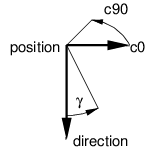
If the array has a second dimension then the intensities are not
rotational symmetric around the main direction (where angle γ is zero),
but are accordingly mapped to the C-halfplanes in \[0–2π\]; the first
“row” of values to 0 and 2π, the other rows such that they have uniform
distance to its neighbors. The orientation of the C0-plane is specified
via `c0`.
| Type | Name | Description |
|:----------|:----------------------|:----------------------------------------------------------------------------------------------------------------------------------------------|
| float\[\] | intensityDistribution | luminous intensity distribution for photometric lights; can be 2D for asymmetric illumination; values are assumed to be uniformly distributed |
| vec3f | c0 | orientation, i.e., direction of the C0-(half)plane (only needed if illumination via `intensityDistribution` is asymmetric) |
Special parameters for photometric lights.
When using an `intensityDistribution` then the default and only valid
value for `intensityQuantity` is `OSP_INTENSITY_QUANTITY_SCALE`.
The following light types are supported by most OSPRay renderers.
### Directional Light / Distant Light
The distant light (or traditionally the directional light) is thought to
be far away (outside of the scene), thus its light arrives (almost) as
parallel rays. It is created by passing the type string “`distant`” to
`ospNewLight`. The distant light supports
`OSP_INTENSITY_QUANTITY_RADIANCE` and
`OSP_INTENSITY_QUANTITY_IRRADIANCE` (default) as `intensityQuantity`
parameter value. In addition to the [general parameters](#lights)
understood by all lights the distant light supports the following
special parameters:
| Type | Name | Default | Description |
|:------|:----------------|------------:|:---------------------------------------------|
| vec3f | direction | $(0, 0, 1)$ | main emission direction of the distant light |
| float | angularDiameter | 0 | apparent size (angle in degree) of the light |
Special parameters accepted by the distant light.
Setting the angular diameter to a value greater than zero will result in
soft shadows when the renderer uses stochastic sampling (like the [path
tracer](#path-tracer)). For instance, the apparent size of the sun is
about 0.53°.
### Point Light / Sphere Light
The sphere light (or the special case point light) is a light emitting
uniformly in all directions from the surface toward the outside. It does
not emit any light toward the inside of the sphere. It is created by
passing the type string “`sphere`” to `ospNewLight`. The point light
supports only `OSP_INTENSITY_QUANTITY_SCALE` when
`intensityDistribution` is set, or otherwise
`OSP_INTENSITY_QUANTITY_POWER`, `OSP_INTENSITY_QUANTITY_INTENSITY` (then
default) and `OSP_INTENSITY_QUANTITY_RADIANCE` as `intensityQuantity`
parameter value. In addition to the [general parameters](#lights)
understood by all lights and the [photometric
parameters](#photometric-lights) the sphere light supports the following
special parameters:
| Type | Name | Default | Description |
|:------|:----------|------------:|:--------------------------------------------|
| vec3f | position | $(0, 0, 0)$ | the center of the sphere light |
| float | radius | 0 | the size of the sphere light |
| vec3f | direction | $(0, 0, 1)$ | main orientation of `intensityDistribution` |
Special parameters accepted by the sphere light.
Setting the radius to a value greater than zero will result in soft
shadows when the renderer uses stochastic sampling (like the [path
tracer](#path-tracer)).
### Spotlight / Ring Light
The spotlight is a light emitting into a cone of directions. It is
created by passing the type string “`spot`” to `ospNewLight`. The
spotlight supports only `OSP_INTENSITY_QUANTITY_SCALE` when
`intensityDistribution` is set, or otherwise
`OSP_INTENSITY_QUANTITY_POWER`, `OSP_INTENSITY_QUANTITY_INTENSITY` (then
default) and `OSP_INTENSITY_QUANTITY_RADIANCE` as `intensityQuantity`
parameter value. In addition to the [general parameters](#lights)
understood by all lights and the [photometric
parameters](#photometric-lights) the spotlight supports the special
parameters listed in the table.
| Type | Name | Default | Description |
|:------|:--------------|------------:|:------------------------------------------------------------------------------------------------------------------------------------------------------------------------------|
| vec3f | position | $(0, 0, 0)$ | the center of the spotlight |
| vec3f | direction | $(0, 0, 1)$ | main emission direction of the spot |
| float | openingAngle | 180 | full opening angle (in degree) of the spot; outside of this cone is no illumination |
| float | penumbraAngle | 5 | size (angle in degree) of the “penumbra”, the region between the rim (of the illumination cone) and full intensity of the spot; should be smaller than half of `openingAngle` |
| float | radius | 0 | the size of the spotlight, the radius of a disk with normal `direction` |
| float | innerRadius | 0 | in combination with `radius` turns the disk into a ring |
Special parameters accepted by the spotlight.
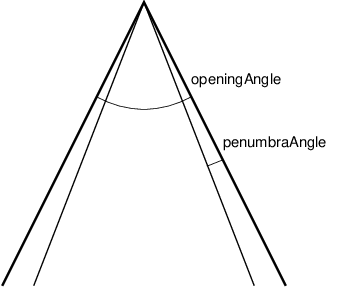
Setting the radius to a value greater than zero will result in soft
shadows when the renderer uses stochastic sampling (like the [path
tracer](#path-tracer)). Additionally setting the inner radius will
result in a ring instead of a disk emitting the light.
### Quad Light
The quad[^4] light is a planar, procedural area light source emitting
uniformly on one side into the half-space. It is created by passing the
type string “`quad`” to `ospNewLight`. The quad light supports only
`OSP_INTENSITY_QUANTITY_SCALE` when `intensityDistribution` is set, or
otherwise `OSP_INTENSITY_QUANTITY_POWER`,
`OSP_INTENSITY_QUANTITY_INTENSITY` and `OSP_INTENSITY_QUANTITY_RADIANCE`
(then default) as `intensityQuantity` parameter. In addition to the
[general parameters](#lights) understood by all lights and the
[photometric parameters](#photometric-lights) the quad light supports
the following special parameters:
| Type | Name | Default | Description |
|:------|:---------|------------:|:-----------------------------------------|
| vec3f | position | $(0, 0, 0)$ | position of one vertex of the quad light |
| vec3f | edge1 | $(1, 0, 0)$ | vector to one adjacent vertex |
| vec3f | edge2 | $(0, 1, 0)$ | vector to the other adjacent vertex |
Special parameters accepted by the quad light.
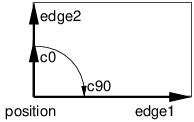
The emission side is determined by the cross product of `edge1`×`edge2`.
which is also the main emission direction for `intensityDistribution`.
Note that only renderers that use stochastic sampling (like the path
tracer) will compute soft shadows from the quad light. Other renderers
will just sample the center of the quad light, which results in hard
shadows.
### Cylinder Light
The cylinder light is a cylinderical, procedural area light source
emitting uniformly outwardly into the space beyond the boundary. It is
created by passing the type string “`cylinder`” to `ospNewLight`. The
cylinder light supports `OSP_INTENSITY_QUANTITY_POWER`,
`OSP_INTENSITY_QUANTITY_INTENSITY` and `OSP_INTENSITY_QUANTITY_RADIANCE`
(default) as `intensityQuantity` parameter. In addition to the [general
parameters](#lights) understood by all lights the cylinder light
supports the following special parameters:
| Type | Name | Default | Description |
|:------|:----------|------------:|:--------------------------------------|
| vec3f | position0 | $(0, 0, 0)$ | position of the start of the cylinder |
| vec3f | position1 | $(0, 0, 1)$ | position of the end of the cylinder |
| float | radius | 1 | radius of the cylinder |
Special parameters accepted by the cylinder light.
Note that only renderers that use stochastic sampling (like the path
tracer) will compute soft shadows from the cylinder light. Other
renderers will just sample the closest point on the cylinder light,
which results in hard shadows.
### HDRI Light
The HDRI light is a textured light source surrounding the scene and
illuminating it from infinity. It is created by passing the type string
“`hdri`” to `ospNewLight`. The values of the HDRI correspond to radiance
and therefore the HDRI light only accepts `OSP_INTENSITY_QUANTITY_SCALE`
as `intensityQuantity` parameter value. In addition to the [general
parameters](#lights) the HDRI light supports the following special
parameters:
| Type | Name | Default | Description |
|:-----------|:----------|------------:|:-----------------------------------------------------------------------------------------------------------------|
| vec3f | up | $(0, 1, 0)$ | up direction of the light |
| vec3f | direction | $(0, 0, 1)$ | direction to which the center of the texture will be mapped to (analog to [panoramic camera](#panoramic-camera)) |
| OSPTexture | map | | environment map in latitude / longitude format |
Special parameters accepted by the HDRI light.
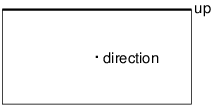
Note that the [SciVis renderer](#scivis-renderer) only shows the HDRI
light in the background (like an environment map) without computing
illumination of the scene.
### Ambient Light
The ambient light surrounds the scene and illuminates it from infinity
with constant radiance (determined by combining the [parameters `color`
and `intensity`](#lights)). It is created by passing the type string
“`ambient`” to `ospNewLight`. The ambient light supports
`OSP_INTENSITY_QUANTITY_RADIANCE` and
`OSP_INTENSITY_QUANTITY_IRRADIANCE` (default) as `intensityQuantity`
parameter value.
Note that the [SciVis renderer](#scivis-renderer) uses ambient lights to
control the color and intensity of the computed ambient occlusion (AO).
### Sun-Sky Light
The sun-sky light is a combination of a `distant` light for the sun and
a procedural `hdri` light for the sky. It is created by passing the type
string “`sunSky`” to `ospNewLight`. The sun-sky light surrounds the
scene and illuminates it from infinity and can be used for rendering
outdoor scenes. The radiance values are calculated using the
Hošek-Wilkie sky model and solar radiance function. The underlying model
of the sun-sky light returns radiance values and therefore the light
only accepts `OSP_INTENSITY_QUANTITY_SCALE` as `intensityQuantity`
parameter value. To rescale the returned radiance of the sky model the
default value for the `intensity` parameter is set to `0.025`. In
addition to the [general parameters](#lights) the following special
parameters are supported:
| Type | Name | Default | Description |
|:------|:-----------------|-------------:|:-----------------------------------------------------------------------------------------------------|
| vec3f | up | $(0, 1, 0)$ | zenith of sky |
| vec3f | direction | $(0, -1, 0)$ | main emission direction of the sun |
| float | turbidity | 3 | atmospheric turbidity due to particles, in \[1–10\] |
| float | albedo | 0.3 | ground reflectance, in \[0–1\] |
| float | horizonExtension | 0.01 | extend the sky dome by stretching the horizon, fraction of the lower hemisphere to cover, in \[0–1\] |
Special parameters accepted by the `sunSky` light.
The lowest elevation for the sun is restricted to the horizon.
Note that the [SciVis renderer](#scivis-renderer) only computes
illumination from the sun (yet the sky is still shown in the background,
like an environment map).
### Emissive Objects
The [path tracer](#path-tracer) will consider illumination by
[geometries](#geometries) which have a light emitting material assigned
(for example the [Luminous](#luminous) or [Principled](#principled)
material).
Materials
---------
Materials describe how light interacts with surfaces, they give objects
their distinctive look. To create a new material of given type `type`
call
``` cpp
OSPMaterial ospNewMaterial(const char *material_type);
```
The returned handle can then be used to assign the material to a given
geometry with
``` cpp
void ospSetObject(OSPGeometricModel, "material", OSPMaterial);
```
### OBJ Material
The OBJ material is the workhorse material supported by both the [SciVis
renderer](#scivis-renderer) and the [path tracer](#path-tracer) (the
[Ambient Occlusion renderer](#ambient-occlusion-renderer) only uses the
`kd` and `d` parameter). It offers widely used common properties like
diffuse and specular reflection and is based on the [MTL material
format](http://paulbourke.net/dataformats/mtl/) of Lightwave’s OBJ scene
files. To create an OBJ material pass the type string “`obj`” to
`ospNewMaterial`. Its main parameters are
| Type | Name | Default | Description |
|:-----------|:---------|----------:|:------------------------------------------------------------|
| vec3f | kd | white 0.8 | diffuse color (linear RGB) |
| vec3f | ks | black | specular color (linear RGB) |
| float | ns | 10 | shininess (Phong exponent), usually in \[2–10<sup>4</sup>\] |
| float | d | opaque | opacity |
| vec3f | tf | black | transparency filter color (linear RGB) |
| OSPTexture | map_bump | NULL | normal map |
Main parameters of the OBJ material.
In particular when using the path tracer it is important to adhere to
the principle of energy conservation, i.e., that the amount of light
reflected by a surface is not larger than the light arriving. Therefore
the path tracer issues a warning and renormalizes the color parameters
if the sum of `kd`, `ks`, and `tf` is larger than one in any color
channel. Similarly important to mention is that almost all materials of
the real world reflect at most only about 80% of the incoming light. So
even for a white sheet of paper or white wall paint do better not set
`kd` larger than 0.8; otherwise rendering times are unnecessary long and
the contrast in the final images is low (for example, the corners of a
white room would hardly be discernible, as can be seen in the figure
below).
<figure>
<img src="https://ospray.github.io/images/diffuse_rooms.png"
style="width:80.0%"
alt="Comparison of diffuse rooms with 100% reflecting white paint (left) and realistic 80% reflecting white paint (right), which leads to higher overall contrast. Note that exposure has been adjusted to achieve similar brightness levels." />
<figcaption aria-hidden="true">Comparison of diffuse rooms with 100%
reflecting white paint (left) and realistic 80% reflecting white paint
(right), which leads to higher overall contrast. Note that exposure has
been adjusted to achieve similar brightness levels.</figcaption>
</figure>
If present, the color component of [geometries](#geometries) is also
used for the diffuse color `kd` and the alpha component is also used for
the opacity `d`.
Normal mapping can simulate small geometric features via the texture
`map_bump`. The normals $n$ in the normal map are with respect to the
local tangential shading coordinate system and are encoded as $½(n+1)$,
thus a texel $(0.5, 0.5, 1)$[^5] represents the unperturbed shading
normal $(0, 0, 1)$. Because of this encoding an sRGB gamma
[texture](#texture) format is ignored and normals are always fetched as
linear from a normal map. Note that the orientation of normal maps is
important for a visually consistent look: by convention OSPRay uses a
coordinate system with the origin in the lower left corner; thus a
convexity will look green toward the top of the texture image (see also
the example image of a normal map). If this is not the case flip the
normal map vertically or invert its green channel.
<figure>
<img src="https://ospray.github.io/images/normalmap_frustum.png"
style="width:60.0%"
alt="Normal map representing an exalted square pyramidal frustum." />
<figcaption aria-hidden="true">Normal map representing an exalted square
pyramidal frustum.</figcaption>
</figure>
Note that `tf` colored transparency is implemented in the SciVis and the
path tracer but normal mapping with `map_bump` is currently supported in
the path tracer only.
All parameters (except `tf`) can be textured by passing a
[texture](#texture) handle, prefixed with “`map_`”. The fetched texels
are multiplied by the respective parameter value. If only the texture is
given (but not the corresponding parameter), only the texture is used
(the default value of the parameter is *not* multiplied). The color
textures `map_kd` and `map_ks` are typically in one of the sRGB gamma
encoded formats, whereas textures `map_ns` and `map_d` are usually in a
linear format (and only the first component is used). Additionally, all
textures support [texture transformations](#texture-transformations).
<figure>
<img src="https://ospray.github.io/images/material_OBJ.jpg"
style="width:60.0%"
alt="Rendering of a OBJ material with wood textures." />
<figcaption aria-hidden="true">Rendering of a OBJ material with wood
textures.</figcaption>
</figure>
### Principled
The Principled material is the most complex material offered by the
[path tracer](#path-tracer), which is capable of producing a wide
variety of materials (e.g., plastic, metal, wood, glass) by combining
multiple different layers and lobes. It uses the GGX microfacet
distribution with approximate multiple scattering for dielectrics and
metals, uses the Oren-Nayar model for diffuse reflection, and is energy
conserving. To create a Principled material, pass the type string
“`principled`” to `ospNewMaterial`. Its parameters are listed in the
table below.
| Type | Name | Default | Description |
|:------|:------------------|----------:|:------------------------------------------------------------------------------------------------------------------------|
| vec3f | baseColor | white 0.8 | base reflectivity (diffuse and/or metallic, linear RGB) |
| vec3f | edgeColor | white | edge tint (metallic only, linear RGB) |
| float | metallic | 0 | mix between dielectric (diffuse and/or specular) and metallic (specular only with complex IOR) in \[0–1\] |
| float | diffuse | 1 | diffuse reflection weight in \[0–1\] |
| float | specular | 1 | specular reflection/transmission weight in \[0–1\] |
| float | ior | 1 | dielectric index of refraction |
| float | transmission | 0 | specular transmission weight in \[0–1\] |
| vec3f | transmissionColor | white | attenuated color due to transmission (Beer’s law, linear RGB) |
| float | transmissionDepth | 1 | distance at which color attenuation is equal to transmissionColor |
| float | roughness | 0 | diffuse and specular roughness in \[0–1\], 0 is perfectly smooth |
| float | anisotropy | 0 | amount of specular anisotropy in \[0–1\] |
| float | rotation | 0 | rotation of the direction of anisotropy in \[0–1\], 1 is going full circle |
| float | normal | 1 | default normal map/scale for all layers |
| float | baseNormal | 1 | base normal map/scale (overrides default normal) |
| bool | thin | false | flag specifying whether the material is thin or solid |
| float | thickness | 1 | thickness of the material (thin only), affects the amount of color attenuation due to specular transmission |
| float | backlight | 0 | amount of diffuse transmission (thin only) in \[0–2\], 1 is 50% reflection and 50% transmission, 2 is transmission only |
| float | coat | 0 | clear coat layer weight in \[0–1\] |
| float | coatIor | 1.5 | clear coat index of refraction |
| vec3f | coatColor | white | clear coat color tint (linear RGB) |
| float | coatThickness | 1 | clear coat thickness, affects the amount of color attenuation |
| float | coatRoughness | 0 | clear coat roughness in \[0–1\], 0 is perfectly smooth |
| float | coatNormal | 1 | clear coat normal map/scale (overrides default normal) |
| float | sheen | 0 | sheen layer weight in \[0–1\] |
| vec3f | sheenColor | white | sheen color tint (linear RGB) |
| float | sheenTint | 0 | how much sheen is tinted from sheenColor toward baseColor |
| float | sheenRoughness | 0.2 | sheen roughness in \[0–1\], 0 is perfectly smooth |
| float | opacity | 1 | cut-out opacity/transparency, 1 is fully opaque |
| vec3f | emissiveColor | black | color (and intensity) of the emitted light |
Parameters of the Principled material.
All parameters can be textured by passing a [texture](#texture) handle,
prefixed with “`map_`” (e.g., “`map_baseColor`”). [texture
transformations](#texture-transformations) are supported as well.
<figure>
<img src="https://ospray.github.io/images/material_Principled.jpg"
style="width:60.0%"
alt="Rendering of a Principled coated brushed metal material with textured anisotropic rotation and a dust layer (sheen) on top." />
<figcaption aria-hidden="true">Rendering of a Principled coated brushed
metal material with textured anisotropic rotation and a dust layer
(sheen) on top.</figcaption>
</figure>
### CarPaint
The CarPaint material is a specialized version of the Principled
material for rendering different types of car paints. To create a
CarPaint material, pass the type string “`carPaint`” to
`ospNewMaterial`. Its parameters are listed in the table below.
| Type | Name | Default | Description |
|:------|:----------------|----------:|:-----------------------------------------------------------------------------------------------------------------------|
| vec3f | baseColor | white 0.8 | diffuse base reflectivity (linear RGB) |
| float | roughness | 0 | diffuse roughness in \[0–1\], 0 is perfectly smooth |
| float | normal | 1 | normal map/scale |
| vec3f | flakeColor | Aluminium | color of metallic flakes (linear RGB) |
| float | flakeDensity | 0 | density of metallic flakes in \[0–1\], 0 disables flakes, 1 fully covers the surface with flakes |
| float | flakeScale | 100 | scale of the flake structure, higher values increase the amount of flakes |
| float | flakeSpread | 0.3 | flake spread in \[0–1\] |
| float | flakeJitter | 0.75 | flake randomness in \[0–1\] |
| float | flakeRoughness | 0.3 | flake roughness in \[0–1\], 0 is perfectly smooth |
| float | coat | 1 | clear coat layer weight in \[0–1\] |
| float | coatIor | 1.5 | clear coat index of refraction |
| vec3f | coatColor | white | clear coat color tint (linear RGB) |
| float | coatThickness | 1 | clear coat thickness, affects the amount of color attenuation |
| float | coatRoughness | 0 | clear coat roughness in \[0–1\], 0 is perfectly smooth |
| float | coatNormal | 1 | clear coat normal map/scale |
| vec3f | flipflopColor | white | reflectivity of coated flakes at grazing angle, used together with coatColor produces a pearlescent paint (linear RGB) |
| float | flipflopFalloff | 1 | flip flop color falloff, 1 disables the flip flop effect |
Parameters of the CarPaint material.
All parameters can be textured by passing a [texture](#texture) handle,
prefixed with “`map_`” (e.g., “`map_baseColor`”). [texture
transformations](#texture-transformations) are supported as well.
<figure>
<img src="https://ospray.github.io/images/material_CarPaint.jpg"
style="width:60.0%"
alt="Rendering of a pearlescent CarPaint material." />
<figcaption aria-hidden="true">Rendering of a pearlescent CarPaint
material.</figcaption>
</figure>
### Metal
The [path tracer](#path-tracer) offers a physical metal, supporting
changing roughness and realistic color shifts at edges. To create a
Metal material pass the type string “`metal`” to `ospNewMaterial`. Its
parameters are
| Type | Name | Default | Description |
|:----------|:----------|----------:|:---------------------------------------------------------------------------------------------------------------------------------------------------------|
| vec3f\[\] | ior | Aluminium | [data](#data) array of spectral samples of complex refractive index, each entry in the form (wavelength, eta, k), ordered by wavelength (which is in nm) |
| vec3f | eta | | RGB complex refractive index, real part |
| vec3f | k | | RGB complex refractive index, imaginary part |
| float | roughness | 0.1 | roughness in \[0–1\], 0 is perfect mirror |
Parameters of the Metal material.
The main appearance (mostly the color) of the Metal material is
controlled by the physical parameters `eta` and `k`, the
wavelength-dependent, complex index of refraction. These coefficients
are quite counter-intuitive but can be found in [published
measurements](https://refractiveindex.info/). For accuracy the index of
refraction can be given as an array of spectral samples in `ior`, each
sample a triplet of wavelength (in nm), eta, and k, ordered
monotonically increasing by wavelength; OSPRay will then calculate the
Fresnel in the spectral domain. Alternatively, `eta` and `k` can also be
specified as approximated RGB coefficients; some examples are given in
below table.
| Metal | eta | k |
|:--------------|:---------------------:|:---------------:|
| Ag, Silver | (0.051, 0.043, 0.041) | (5.3, 3.6, 2.3) |
| Al, Aluminium | (1.5, 0.98, 0.6) | (7.6, 6.6, 5.4) |
| Au, Gold | (0.07, 0.37, 1.5) | (3.7, 2.3, 1.7) |
| Cr, Chromium | (3.2, 3.1, 2.3) | (3.3, 3.3, 3.1) |
| Cu, Copper | (0.1, 0.8, 1.1) | (3.5, 2.5, 2.4) |
Index of refraction of selected metals as approximated RGB coefficients,
based on data from https://refractiveindex.info/.
The `roughness` parameter controls the variation of microfacets and thus
how polished the metal will look. The roughness can be modified by a
[texture](#texture) `map_roughness` ([texture
transformations](#texture-transformations) are supported as well) to
create notable edging effects.
<figure>
<img src="https://ospray.github.io/images/material_Metal.jpg"
style="width:60.0%"
alt="Rendering of golden Metal material with textured roughness." />
<figcaption aria-hidden="true">Rendering of golden Metal material with
textured roughness.</figcaption>
</figure>
### Alloy
The [path tracer](#path-tracer) offers an alloy material, which behaves
similar to [Metal](#metal), but allows for more intuitive and flexible
control of the color. To create an Alloy material pass the type string
“`alloy`” to `ospNewMaterial`. Its parameters are
| Type | Name | Default | Description |
|:------|:----------|----------:|:--------------------------------------------------------|
| vec3f | color | white 0.9 | reflectivity at normal incidence (0 degree, linear RGB) |
| vec3f | edgeColor | white | reflectivity at grazing angle (90 degree, linear RGB) |
| float | roughness | 0.1 | roughness, in \[0–1\], 0 is perfect mirror |
Parameters of the Alloy material.
The main appearance of the Alloy material is controlled by the parameter
`color`, while `edgeColor` influences the tint of reflections when seen
at grazing angles (for real metals this is always 100% white). If
present, the color component of [geometries](#geometries) is also used
for reflectivity at normal incidence `color`. As in [Metal](#metal) the
`roughness` parameter controls the variation of microfacets and thus how
polished the alloy will look. All parameters can be textured by passing
a [texture](#texture) handle, prefixed with “`map_`”; [texture
transformations](#texture-transformations) are supported as well.
<figure>
<img src="https://ospray.github.io/images/material_Alloy.jpg"
style="width:60.0%"
alt="Rendering of a fictional Alloy material with textured color." />
<figcaption aria-hidden="true">Rendering of a fictional Alloy material
with textured color.</figcaption>
</figure>
### Glass
The [path tracer](#path-tracer) offers a realistic a glass material,
supporting refraction and volumetric attenuation (i.e., the transparency
color varies with the geometric thickness). To create a Glass material
pass the type string “`glass`” to `ospNewMaterial`. Its parameters are
| Type | Name | Default | Description |
|:------|:--------------------|--------:|:------------------------------------------------|
| float | eta | 1.5 | index of refraction |
| vec3f | attenuationColor | white | resulting color due to attenuation (linear RGB) |
| float | attenuationDistance | 1 | distance affecting attenuation |
Parameters of the Glass material.
For convenience, the rather counter-intuitive physical attenuation
coefficients will be calculated from the user inputs in such a way, that
the `attenuationColor` will be the result when white light traveled
through a glass of thickness `attenuationDistance`.
<figure>
<img src="https://ospray.github.io/images/material_Glass.jpg"
style="width:60.0%"
alt="Rendering of a Glass material with orange attenuation." />
<figcaption aria-hidden="true">Rendering of a Glass material with orange
attenuation.</figcaption>
</figure>
### ThinGlass
The [path tracer](#path-tracer) offers a thin glass material useful for
objects with just a single surface, most prominently windows. It models
a thin, transparent slab, i.e., it behaves as if a second, virtual
surface is parallel to the real geometric surface. The implementation
accounts for multiple internal reflections between the interfaces
(including attenuation), but neglects parallax effects due to its
(virtual) thickness. To create a such a thin glass material pass the
type string “`thinGlass`” to `ospNewMaterial`. Its parameters are
| Type | Name | Default | Description |
|:------|:--------------------|--------:|:------------------------------------------------|
| float | eta | 1.5 | index of refraction |
| vec3f | attenuationColor | white | resulting color due to attenuation (linear RGB) |
| float | attenuationDistance | 1 | distance affecting attenuation |
| float | thickness | 1 | virtual thickness |
Parameters of the ThinGlass material.
For convenience the attenuation is controlled the same way as with the
[Glass](#glass) material. Additionally, the color due to attenuation can
be modulated with a [texture](#texture) `map_attenuationColor` ([texture
transformations](#texture-transformations) are supported as well). If
present, the color component of [geometries](#geometries) is also used
for the attenuation color. The `thickness` parameter sets the (virtual)
thickness and allows for easy exchange of parameters with the (real)
[Glass](#glass) material; internally just the ratio between
`attenuationDistance` and `thickness` is used to calculate the resulting
attenuation and thus the material appearance.
<figure>
<img src="https://ospray.github.io/images/material_ThinGlass.jpg"
style="width:60.0%"
alt="Rendering of a ThinGlass material with red attenuation." />
<figcaption aria-hidden="true">Rendering of a ThinGlass material with
red attenuation.</figcaption>
</figure>
<figure>
<img src="https://ospray.github.io/images/ColoredWindow.jpg"
style="width:60.0%"
alt="Example image of a colored window made with textured attenuation of the ThinGlass material." />
<figcaption aria-hidden="true">Example image of a colored window made
with textured attenuation of the ThinGlass material.</figcaption>
</figure>
### MetallicPaint
The [path tracer](#path-tracer) offers a metallic paint material,
consisting of a base coat with optional flakes and a clear coat. To
create a MetallicPaint material pass the type string “`metallicPaint`”
to `ospNewMaterial`. Its parameters are listed in the table below.
| Type | Name | Default | Description |
|:------|:------------|----------:|:--------------------------------------|
| vec3f | baseColor | white 0.8 | color of base coat (linear RGB) |
| float | flakeAmount | 0.3 | amount of flakes, in \[0–1\] |
| vec3f | flakeColor | Aluminium | color of metallic flakes (linear RGB) |
| float | flakeSpread | 0.5 | spread of flakes, in \[0–1\] |
| float | eta | 1.5 | index of refraction of clear coat |
Parameters of the MetallicPaint material.
The color of the base coat `baseColor` can be textured by a
[texture](#texture) `map_baseColor`, which also supports [texture
transformations](#texture-transformations). If present, the color
component of [geometries](#geometries) is also used for the color of the
base coat. Parameter `flakeAmount` controls the proportion of flakes in
the base coat, so when setting it to 1 the `baseColor` will not be
visible. The shininess of the metallic component is governed by
`flakeSpread`, which controls the variation of the orientation of the
flakes, similar to the `roughness` parameter of [Metal](#metal). Note
that the effect of the metallic flakes is currently only computed on
average, thus individual flakes are not visible.
<figure>
<img src="https://ospray.github.io/images/material_MetallicPaint.jpg"
style="width:60.0%" alt="Rendering of a MetallicPaint material." />
<figcaption aria-hidden="true">Rendering of a MetallicPaint
material.</figcaption>
</figure>
### Luminous
The [path tracer](#path-tracer) supports the Luminous material which
emits light uniformly in all directions and which can thus be used to
turn any geometric object into a light source. It is created by passing
the type string “`luminous`” to `ospNewMaterial`. The amount of constant
radiance that is emitted is determined by combining the general
parameters of lights: [`color` and `intensity`](#lights) (which
essentially means that parameter `intensityQuantity` is not needed
because it is always `OSP_INTENSITY_QUANTITY_RADIANCE`).
| Type | Name | Default | Description |
|:------|:-------------|--------:|:----------------------------------------|
| vec3f | color | white | color of the emitted light (linear RGB) |
| float | intensity | 1 | intensity of the light (a factor) |
| float | transparency | 0 | material transparency |
Parameters accepted by the Luminous material.
The emission can be textured by passing a `map_color`
[texture](#texture) handle, [texture
transformations](#texture-transformations) are supported as well.
<figure>
<img src="https://ospray.github.io/images/material_Luminous.jpg"
style="width:60.0%" alt="Rendering of a yellow Luminous material." />
<figcaption aria-hidden="true">Rendering of a yellow Luminous
material.</figcaption>
</figure>
Texture
-------
OSPRay currently implements two texture types (`texture2d` and `volume`)
and is open for extension to other types by applications. More types may
be added in future releases.
To create a new texture use
``` cpp
OSPTexture ospNewTexture(const char *type);
```
### Texture2D
The `texture2d` texture type implements an image-based texture, where
its parameters are as follows
| Type | Name | Description |
|:--------------|:---------|:------------------------------------------------------------------------------------|
| uint | format | `OSPTextureFormat` for the texture |
| uint | filter | default `OSP_TEXTURE_FILTER_LINEAR`, alternatively `OSP_TEXTURE_FILTER_NEAREST` |
| OSPData | data | the actual texel 2D [data](#data) |
| uint / vec2ui | wrapMode | `OSPTextureWrapMode` for the texture coordinates s and t; supported wrap modes are: |
| | | `OSP_TEXTURE_WRAP_REPEAT` (default) |
| | | `OSP_TEXTURE_WRAP_MIRRORED_REPEAT` |
| | | `OSP_TEXTURE_WRAP_CLAMP_TO_EDGE` |
Parameters of `texture2d` texture type.
The supported texture formats for `texture2d` are:
| Name | Description |
|:--------------------|:---------------------------------------------------------------------------|
| OSP_TEXTURE_RGBA8 | 8 bit \[0–255\] linear components red, green, blue, alpha |
| OSP_TEXTURE_SRGBA | 8 bit sRGB gamma encoded color components, and linear alpha |
| OSP_TEXTURE_RGBA32F | 32 bit float components red, green, blue, alpha |
| OSP_TEXTURE_RGBA16F | 16 bit float components red, green, blue, alpha |
| OSP_TEXTURE_RGB8 | 8 bit \[0–255\] linear components red, green, blue |
| OSP_TEXTURE_SRGB | 8 bit sRGB gamma encoded components red, green, blue |
| OSP_TEXTURE_RGB32F | 32 bit float components red, green, blue |
| OSP_TEXTURE_RGB16F | 16 bit float components red, green, blue |
| OSP_TEXTURE_R8 | 8 bit \[0–255\] linear single component red |
| OSP_TEXTURE_RA8 | 8 bit \[0–255\] linear two components red, alpha |
| OSP_TEXTURE_L8 | 8 bit \[0–255\] gamma encoded luminance (replicated into red, green, blue) |
| OSP_TEXTURE_LA8 | 8 bit \[0–255\] gamma encoded luminance, and linear alpha |
| OSP_TEXTURE_RA32F | 32 bit float two component red, alpha |
| OSP_TEXTURE_R32F | 32 bit float single component red |
| OSP_TEXTURE_RA16F | 16 bit float two component red, alpha |
| OSP_TEXTURE_R16F | 16 bit float single component red |
| OSP_TEXTURE_RGBA16 | 16 bit \[0–65535\] linear components red, green, blue, alpha |
| OSP_TEXTURE_RGB16 | 16 bit \[0–65535\] linear components red, green, blue |
| OSP_TEXTURE_RA16 | 16 bit \[0–65535\] linear two components red, alpha |
| OSP_TEXTURE_R16 | 16 bit \[0–65535\] linear single component red |
Supported texture formats by `texture2d`, i.e., valid constants of type
`OSPTextureFormat`.
The size of the texture is inferred from the size of the 2D array
`data`, which also needs have a compatible type to `format`. The texel
data in `data` starts with the texels in the lower left corner of the
texture image, like in OpenGL. Per default a texture fetch is filtered
by performing bi-linear interpolation of the nearest 2×2 texels; if
instead fetching only the nearest texel is desired (i.e., no filtering)
then pass the `OSP_TEXTURE_FILTER_NEAREST` flag.
Texturing with `texture2d` image textures requires
[geometries](#geometries) with texture coordinates, e.g., a
[mesh](#mesh) with `vertex.texcoord` provided.
### Volume Texture
The `volume` texture type implements texture lookups based on 3D object
coordinates of the surface hit point on the associated geometry. If the
given hit point is within the attached volume, the volume is sampled and
classified with the transfer function attached to the volume. This
implements the ability to visualize volume values (as colored by a
transfer function) on arbitrary surfaces inside the volume (as opposed
to an isosurface showing a particular value in the volume). Its
parameters are as follows
| Type | Name | Description |
|:--------------------|:-----------------|:------------------------------------------------------------|
| OSPVolume | volume | [Volume](#volumes) used to generate color lookups |
| OSPTransferFunction | transferFunction | [transfer function](#transfer-function) applied to `volume` |
Parameters of `volume` texture type.
TextureVolume can be used for implementing slicing of volumes with any
geometry type. It enables coloring of the slicing geometry with a
different transfer function than that of the sliced volume.
### Texture Transformations
All materials with textures also offer to manipulate the placement of
these textures with the help of texture transformations. If so, this
convention shall be used: the following parameters are prefixed with
“`texture_name.*`”).
| Type | Name | Description |
|:---------|:------------|:-------------------------------------------------|
| linear2f | transform | linear transformation (rotation, scale) |
| float | rotation | angle in degree, counterclockwise, around center |
| vec2f | scale | enlarge texture, relative to center $(0.5, 0.5)$ |
| vec2f | translation | move texture in positive direction (right/up) |
Parameters to define 2D texture coordinate transformations.
Above parameters are combined into a single `affine2d` transformation
matrix and the transformations are applied in the given order. Rotation,
scale and translation are interpreted “texture centric”, i.e., their
effect seen by an user are relative to the texture (although the
transformations are applied to the texture coordinates).
| Type | Name | Description |
|:---------|:----------|:---------------------------------------------------------|
| affine3f | transform | linear transformation (rotation, scale) plus translation |
Parameter to define 3D volume texture transformations.
Similarly, volume texture placement can also be modified by an
`affine3f` transformation matrix.
Cameras
-------
To create a new camera of given type `type` use
``` cpp
OSPCamera ospNewCamera(const char *type);
```
All cameras accept these parameters:
| Type | Name | Default | Description |
|:-------------|:-----------------------|---------------------:|:-----------------------------------------------------------------------------------------------------------------------------------------------------------------|
| vec3f | position | $(0, 0, 0)$ | position of the camera |
| vec3f | direction | $(0, 0, 1)$ | main viewing direction of the camera |
| vec3f | up | $(0, 1, 0)$ | up direction of the camera |
| affine3f | transform | identity | additional world-space transform, overridden by `motion.*` arrays |
| float | nearClip | 10<sup>-6</sup> | near clipping distance |
| vec2f | imageStart | $(0, 0)$ | start of image region (lower left corner) |
| vec2f | imageEnd | $(1, 1)$ | end of image region (upper right corner) |
| affine3f\[\] | motion.transform | | additional uniformly distributed world-space transforms |
| vec3f\[\] | motion.scale | | additional uniformly distributed world-space scale, overridden by `motion.transform` |
| vec3f\[\] | motion.pivot | | additional uniformly distributed world-space translation which is applied before `motion.rotation` (i.e., the rotation center), overridden by `motion.transform` |
| quatf\[\] | motion.rotation | | additional uniformly distributed world-space quaternion rotation, overridden by `motion.transform` |
| vec3f\[\] | motion.translation | | additional uniformly distributed world-space translation, overridden by `motion.transform` |
| box1f | time | \[0, 1\] | time associated with first and last key in `motion.*` arrays |
| box1f | shutter | \[0.5, 0.5\] | start and end of shutter time (for motion blur), in \[0, 1\] |
| uint | shutterType | `OSP_SHUTTER_GLOBAL` | `OSPShutterType` for motion blur, also allowed are: |
| | | | `OSP_SHUTTER_ROLLING_RIGHT` |
| | | | `OSP_SHUTTER_ROLLING_LEFT` |
| | | | `OSP_SHUTTER_ROLLING_DOWN` |
| | | | `OSP_SHUTTER_ROLLING_UP` |
| float | rollingShutterDuration | 0 | for a rolling shutter (see `shutterType`) the “open” time per line, in \[0, `shutter`.upper-`shutter`.lower\] |
Parameters accepted by all cameras.
The camera is placed and oriented in the world with `position`,
`direction` and `up`. Additionally, an extra transformation `transform`
can be specified, which will only be applied to 3D vectors (i.e.,
`position`, `direction` and `up`), but does *not* affect any sizes
(e.g., `nearClip`, `apertureRadius`, or `height`). The same holds for
the array of transformations `motion.transform` to achieve camera motion
blur (in combination with `time` and `shutter`).
OSPRay uses a right-handed coordinate system. The region of the camera
sensor that is rendered to the image can be specified in normalized
screen-space coordinates with `imageStart` (lower left corner) and
`imageEnd` (upper right corner). This can be used, for example, to crop
the image, to achieve asymmetrical view frusta, or to horizontally flip
the image to view scenes which are specified in a left-handed coordinate
system. Note that values outside the default range of \[0–1\] are valid,
which is useful to easily realize overscan or film gate, or to emulate a
shifted sensor.
### Perspective Camera
The perspective camera implements a simple thin lens camera for
perspective rendering, supporting optionally depth of field and stereo
rendering (with the [path tracer](#path-tracer)). It is created by
passing the type string “`perspective`” to `ospNewCamera`. In addition
to the [general parameters](#cameras) understood by all cameras the
perspective camera supports the special parameters listed in the table
below.
| Type | Name | Default | Description |
|:------|:-----------------------|------------------:|:-----------------------------------------------------------------------|
| float | fovy | 60 | the field of view (angle in degree) of the frame’s height |
| float | aspect | 1 | ratio of width by height of the frame (and image region) |
| float | apertureRadius | 0 | size of the aperture, controls the depth of field |
| float | focusDistance | 1 | distance at where the image is sharpest when depth of field is enabled |
| bool | architectural | false | vertical edges are projected to be parallel |
| uint | stereoMode | `OSP_STEREO_NONE` | `OSPStereoMode` for stereo rendering, also allowed are: |
| | | | `OSP_STEREO_LEFT` |
| | | | `OSP_STEREO_RIGHT` |
| | | | `OSP_STEREO_SIDE_BY_SIDE` |
| | | | `OSP_STEREO_TOP_BOTTOM` (left eye at top half) |
| float | interpupillaryDistance | 0.0635 | distance between left and right eye when stereo is enabled |
Additional parameters accepted by the perspective camera.
Note that when computing the `aspect` ratio a potentially set image
region (using `imageStart` & `imageEnd`) needs to be regarded as well.
In architectural photography it is often desired for aesthetic reasons
to display the vertical edges of buildings or walls vertically in the
image as well, regardless of how the camera is tilted. Enabling the
`architectural` mode achieves this by internally leveling the camera
parallel to the ground (based on the `up` direction) and then shifting
the lens such that the objects in direction `dir` are centered in the
image. If finer control of the lens shift is needed use `imageStart` &
`imageEnd`. Because the camera is now effectively leveled its image
plane and thus the plane of focus is oriented parallel to the front of
buildings, the whole façade appears sharp, as can be seen in the example
images below. The resolution of the [framebuffer](#framebuffer) is not
altered by `imageStart`/`imageEnd`.
<figure>
<img src="https://ospray.github.io/images/camera_perspective.jpg"
style="width:60.0%"
alt="Example image created with the perspective camera, featuring depth of field." />
<figcaption aria-hidden="true">Example image created with the
perspective camera, featuring depth of field.</figcaption>
</figure>
<figure>
<img src="https://ospray.github.io/images/camera_architectural.jpg"
style="width:60.0%"
alt="Enabling the architectural flag corrects the perspective projection distortion, resulting in parallel vertical edges." />
<figcaption aria-hidden="true">Enabling the <code>architectural</code>
flag corrects the perspective projection distortion, resulting in
parallel vertical edges.</figcaption>
</figure>
<figure>
<img src="https://ospray.github.io/images/camera_stereo.jpg"
style="width:90.0%"
alt="Example 3D stereo image using stereoMode = OSP_STEREO_SIDE_BY_SIDE." />
<figcaption aria-hidden="true">Example 3D stereo image using
<code>stereoMode = OSP_STEREO_SIDE_BY_SIDE</code>.</figcaption>
</figure>
### Orthographic Camera
The orthographic camera implements a simple camera with orthographic
projection, without support for depth. It is created by passing the type
string “`orthographic`” to `ospNewCamera`. In addition to the [general
parameters](#cameras) understood by all cameras the orthographic camera
supports the following special parameters:
| Type | Name | Description |
|:------|:-------|:------------------------------------------------------------|
| float | height | size of the camera’s image plane in y, in world coordinates |
| float | aspect | ratio of width by height of the frame |
Additional parameters accepted by the orthographic camera.
For convenience the size of the camera sensor, and thus the extent of
the scene that is captured in the image, can be controlled with the
`height` parameter. The same effect can be achieved with `imageStart`
and `imageEnd`, and both methods can be combined. In any case, the
`aspect` ratio needs to be set accordingly to get an undistorted image.
<figure>
<img src="https://ospray.github.io/images/camera_orthographic.jpg"
style="width:60.0%"
alt="Example image created with the orthographic camera." />
<figcaption aria-hidden="true">Example image created with the
orthographic camera.</figcaption>
</figure>
### Panoramic Camera
The panoramic camera implements a simple camera with support for stereo
rendering. It captures the complete surrounding with a latitude /
longitude mapping and thus the rendered images should best have a ratio
of 2:1. A panoramic camera is created by passing the type string
“`panoramic`” to `ospNewCamera`. It is placed and oriented in the scene
by using the [general parameters](#cameras) understood by all cameras.
| Type | Name | Description |
|:------|:-----------------------|:---------------------------------------------------------------------------|
| uint | stereoMode | `OSPStereoMode` for stereo rendering, possible values are: |
| | | `OSP_STEREO_NONE` (default) |
| | | `OSP_STEREO_LEFT` |
| | | `OSP_STEREO_RIGHT` |
| | | `OSP_STEREO_SIDE_BY_SIDE` |
| | | `OSP_STEREO_TOP_BOTTOM` (left eye at top half) |
| float | interpupillaryDistance | distance between left and right eye when stereo is enabled, default 0.0635 |
Additional parameters accepted by the panoramic camera.
<figure>
<img src="https://ospray.github.io/images/camera_panoramic.jpg"
style="width:90.0%"
alt="Latitude / longitude map created with the panoramic camera." />
<figcaption aria-hidden="true">Latitude / longitude map created with the
panoramic camera.</figcaption>
</figure>
Scene Hierarchy
---------------
### Groups
Groups in OSPRay represent collections of GeometricModels,
VolumetricModels and Lights which share a common local-space coordinate
system. To create a group call
``` cpp
OSPGroup ospNewGroup();
```
Groups take arrays of geometric models, volumetric models, clipping
geometric models and lights, but they are all optional. In other words,
there is no need to create empty arrays if there are no geometries,
volumes or lights in the group.
By adding `OSPGeometricModel`s to the `clippingGeometry` array a
clipping geometry feature is enabled. Geometries assigned to this
parameter will be used as clipping geometries. Any supported geometry
can be used for clipping[^6], the only requirement is that it has to
distinctly partition space into clipping and non-clipping one. The use
of clipping geometry that is not closed or infinite could result in
rendering artifacts. User can decide which part of space is clipped by
changing shading normals orientation with the `invertNormals` flag of
the [GeometricModel](#geometricmodels). All geometries and volumes
assigned to `geometry` or `volume` will be clipped. All clipping
geometries from all groups and [Instances](#instances) will be combined
together – a union of these areas will be applied to all other objects
in the [world](#world).
| Type | Name | Default | Description |
|:-----------------------|:-----------------|--------:|:-------------------------------------------------------------------------------------------------------------------------------------|
| OSPGeometricModel\[\] | geometry | NULL | [data](#data) array of [GeometricModels](#geometricmodels) |
| OSPVolumetricModel\[\] | volume | NULL | [data](#data) array of [VolumetricModels](#volumetricmodels) |
| OSPGeometricModel\[\] | clippingGeometry | NULL | [data](#data) array of [GeometricModels](#geometricmodels) used for clipping |
| OSPLight\[\] | light | NULL | [data](#data) array of [lights](#lights) |
| bool | dynamicScene | false | tell Embree to use faster BVH build (slower ray traversal), otherwise optimized for faster ray traversal (slightly slower BVH build) |
| bool | compactMode | false | tell Embree to use a more compact BVH in memory by trading ray traversal performance |
| bool | robustMode | false | tell Embree to enable more robust ray intersection code paths (slightly slower) |
Parameters understood by groups.
### Instances
Instances in OSPRay represent a single group’s placement into the world
via a transform. To create and instance call
``` cpp
OSPInstance ospNewInstance(OSPGroup);
```
The passed group can be `NULL` as long as the group to be instanced is
passed as a parameter. If both a group is specified on object creation
and as a parameter, the parameter value is used. If the parameter value
is later removed, the group object passed on object creation is again
used.
| Type | Name | Default | Description |
|:-------------|:-------------------|---------:|:------------------------------------------------------------------------------------------------------------------------------------------------------|
| OSPGroup | group | | optional [group](#groups) object to be instanced |
| affine3f | transform | identity | world-space transform for all attached geometries and volumes, overridden by `motion.*` arrays |
| affine3f\[\] | motion.transform | | uniformly distributed world-space transforms |
| vec3f\[\] | motion.scale | | uniformly distributed world-space scale, overridden by `motion.transform` |
| vec3f\[\] | motion.pivot | | uniformly distributed world-space translation which is applied before `motion.rotation` (i.e., the rotation center), overridden by `motion.transform` |
| quatf\[\] | motion.rotation | | uniformly distributed world-space quaternion rotation, overridden by `motion.transform` |
| vec3f\[\] | motion.translation | | uniformly distributed world-space translation, overridden by `motion.transform` |
| box1f | time | \[0, 1\] | time associated with first and last key in `motion.*` arrays (for motion blur) |
| uint32 | id | -1u | optional user ID, for [framebuffer](#framebuffer) channel `OSP_FB_ID_INSTANCE` |
Parameters understood by instances.
### World
Worlds are a container of scene data represented by
[instances](#instances). To create an (empty) world call
``` cpp
OSPWorld ospNewWorld();
```
Objects are placed in the world through an array of instances. Similar
to [groups](#groups), the array of instances is optional: there is no
need to create empty arrays if there are no instances (though there will
be nothing to render).
Applications can query the world (axis-aligned) bounding box after the
world has been committed. To get this information, call
``` cpp
OSPBounds ospGetBounds(OSPObject);
```
The result is returned in the provided `OSPBounds`[^7] struct:
``` cpp
typedef struct {
float lower[3];
float upper[3];
} OSPBounds;
```
This call can also take `OSPGroup` and `OSPInstance` as well: all other
object types will return an empty bounding box.
Finally, Worlds can be configured with parameters for making various
feature/performance trade-offs (similar to groups).
| Type | Name | Default | Description |
|:----------------|:-------------|--------:|:-------------------------------------------------------------------------------------------------------------------------------------|
| OSPInstance\[\] | instance | NULL | [data](#data) array with handles of the [instances](#instances) |
| OSPLight\[\] | light | NULL | [data](#data) array with handles of the [lights](#lights) |
| bool | dynamicScene | false | tell Embree to use faster BVH build (slower ray traversal), otherwise optimized for faster ray traversal (slightly slower BVH build) |
| bool | compactMode | false | tell Embree to use a more compact BVH in memory by trading ray traversal performance |
| bool | robustMode | false | tell Embree to enable more robust ray intersection code paths (slightly slower) |
Parameters understood by worlds.
Renderers
---------
A renderer is the central object for rendering in OSPRay. Different
renderers implement different features and support different materials.
To create a new renderer of given type `type` use
``` cpp
OSPRenderer ospNewRenderer(const char *type);
```
General parameters of all renderers are
| Type | Name | Default | Description |
|:----------------------|:------------------|------------------------:|:--------------------------------------------------------------------------------------------------------------------------------------------|
| int | pixelSamples | 1 | samples per pixel, best results when a power of 2 |
| int | maxPathLength | 20 | maximum ray recursion depth |
| float | minContribution | 0.001 | sample contributions below this value will be neglected to speedup rendering |
| float | varianceThreshold | 0 | threshold for adaptive accumulation |
| float / vec3f / vec4f | backgroundColor | black, transparent | background color and alpha (linear A/RGB/RGBA), if no `map_backplate` is set |
| OSPTexture | map_backplate | | optional [texture](#texture) image used as background (use texture type `texture2d`) |
| OSPTexture | map_maxDepth | | optional screen-sized float [texture](#texture) with maximum far distance per pixel (use texture type `texture2d`) |
| OSPMaterial\[\] | material | | optional [data](#data) array of [materials](#materials) which can be indexed by a [GeometricModel](#geometricmodels)’s `material` parameter |
| uint | pixelFilter | `OSP_PIXELFILTER_GAUSS` | `OSPPixelFilterType` to select the pixel filter used by the renderer for antialiasing. Possible pixel filters are listed below. |
| float | mipMapBias | 0 | bias for texture MIP-mapping, balancing between sharpness/aliasing and blurriness due to prefiltering |
Parameters understood by all renderers.
OSPRay’s renderers support a feature called adaptive accumulation, which
accelerates progressive [rendering](#rendering) by stopping the
rendering and refinement of image regions that have an estimated
variance below the `varianceThreshold`. This feature requires a
[framebuffer](#framebuffer) with an `OSP_FB_VARIANCE` channel.
Per default the background of the rendered image will be transparent
black, i.e., the alpha channel holds the opacity of the rendered
objects. This eases transparency-aware blending of the image with an
arbitrary background image by the application (via
$ospray.rgb + appBackground.rgb⋅(1-ospray.alpha)$). The parameter
`backgroundColor` or `map_backplate` can be used to already blend with a
constant background color or backplate texture, respectively, (and
alpha) during rendering.
OSPRay renderers support depth composition with images of other
renderers, for example to incorporate help geometries of a 3D UI that
were rendered with OpenGL. The screen-sized [texture](#texture)
`map_maxDepth` must have format `OSP_TEXTURE_R32F` and flag
`OSP_TEXTURE_FILTER_NEAREST`. The fetched values are used to limit the
distance of primary rays, thus objects of other renderers can hide
objects rendered by OSPRay.
OSPRay supports antialiasing in image space by using pixel filters,
which are aligned around the center of a pixel. The size $w×w$ of the
filter depends on the selected filter type. The types of supported pixel
filters are defined by the `OSPPixelFilterType` enum and can be set
using the `pixelFilter` parameter.
| Name | Description |
|:--------------------------------|:--------------------------------------------------------------------------------------------------------------|
| OSP_PIXELFILTER_POINT | a point filter only samples the center of the pixel, therefore the filter width is $w = 0$ |
| OSP_PIXELFILTER_BOX | a uniform box filter with a width of $w = 1$ |
| OSP_PIXELFILTER_GAUSS | a truncated, smooth Gaussian filter with a standard deviation of $\sigma = 0.5$ and a filter width of $w = 3$ |
| OSP_PIXELFILTER_MITCHELL | the Mitchell-Netravali filter with a width of $w = 4$ |
| OSP_PIXELFILTER_BLACKMAN_HARRIS | the Blackman-Harris filter with a width of $w = 3$ |
Pixel filter types supported by OSPRay for antialiasing in image space.
OSPRay also antialiases textures with prefiltering and MIP-mapping,
which can be adjusted with parameter `mipMapBias`. For final frame
rendering with a high number of `pixelSamples` or accumulated frames
`mipMapBias` can be lowered (e.g., set to -0.5 or -2) to result in
sharper textures which are essentially anisotropically filtered.
Conversely, for preview rendering with just a single sample per pixel a
higher `mipMapBias` of 1 or 2 can reduce texture aliasing and increase
rendering speed.
### SciVis Renderer
The SciVis renderer is a fast ray tracer for scientific visualization
which supports volume rendering and ambient occlusion (AO). It is
created by passing the type string “`scivis`” to `ospNewRenderer`. In
addition to the [general parameters](#renderer) understood by all
renderers, the SciVis renderer supports the following parameters:
| Type | Name | Default | Description |
|:------|:-------------------|----------------:|:------------------------------------------------------------------------------------------------------------------------|
| bool | shadows | false | whether to compute (hard) shadows |
| int | aoSamples | 0 | number of rays per sample to compute ambient occlusion |
| float | aoDistance | 10<sup>20</sup> | maximum distance to consider for ambient occlusion |
| float | volumeSamplingRate | 1 | sampling rate for volumes |
| bool | visibleLights | false | whether light sources are potentially visible (as in the [path tracer](#path-tracer), regarding each light’s `visible`) |
Special parameters understood by the SciVis renderer.
Note that the intensity (and color) of AO is deduced from an [ambient
light](#ambient-light) in the `lights` array.[^8] If `aoSamples` is zero
(the default) then ambient lights cause ambient illumination (without
occlusion).
### Ambient Occlusion Renderer
This renderer supports only a subset of the features of the [SciVis
renderer](#scivis-renderer) to gain performance. As the name suggest its
main shading method is ambient occlusion (AO), [lights](#lights) are
*not* considered at all. Volume rendering is supported. The Ambient
Occlusion renderer is created by passing the type string “`ao`” to
`ospNewRenderer`. In addition to the [general parameters](#renderer)
understood by all renderers the following parameters are supported as
well:
| Type | Name | Default | Description |
|:------|:-------------------|----------------:|:-------------------------------------------------------|
| int | aoSamples | 1 | number of rays per sample to compute ambient occlusion |
| float | aoDistance | 10<sup>20</sup> | maximum distance to consider for ambient occlusion |
| float | aoIntensity | 1 | ambient occlusion strength |
| float | volumeSamplingRate | 1 | sampling rate for volumes |
Special parameters understood by the Ambient Occlusion renderer.
### Path Tracer
The path tracer supports soft shadows, indirect illumination and
realistic materials. This renderer is created by passing the type string
“`pathtracer`” to `ospNewRenderer`. In addition to the [general
parameters](#renderer) understood by all renderers the path tracer
supports the following special parameters:
| Type | Name | Default | Description |
|:------|:--------------------------|--------:|:------------------------------------------------------------------------------------------------------------------------------------------|
| int | lightSamples | all | number of random light samples per path vertex, best results when a power of 2; per default all light sources are sampled |
| bool | limitIndirectLightSamples | true | after the first non-specular (i.e., diffuse and glossy) path vertex take (at most) a single light sample (instead of `lightSamples` many) |
| int | roulettePathLength | 5 | ray recursion depth at which to start Russian roulette termination |
| int | maxScatteringEvents | 20 | maximum number of non-specular (i.e., diffuse and glossy) bounces |
| float | maxContribution | ∞ | samples are clamped to this value before they are accumulated into the framebuffer |
| bool | backgroundRefraction | false | allow for alpha blending even if background is seen through refractive objects like glass |
Special parameters understood by the path tracer.
The path tracer requires that [materials](#materials) are assigned to
[geometries](#geometries), otherwise surfaces are treated as completely
black.
The path tracer supports [volumes](#volumes) with multiple scattering.
The scattering albedo can be specified using the [transfer
function](#transfer-function). Extinction is assumed to be spectrally
constant.
Framebuffer
-----------
The framebuffer holds the rendered 2D image (and optionally auxiliary
information associated with pixels). To create a new framebuffer object
of given size `size` (in pixels), color format, and channels use
``` cpp
OSPFrameBuffer ospNewFrameBuffer(int size_x, int size_y,
OSPFrameBufferFormat format = OSP_FB_SRGBA,
uint32_t frameBufferChannels = OSP_FB_COLOR);
```
The parameter `format` describes the format the color buffer has *on the
host*, and the format that `ospMapFrameBuffer` will eventually return.
Valid values are:
| Name | Description |
|:---------------|:------------------------------------------------------------|
| OSP_FB_NONE | framebuffer will not be mapped by the application |
| OSP_FB_RGBA8 | 8 bit \[0–255\] linear component red, green, blue, alpha |
| OSP_FB_SRGBA | 8 bit sRGB gamma encoded color components, and linear alpha |
| OSP_FB_RGBA32F | 32 bit float components red, green, blue, alpha |
Supported color formats of the framebuffer that can be passed to
`ospNewFrameBuffer`, i.e., valid constants of type
`OSPFrameBufferFormat`.
The parameter `frameBufferChannels` specifies which channels the
framebuffer holds, and can be combined together by bitwise OR from the
values of `OSPFrameBufferChannel` listed in the table below.
| Name | Description |
|:--------------------|:-------------------------------------------------------------------------------------------------------------------------------------------|
| OSP_FB_COLOR | RGB color including alpha |
| OSP_FB_DEPTH | euclidean distance to the camera (*not* to the image plane), as linear 32 bit float; for multiple samples per pixel their minimum is taken |
| OSP_FB_ACCUM | accumulation buffer for progressive refinement |
| OSP_FB_VARIANCE | for estimation of the current noise level if OSP_FB_ACCUM is also present, see [rendering](#rendering) |
| OSP_FB_NORMAL | accumulated world-space normal of the first non-specular hit, as vec3f |
| OSP_FB_ALBEDO | accumulated material albedo (color without illumination) at the first non-specular hit, as vec3f |
| OSP_FB_ID_PRIMITIVE | primitive index of the first hit, as uint32 |
| OSP_FB_ID_OBJECT | geometric/volumetric model `id`, if specified, or index in [group](#groups) of first hit, as uint32 |
| OSP_FB_ID_INSTANCE | user defined [instance](#instances) `id`, if specified, or instance index of first hit, as uint32 |
Framebuffer channels constants (of type `OSPFrameBufferChannel`), naming
optional information the framebuffer can store. These values can be
combined by bitwise OR when passed to `ospNewFrameBuffer`.
If a certain channel value is *not* specified, the given buffer channel
will not be present. Note that OSPRay makes a clear distinction between
the *external* format of the framebuffer and the internal one: The
external format is the format the user specifies in the `format`
parameter; it specifies what color format OSPRay will eventually
*return* the framebuffer to the application (when calling
`ospMapFrameBuffer`): no matter what OSPRay uses internally, it will
simply return a 2D array of pixels of that format, with possibly all
kinds of reformatting, compression/decompression, etc., going on
in-between the generation of the *internal* framebuffer and the mapping
of the externally visible one.
In particular, `OSP_FB_NONE` is a perfectly valid pixel format for a
framebuffer that an application will never map. For example, an
application driving a display wall may well generate an intermediate
framebuffer and eventually transfer its pixel to the individual displays
using an `OSPImageOperation` [image operation](#image-operation).
The application can map the given channel of a framebuffer – and thus
access the stored pixel information – via
``` cpp
const void *ospMapFrameBuffer(OSPFrameBuffer, OSPFrameBufferChannel = OSP_FB_COLOR);
```
Note that `OSP_FB_ACCUM` or `OSP_FB_VARIANCE` cannot be mapped. The
origin of the screen coordinate system in OSPRay is the lower left
corner (as in OpenGL), thus the first pixel addressed by the returned
pointer is the lower left pixel of the image.
A previously mapped channel of a framebuffer can be unmapped by passing
the received pointer `mapped` to
``` cpp
void ospUnmapFrameBuffer(const void *mapped, OSPFrameBuffer);
```
The individual channels of a framebuffer can be cleared with
``` cpp
void ospResetAccumulation(OSPFrameBuffer);
```
This function will clear *all* accumulating buffers (`OSP_FB_VARIANCE`,
`OSP_FB_NORMAL`, and `OSP_FB_ALBEDO`, if present) and resets the
accumulation counter `accumID`. It is unspecified if the existing color
and depth buffers are physically cleared when `ospResetAccumulation` is
called.
If `OSP_FB_VARIANCE` is specified, an estimate of the variance of the
last accumulated frame can be queried with
``` cpp
float ospGetVariance(OSPFrameBuffer);
```
Note this value is only updated after synchronizing with
`OSP_FRAME_FINISHED`, as further described in [asynchronous
rendering](#asynchronous-rendering). The estimated variance can be used
by the application as a quality indicator and thus to decide whether to
stop or to continue progressive rendering.
The framebuffer takes a list of pixel operations to be applied to the
image in sequence as an `OSPData`. The pixel operations will be run in
the order they are in the array.
| Type | Name | Description |
|:----------------------|:---------------|:-----------------------------------------------------------------------------------------------------------------------------------------------------------------------------------------------------------------------------|
| OSPImageOperation\[\] | imageOperation | ordered sequence of image operations |
| int | targetFrames | anticipated number of frames that will be accumulated for progressive refinement, used renderers to generate a blue noise sampling pattern; should be a power of 2, is always 1 without `OSP_FB_ACCUM`; default 0 (disabled) |
Parameters accepted by the framebuffer.
If the total number of frames to be accumulated is known, then
`targetFrames` should be set, because then renderers can generate more
pleasing blue noise patterns. Accumulation stops when `targetFrames` is
reached.
### Image Operation
Image operations are functions that are applied to every pixel of a
frame. Examples include post-processing, filtering, blending, tone
mapping, or sending tiles to a display wall. To create a new pixel
operation of given type `type` use
``` cpp
OSPImageOperation ospNewImageOperation(const char *type);
```
#### Tone Mapper
The tone mapper is a pixel operation which implements a generic filmic
tone mapping operator. Using the default parameters it approximates the
Academy Color Encoding System (ACES). The tone mapper is created by
passing the type string “`tonemapper`” to `ospNewImageOperation`. The
tone mapping curve can be customized using the parameters listed in the
table below.
| Type | Name | Default | Filmic | Description |
|:------|:----------|--------:|-------:|:-------------------------------------------------------------------------|
| float | exposure | 1.0 | 1.0 | amount of light per unit area |
| float | contrast | 1.6773 | 1.1759 | contrast (toe of the curve); typically is in \[1–2\] |
| float | shoulder | 0.9714 | 0.9746 | highlight compression (shoulder of the curve); typically is in \[0.9–1\] |
| float | midIn | 0.18 | 0.18 | mid-level anchor input; default is 18% gray |
| float | midOut | 0.18 | 0.18 | mid-level anchor output; default is 18% gray |
| float | hdrMax | 11.0785 | 6.3704 | maximum HDR input that is not clipped |
| bool | acesColor | true | false | apply the ACES color transforms |
Parameters accepted by the tone mapper. The column “Filmic” lists
alternative values for the popular “Uncharted 2” tone mapping curve
(note that that curve includes an exposure bias to match 18% middle
gray).
#### Denoiser
OSPRay comes with a module that adds support for Intel® Open Image
Denoise (OIDN). This is provided as an optional module as it creates an
additional project dependency at compile time. The module implements a
“`denoiser`” frame operation, which denoises the entire frame before the
frame is completed. OIDN will automatically select the fastest device,
using a GPU when available. The device selection be overridden by the
environment variable `OIDN_DEFAULT_DEVICE`, possible values are `cpu`,
`sycl`, `cuda`, `hip`, or a physical device ID
| Type | Name | Description |
|:-----|:-------------|:-------------------------------------------------------------------------------------------------------------------|
| uint | quality | `OSPDenoiserQuality` for denoiser quality, default is |
| | | `OSP_DENOISER_QUALITY_MEDIUM`: balanced quality/performance for interactive/real-time rendering; also allowed are: |
| | | `OSP_DENOISER_QUALITY_LOW`: high performance, for interactive/real-time preview rendering |
| | | `OSP_DENOISER_QUALITY_HIGH`: high quality, for final frame rendering |
| bool | denoiseAlpha | whether to denoise the alpha channel as well, default false |
Parameters accepted by the denoiser.
Rendering
---------
### Asynchronous Rendering
Rendering is by default asynchronous (non-blocking), and is done by
combining a framebuffer, renderer, camera, and world.
What to render and how to render it depends on the renderer’s
parameters. If the framebuffer supports accumulation (i.e., it was
created with `OSP_FB_ACCUM`) then successive calls to `ospRenderFrame`
will progressively refine the rendered image (until `targetFrames` is
reached).
To start an render task, use
``` cpp
OSPFuture ospRenderFrame(OSPFrameBuffer, OSPRenderer, OSPCamera, OSPWorld);
```
This returns an `OSPFuture` handle, which can be used to synchronize
with the application, cancel, or query for progress of the running task.
When `ospRenderFrame` is called, there is no guarantee when the
associated task will begin execution.
Progress of a running frame can be queried with the following API
function
``` cpp
float ospGetProgress(OSPFuture);
```
This returns the approximated progress of the task in \[0-1\].
Applications can cancel a currently running asynchronous operation via
``` cpp
void ospCancel(OSPFuture);
```
Applications can wait on the result of an asynchronous operation, or
choose to only synchronize with a specific event. To synchronize with an
`OSPFuture` use
``` cpp
void ospWait(OSPFuture, OSPSyncEvent = OSP_TASK_FINISHED);
```
The following are values which can be synchronized with the application
| Name | Description |
|:--------------------|:------------------------------------------------------------------------------------------------------------------------------------------------|
| OSP_NONE_FINISHED | Do not wait for anything to be finished (immediately return from `ospWait`) |
| OSP_WORLD_COMMITTED | Wait for the world to be committed (not yet implemented) |
| OSP_WORLD_RENDERED | Wait for the world to be rendered, but not post-processing operations (Pixel/Tile/Frame Op) |
| OSP_FRAME_FINISHED | Wait for all rendering operations to complete |
| OSP_TASK_FINISHED | Wait on full completion of the task associated with the future. The underlying task may involve one or more of the above synchronization events |
Supported events that can be passed to `ospWait`.
Currently only rendering can be invoked asynchronously. However, future
releases of OSPRay may add more asynchronous versions of API calls (and
thus return `OSPFuture`).
Applications can query whether particular events are complete with
``` cpp
int ospIsReady(OSPFuture, OSPSyncEvent = OSP_TASK_FINISHED);
```
As the given running task runs (as tracked by the `OSPFuture`),
applications can query a boolean \[0, 1\] result if the passed event has
been completed.
Applications can query how long an async task ran with
``` cpp
float ospGetTaskDuration(OSPFuture);
```
This returns the wall clock execution time of the task in seconds. If
the task is still running, this will block until the task is completed.
This is useful for applications to query exactly how long an
asynchronous task executed without the overhead of measuring both task
execution + synchronization by the calling application.
### Synchronous Rendering
For convenience in certain use cases, `ospray_util.h` provides a
synchronous version of `ospRenderFrame`:
``` cpp
float ospRenderFrameBlocking(OSPFrameBuffer, OSPRenderer, OSPCamera, OSPWorld);
```
This version is the equivalent of:
``` cpp
ospRenderFrame
ospWait(f, OSP_TASK_FINISHED)
return ospGetVariance(fb)
```
This version is closest to `ospRenderFrame` from OSPRay v1.x.
### Rendering and ospCommit
The use of either `ospRenderFrame` or `ospRenderFrameBlocking` requires
that all objects in the scene being rendered have been committed before
rendering occurs. If a call to `ospCommit` happens while a frame is
rendered, the result is undefined behavior and should be avoided.
### Picking
To get the world-space position of the geometry (if any) seen at \[0–1\]
normalized screen-space pixel coordinates `screenPos_x` and
`screenPos_y` use
``` cpp
void ospPick(OSPPickResult *,
OSPFrameBuffer,
OSPRenderer,
OSPCamera,
OSPWorld,
float screenPos_x,
float screenPos_y);
```
The result is returned in the provided `OSPPickResult` struct:
``` cpp
typedef struct {
int hasHit;
float worldPosition[3];
OSPInstance instance;
OSPGeometricModel model;
uint32_t primID;
} OSPPickResult;
```
Note that `ospPick` considers exactly the same camera of the given
renderer that is used to render an image, thus matching results can be
expected. If the camera supports depth of field then the center of the
lens and thus the center of the circle of confusion is used for picking.
Note that the caller needs to `ospRelease` the `instance` and `model`
handles of `OSPPickResult` once the information is not needed anymore.
Modules and Devices
===================
CPU
---
The CPU module is implicitly loaded and the `cpu` device is
automatically used if no other options are specified.
GPU (Beta)
----------
To use the GPU for rendering load the `gpu` module and select the `gpu`
device:
``` sh
./ospExamples --osp:load-modules=gpu --osp:device=gpu
```
or via explicit device creation by the application:
``` cpp
ospLoadModule("gpu");
OSPDevice dev = ospNewDevice("gpu");
ospDeviceCommit(dev);
ospSetCurrentDevice(dev);
```
| Type | Name | Description |
|:--------|:------------|:-------------|
| void \* | syclContext | SYCL context |
| void \* | syclDevice | SYCL device |
Parameters specific to the `gpu` device.
Applications can set their SYCL context and device to share device
memory with OSPRay or to control which device should be used (e.g., in
case multiple GPUs are present). If neither parameter is set, the `gpu`
device will automatically create a context internally and select a GPU
(that selection can be influenced via environment variable
`ONEAPI_DEVICE_SELECTOR`, see [Intel oneAPI DPC++ Compiler
documentation](https://intel.github.io/llvm-docs/EnvironmentVariables.html#oneapi-device-selector)).
Compile times for just in time compilation (JIT compilation) can be
large. To resolve this issue we recommend enabling persistent JIT
compilation caching inside your application before the SYCL device is
created, by setting environment variables `SYCL_CACHE_PERSISTENT=1` (and
optionally `SYCL_CACHE_DIR=<path>` to some proper directory where the
JIT cache should get stored).
To reduce GPU memory allocation overhead when rendering scenes with many
objects (geometries, instances, etc.), memory pooling should be enabled
by setting the environment variable
`SYCL_PI_LEVEL_ZERO_USM_ALLOCATOR="1;0;shared:1M,0,2M"`. See [Intel
oneAPI DPC++ Compiler
documentation](https://intel.github.io/llvm-docs/EnvironmentVariables.html#debugging-variables-for-level-zero-plugin)
for more details.
### Known Issues
The following features are not implemented yet or are not working
correctly on the GPU device:
- Multiple volumes in the scene
- Clipping
- Motion blur
- Subdivision surfaces
- Progress reporting via `ospGetProgress` or canceling the frame via
`ospCancel`
- Picking via `ospPick`
- Adaptive accumulation via `OSP_FB_VARIANCE` and `varianceThreshold`
- Framebuffer channels `OSP_FB_ID_*` (id buffers)
- Experimental support for shared device-only data, works only for
`structuredRegular` volume
There will be some delay on start-up as the kernel code is JIT compiled
for the device, and similar pauses when changing the scene
configuration, because the kernel specialized and re-compiled.
For some combination of compiler, GPU driver and scene the rendered
images might show artifacts (e.g., vertical lines or small blocks).
Distributed Rendering with MPI
------------------------------
The purpose of OSPRay’s MPI modules is to provide distributed rendering
capabilities for OSPRay. The modules enables image- and data-parallel
rendering across HPC clusters using MPI, allowing applications to
transparently distribute rendering work, or to render data sets which
are too large to fit in memory on a single machine.
OSPRay provides multiple MPI modules that expose different distributed
rendering capabilities. The `mpi_offload` module provides image-parallel
rendering through the `mpiOffload` device; it enables OSPRay
applications written for local rendering to be replicated across
multiple nodes to distribute the rendering work without code changes.
And the `mpi_distributed_cpu` and `mpi_distributed_gpu` modules provides
data-parallel rendering through the `mpiDistributed` device, which
allows MPI distributed applications to use OSPRay for distributed
rendering. Each rank using the `mpiDistributed` device can render an
independent piece of a global data set, or perform hybrid rendering
where ranks partially or completely share data.
The `mpiDistributed` device’s image-parallel rendering support can be
used to accelerate data loading for image-parallel applications, where
all ranks load the same data from a shared disk and then perform
image-parallel rendering on the replicated data, as if the `mpiOffload`
device where being used.
### MPI Offload Rendering
The `mpiOffload` device can be used to distribute image rendering tasks
across a cluster without requiring modifications to the application
itself. Existing applications using OSPRay for local rendering simply be
passed command line arguments to load the module and indicate that the
`mpiOffload` device should be used for image-parallel rendering. To load
the module, pass `--osp:load-modules=mpi_offload`, to select the
MPIOffloadDevice, pass `--osp:device=mpiOffload`. For example, the
`ospExamples` application can be run as:
``` sh
mpirun -n <N> ./ospExamples --osp:load-modules=mpi_offload --osp:device=mpiOffload
```
and will automatically distribute the image rendering tasks among the
corresponding `N` nodes. Note that in this configuration rank 0 will act
as a master/application rank, and will run the user application code but
not perform rendering locally. Thus, a minimum of 2 ranks are required,
one master to run the application and one worker to perform the
rendering. Running with 3 ranks for example would now distribute half
the image rendering work to rank 1 and half to rank 2.
If more control is required over the placement of ranks to nodes, or you
want to run a worker rank on the master node as well you can run the
application and the `ospray_mpi_worker` program through MPI’s MPMD mode.
The `ospray_mpi_worker` will load the MPI module and select the offload
device by default.
``` sh
mpirun -n 1 ./ospExamples --osp:load-modules=mpi_offload --osp:device=mpiOffload \
: -n <N> ./ospray_mpi_worker
```
If initializing the `mpiOffload` device manually, or passing parameters
through the command line, the following parameters can be set:
| Type | Name | Default | Description |
|:-------|:------------------------|--------:|:---------------------------------------------------------------------------------------------------------------------------------------------------------------------------------------------------|
| string | mpiMode | mpi | The mode to communicate with the worker ranks. `mpi` will assume you are launching the application and workers in the same mpi command (or split launch command). `mpi` is the only supported mode |
| uint | maxCommandBufferEntries | 8192 | Set the max number of commands to buffer before submitting the command buffer to the workers |
| uint | commandBufferSize | 512 MiB | Set the max command buffer size to allow. Units are in MiB. Max size is 1.8 GiB |
| uint | maxInlineDataSize | 32 MiB | Set the max size of an OSPData which can be inline’d into the command buffer instead of being sent separately. Max size is half the commandBufferSize. Units are in MiB |
Parameters specific to the `mpiOffload` device.
The `maxCommandBufferEntries`, `commandBufferSize`, and
`maxInlineDataSize` can also be set via the environment variables:
`OSPRAY_MPI_MAX_COMMAND_BUFFER_ENTRIES`,
`OSPRAY_MPI_COMMAND_BUFFER_SIZE`, and `OSPRAY_MPI_MAX_INLINE_DATA_SIZE`,
respectively.
The `mpiOffload` device uses a dynamic load balancer by default. If you
wish to use a static load balancer you can do so by setting the
`OSPRAY_STATIC_BALANCER` environment variable to 1.
For the worker ranks to create GPU devices instead of the default CPU
devices set the environment variable `OSPRAY_MPI_DISTRIBUTED_GPU`, e.g.,
``` sh
export OSPRAY_MPI_DISTRIBUTED_GPU=1
```
or
``` sh
mpiexec -genv OSPRAY_MPI_DISTRIBUTED_GPU 1 \
-n 1 ./ospExamples --osp:load-modules=mpi_offload --osp:device=mpiOffload \
: -n 2 ./ospray_mpi_worker
```
The `mpiOffload` device does not support multiple init/shutdown cycles.
Thus, to run `ospBenchmark` for this device make sure to exclude the
init/shutdown test by passing `--benchmark_filter=-ospInit_ospShutdown`
through the command line.
### MPI Distributed Rendering
While MPI Offload rendering is used to transparently distribute
rendering work without requiring modification to the application, MPI
Distributed rendering is targeted at use of OSPRay within MPI-parallel
applications. The MPI distributed device can be selected by loading the
`mpi_distributed_cpu` module for CPU rendering or `mpi_distributed_gpu`
for GPU rendering, and manually creating and using an instance of the
`mpiDistributed` device, for example:
``` cpp
ospLoadModule("mpi_distributed_cpu");
OSPDevice mpiDevice = ospNewDevice("mpiDistributed");
ospDeviceCommit(mpiDevice);
ospSetCurrentDevice(mpiDevice);
```
Your application can either initialize MPI before-hand, ensuring that
`MPI_THREAD_SERIALIZED` or higher is supported, or allow the device to
initialize MPI on commit. Thread multiple support is required if your
application will make MPI calls while rendering asynchronously with
OSPRay. When using the distributed device each rank can specify
independent local data using the OSPRay API, as if rendering locally.
However, when calling `ospRenderFrameAsync` the ranks will work
collectively to render the data. The distributed device supports both
image-parallel, where the data is replicated, and data-parallel, where
the data is distributed, rendering modes. The `mpiDistributed` device
will by default use each rank in `MPI_COMM_WORLD` as a render worker;
however, it can also take a specific MPI communicator to use as the
world communicator. Only those ranks in the specified communicator will
participate in rendering.
| Type | Name | Default | Description |
|:--------|:------------------|---------------:|:--------------------------------------------------------------------------|
| void \* | worldCommunicator | MPI_COMM_WORLD | The MPI communicator which the OSPRay workers should treat as their world |
Parameters specific to the `mpiDistributed` device.
| Type | Name | Default | Description |
|:----------|:-------|--------:|:-------------------------------------------------------------------------------------|
| box3f\[\] | region | NULL | A list of bounding boxes which bound the owned local data to be rendered by the rank |
Parameters specific to the distributed `OSPWorld`.
| Type | Name | Default | Description |
|:------|:-------------------|----------------:|:-------------------------------------------------------------------------------------------------------------------------------------------------------------------------|
| int | aoSamples | 0 | The number of AO samples to take per-pixel |
| float | aoDistance | 10<sup>20</sup> | The AO ray length to use. Note that if the AO ray would have crossed a rank boundary and ghost geometry is not available, there will be visible artifacts in the shading |
| float | volumeSamplingRate | 1 | sampling rate for volumes |
Parameters specific to the `mpiRaycast` renderer.
#### Image Parallel Rendering in the MPI Distributed Device
If all ranks specify exactly the same data, the distributed device can
be used for image-parallel rendering. This works identical to the
offload device, except that the MPI-aware application is able to load
data in parallel on each rank rather than loading on the master and
shipping data out to the workers. When a parallel file system is
available, this can improve data load times. Image-parallel rendering is
selected by specifying the same data on each rank, and using any of the
existing local renderers (e.g., `scivis`, `pathtracer`). See
[ospMPIDistribTutorialReplicated](https://github.com/ospray/ospray/blob/master/modules/mpi/tutorials/ospMPIDistribTutorialReplicated.cpp)
for an example.
#### Data Parallel Rendering in the MPI Distributed Device
The MPI Distributed device also supports data-parallel rendering with
sort-last compositing. Each rank can specify a different piece of data,
as long as the bounding boxes of each rank’s data are non-overlapping.
The rest of the scene setup is similar to local rendering; however, for
distributed rendering only the `mpiRaycast` renderer is supported. This
renderer implements a subset of the `scivis` rendering features which
are suitable for implementation in a distributed environment.
By default the aggregate bounding box of the instances in the local
world will be used as the bounds of that rank’s data. However, when
using ghost zones for volume interpolation, geometry or ambient
occlusion, each rank’s data can overlap. To clip these non-owned overlap
regions out a set of regions (the `region` parameter) can pass as a
parameter to the `OSPWorld` being rendered. Each rank can specify one or
more non-overlapping `box3f`’s which bound the portions of its local
data which it is responsible for rendering. See the
[ospMPIDistribTutorialVolume](https://github.com/ospray/ospray/blob/master/modules/mpi/tutorials/ospMPIDistribTutorialVolume.cpp)
for an example.
Finally, the MPI distributed device also supports hybrid-parallel
rendering, where multiple ranks can share a single piece of data. For
each shared piece of data the rendering work will be assigned
image-parallel among the ranks. Partially-shared regions are determined
by finding those ranks specifying data with the same bounds (matching
regions) and merging them. See the
[ospMPIDistribTutorialPartialRepl](https://github.com/ospray/ospray/blob/master/modules/mpi/tutorials/ospMPIDistribTutorialPartialRepl.cpp)
for an example.
#### Picking on Distributed Data in the MPI Distributed Device
Calling `ospPick` in the distributed device will find and return the
closest global object at the screen position on the rank that owns that
object. The other ranks will report no hit. Picking in the distributed
device takes into account data clipping applied through the `regions`
parameter to avoid picking ghost data.
### Interaction with User Modules
The MPI Offload rendering mode trivially supports user modules, with the
caveat that attempting to share data directly with the application
(e.g., passing a `void *` or other tricks to the module) will not work
in a distributed environment. Instead, use the `ospNewSharedData` API to
share data from the application with OSPRay, which will in turn be
copied over the network to the workers.
The MPI Distributed device also supports user modules, as all that is
required for compositing the distributed data are the bounds of each
rank’s local data.
MultiDevice
-----------
The multidevice module is an experimental OSPRay device type that
renders images by delegating off pixel tiles to a number of internal
delegate OSPRay devices.
If you wish to try it set the `OSPRAY_NUM_SUBDEVICES` environmental
variable to the number of subdevices you want to create and tell OSPRay
to both load the `multidevice_cpu` extension and create a multidevice
for rendering instead of the default CPU device.
One example in a bash like shell is as follows:
``` sh
OSPRAY_NUM_SUBDEVICES=6 ./ospTutorial --osp:load-modules=multidevice_cpu --osp:device=multidevice
```
Note that the multidevice currently does not support
`OSPImageOperation`s for denoising nor tone mapping.
Tutorials
=========
ospTutorial
-----------
A minimal working example demonstrating how to use OSPRay can be found
at
[`apps/tutorials/ospTutorial.c`](https://github.com/ospray/ospray/blob/master/apps/ospTutorial/ospTutorial.c)[^9].
An example of building `ospTutorial.c` with CMake can be found in
[`apps/tutorials/ospTutorialFindospray/`](https://github.com/ospray/ospray/tree/master/apps/ospTutorial/ospTutorialFindospray).
To build the tutorial on Linux, build it in a build directory with
``` sh
gcc -std=c99 ../apps/ospTutorial/ospTutorial.c \
-I ../ospray/include -L . -lospray -Wl,-rpath,. -o ospTutorial
```
On Windows build it can be build manually in a
“build_directory\\\$Configuration” directory with
``` sh
cl ..\..\apps\ospTutorial\ospTutorial.c -I ..\..\ospray\include -I ..\.. ospray.lib
```
Running `ospTutorial` will create two images of two triangles, rendered
with the Scientific Visualization renderer with full Ambient Occlusion.
The first image `firstFrame.ppm` shows the result after one call to
`ospRenderFrame` – jagged edges and noise in the shadow can be seen.
Calling `ospRenderFrame` multiple times enables progressive refinement,
resulting in antialiased edges and converged shadows, shown after ten
frames in the second image `accumulatedFrames.ppm`.
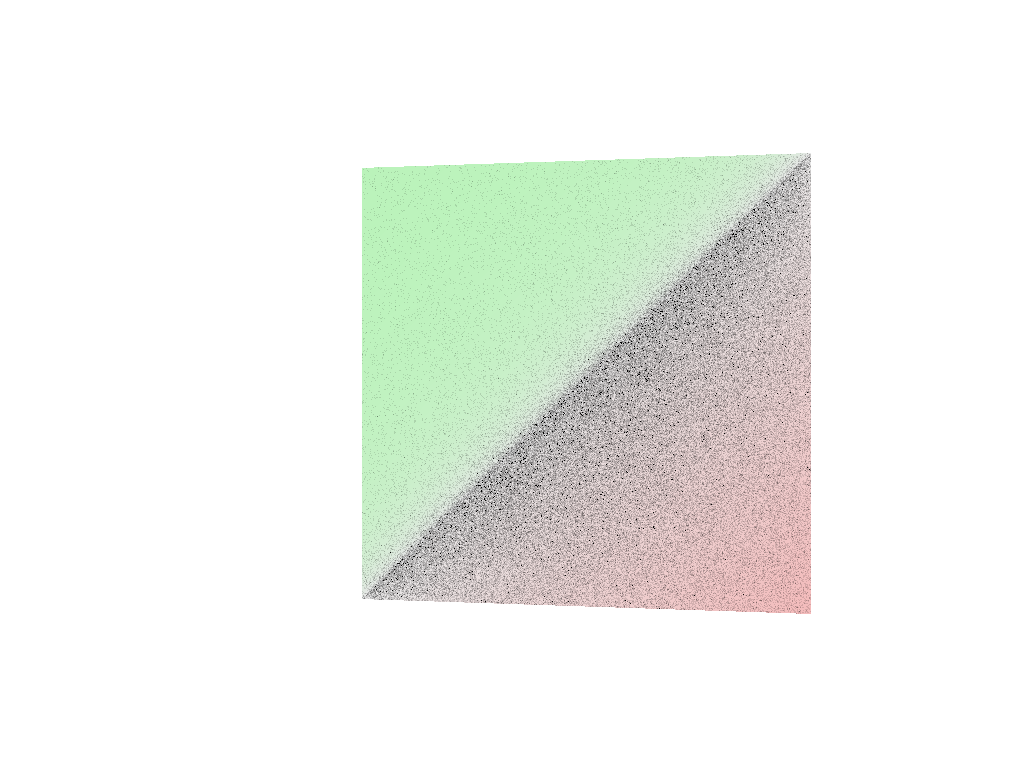
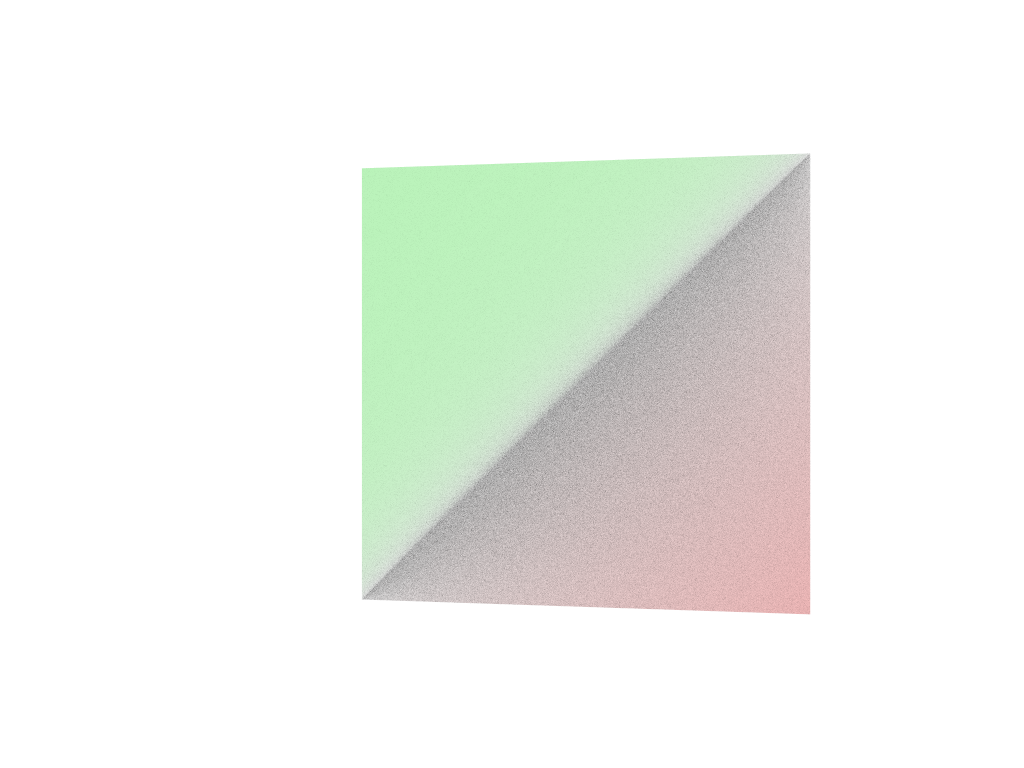
ospExamples
-----------
Apart from tutorials, `OSPRay` comes with a C++ app called
[`ospExamples`](https://github.com/ospray/ospray/tree/master/apps/ospExamples)
which is an elaborate easy-to-use tutorial, with a single interface to
try various `OSPRay` features. It is aimed at providing users with
multiple simple scenes composed of basic geometry types, lights, volumes
etc. to get started with OSPRay quickly.
`ospExamples` app runs a `GLFWOSPRayWindow` instance that manages
instances of the camera, framebuffer, renderer and other OSPRay objects
necessary to render an interactive scene. The scene is rendered on a
`GLFW` window with an `imgui` GUI controls panel for the user to
manipulate the scene at runtime.
The application is located in
[`apps/ospExamples/`](https://github.com/ospray/ospray/tree/master/apps/ospExamples)
directory and can be built with CMake. It can be run from the build
directory via:
./ospExamples <command-line-parameter>
The command line parameter is optional however.
<figure>
<img src="https://ospray.github.io/images/ospExamples.png"
style="width:90.0%"
alt="ospExamples application with default boxes scene." />
<figcaption aria-hidden="true"><code>ospExamples</code> application with
default <code>boxes</code> scene.</figcaption>
</figure>
### Scenes
Different scenes can be selected from the `scenes` dropdown and each
scene corresponds to an instance of a special `detail::Builder` struct.
Example builders are located in
[`apps/common/ospray_testing/builders/`](https://github.com/ospray/ospray/tree/master/apps/common/ospray_testing/builders).
These builders provide a usage guide for the OSPRay scene hierarchy and
OSPRay API in the form of `cpp` wrappers. They instantiate and manage
objects for the specific scene like `cpp::Geometry`, `cpp::Volume`,
`cpp::Light` etc.
The `detail::Builder` base struct is mostly responsible for setting up
OSPRay `world` and objects common in all scenes (for example lighting
and ground plane), which can be conveniently overridden in the derived
builders.
### Renderer
This app comes with four [renderer](#renderers) options: `scivis`,
`pathtracer`, `ao` and `debug`. The app provides some common rendering
controls like `pixelSamples` and other more specific to the renderer
type like `aoSamples` for the `scivis` and `ao` renderer or
`maxPathLength` for the `pathtracer`.
The sun-sky lighting can be used in a sample scene by enabling the
`renderSunSky` option of the `pathtracer` renderer. It allows the user
to change `turbidity` and `sunDirection`.
<figure>
<img src="https://ospray.github.io/images/renderSunSky.png"
style="width:90.0%"
alt="Rendering an evening sky with the renderSunSky option." />
<figcaption aria-hidden="true">Rendering an evening sky with the
<code>renderSunSky</code> option.</figcaption>
</figure>
ospMPIDistribTutorial
---------------------
A minimal working example demonstrating how to use OSPRay for rendering
distributed data can be found at
[`modules/mpi/tutorials/ospMPIDistribTutorial.c`](https://github.com/ospray/ospray/blob/master/modules/mpi/tutorials/ospMPIDistribTutorial.c)[^10].
The compilation process via CMake is the similar to
[`apps/tutorials/ospTutorialFindospray/`](https://github.com/ospray/ospray/tree/master/apps/ospTutorial/ospTutorialFindospray),
with the addition of finding and linking MPI.
To build the tutorial on Linux, build it in a build directory with
``` sh
mpicc -std=c99 ../modules/mpi/tutorials/ospMPIDistribTutorial.c \
-I ../ospray/include -L . -lospray -Wl,-rpath,. -o ospMPIDistribTutorial
```
On Windows build it can be build manually in a
“build_directory\\\$Configuration” directory with
``` sh
cl ..\..\modules\mpi\tutorials\ospMPIDistribTutorial.c -I ..\..\ospray\include -I ..\.. ospray.lib
```
The MPI module does not need to be linked explicitly, as it is loaded as
a module at runtime.
<figure>
<img
src="https://ospray.github.io/images/ospMPIDistribTutorial_firstFrame.jpg"
style="width:60.0%"
alt="The first frame output by the ospMPIDistribTutorial or C++ tutorial with 4 ranks." />
<figcaption aria-hidden="true">The first frame output by the
<code>ospMPIDistribTutorial</code> or C++ tutorial with 4
ranks.</figcaption>
</figure>
<figure>
<img
src="https://ospray.github.io/images/ospMPIDistribTutorial_accumulatedFrame.jpg"
style="width:60.0%"
alt="The accumulated frame output by the ospMPIDistribTutorial or C++ tutorial with 4 ranks." />
<figcaption aria-hidden="true">The accumulated frame output by the
<code>ospMPIDistribTutorial</code> or C++ tutorial with 4
ranks.</figcaption>
</figure>
ospMPIDistribTutorialSpheres and ospMPIDistribTutorialVolume
------------------------------------------------------------
The spheres and volume distributed tutorials are built as part of the
MPI tutorials when building OSPRay with the MPI module and tutorials
enabled. These tutorials demonstrate using OSPRay to render distributed
data sets where each rank owns some subregion of the data, and
displaying the output in an interactive window. The domain is
distributed in a grid among the processes, each of which will generate a
subset of the data corresponding to its subdomain.
In `ospMPIDistribTutorialSpheres`, each process generates a set of
spheres within its assigned domain. The spheres are colored from dark to
light blue, where lighter colors correspond to higher ranks.
<figure>
<img
src="https://ospray.github.io/images/ospMPIDistribTutorialSpheres.jpg"
style="width:60.0%"
alt="Running ospMPIDistribTutorialSpheres on 4 ranks." />
<figcaption aria-hidden="true">Running
<code>ospMPIDistribTutorialSpheres</code> on 4 ranks.</figcaption>
</figure>
In `ospMPIDistribTutorialVolume`, each process generates a subbrick of
volume data, which is colored by its rank.
<figure>
<img
src="https://ospray.github.io/images/ospMPIDistribTutorialVolume.jpg"
style="width:60.0%"
alt="Running ospMPIDistribTutorialVolume on 4 ranks." />
<figcaption aria-hidden="true">Running
<code>ospMPIDistribTutorialVolume</code> on 4 ranks.</figcaption>
</figure>
ospMPIDistribTutorialPartialRepl
--------------------------------
The partially replicated MPI tutorial demonstrates how to use OSPRay’s
distributed rendering capabilities to render data sets that are
partially replicated among the processes. Each pair of ranks generates
the same volume brick, allowing them to subdivide the rendering workload
between themselves. For example, when run with two ranks, each will
generate the same brick and be responsible for rendering half of the
image tiles it projects to. When run with four ranks, the pairs of ranks
0,1 and 2,3 will generate the same data and divide the rendering
workload for that data among themselves.
The image work subdivision happens automatically, based on which ranks
specify the same bounding box for their data, as demonstrated in the
tutorial.
The partially replicated distribution is useful to support load-balanced
rendering of data sets that are too large to be fully replicated among
the processes, but are small enough to be partially replicated among
them.
ospMPIDistribTutorialReplicated
-------------------------------
The replicated MPI tutorial demonstrates how OSPRay’s distributed
rendering capabilities can be used to render data sets that are fully
replicated among the ranks with advanced illumination effects. In this
case, although the processes are run MPI parallel, each rank specifies
the exact same data. OSPRay’s MPI parallel renderer will detect that the
data is replicated in this case and use the same image-parallel
rendering algorithms employed in the MPI offload rendering configuration
to render the data. This image-parallel rendering algorithm supports all
rendering configurations that are used in local rendering, e.g., path
tracing, to provide high-quality images.
The replicated MPI tutorial supports the same scenes and parameters as
the [`ospExamples`](#ospexamples) app described above.
This mode can be useful when high-quality rendering is desired and it is
possible to copy the entire data set on to each rank, or to accelerate
loading of a large model by leveraging a parallel file system.
[^1]: This file is usually in
`${install_location}/[lib|lib64]/cmake/ospray-${version}/`. If CMake
does not find it automatically, then specify its location in
variable `ospray_DIR` (either an environment variable or CMake
variable).
[^2]: The number of items to be copied is defined by the size of the
source array.
[^3]: For consecutive memory addresses the x-index of the corresponding
voxel changes the quickest.
[^4]: actually a parallelogram
[^5]: respectively $(127, 127, 255)$ for 8 bit textures and
$(32767, 32767, 65535)$ for 16 bit textures
[^6]: including spheres, boxes, infinite planes, closed meshes, closed
subdivisions and curves
[^7]: `OSPBounds` has essentially the same layout as the `OSP_BOX3F`
[`OSPDataType`](#data).
[^8]: If there are multiple ambient lights then their contribution is
added.
[^9]: A C++ version that uses the C++ convenience wrappers of OSPRay’s
C99 API via
[`include/ospray/ospray_cpp.h`](https://github.com/ospray/ospray/blob/master/ospray/include/ospray/ospray_cpp.h)
is available at
[`apps/tutorials/ospTutorial.cpp`](https://github.com/ospray/ospray/blob/master/apps/ospTutorial/ospTutorial.cpp).
[^10]: A C++ version that uses the C++ convenience wrappers of OSPRay’s
C99 API via
[`include/ospray/ospray_cpp.h`](https://github.com/ospray/ospray/blob/master/ospray/include/ospray/ospray_cpp.h)
is available at
[`modules/mpi/tutorials/ospMPIDistribTutorial.cpp`](https://github.com/ospray/ospray/blob/master/modules/mpi/tutorials/ospMPIDistribTutorial.cpp).
|
