1
2
3
4
5
6
7
8
9
10
11
12
13
14
15
16
17
18
19
20
21
22
23
24
25
26
27
28
29
30
31
32
33
34
35
36
37
38
39
40
41
42
43
44
45
46
47
48
49
50
51
52
53
54
55
56
57
58
59
60
61
62
63
64
65
66
67
68
69
70
|
English | [中文](README_CN.md)
# pdf2docx

[](https://codecov.io/gh/dothinking/pdf2docx)
[](https://pypi.python.org/pypi/pdf2docx/)


- Extract data from PDF with `PyMuPDF`, e.g. text, images and drawings
- Parse layout with rule, e.g. sections, paragraphs, images and tables
- Generate docx with `python-docx`
## Features
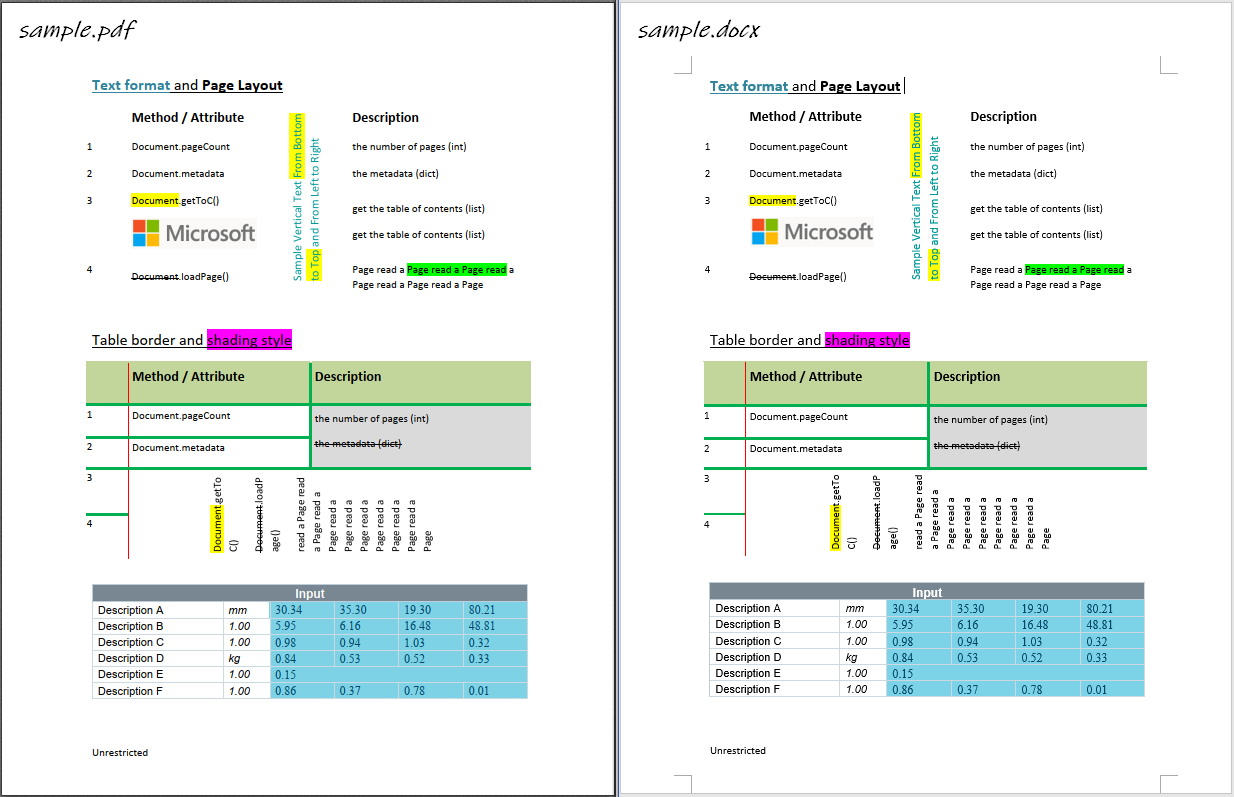
- Parse and re-create page layout
- page margin
- section and column (1 or 2 columns only)
- page header and footer [TODO]
- Parse and re-create paragraph
- OCR text [TODO]
- text in horizontal/vertical direction: from left to right, from bottom to top
- font style, e.g. font name, size, weight, italic and color
- text format, e.g. highlight, underline, strike-through
- list style [TODO]
- external hyper link
- paragraph horizontal alignment (left/right/center/justify) and vertical spacing
- Parse and re-create image
- in-line image
- image in Gray/RGB/CMYK mode
- transparent image
- floating image, i.e. picture behind text
- Parse and re-create table
- border style, e.g. width, color
- shading style, i.e. background color
- merged cells
- vertical direction cell
- table with partly hidden borders
- nested tables
- Parsing pages with multi-processing
*It can also be used as a tool to extract table contents since both table content and format/style is parsed.*
## Limitations
- Text-based PDF file
- Left to right language
- Normal reading direction, no word transformation / rotation
- Rule-based method can't 100% convert the PDF layout
## Documentation
- [Installation](https://pdf2docx.readthedocs.io/en/latest/installation.html)
- [Quickstart](https://pdf2docx.readthedocs.io/en/latest/quickstart.html)
- [Convert PDF](https://pdf2docx.readthedocs.io/en/latest/quickstart.convert.html)
- [Extract table](https://pdf2docx.readthedocs.io/en/latest/quickstart.table.html)
- [Command Line Interface](https://pdf2docx.readthedocs.io/en/latest/quickstart.cli.html)
- [Graphic User Interface](https://pdf2docx.readthedocs.io/en/latest/quickstart.gui.html)
- [Technical Documentation (In Chinese)](https://pdf2docx.readthedocs.io/en/latest/techdoc.html)
- [API Documentation](https://pdf2docx.readthedocs.io/en/latest/modules.html)
## Sample
|
