1
2
3
4
5
6
7
8
9
10
11
12
13
14
15
16
17
18
19
20
21
22
23
24
25
26
27
28
29
30
31
32
33
34
35
36
37
38
39
40
41
42
43
44
45
46
47
48
49
50
51
52
53
54
55
56
57
58
59
60
61
62
63
64
65
66
67
68
69
70
|
[English](README.md) | 中文
# pdf2docx

[](https://codecov.io/gh/dothinking/pdf2docx)
[](https://pypi.python.org/pypi/pdf2docx/)


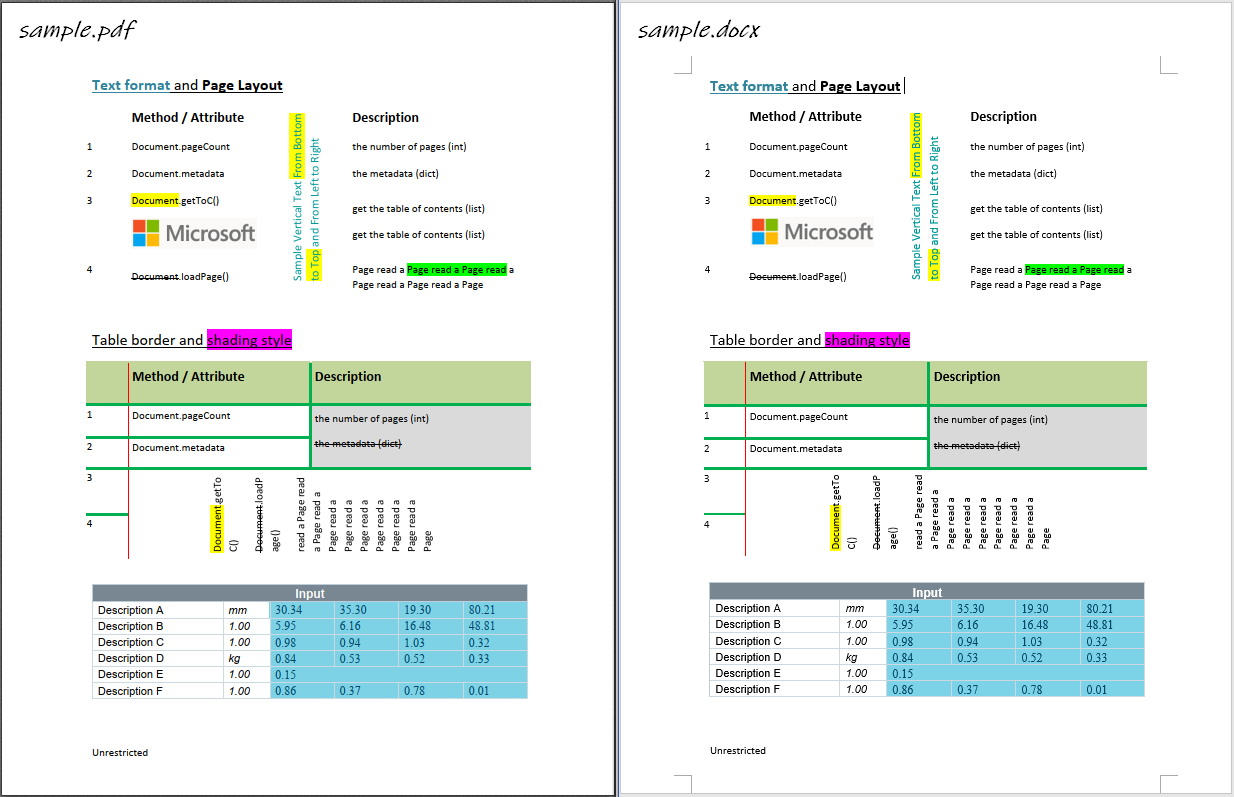
- 基于 `PyMuPDF` 提取文本、图片、矢量等原始数据
- 基于规则解析章节、段落、表格、图片、文本等布局及样式
- 基于 `python-docx` 创建Word文档
## 主要功能
- 解析和创建页面布局
- 页边距
- 章节和分栏 (目前最多支持两栏布局)
- 页眉和页脚 [TODO]
- 解析和创建段落
- OCR 文本 [TODO]
- 水平(从左到右)或竖直(自底向上)方向文本
- 字体样式例如字体、字号、粗/斜体、颜色
- 文本样式例如高亮、下划线和删除线
- 列表样式 [TODO]
- 外部超链接
- 段落水平对齐方式 (左/右/居中/分散对齐)及前后间距
- 解析和创建图片
- 内联图片
- 灰度/RGB/CMYK等颜色空间图片
- 带有透明通道图片
- 浮动图片(衬于文字下方)
- 解析和创建表格
- 边框样式例如宽度和颜色
- 单元格背景色
- 合并单元格
- 单元格垂直文本
- 隐藏部分边框线的表格
- 嵌套表格
- 支持多进程转换
*`pdf2docx`同时解析出了表格内容和样式,因此也可以作为一个表格内容提取工具。*
## 限制
- 目前暂不支持扫描PDF文字识别
- 仅支持从左向右书写的语言(因此不支持阿拉伯语)
- 不支持旋转的文字
- 基于规则的解析无法保证100%还原PDF样式
## 使用帮助
- [安装](https://pdf2docx.readthedocs.io/en/latest/installation.html)
- [快速上手](https://pdf2docx.readthedocs.io/en/latest/quickstart.html)
- [转换PDF](https://pdf2docx.readthedocs.io/en/latest/quickstart.convert.html)
- [提取表格](https://pdf2docx.readthedocs.io/en/latest/quickstart.table.html)
- [命令行参数](https://pdf2docx.readthedocs.io/en/latest/quickstart.cli.html)
- [简单图形界面](https://pdf2docx.readthedocs.io/en/latest/quickstart.gui.html)
- [技术手册](https://pdf2docx.readthedocs.io/en/latest/techdoc.html)
- [API手册](https://pdf2docx.readthedocs.io/en/latest/modules.html)
## 样例
|
