1
2
3
4
5
6
7
8
9
10
11
12
13
14
15
16
17
18
19
20
21
22
23
24
25
26
27
28
29
30
31
32
33
34
35
36
37
38
39
40
41
42
43
44
45
46
47
48
49
50
51
52
53
54
55
56
57
58
59
60
61
62
63
64
65
66
67
68
69
70
71
72
73
74
75
76
77
78
79
80
81
82
83
84
85
86
87
88
89
90
91
92
93
94
95
96
97
98
99
100
101
102
103
104
105
106
107
108
109
110
111
112
113
114
115
116
117
118
119
120
121
122
123
124
125
126
127
128
129
130
131
132
133
134
135
136
137
138
139
140
141
142
143
144
145
146
147
148
149
150
151
152
153
154
155
156
157
158
159
160
161
162
163
164
165
166
167
168
169
170
171
172
173
174
175
176
177
178
179
180
181
182
183
184
185
186
187
188
189
190
191
192
193
194
195
196
197
198
199
|
# awscurl [](https://github.com/sponsors/okigan) [](https://www.paypal.com/donate/?business=UDN4FL55J34QC&amount=25) [](https://www.buymeacoffee.com/okigan)
[](https://pypi.python.org/pypi/awscurl)
[](https://github.com/okigan/awscurl)
[](https://hub.docker.com/r/okigan/awscurl)

[](https://gitpod.io/#https://github.com/okigan/awscurl)
[](https://vscode.dev/github/okigan/awscurl)
[](https://github.dev/okigan/awscurl)
curl-like tool with AWS Signature Version 4 request signing.
## Features
* performs requests to AWS services with request signing using curl interface
* supports IAM profile credentials
## Overview
Requests to AWS API must be signed (see [Signing AWS API Requests](http://docs.aws.amazon.com/general/latest/gr/signing_aws_api_requests.html))
automates the process of signing and makes requests to AWS as simple as a standard curl command.
## Installation
```sh
pip install awscurl
```
### Installation from source (bleeding edge)
```sh
pip install git+https://github.com/okigan/awscurl
```
### Installation via Homebrew for MacOS
```sh
brew install awscurl
```
#### Running via Docker
```sh
docker pull okigan/awscurl # or via docker pull ghcr.io/okigan/awscurl
```
or via Github docker registry
```sh
docker pull ghcr.io/okigan/awscurl
```
then
```sh
$ docker run --rm -it okigan/awscurl --access_key ACCESS_KEY --secret_key SECRET_KEY --service s3 s3://...
# or allow access to local credentials as following
$ docker run --rm -it -v "$HOME/.aws:/root/.aws" okigan/awscurl --service s3 s3://...
```
To shorten the length of docker commands use the following alias:
```sh
alias awscurl='docker run --rm -ti -v "$HOME/.aws:/root/.aws" -e AWS_ACCESS_KEY_ID -e AWS_SECRET_ACCESS_KEY -e AWS_SECURITY_TOKEN -e AWS_PROFILE okigan/awscurl'
```
This will allow you to run awscurl from within a Docker container as if it was installed on the host system:
```sh
awscurl
```
## Examples
* Call S3: List bucket content
```sh
$ awscurl --service s3 'https://awscurl-sample-bucket.s3.amazonaws.com' | tidy -xml -iq
<?xml version="1.0" encoding="utf-8"?>
<ListBucketResult xmlns="http://s3.amazonaws.com/doc/2006-03-01/">
<Name>awscurl-sample-bucket</Name>
<Prefix></Prefix>
<Marker></Marker>
<MaxKeys>1000</MaxKeys>
<IsTruncated>false</IsTruncated>
<Contents>
<Key>awscurl-sample-file.txt</Key>
<LastModified>2017-07-25T21:27:38.000Z</LastModified>
<ETag>"d41d8cd98f00b204e9800998ecf8427e"</ETag>
<Size>0</Size>
<StorageClass>STANDARD</StorageClass>
</Contents>
</ListBucketResult>
```
* Call EC2:
```sh
$ awscurl --service ec2 'https://ec2.amazonaws.com?Action=DescribeRegions&Version=2013-10-15' | tidy -xml -iq
<?xml version="1.0" encoding="utf-8"?>
<DescribeRegionsResponse xmlns="http://ec2.amazonaws.com/doc/2013-10-15/">
<requestId>96511ccd-2d6d-4d63-ad9b-6be6f2c9874d</requestId>
<regionInfo>
<item>
<regionName>eu-north-1</regionName>
<regionEndpoint>ec2.eu-north-1.amazonaws.com</regionEndpoint>
</item>
<item>
<regionName>ap-south-1</regionName>
<regionEndpoint>ec2.ap-south-1.amazonaws.com</regionEndpoint>
</item>
</regionInfo>
</DescribeRegionsResponse>
```
* Call API Gateway:
```sh
$ awscurl --service execute-api -X POST -d @request.json \
https://<prefix>.execute-api.us-east-1.amazonaws.com/<resource>
```
## Options
```sh
usage: __main__.py [-h] [-v] [-i] [-X REQUEST] [-d DATA] [-H HEADER] [-k] [--fail-with-body] [--data-binary] [--region REGION] [--profile PROFILE] [--service SERVICE]
[--access_key ACCESS_KEY] [--secret_key SECRET_KEY] [--security_token SECURITY_TOKEN] [--session_token SESSION_TOKEN] [-L] [-o <file>]
uri
Curl AWS request signing
positional arguments:
uri
options:
-h, --help show this help message and exit
-v, --verbose verbose flag (default: False)
-i, --include include headers in the output (default: False)
-X REQUEST, --request REQUEST
Specify request command to use (default: GET)
-d DATA, --data DATA HTTP POST data (default: )
-H HEADER, --header HEADER
HTTP header (default: None)
-k, --insecure Allow insecure server connections when using SSL (default: False)
--fail-with-body Fail on HTTP errors but save the body (default: False)
--data-binary Process HTTP POST data exactly as specified with no extra processing whatsoever. (default: False)
--region REGION AWS region [env var: AWS_DEFAULT_REGION] (default: us-east-1)
--profile PROFILE AWS profile [env var: AWS_PROFILE] (default: default)
--service SERVICE AWS service (default: execute-api)
--access_key ACCESS_KEY
[env var: AWS_ACCESS_KEY_ID] (default: None)
--secret_key SECRET_KEY
[env var: AWS_SECRET_ACCESS_KEY] (default: None)
--security_token SECURITY_TOKEN
[env var: AWS_SECURITY_TOKEN] (default: None)
--session_token SESSION_TOKEN
[env var: AWS_SESSION_TOKEN] (default: None)
-L, --location Follow redirects (default: False)
-o <file>, --output <file>
Write to file instead of stdout (default: )
In general, command-line values override environment variables which override defaults.
```
If you do not specify the `--access_key` or `--secret_key`
(or environment variables), `awscurl` will attempt to use
the credentials you set in `~/.aws/credentials`. If you
do not specify a `--profile` or `AWS_PROFILE`, `awscurl`
uses `default`.
## Who uses awscurl
* [AWS Documentation](https://docs.aws.amazon.com/apigateway/latest/developerguide/apigateway-how-to-call-websocket-api-connections.html)
* [Onica blog](https://onica.com/blog/how-to/how-to-kibana-default-index-pattern/)
* QnA on [StackOverflow](https://stackoverflow.com/search?q=awscurl)
* QnA on [DevOps StackExchange](https://devops.stackexchange.com/search?q=awscurl)
* Examples on [Golfbert](https://golfbert.com/api/samples)
## Star History
[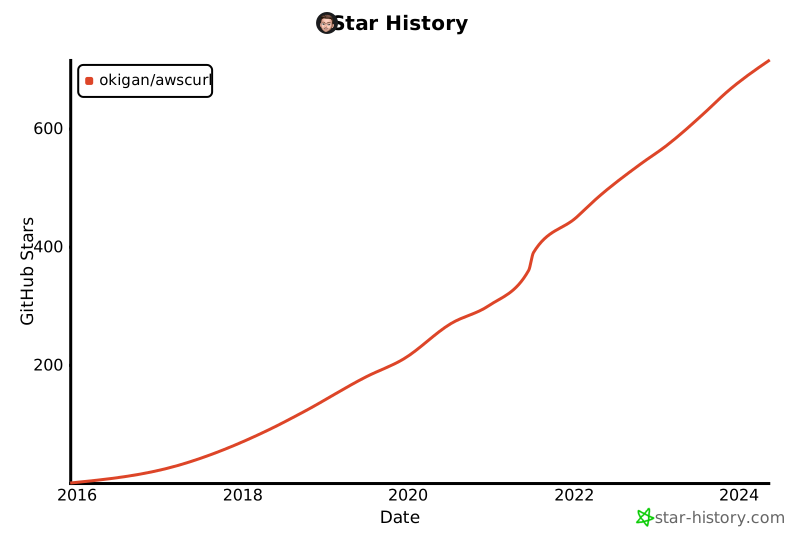](https://star-history.com/#okigan/awscurl&Date)
## Related projects
* awscurl in Go:
* <https://github.com/allthings/awscurl>
* <https://github.com/legal90/awscurl>
* awscurl in Lisp: <https://github.com/aw/picolisp-awscurl>
* awscurl on DockerHub: <https://hub.docker.com/r/okigan/awscurl>
* [aws-signature-proxy](https://github.com/sverch/aws-signature-proxy) and related [blog post](https://shaunverch.com/butter/open-source/2019/09/27/butter-days-6.html)
* [aws-sigv4-proxy](https://github.com/awslabs/aws-sigv4-proxy) on awslabs
## Last but not least
* [Sponsor awscurl](https://github.com/sponsors/okigan)
|
