1
2
3
4
5
6
7
8
9
10
11
12
13
14
15
16
17
18
19
20
21
22
23
24
25
26
27
28
29
30
31
32
33
34
35
36
37
38
39
40
41
42
43
44
45
46
47
48
49
50
51
52
53
54
55
56
57
58
59
60
61
62
63
64
65
66
67
68
69
70
71
72
73
74
75
76
77
78
79
80
81
82
83
84
85
86
87
88
89
90
91
92
93
94
95
96
97
98
99
100
101
102
103
104
105
106
107
108
109
110
111
112
113
114
115
116
117
118
119
120
121
122
123
124
125
126
127
128
129
130
131
132
133
134
135
136
|
# better-exceptions
Pretty and more helpful exceptions in Python, automatically.
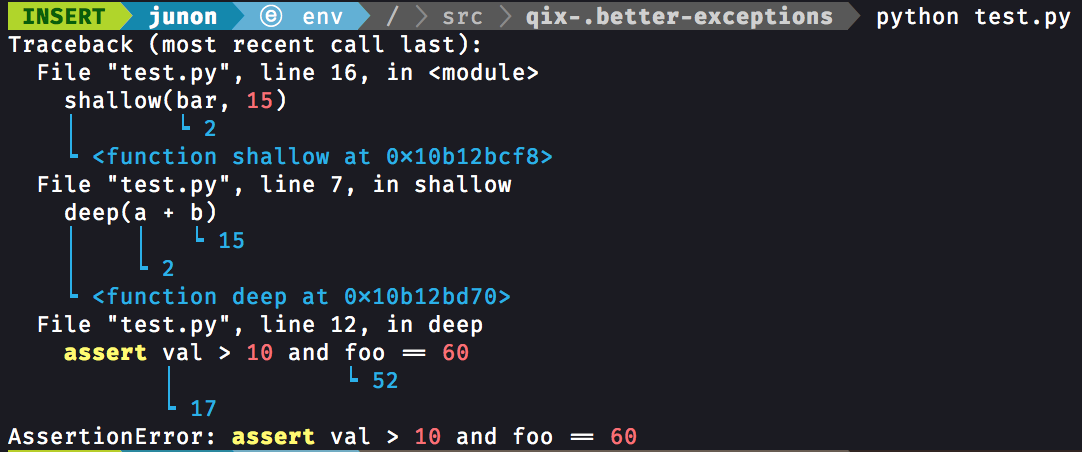
## Usage
Install `better_exceptions` via pip:
```console
pip install better_exceptions
```
And set the `BETTER_EXCEPTIONS` environment variable to any value:
```bash
export BETTER_EXCEPTIONS=1 # Linux / OSX
setx BETTER_EXCEPTIONS 1 # Windows
```
That's it!
### Python REPL (Interactive Shell)
In order to use `better_exceptions` in the Python REPL, first install the package (as instructed above) and run:
```console
$ python -m better_exceptions
Type "help", "copyright", "credits" or "license" for more information.
(BetterExceptionsConsole)
>>>
```
in order to drop into a `better_exceptions`-enabled Python interactive shell.
### Advanced Usage
If you want to allow the entirety of values to be outputted instead of being truncated to a certain amount of characters:
```python
import better_exceptions
better_exceptions.MAX_LENGTH = None
```
While using `better_exceptions` in production, do not forget to unset the `BETTER_EXCEPTIONS` variable to avoid leaking sensitive data in your logs.
### Use with unittest
If you want to use `better_exceptions` to format `unittest`'s exception output, you can use the monkey patch below:
```python
import sys
import unittest
import better_exceptions
def patch(self, err, test):
lines = better_exceptions.format_exception(*err)
if sys.version_info[0] == 2:
return u"".join(lines).encode("utf-8")
return "".join(lines)
unittest.result.TestResult._exc_info_to_string = patch
```
Note that this uses an undocumented method override, so it is **not** guaranteed to work on all platforms or versions of Python.
### Django Usage
In `settings.py`, add your new class to the `MIDDLEWARE` setting and update your logging configuration:
```python
# ...
MIDDLEWARE = [
# ...
"better_exceptions.integrations.django.BetterExceptionsMiddleware",
]
# ...
from better_exceptions.integrations.django import skip_errors_filter
# if you don't want to override LOGGING because you want to change the default,
# you can vendor Django's default logging configuration and update it for
# better-exceptions. the default for Django 3.1.4 can be found here:
# https://github.com/django/django/blob/3.1.4/django/utils/log.py#L13-L63
LOGGING = {
'version': 1,
'disable_existing_loggers': False,
'filters': {
'skip_errors': {
'()': 'django.utils.log.CallbackFilter',
'callback': skip_errors_filter,
}
},
'handlers': {
'console': {
'level': 'INFO',
# without the 'filters' key, Django will log errors twice:
# one time from better-exceptions and one time from Django.
# with the 'skip_errors' filter, we remove the repeat log
# from Django, which is unformatted.
'filters': ['skip_errors'],
'class': 'logging.StreamHandler',
}
},
'loggers': {
'django': {
'handlers': [
'console',
],
}
}
}
```
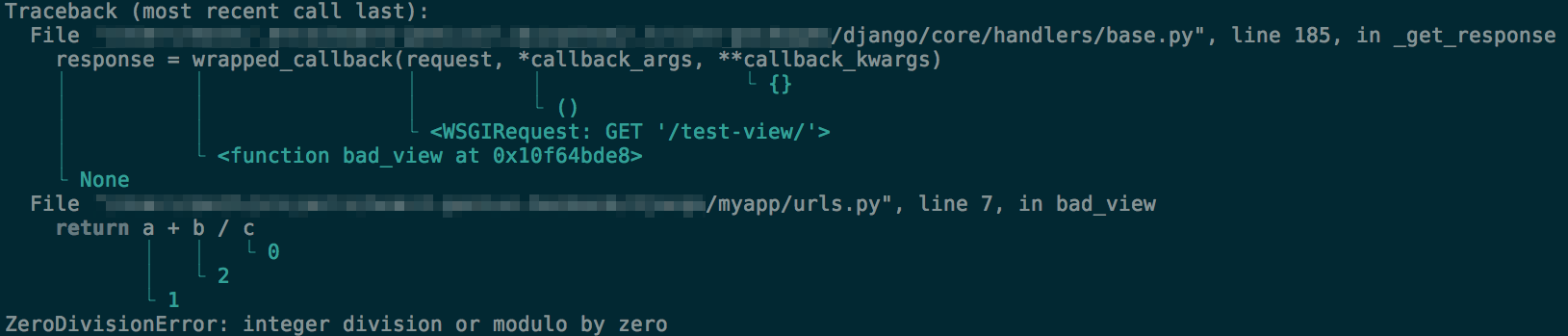
example output:
## Troubleshooting
If you do not see beautiful exceptions, first make sure that the environment variable does exist. You can try `echo $BETTER_EXCEPTIONS` (Linux / OSX) or `echo %BETTER_EXCEPTIONS%` (Windows). On Linux and OSX, the `export` command does not add the variable permanently, you will probably need to edit the `~/.profile` file to make it persistent. On Windows, you need to open a new terminal after the `setx` command.
Check that there is no conflict with another library, and that the `sys.excepthook` function has been correctly replaced with the `better_exceptions`'s one. Sometimes other components can set up their own exception handlers, such as the `python3-apport` Ubuntu package that you may need to uninstall.
Make sure that you have not inadvertently deleted the `better_exceptions_hook.pth` file that should be in the same place as the `better_exceptions` folder where all of your Python packages are installed. Otherwise, try re-installing `better_exceptions`.
You can also try to manually activate the hook by adding `import better_exceptions; better_exceptions.hook()` at the beginning of your script.
Finally, if you still can not get this module to work, [open a new issue](https://github.com/Qix-/better-exceptions/issues/new) by describing your problem precisely and detailing your configuration (Python and `better_exceptions` versions, OS, code snippet, interpreter, etc.) so that we can reproduce the bug you are experiencing.
# License
Copyright © 2017, Josh Junon. Licensed under the [MIT license](LICENSE.txt).
|
