1
2
3
4
5
6
7
8
9
10
11
12
13
14
15
16
17
18
19
20
21
22
23
24
25
26
27
28
29
30
31
32
33
34
35
36
37
38
39
40
41
42
43
44
45
46
47
48
49
50
51
52
53
54
55
56
57
58
59
60
61
62
63
64
65
66
67
68
69
70
71
72
73
74
75
76
77
78
79
80
81
82
83
84
85
86
87
88
89
90
91
92
93
94
95
96
97
98
99
100
101
102
103
104
105
106
107
108
109
110
111
112
113
114
115
116
117
118
119
120
121
122
123
124
125
126
127
128
129
130
131
132
133
134
135
136
137
138
139
140
141
142
143
144
145
146
147
148
149
150
151
152
153
154
155
156
157
158
159
160
161
162
163
164
165
166
167
168
169
170
171
172
173
174
175
176
177
178
179
180
181
182
183
184
185
186
187
188
189
190
191
192
193
194
195
196
197
198
199
200
201
202
203
204
205
206
207
208
209
210
211
212
213
214
215
|
# Python library to parse, validate and create SPDX documents
CI status (Linux, macOS and Windows): [![Install and Test][1]][2]
[1]: https://github.com/spdx/tools-python/actions/workflows/install_and_test.yml/badge.svg
[2]: https://github.com/spdx/tools-python/actions/workflows/install_and_test.yml
# Breaking changes v0.7 -> v0.8
Please be aware that the upcoming 0.8 release has undergone a significant refactoring in preparation for the upcoming
SPDX v3.0 release, leading to breaking changes in the API.
Please refer to the [migration guide](https://github.com/spdx/tools-python/wiki/How-to-migrate-from-0.7-to-0.8)
to update your existing code.
The main features of v0.8 are:
- full validation of SPDX documents against the v2.2 and v2.3 specification
- support for SPDX's RDF format with all v2.3 features
- experimental support for the upcoming SPDX v3 specification. Note, however, that support is neither complete nor
stable at this point, as the spec is still evolving. SPDX3-related code is contained in a separate subpackage "spdx3"
and its use is optional. We do not recommend using it in production code yet.
# Information
This library implements SPDX parsers, convertors, validators and handlers in Python.
- Home: https://github.com/spdx/tools-python
- Issues: https://github.com/spdx/tools-python/issues
- PyPI: https://pypi.python.org/pypi/spdx-tools
- Browse the API: https://spdx.github.io/tools-python
Important updates regarding this library are shared via the SPDX tech mailing list: https://lists.spdx.org/g/Spdx-tech.
# License
[Apache-2.0](LICENSE)
# Features
* API to create and manipulate SPDX v2.2 and v2.3 documents
* Parse, convert, create and validate SPDX files
* supported formats: Tag/Value, RDF, JSON, YAML, XML
* visualize the structure of a SPDX document by creating an `AGraph`. Note: This is an optional feature and requires
additional installation of optional dependencies
## Experimental support for SPDX 3.0
* Create v3.0 elements and payloads
* Convert v2.2/v2.3 documents to v3.0
* Serialize to JSON-LD
See [Quickstart to SPDX 3.0](#quickstart-to-spdx-30) below.
The implementation is based on the descriptive markdown files in the repository https://github.com/spdx/spdx-3-model (latest commit: a5372a3c145dbdfc1381fc1f791c68889aafc7ff).
# Installation
As always you should work in a virtualenv (venv). You can install a local clone
of this repo with `yourenv/bin/pip install .` or install it from PyPI
(check for the [newest release](https://pypi.org/project/spdx-tools/#history) and install it like
`yourenv/bin/pip install spdx-tools==0.8.0a2`). Note that on Windows it would be `Scripts`
instead of `bin`.
# How to use
## Command-line usage
1. **PARSING/VALIDATING** (for parsing any format):
* Use `pyspdxtools -i <filename>` where `<filename>` is the location of the file. The input format is inferred automatically from the file ending.
* If you are using a source distribution, try running:
`pyspdxtools -i tests/data/SPDXJSONExample-v2.3.spdx.json`
2. **CONVERTING** (for converting one format to another):
* Use `pyspdxtools -i <input_file> -o <output_file>` where `<input_file>` is the location of the file to be converted
and `<output_file>` is the location of the output file. The input and output formats are inferred automatically from the file endings.
* If you are using a source distribution, try running:
`pyspdxtools -i tests/data/SPDXJSONExample-v2.3.spdx.json -o output.tag`
* If you want to skip the validation process, provide the `--novalidation` flag, like so:
`pyspdxtools -i tests/data/SPDXJSONExample-v2.3.spdx.json -o output.tag --novalidation`
(use this with caution: note that undetected invalid documents may lead to unexpected behavior of the tool)
* For help use `pyspdxtools --help`
3. **GRAPH GENERATION** (optional feature)
* This feature generates a graph representing all elements in the SPDX document and their connections based on the provided
relationships. The graph can be rendered to a picture. Below is an example for the file `tests/data/SPDXJSONExample-v2.3.spdx.json`:
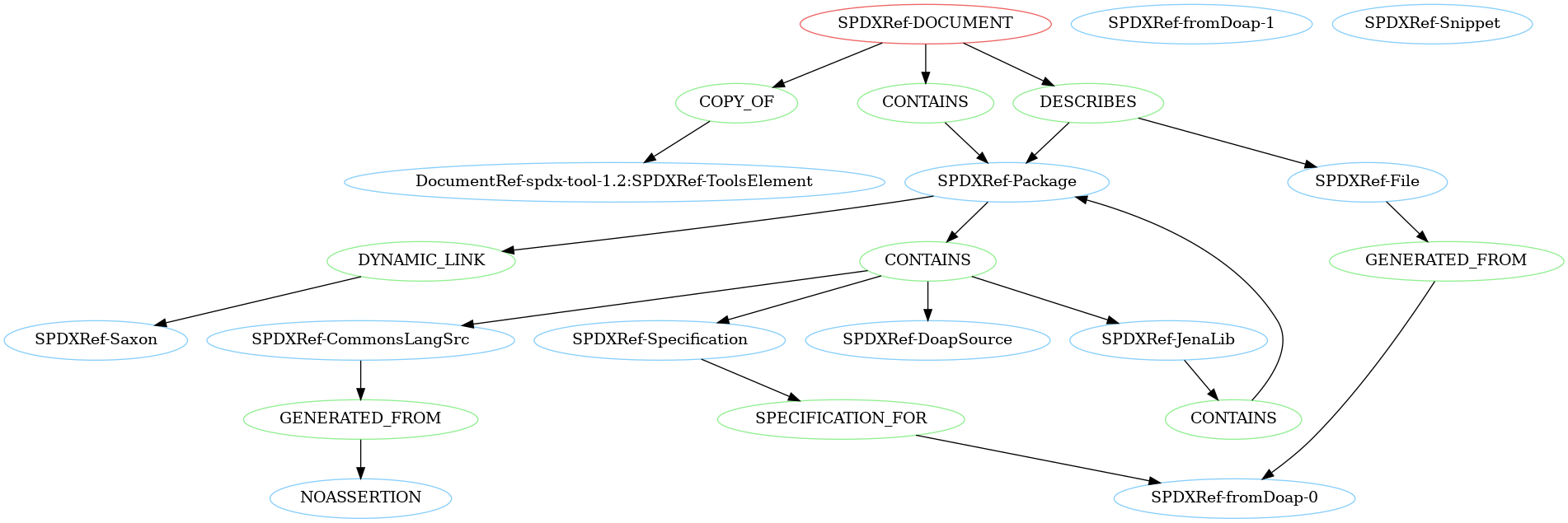
* Make sure you install the optional dependencies `networkx` and `pygraphviz`. To do so run `pip install ".[graph_generation]"`.
* Use `pyspdxtools -i <input_file> --graph -o <output_file>` where `<output_file>` is an output file name with valid format for `pygraphviz` (check
the documentation [here](https://pygraphviz.github.io/documentation/stable/reference/agraph.html#pygraphviz.AGraph.draw)).
* If you are using a source distribution, try running
`pyspdxtools -i tests/data/SPDXJSONExample-v2.3.spdx.json --graph -o SPDXJSONExample-v2.3.spdx.png` to generate
a png with an overview of the structure of the example file.
## Library usage
1. **DATA MODEL**
* The `spdx_tools.spdx.model` package constitutes the internal SPDX v2.3 data model (v2.2 is simply a subset of this). All relevant classes for SPDX document creation are exposed in the `__init__.py` found [here](src%2Fspdx_tools%2Fspdx%2Fmodel%2F__init__.py).
* SPDX objects are implemented via `@dataclass_with_properties`, a custom extension of `@dataclass`.
* Each class starts with a list of its properties and their possible types. When no default value is provided, the property is mandatory and must be set during initialization.
* Using the type hints, type checking is enforced when initializing a new instance or setting/getting a property on an instance
(wrong types will raise `ConstructorTypeError` or `TypeError`, respectively). This makes it easy to catch invalid properties early and only construct valid documents.
* Note: in-place manipulations like `list.append(item)` will circumvent the type checking (a `TypeError` will still be raised when reading `list` again). We recommend using `list = list + [item]` instead.
* The main entry point of an SPDX document is the `Document` class from the [document.py](src%2Fspdx_tools%2Fspdx%2Fmodel%2Fdocument.py) module, which links to all other classes.
* For license handling, the [license_expression](https://github.com/nexB/license-expression) library is used.
* Note on `documentDescribes` and `hasFiles`: These fields will be converted to relationships in the internal data model. As they are deprecated, these fields will not be written in the output.
2. **PARSING**
* Use `parse_file(file_name)` from the `parse_anything.py` module to parse an arbitrary file with one of the supported file endings.
* Successful parsing will return a `Document` instance. Unsuccessful parsing will raise `SPDXParsingError` with a list of all encountered problems.
3. **VALIDATING**
* Use `validate_full_spdx_document(document)` to validate an instance of the `Document` class.
* This will return a list of `ValidationMessage` objects, each consisting of a String describing the invalidity and a `ValidationContext` to pinpoint the source of the validation error.
* Validation depends on the SPDX version of the document. Note that only versions `SPDX-2.2` and `SPDX-2.3` are supported by this tool.
4. **WRITING**
* Use `write_file(document, file_name)` from the `write_anything.py` module to write a `Document` instance to the specified file.
The serialization format is determined from the filename ending.
* Validation is performed per default prior to the writing process, which is cancelled if the document is invalid. You can skip the validation via `write_file(document, file_name, validate=False)`.
Caution: Only valid documents can be serialized reliably; serialization of invalid documents is not supported.
## Example
Here are some examples of possible use cases to quickly get you started with the spdx-tools.
If you want more examples, like how to create an SPDX document from scratch, have a look [at the examples folder](examples).
```python
import logging
from license_expression import get_spdx_licensing
from spdx_tools.spdx.model import (Checksum, ChecksumAlgorithm, File,
FileType, Relationship, RelationshipType)
from spdx_tools.spdx.parser.parse_anything import parse_file
from spdx_tools.spdx.validation.document_validator import validate_full_spdx_document
from spdx_tools.spdx.writer.write_anything import write_file
# read in an SPDX document from a file
document = parse_file("spdx_document.json")
# change the document's name
document.creation_info.name = "new document name"
# define a file and a DESCRIBES relationship between the file and the document
checksum = Checksum(ChecksumAlgorithm.SHA1, "71c4025dd9897b364f3ebbb42c484ff43d00791c")
file = File(name="./fileName.py", spdx_id="SPDXRef-File", checksums=[checksum],
file_types=[FileType.TEXT],
license_concluded=get_spdx_licensing().parse("MIT and GPL-2.0"),
license_comment="licenseComment", copyright_text="copyrightText")
relationship = Relationship("SPDXRef-DOCUMENT", RelationshipType.DESCRIBES, "SPDXRef-File")
# add the file and the relationship to the document
# (note that we do not use "document.files.append(file)" as that would circumvent the type checking)
document.files = document.files + [file]
document.relationships = document.relationships + [relationship]
# validate the edited document and log the validation messages
# (depending on your use case, you might also want to utilize the validation_message.context)
validation_messages = validate_full_spdx_document(document)
for validation_message in validation_messages:
logging.warning(validation_message.validation_message)
# if there are no validation messages, the document is valid
# and we can safely serialize it without validating again
if not validation_messages:
write_file(document, "new_spdx_document.rdf", validate=False)
```
# Quickstart to SPDX 3.0
In contrast to SPDX v2, all elements are now subclasses of the central `Element` class.
This includes packages, files, snippets, relationships, annotations, but also SBOMs, SpdxDocuments, and more.
For serialization purposes, all Elements that are to be serialized into the same file are collected in a `Payload`.
This is just a dictionary that maps each Element's SpdxId to itself.
Use the `write_payload()` functions to serialize a payload.
There currently are two options:
* The `spdx_tools.spdx3.writer.json_ld.json_ld_writer` module generates a JSON-LD file of the payload.
* The `spdx_tools.spdx3.writer.console.payload_writer` module prints a debug output to console. Note that this is not an official part of the SPDX specification and will probably be dropped as soon as a better standard emerges.
You can convert an SPDX v2 document to v3 via the `spdx_tools.spdx3.bump_from_spdx2.spdx_document` module.
The `bump_spdx_document()` function will return a payload containing an `SpdxDocument` Element and one Element for each package, file, snippet, relationship, or annotation contained in the v2 document.
# Dependencies
* PyYAML: https://pypi.org/project/PyYAML/ for handling YAML.
* xmltodict: https://pypi.org/project/xmltodict/ for handling XML.
* rdflib: https://pypi.python.org/pypi/rdflib/ for handling RDF.
* ply: https://pypi.org/project/ply/ for handling tag-value.
* click: https://pypi.org/project/click/ for creating the CLI interface.
* beartype: https://pypi.org/project/beartype/ for type checking.
* uritools: https://pypi.org/project/uritools/ for validation of URIs.
* license-expression: https://pypi.org/project/license-expression/ for handling SPDX license expressions.
# Support
* Submit issues, questions or feedback at https://github.com/spdx/tools-python/issues
* Join the chat at https://gitter.im/spdx-org/Lobby
* Join the discussion on https://lists.spdx.org/g/spdx-tech and
https://spdx.dev/participate/tech/
# Contributing
Contributions are very welcome! See [CONTRIBUTING.md](./CONTRIBUTING.md) for instructions on how to contribute to the
codebase.
# History
This is the result of an initial GSoC contribution by @[ah450](https://github.com/ah450)
(or https://github.com/a-h-i) and is maintained by a community of SPDX adopters and enthusiasts.
In order to prepare for the release of SPDX v3.0, the repository has undergone a major refactoring during the time from 11/2022 to 07/2023.
|
