1
2
3
4
5
6
7
8
9
10
11
12
13
14
15
16
17
18
19
20
21
22
23
24
25
26
27
28
29
30
31
32
33
34
35
36
37
38
39
40
41
42
43
44
45
46
47
48
49
50
51
52
53
54
55
56
57
58
59
60
61
62
63
64
65
66
67
68
69
70
71
72
73
74
75
76
77
78
79
80
81
82
83
84
85
86
87
88
89
90
91
92
93
94
95
96
97
98
99
100
101
102
103
104
105
106
107
108
109
110
111
112
113
114
115
116
117
118
119
120
121
122
123
124
125
126
127
128
129
130
131
132
133
134
135
136
137
138
139
140
141
142
143
144
145
146
147
148
149
150
151
152
153
154
155
156
157
158
159
160
161
162
163
164
165
166
167
168
169
170
171
172
173
174
175
176
177
178
179
180
181
182
183
184
185
186
187
188
189
190
191
192
193
194
195
196
197
198
199
200
201
202
203
204
205
206
207
208
209
210
211
212
213
214
215
216
217
218
219
220
221
222
223
224
225
226
227
228
229
230
231
232
233
234
235
236
237
238
239
240
241
242
243
244
245
246
247
248
249
250
251
252
253
254
255
256
257
258
259
260
261
262
263
264
265
266
267
268
269
270
271
272
273
274
275
276
277
278
279
280
281
282
283
284
285
286
287
288
289
290
291
292
293
294
295
296
297
298
299
300
301
302
303
304
305
306
307
308
309
310
311
312
313
314
315
316
317
318
319
320
321
322
323
324
325
326
327
328
329
330
331
332
333
334
335
336
337
338
339
340
341
342
343
344
345
346
347
348
349
350
351
352
353
354
355
356
357
358
359
360
361
362
363
364
365
366
367
368
369
370
371
372
373
374
375
376
377
378
379
380
381
382
383
384
385
386
387
388
389
390
391
392
393
394
395
396
397
398
399
400
401
402
|
<div align="center">
<a href="https://ttytoolkit.org"><img width="130" src="https://github.com/piotrmurach/tty/raw/master/images/tty.png" alt="TTY Toolkit logo" /></a>
</div>
# TTY::Reader [][gitter]
[][gem]
[][gh_actions_ci]
[][appveyor]
[][codeclimate]
[][coverage]
[][inchpages]
[gitter]: https://gitter.im/piotrmurach/tty
[gem]: http://badge.fury.io/rb/tty-reader
[gh_actions_ci]: https://github.com/piotrmurach/tty-reader/actions?query=workflow%3ACI
[travis]: http://travis-ci.org/piotrmurach/tty-reader
[appveyor]: https://ci.appveyor.com/project/piotrmurach/tty-reader
[codeclimate]: https://codeclimate.com/github/piotrmurach/tty-reader/maintainability
[coverage]: https://coveralls.io/github/piotrmurach/tty-reader
[inchpages]: http://inch-ci.org/github/piotrmurach/tty-reader
> A pure Ruby library that provides a set of methods for processing keyboard input in character, line and multiline modes. It maintains history of entered input with an ability to recall and re-edit those inputs. It lets you register to listen for keystroke events and trigger custom key events yourself.
**TTY::Reader** provides independent reader component for [TTY](https://github.com/piotrmurach/tty) toolkit.
## Compatibility
The `tty-reader` is not compatible with the GNU Readline and doesn't aim to be. It originated from [tty-prompt](https://github.com/piotrmurach/tty-prompt) project to provide flexibility, independence from underlying operating system and Ruby like API interface for creating different prompts.
`TTY::Reader` forges its own path to provide features necessary for building line editing in terminal applications!
## Features
* Pure Ruby
* Reading [single keypress](#21-read_keypress)
* [Line editing](#22-read_line)
* Reading [multiline input](#23-read_multiline)
* Ability to [register](#24-on) for keystroke events
* Track input [history](#32-track_history)
* No global state
* Works on Linux, OS X, FreeBSD and Windows
* Supports Ruby versions `>= 2.0.0` & JRuby
## Installation
Add this line to your application's Gemfile:
```ruby
gem "tty-reader"
```
And then execute:
$ bundle
Or install it yourself as:
$ gem install tty-reader
* [1. Usage](#1-usage)
* [2. API](#2-api)
* [2.1 read_keypress](#21-read_keypress)
* [2.2 read_line](#22-read_line)
* [2.3 read_multiline](#23-read_multiline)
* [2.4 on](#24-on)
* [2.5 subscribe](#25-subscribe)
* [2.6 unsubscribe](#26-unsubscribe)
* [2.7 trigger](#27-trigger)
* [2.8 supported events](#28-supported-events)
* [3. Configuration](#3-configuration)
* [3.1 :interrupt](#31-interrupt)
* [3.2 :track_history](#32-track_history)
* [3.3 :history_cycle](#33-history_cycle)
* [3.4 :history_duplicates](#34-history_duplicates)
* [3.5 :history_exclude](#35-history_exclude)
## Usage
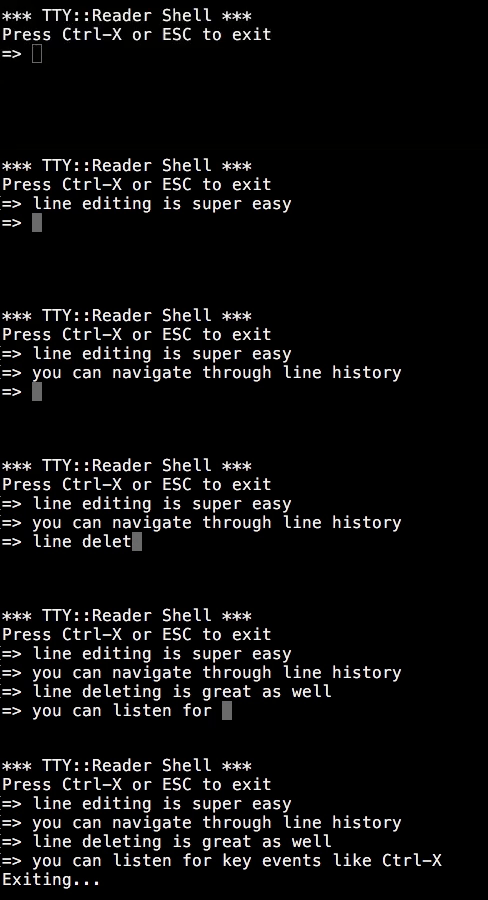
In just a few lines you can recreate IRB prompt.
Initialize the reader:
```ruby
reader = TTY::Reader.new
```
Then register to listen for key events, in this case listen for `Ctrl-X` or `Esc` keys to exit:
```ruby
reader.on(:keyctrl_x, :keyescape) do
puts "Exiting..."
exit
end
```
Finally, keep asking user for line input with a `=>` as a prompt:
```ruby
loop do
reader.read_line("=> ")
end
```
## API
### 2.1 read_keypress
To read a single key stroke from the user use `read_char` or `read_keypress`:
```ruby
reader.read_char
reader.read_keypress
reader.read_keypress(nonblock: true)
```
### 2.2 read_line
By default `read_line` works in `raw mode` which means it behaves like a line editor that allows you to edit each character, respond to `control characters` such as `Control-A` to `Control-B` or navigate through history.
For example, to read a single line terminated by a new line character use `read_line` like so:
```ruby
reader.read_line
```
If you wish for the keystrokes to be interpreted by the terminal instead, use so called `cooked` mode by providing the `:raw` option set to `false`:
```ruby
reader.read_line(raw: false)
```
Any non-interpreted characters received are written back to terminal, however you can stop this by using `:echo` option set to `false`:
```ruby
reader.read_line(echo: false)
```
You can also provide a line prefix displayed before input by passing it as a first argument:
```ruby
reader.read_line(">> ")
# >>
```
To pre-populate the line content for editing use `:value` option:
```ruby
reader.read_line("> ", value: "edit me")
# > edit me
```
### 2.3 read_multiline
By default `read_multiline` works in `raw mode` which means it behaves like a multiline editor that allows you to edit each character, respond to `control characters` such as `Control-A` to `Control-B` or navigate through history.
For example, to read more than one line terminated by `Ctrl+d` or `Ctrl+z` use `read_multiline`:
```ruby
reader.read_multiline
# => [ "line1", "line2", ... ]
```
If you wish for the keystrokes to be interpreted by the terminal instead, use so called `cooked` mode by providing the `:raw` option set to `false`:
```ruby
reader.read_line(raw: false)
```
You can also provide a line prefix displayed before input by passing a string as a first argument:
```ruby
reader.read_multiline(">> ")
```
### 2.4 on
You can register to listen on a key pressed events. This can be done by calling `on` with a event name(s):
```ruby
reader.on(:keypress) { |event| .... }
```
or listen for multiple events:
```ruby
reader.on(:keyctrl_x, :keyescape) { |event| ... }
```
The `KeyEvent` object is yielded to a block whenever a particular key event fires. The event responds to:
* `key` - key pressed
* `value` - value of the key pressed
* `line` - the content of the currently edited line, empty otherwise
The `value` returns the actual key pressed and the `line` the content for the currently edited line or is empty.
The `key` is an object that responds to following messages:
* `name` - the name of the event such as :up, :down, letter or digit
* `meta` - true if event is non-standard key associated
* `shift` - true if shift has been pressed with the key
* `ctrl` - true if ctrl has been pressed with the key
For example, to add listen to vim like navigation keys, one would do the following:
```ruby
reader.on(:keypress) do |event|
if event.value == "j"
...
end
if event.value == "k"
...
end
end
```
You can subscribe to more than one event:
```ruby
reader.on(:keypress) { |event| ... }
.on(:keydown) { |event| ... }
```
### 2.5 subscribe
You can subscribe any object to listen for the emitted [key events](#27-supported-events) using the `subscribe` message. The listener would need to implement a method for every event it wishes to receive.
For example, if a `MyListener` class wishes to only listen for `keypress` event:
```ruby
class MyListener
def keypress(event)
...
end
end
```
Then subscribing is done:
```ruby
reader.subscribe(MyListener.new)
```
Alternatively, `subscribe` allows you to listen to events only for the duration of block execution like so:
```ruby
reader.subscribe(MyListener) do
...
end
```
### 2.6 unsubscribe
You can unsubscribe any object from listening to the key events using the `unsubscribe` message:
```ruby
reader.unsubscribe(my_listener)
```
### 2.7 trigger
The signature for triggering key events is `trigger(event, args...)`. The first argument is a [key event name](#27-supported-events) followed by any number of actual values related to the event being triggered.
For example, to trigger `:keydown` event do:
```ruby
reader.trigger(:keydown)
```
To add vim bindings for line editing you could discern between alphanumeric inputs like so:
```ruby
reader.on(:keypress) do |event|
if event.value == "j"
reader.trigger(:keydown)
end
if evevnt.value == "k"
reader.trigger(:keyup)
end
end
```
### 2.8 supported events
The available key events for character input are:
* `:keypress`
* `:keyenter`
* `:keyreturn`
* `:keytab`
* `:keybackspace`
* `:keyspace`
* `:keyescape`
* `:keydelete`
* `:keyalpha`
* `:keynum`
The navigation related key events are:
* `:keydown`
* `:keyup`
* `:keyleft`
* `:keyright`
* `:keyhome`
* `:keyend`
* `:keyclear`
The specific `ctrl` key events:
* `:keyctrl_a`
* `:keyctrl_b`
* ...
* `:keyctrl_z`
The key events for functional keys `f*` are:
* `:keyf1`
* `:keyf2`
* ...
* `:keyf24`
## 3. Configuration
### 3.1. `:interrupt`
By default `InputInterrupt` error will be raised when the user hits the interrupt key(Control-C). However, you can customise this behaviour by passing the `:interrupt` option. The available options are:
* `:signal` - sends interrupt signal
* `:exit` - exists with status code
* `:noop` - skips handler
* custom proc
For example, to send interrupt signal do:
```ruby
reader = TTY::Reader.new(interrupt: :signal)
```
### 3.2. `:track_history`
The `read_line` and `read_multiline` provide history buffer that tracks all the lines entered during `TTY::Reader.new` interactions. The history buffer provides previous or next lines when user presses up/down arrows respectively. However, if you wish to disable this behaviour use `:track_history` option like so:
```ruby
reader = TTY::Reader.new(track_history: false)
```
### 3.3. `:history_cycle`
This option determines whether the history buffer allows for infinite navigation. By default it is set to `false`. You can change this:
```ruby
reader = TTY::Reader.new(history_cycle: true)
```
### 3.4. `:history_duplicates`
This option controls whether duplicate lines are stored in history. By default set to `true`. You can change this:
```ruby
reader = TTY::Reader.new(history_duplicates: false)
```
### 3.5. `:history_exclude`
This option allows you to exclude lines from being stored in history. It accepts a `Proc` with a line as a first argument. By default it is set to exclude empty lines. To change this:
```ruby
reader = TTY::Reader.new(history_exclude: ->(line) { ... })
```
## Development
After checking out the repo, run `bin/setup` to install dependencies. Then, run `rake spec` to run the tests. You can also run `bin/console` for an interactive prompt that will allow you to experiment.
## Contributing
Bug reports and pull requests are welcome on GitHub at https://github.com/piotrmurach/tty-reader. This project is intended to be a safe, welcoming space for collaboration, and contributors are expected to adhere to the [Contributor Covenant](http://contributor-covenant.org) code of conduct.
1. Clone the project on GitHub
2. Create a feature branch
3. Submit a Pull Request
Important notes:
- **All new features must include test coverage.** At a bare minimum, unit tests are required. It is preferred if you include acceptance tests as well.
- **The tests must be be idempotent.** Any test run should produce the same result when run over and over.
- **All new features must include source code & readme documentation** Any new method you add should include yarddoc style documentation with clearly specified parameter and return types.
## License
The gem is available as open source under the terms of the [MIT License](http://opensource.org/licenses/MIT).
## Code of Conduct
Everyone interacting in the TTY::Reader project’s codebases, issue trackers, chat rooms and mailing lists is expected to follow the [code of conduct](https://github.com/piotrmurach/tty-reader/blob/master/CODE_OF_CONDUCT.md).
## Copyright
Copyright (c) 2017 Piotr Murach. See LICENSE for further details.
|
