1
2
3
4
5
6
7
8
9
10
11
12
13
14
15
16
17
18
19
20
21
22
23
24
25
26
27
28
29
30
31
32
33
34
35
36
37
38
39
40
41
42
43
44
45
46
47
48
49
50
51
52
53
54
55
56
57
58
59
60
61
62
63
64
65
66
67
68
69
|
# Apertis SBOM tooling
This is a collection of the Apertis tooling to generate SBOM as described
in the [Apertis' website](https://www.apertis.org/architecture/platform/software_bill_of_materials/).
## Machine-readable debian/copyright
The first step is to ensure your package has a [machine-readable `debian/copyright`](https://www.debian.org/doc/packaging-manuals/copyright-format/1.0/),
otherwise convert it!
Although, the Debian policy declares for now [this format as optional](https://www.debian.org/doc/debian-policy/ch-docs.html#machine-readable-copyright-information),
most of the Debian packages already [have a machine-readable debian/copyright](https://trends.debian.net/#copyright-format-machine-readable-dep-5-vs-old-format).
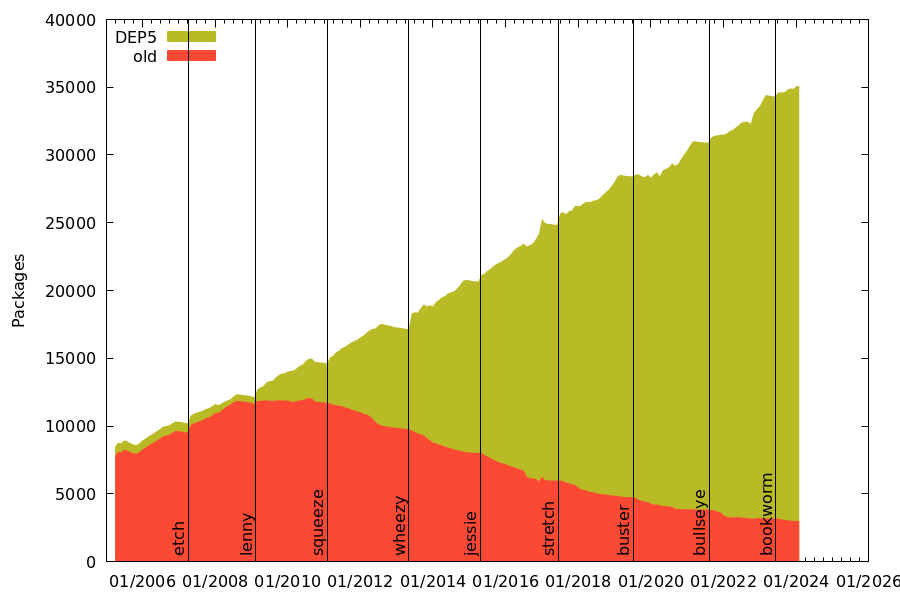
The list of packages to be converted is available either through [lintian](https://udd.debian.org/lintian-tag/no-dep5-copyright?affected=yes)
or through [Debian Trends](https://trends.debian.net/copyright_unstable-packages.csv).
## Build your package with dh_setup_copyright
Install the debhelper module `dh_setup_copyright` with:
```sh
sudo apt install dh-setup-copyright
```
Then build your package with the sequence` dh_setup_copyright` enabled.
This can be achieved in two ways:
Either by exporting the environment variable (the recommanded way):
```
export DH_EXTRA_ADDONS=setup_copyright
dpkg-buildpackage
```
Or by editing the `debian/rules` which means having to edit all your packages:
```
dh $@ --with setup_copyright
```
Finally, just build your package:
```
dpkg-buildpackage
```
`dh_setup_copyright` will generate two files for each binary installed in a
package: `<binary>_bin2sources_<arch>.json` and `<binary>_metadata_<arch>.json`
at `/usr/share/doc/<package>/`.
## Generate SBOMs
`generate_licensing_bom` can be used to generate a
[licenses SBOM file](https://www.apertis.org/architecture/platform/software_bill_of_materials/#licenses-sbom).
It will scan all installed `<binary>_metadata_<arch>.json` generated with
`dh_setup_copyright`, then it will agregate all the licensing data in to a unique file.
An example of licenses SBOM file generated for [Apertis v2026pre is available here](https://images.apertis.org/release/v2026pre/v2026pre.0/amd64/fixedfunction/apertis_v2026pre-fixedfunction-amd64-uefi_v2026pre.0.img.licenses.gz).
`generate_build_deps_bom` can be used to generate a [build dependency SBOM file](https://www.apertis.org/architecture/platform/software_bill_of_materials/#build-deps-sbom).
It will scan all installed `<binary>_metadata_<arch>.json` generated with
`dh_setup_copyright`, then it will agregate all build dependency data in to a unique file.
An example of licenses SBOM file generated for [Apertis v2026pre is available here](https://images.apertis.org/release/v2026pre/v2026pre.0/amd64/fixedfunction/apertis_v2026pre-fixedfunction-amd64-uefi_v2026pre.0.img.build_deps.gz).
## Check SBOMs
`check_licensing_bom` scans the licenses SBOM file to find potential license
issues like undetermined or blacklisted licenses based on your own needs.
`check_build_deps_bom` scans the build dependency SBOM to find potential
dependency issues. Additional checks can also be added to the source package and versions used,
to stop security issues, such as packaged build using old dependencies with CVEs reported.
|
