1
2
3
4
5
6
7
8
9
10
11
12
13
14
15
16
17
18
19
20
21
22
23
24
25
26
27
28
29
30
31
32
33
34
35
36
37
38
39
40
41
42
43
44
45
46
47
48
49
50
51
52
53
54
55
56
57
58
59
60
61
62
63
64
65
66
67
68
69
70
71
72
73
74
75
76
77
78
79
80
81
82
83
84
85
86
87
88
89
90
91
92
93
94
95
96
97
98
99
100
101
102
103
104
105
106
107
108
109
110
111
112
113
114
115
116
117
118
119
120
121
122
123
124
125
126
127
128
129
130
131
132
133
134
135
136
137
138
139
|
# coding: utf-8
# # Example 01: Basic Queries
#
# Retrieving data from Socrata databases using sodapy
# ## Setup
# In[1]:
import os
import pandas as pd
import numpy as np
from sodapy import Socrata
# ## Find some data
#
# Though any organization can host their own data with Socrata's tools, Socrata also hosts several open datasets themselves:
#
# https://opendata.socrata.com/browse
#
# The following search options can help you find some great datasets for getting started:
# * Limit to data sets (pre-analyzed stuff is great, but if you're using sodapy you probably want the raw numbers!)
# * Sort by "Most Accessed"
#
# [Here's](https://opendata.socrata.com/browse?limitTo=datasets&sortBy=most_accessed&utf8=%E2%9C%93&page=1) a link that applies those filters automatically.
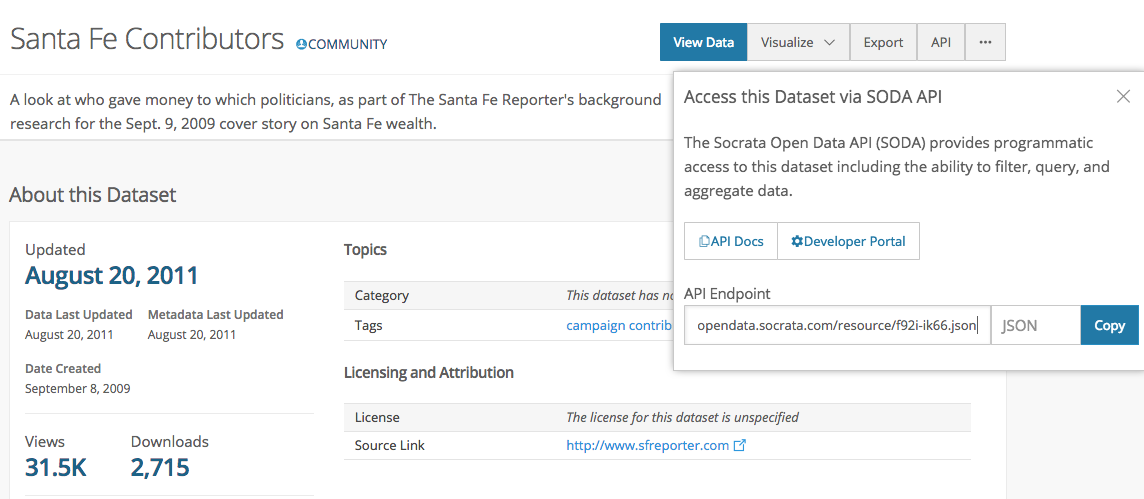
#
# Click on a few listings until you find one that looks interesting. Then click API and extract the following bits of data from the displayed url.
#
# https://<**opendata.socrata.com**>/dataset/Santa-Fe-Contributors/<**f92i-ik66**>.json
#
# 
# In[4]:
# Enter the information from those sections here
socrata_domain = "opendata.socrata.com"
socrata_dataset_identifier = "f92i-ik66"
# App Tokens can be generated by creating an account at https://opendata.socrata.com/signup
# Tokens are optional (`None` can be used instead), though requests will be rate limited.
#
# If you choose to use a token, run the following command on the terminal (or add it to your .bashrc)
# $ export SODAPY_APPTOKEN=<token>
socrata_token = os.environ.get("SODAPY_APPTOKEN")
# ## Get all the data
# In[5]:
client = Socrata(socrata_domain, socrata_token)
print(
"Domain: {domain:}\nSession: {session:}\nURI Prefix: {uri_prefix:}".format(
**client.__dict__
)
)
# In[6]:
results = client.get(socrata_dataset_identifier)
df = pd.DataFrame.from_dict(results)
df.head()
# Success! Let's do some minimal cleaning and analysis just to justify the bandwidth used.
# In[7]:
df["amount"] = df["amount"].astype(float)
# In[8]:
by_candidate = (
df.groupby("recipient").amount.aggregate([np.sum, np.mean, np.size]).round(0)
)
by_candidate.sort_values("sum", ascending=False).head()
# ## Multiple Data Sources
#
# That was much less annoying than downloading a CSV, though you can always save the dataframe to a CSV if you'd like. Where sodapy really shines though is in grabbing different data sources and mashing them together.
#
# For example, let's compare 311 calls between [New York City](https://data.cityofnewyork.us/Social-Services/311-Service-Requests-from-2010-to-Present/erm2-nwe9) and [Chattanooga, TN](https://data.chattlibrary.org/Government/311-Service-Requests/9iep-6yhz). Socrata makes it so easy, you'd be crazy _not_ to do it!
# In[12]:
nyc_domain = "data.cityofnewyork.us"
nyc_dataset_identifier = "fhrw-4uyv"
nyc_client = Socrata(nyc_domain, socrata_token)
nyc_results = nyc_client.get(nyc_dataset_identifier)
nyc_df = pd.DataFrame.from_dict(nyc_results)
print(nyc_df.shape)
chatt_domain = "data.chattlibrary.org"
chatt_dataset_identifier = "sf89-4qcw"
chatt_client = Socrata(chatt_domain, socrata_token)
chatt_results = chatt_client.get(chatt_dataset_identifier)
chatt_df = pd.DataFrame.from_dict(chatt_results)
print(chatt_df.shape)
# In[11]:
# extract tree-related complaints
tree_related = pd.concat(
[
nyc_df.complaint_type.str.contains(r"[T|t]ree").value_counts(),
chatt_df.description.str.contains(r"[T|t]ree").value_counts(),
],
axis=1,
keys=["nyc", "chatt"],
)
tree_related.div(tree_related.sum()).round(2)
# Looks like trees are a higher percentage of NYC complaints than Chattanooga's.
#
# Note that we can only talk about percentages, since our query results got truncated to 1,000 rows.
#
# What if we want to be smarter about what we ask for, so that we can get 100% of the subset of data
# we're most interested in? That's the subject of a future example, so stay tuned!
#
# If you want to find more data sets, here's Socrata's data finder:
#
# https://www.opendatanetwork.com/search
|
