1
2
3
4
5
6
7
8
9
10
11
12
13
14
15
16
17
18
19
20
21
22
23
24
25
26
27
28
29
30
31
32
33
34
35
36
37
38
39
40
41
42
43
44
45
46
47
48
49
50
51
52
53
54
55
56
57
58
59
60
61
62
63
64
65
66
67
68
69
70
71
72
73
74
75
76
77
78
79
80
81
82
83
84
85
86
87
88
89
90
91
92
93
94
95
96
97
98
99
100
101
102
103
104
105
106
107
108
109
110
111
112
113
114
115
116
117
118
119
120
121
122
123
124
125
126
127
128
129
130
131
132
133
134
135
136
137
138
139
140
141
142
143
144
145
146
147
148
149
150
151
152
153
154
155
156
157
158
159
160
161
162
163
164
165
166
167
168
169
170
171
172
173
174
175
176
177
178
179
180
181
182
183
184
185
186
187
188
189
190
191
192
193
194
195
196
197
198
199
200
201
202
203
204
205
206
207
208
209
210
211
212
213
214
215
216
217
218
219
220
221
222
223
224
225
|
# starfetch
A command line tool written in C++ that displays constellations.
## Table of contents
* [Description](https://github.com/Haruno19/starfetch#description)
* [Demo visuals](https://github.com/Haruno19/starfetch#demo-visuals)
* [Installation](https://github.com/Haruno19/starfetch#installation)
* [Manual (UNIX systems)](https://github.com/Haruno19/starfetch#manual-unix-systems)
* [Manual (Windows)](https://github.com/Haruno19/starfetch#manual-windows)
* [Usage](https://github.com/Haruno19/starfetch#usage)
* [Available constellations](https://github.com/Haruno19/starfetch#available-constellations)
* [JSON Format](https://github.com/Haruno19/starfetch#json-format)
* [Contribution guidelines](https://github.com/Haruno19/starfetch#contribution-guidelines)
* [Credits & Dependencies](https://github.com/Haruno19/starfetch#credits--dependencies)
* [JSON for Modern C++](https://github.com/Haruno19/starfetch#json-for-modern-c)
* [Contributions](https://github.com/Haruno19/starfetch#contributions)
---
## Description
**starfetch** is a tool that prints out a scheme of a given constellation and some information about it: its _quadrant_, its _right ascension_, its _declination_, its _area_ and its _main stars number_.
## Demo (CLI)
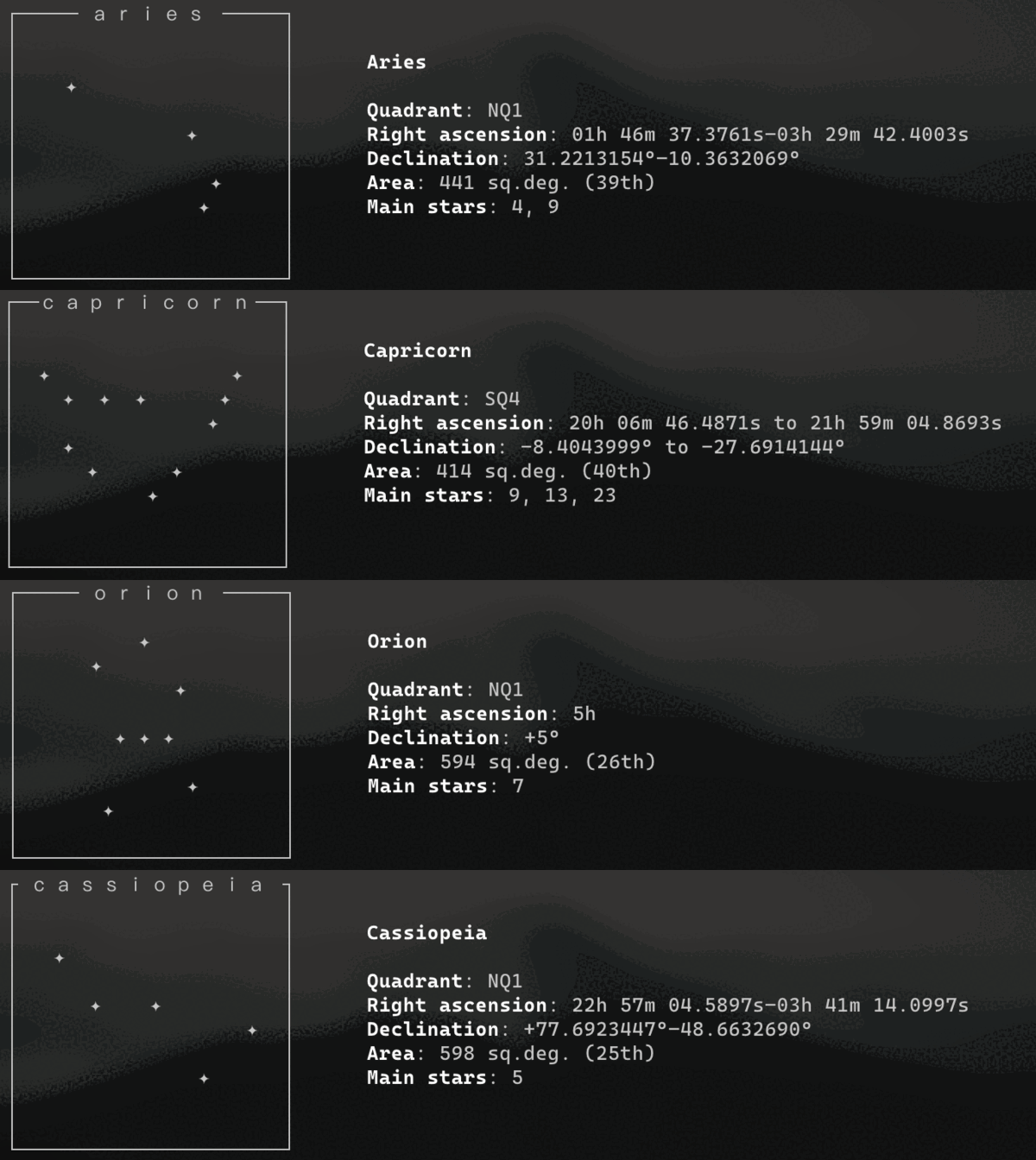
<img width="1375" alt="1" src="https://user-images.githubusercontent.com/61376940/161760417-8ba116fc-71a6-4d0c-8219-1b76a4121ace.png">
## Demo (GUI)

## Installation
### Manual (UNIX systems)
```bash
git clone https://github.com/Haruno19/starfetch
cd starfetch
make -j8 # 8 cores/threads to use in parallel compile
sudo make install
```
Install directoy: ``/usr/local/share/starfetch/``.
### Manual (Windows)
Compilation process on Windows relies on [MingW](https://www.mingw-w64.org). Follow the instructions to properly set a C/C++ MinGW developing environment within the [Visual Studio Code](https://code.visualstudio.com/download) editor.
- Download [MingW](https://github.com/niXman/mingw-builds-binaries/releases);
- Once finished downloading, extract it to the following path: `C:\MingW`;
- Launch [Visual Studio Code](https://code.visualstudio.com/download)
- You might want to install the [C\C++ Extensions](https://marketplace.visualstudio.com/items?itemName=ms-vscode.cpptools);
- Navigate to `File > Preferences > Settings` and type to search for `cppStandard`;
- Set the field to `c17` for both C++ and C.
- Navigate to `Terminal > Configure Tasks... > Create tasks.json from template`, then copy and paste the following segment into your task file:
```json
{
"version": "2.0.0",
"tasks": [
{
"type": "cppbuild",
"label": "C/C++",
"command": "C:\\MingW\\bin\\g++.exe",
"args": [
"-fdiagnostics-color=always",
"-std=c++17",
"-ggdb",
"-lpthread",
"-Wall",
"-Wextra",
"-O2",
"-pipe",
"-pedantic",
"-Wundef",
"-Wshadow",
"-W",
"-Wwrite-strings",
"-Wcast-align",
"-Wstrict-overflow=5",
"-Wconversion",
"-Wpointer-arith",
"-Wformat=2",
"-Wsign-compare",
"-Wendif-labels",
"-Wredundant-decls",
"-Winit-self",
"${file}",
"-o",
"${fileDirname}/${fileBasenameNoExtension}"
],
"options": {
"cwd": "C:\\MingW\\bin"
},
"problemMatcher": [
"$gcc"
],
"group": {
"kind": "build",
"isDefault": true
},
"detail": "compiler: C:\\MingW\\bin\\g++.exe"
}
]
}
```
- Clone strafetch repository and move all files from `starfetch/res` to `C:\starfetch`;
- Return to Visual Studio Code and compile the program pressing `CTRL + SHIFT + B`;
- After the compilation has finisheda, press ```CTRL + \` ``` and run the following commands:
`cp -r C:\Users\[USERNAME]\Desktop\starfetch.exe`, `C:\MingW\bin; cd C:\MingW\bin`, `.\starfetch.exe`
Alternative versions:
- [K1ngst0m](https://github.com/K1ngst0m/starfetch): starfetch doesn't depend on the files in `/usr/local/share/starfetch/`
## Usage
**starfetch** accepts parameters to tweak its behaviour:
```
starfetch [OPTION] [CONSTELLATION NAME]
-h Prints this help message.
-n Shows the selected constellation.
-r Shows a random constellation.
-l Prints the list of all the available constellations.
-c Use given color such as: black, white, cyan, magenta, yellow, red, blue. Must be used the following way: starfetch -c yellow -n cancer
If launched with no arguments, the behaviour is the same as with '-r'.
Examples: starfetch -r
starfetch -n orion
starfetch
```
## Available constellations
```
orion gemini monoceros
aries scorpio canes_venatici
cancer sagittarius
cygnus aquarius
cassiopeia ophiuchus
libra pisces
virgo antilia
leo ara
capricorn apus
taurus bootes
ursa_major crux
ursa_minor corona_borealis
lupus lyra
```
I will add more and more constellations!
## JSON format
All the constellation data is stored as JSON files in the ``res/constellations/`` directory.
Here's a sample of the JSON format from the **Orion** constellation:
```json
{
"title": "───── orion ─────",
"graph":
{
"line1": { },
"line2": { "11": "✦" },
"line3": { "7": "✦" },
"line4": { "14": "✦" },
"line5": { },
"line6": { "9": "✦", "11": "✦", "13": "✦"},
"line7": { },
"line8": { "15": "✦" },
"line9": { "8": "✦" },
"line10": { }
},
"name": "Orion",
"quadrant": "NQ1",
"right ascension": "5h",
"declination": "+5°",
"area": "594 sq.deg. (26th)",
"main stars": "7"
}
```
* ``title`` contains the first line of the constellation graph.
* ``graph`` contains 10 lines keys, describing the constellation graph.
* ``line1`` to ``line10`` contain the X coordinate of the stars on the relative line (e.g. the 6th line of Orion's graph contains three stars: one at position ``9``, one at poistion ``11`` and one at position ``13``).
* ``name`` contains the name of the constellation, this time written with regular characters.
* ``quadrant`` contains the quadrant of the constellation.
* ``right ascension`` contains the right ascension of the constellation.
* ``declination`` contains the declination of the constellation.
* ``area`` contains the area of the constellation.
* ``main stars`` contains the number of stars that compose the constellation.
### Contribution guidelines
If you want to help this project grow by adding constellation files, here are some guidelines to write correct JSON files:
* The ``"title"`` field should contain the name of the constellation written with [fullwidth Unicode characters](https://en.wikipedia.org/wiki/Halfwidth_and_Fullwidth_Forms_(Unicode_block)).
Please, make sure to use them. Before and after the name, you have to put the [box-drawing character](https://en.wikipedia.org/wiki/Box-drawing_character) U+2500 as many times as needed to make the line reach the right side of the graph.
Please, make sure to place the same number of box-drawing characters on both sides, in order to make the name appear at the center.
Between the constellation name and the box-drawing characters, you should place a whitespace.
(e.g. ``"───── name ─────"``).
* The ``line1`` to ``line10`` fields should containd the X coordinates of the stars in each line.
Please, make sure to center the graph both vertically and horizontally and please, make sure not to leave any star without an X coordinate (e.g. **don't** write this: ``"" : "✦"``).
* The ``"name"`` field should contain the name of the constellation starting with the capital letter.
* The ``"quadrant"`` field should contain the quadrant of the constellation, all in capital letters and without spaces.
* The ``"right ascension"`` field should contain the right ascension of the constellation.
Please, make sure to separate each value with a whitespace, and in case a constellation has two right ascension values, separate them with a "to" (e.g. ``"22h 57m 04.5897s to –03h 41m 14.0997s"``).
* The ``declination`` field should contain the declination of the constellation.
Please, make sure to specify bot - and + symbols for negative and positive values. If there are two declination values, separate them with a "to" (e.g. ``"+77.6923447° to –48.6632690°"``).
* The ``"area"`` field should contain the area of the constellation.
Please, make sure to include the unit of measurement, written with lowercase letters (e.g. ``"598 sq.deg. (25th)"``).
* The ``"main stars"`` field should contain the number of stars that compose the constellation.
Please, if there's more than a value for this field, make sure to separate them with a comma and a space, and place them in ascending order (e.g. ``"9, 11, 20"``).
Your help is highly appreciated!
## Credits & Dependencies
### JSON for Modern C++
To work easly with JSON files, starfetch relies on [JSON for Modern C++](https://github.com/nlohmann/json) by [Niels Lohmann](https://github.com/nlohmann).
Although relying on external libraries, no dependencies are needed to install starfetch, since said library is already included in this repository (``src/include/json.hpp``) via the [single_include](https://github.com/nlohmann/json/blob/develop/single_include/nlohmann/json.hpp) version provided by the author, in order to make it easier for you, the end user, to enjoy starfetch.
### Contributions
* Credits to John Southern for creating the JSON files for the ``gemini``, ``scorpio``, ``sagittarius``, ``aquarius``, ``ophiuchus`` and ``pisces`` constellations!
* Credits to [Hushm](https://github.com/HushmKun) for creating the JSON files for the ``antlia``, ``ara`` and ``apus`` constellations!
* Credits to [kbHoward2](https://github.com/kbHoward2) for creating the JSON file for the ``lupus`` constellation!
* Credits to [Vega Deftwing](https://github.com/VegaDeftwing) for creating the JSON file for the ``lyra`` constellation!
* Credits to [Nathan Richard](https://github.com/naTariks) for creating the JSON file for the ``monoceros`` constellation!
* Credits to [Andreas Grafen](https://github.com/andreasgrafen) for creating the JSON file for the ``canes venatici`` constellation!
Very huge thanks to [su8](https://github.com/su8) for optimizing and polishing starfetch's code, adding compatibilty for Windows systems and the related detailed documentation, and developing the graphical version of starfetch!
----
###### All data regarding the constellations is taken from Wikipedia.
|
