1
2
3
4
5
6
7
8
9
10
11
12
13
14
15
16
17
18
19
20
21
22
23
24
25
26
27
28
29
30
31
32
33
34
35
36
37
38
39
40
41
42
43
44
45
46
47
48
49
50
51
52
53
54
55
56
57
58
59
|
# latex-alert-message - available on [CTAN](http://www.ctan.org/pkg/alertmessage)
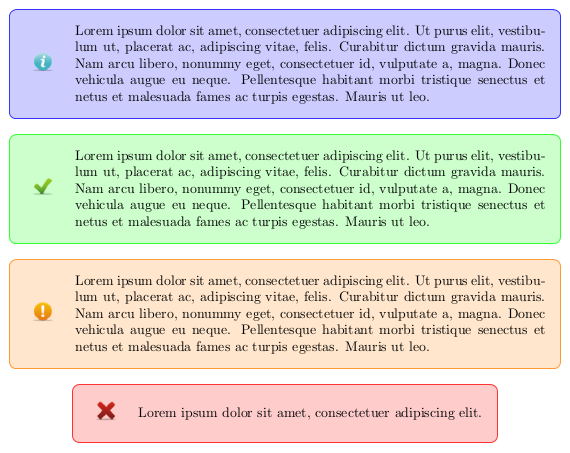
Alert messages for LaTeX - Inspired by [Bootstrap alerts](http://www.w3schools.com/bootstrap/bootstrap_alerts.asp)
[](https://raw.githubusercontent.com/pidupuis/latex-alert-message/master/panels.png)
## Installation
#### Clean installation
To install the package properly, download the [TDS archive](https://github.com/pidupuis/latex-alert-message/blob/master/alertmessage.tds.zip?raw=true). Then extract the archive into the texmf folder and install the package as following:
```bash
sudo unzip alertmessage.tds.zip -d "$(kpsewhich -var-value TEXMFLOCAL)"
sudo texhash
```
The package will be available from anywhere on your computer.
#### Use the package without installation
You can use the package without installation by putting the [package file](https://raw.githubusercontent.com/pidupuis/latex-alert-message/master/alertmessage.sty) and the [images](https://github.com/pidupuis/latex-alert-message/tree/master/img) in the root directory of your LaTeX project.
Download the [latest release](https://github.com/pidupuis/latex-alert-message/releases/tag/v1.0) as a full example project or look at the [example.tex](https://github.com/pidupuis/latex-alert-message/blob/master/example.tex).
## Documentation
Include the package in the header of your TeX file:
```tex
\usepackage{alertmessage}
```
And simply call the methods you need. There are four panels availables for `information`, `warnings`, `errors` or `success` messages.
```tex
\alertinfo{Lorem ipsum dolor sit amet.}
\alertsuccess{Lorem ipsum dolor sit amet.}
\alertwarning{Lorem ipsum dolor sit amet.}
\alerterror{Lorem ipsum dolor sit amet.}
```
The panel will adapt its size according to the length of the text (as you can see in the example).
## Contributing
Feel free to open [issues](https://github.com/pidupuis/latex-alert-message/issues) or create [pull requests](https://github.com/pidupuis/latex-alert-message/pulls).
If you want to modify the package for personal use, you can manually edit the [package file](https://github.com/pidupuis/latex-alert-message/blob/master/alertmessage.sty).
If you want to create a TDS archive to share your modifications with your friends, use the [TDS generation script](https://github.com/pidupuis/latex-alert-message/blob/master/generate_tds.sh).
If you want to deploy your modifications on the CTAN by yourself, please take a different package name.
## Releases
* [v1.1](https://github.com/pidupuis/latex-alert-message/releases/tag/v1.1) [2015-08-04]: Provides TDS archive to facilitate the installation process.
* [v1.0](https://github.com/pidupuis/latex-alert-message/releases/tag/v1.0) [2015-08-02]: Provides macros for `information`, `warnings`, `errors` or `success` alerts.
|
