1
2
3
4
5
6
7
8
9
10
11
12
13
14
15
16
17
18
19
20
21
22
23
24
25
26
27
28
29
30
31
32
33
34
35
36
37
38
39
40
|
Hostname management
===================
NetworkManager can update the system hostname via different
mechanisms. The following diagram describes the workflow:
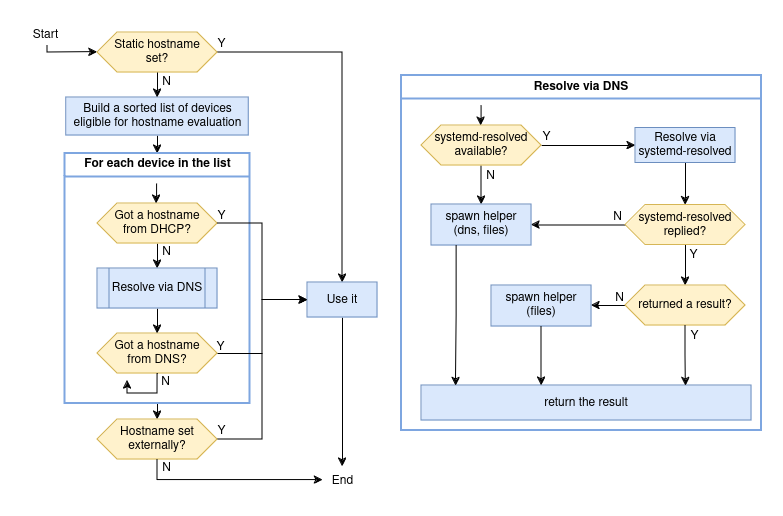
A few notes on the diagram:
- if there is a static hostname set in `/etc/hostname`, no action is
taken. NetworkManager only manages the transient hostname. See the
systemd-hostnamed
[documentation](https://www.freedesktop.org/software/systemd/man/latest/org.freedesktop.hostname1.html#Semantics)
about the distinction between static and transient hostname.
- When there is no static hostname set, NetworkManager builds a
sorted list of active devices that are eligible for the hostname
evaluation. When doing so, the `hostname` setting of the connection
active on each device is taken into account. Properties `from-dhcp`
and `from-dns-lookup` determine if the two methods must be used for
the device; property `only-from-default` determines whether devices
without a default route should be considered, and `priority` is
used to sort the entries. In case of a tie of the priority, a
device with the default route comes first.
- When evaluating a given device, first NM checks if the device
received an hostname via DHCP and then if the first IPv4 and IPv6
addresses configured on the interface can be resolved to a name via
DNS. The mechanism used to perform the reverse DNS lookup of a
specific address is described in the diagram on the right.
- In the "spawn helper" step, NM starts a separate process that
performs the reverse DNS lookup using the NSS services specified
(see `man nsswitch.conf`). Service `dns` does the lookup via a DNS
query, while `files` returns results from `/etc/hosts`.
- In case there is no valid result from DHCP or DNS, from any device,
if there a valid transient hostname set outside of NetworkManager,
that hostname is honored.
|
