1
2
3
4
5
6
7
8
9
10
11
12
13
14
15
16
17
18
19
20
21
22
23
24
25
26
27
28
29
30
31
32
33
34
35
36
37
38
39
40
41
42
43
44
45
46
47
48
49
50
51
52
53
54
55
56
57
58
59
60
61
62
63
64
65
66
67
68
69
70
71
72
73
74
75
76
77
78
79
80
81
82
83
84
85
86
87
88
89
90
91
92
93
94
95
96
97
98
99
100
101
102
103
104
105
106
107
108
109
110
111
112
113
114
115
116
117
118
119
120
121
122
123
124
125
126
127
128
129
130
131
132
133
134
135
136
137
138
139
140
141
142
143
144
145
146
147
148
149
150
151
152
153
154
155
156
157
158
159
160
161
162
163
164
165
166
167
168
169
170
171
172
173
174
175
176
177
178
179
180
181
182
183
|
# Plugins
Plugins are the most efficient way to customize or change the default behavior of a chart. They have been introduced at [version 2.1.0](https://github.com/chartjs/Chart.js/releases/tag/2.1.0) (global plugins only) and extended at [version 2.5.0](https://github.com/chartjs/Chart.js/releases/tag/v2.5.0) (per chart plugins and options).
## Using plugins
Plugins can be shared between chart instances:
```javascript
const plugin = { /* plugin implementation */ };
// chart1 and chart2 use "plugin"
const chart1 = new Chart(ctx, {
plugins: [plugin]
});
const chart2 = new Chart(ctx, {
plugins: [plugin]
});
// chart3 doesn't use "plugin"
const chart3 = new Chart(ctx, {});
```
Plugins can also be defined directly in the chart `plugins` config (a.k.a. *inline plugins*):
:::warning
*inline* plugins are not registered. Some plugins require registering, i.e. can't be used *inline*.
:::
```javascript
const chart = new Chart(ctx, {
plugins: [{
beforeInit: function(chart, args, options) {
//..
}
}]
});
```
However, this approach is not ideal when the customization needs to apply to many charts.
## Global plugins
Plugins can be registered globally to be applied on all charts (a.k.a. *global plugins*):
```javascript
Chart.register({
// plugin implementation
});
```
:::warning
*inline* plugins can't be registered globally.
:::
## Configuration
### Plugin ID
Plugins must define a unique id in order to be configurable.
This id should follow the [npm package name convention](https://docs.npmjs.com/files/package.json#name):
- can't start with a dot or an underscore
- can't contain any non-URL-safe characters
- can't contain uppercase letters
- should be something short, but also reasonably descriptive
If a plugin is intended to be released publicly, you may want to check the [registry](https://www.npmjs.com/search?q=chartjs-plugin-) to see if there's something by that name already. Note that in this case, the package name should be prefixed by `chartjs-plugin-` to appear in Chart.js plugin registry.
### Plugin options
Plugin options are located under the `options.plugins` config and are scoped by the plugin ID: `options.plugins.{plugin-id}`.
```javascript
const chart = new Chart(ctx, {
options: {
foo: { ... }, // chart 'foo' option
plugins: {
p1: {
foo: { ... }, // p1 plugin 'foo' option
bar: { ... }
},
p2: {
foo: { ... }, // p2 plugin 'foo' option
bla: { ... }
}
}
}
});
```
#### Disable plugins
To disable a global plugin for a specific chart instance, the plugin options must be set to `false`:
```javascript
Chart.register({
id: 'p1',
// ...
});
const chart = new Chart(ctx, {
options: {
plugins: {
p1: false // disable plugin 'p1' for this instance
}
}
});
```
To disable all plugins for a specific chart instance, set `options.plugins` to `false`:
```javascript
const chart = new Chart(ctx, {
options: {
plugins: false // all plugins are disabled for this instance
}
});
```
#### Plugin defaults
You can set default values for your plugin options in the `defaults` entry of your plugin object. In the example below the canvas will always have a lightgreen backgroundColor unless the user overrides this option in `options.plugins.custom_canvas_background_color.color`.
```javascript
const plugin = {
id: 'custom_canvas_background_color',
beforeDraw: (chart, args, options) => {
const {ctx} = chart;
ctx.save();
ctx.globalCompositeOperation = 'destination-over';
ctx.fillStyle = options.color;
ctx.fillRect(0, 0, chart.width, chart.height);
ctx.restore();
},
defaults: {
color: 'lightGreen'
}
}
```
## Plugin Core API
Read more about the [existing plugin extension hooks](../api/interfaces/Plugin).
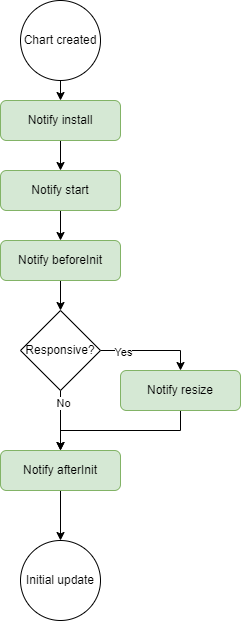
### Chart Initialization
Plugins are notified during the initialization process. These hooks can be used to setup data needed for the plugin to operate.
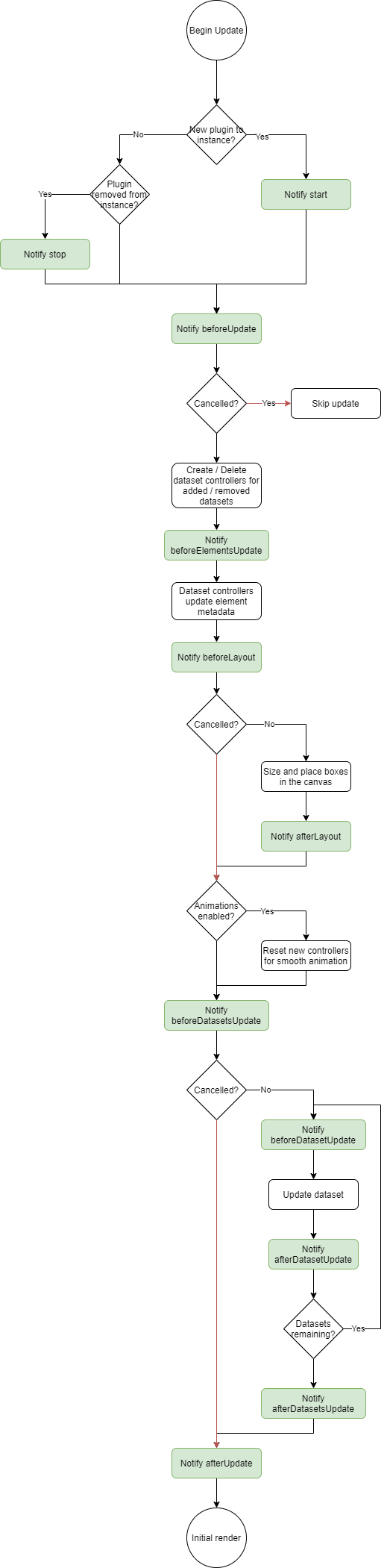
### Chart Update
Plugins are notified throughout the update process.
### Scale Update
Plugins are notified throughout the scale update process.

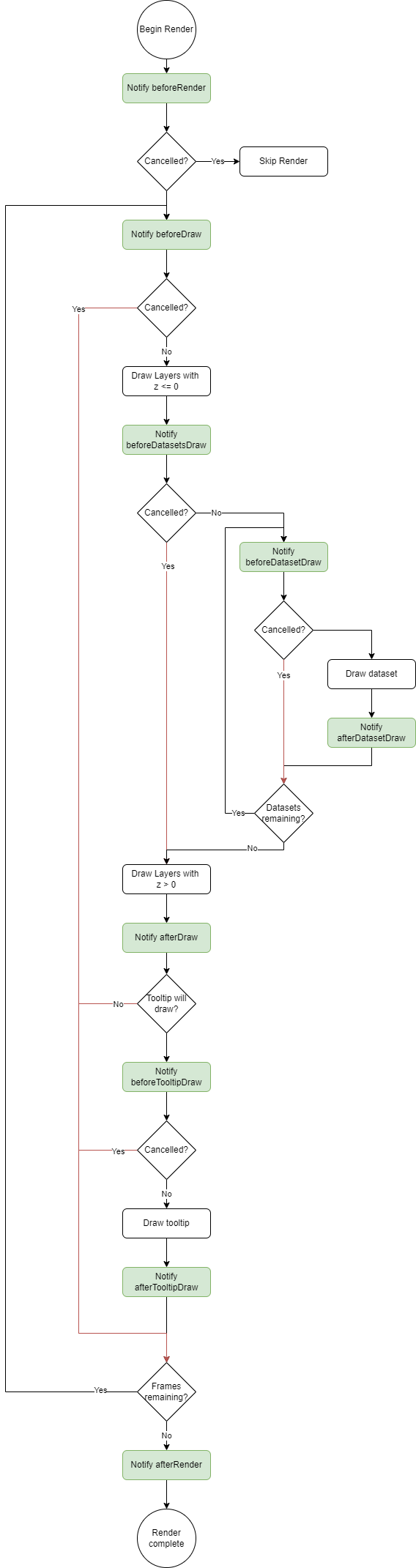
### Rendering
Plugins can interact with the chart throughout the render process. The rendering process is documented in the flowchart below. Each of the green processes is a plugin notification. The red lines indicate how cancelling part of the render process can occur when a plugin returns `false` from a hook. Not all hooks are cancelable, however, in general most `before*` hooks can be cancelled.
### Event Handling
Plugins can interact with the chart during the event handling process. The event handling flow is documented in the flowchart below. Each of the green processes is a plugin notification. If a plugin makes changes that require a re-render, the plugin can set `args.changed` to `true` to indicate that a render is needed. The built-in tooltip plugin uses this method to indicate when the tooltip has changed.

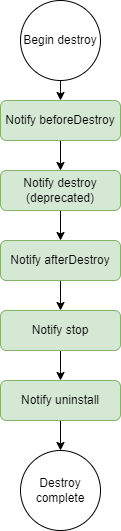
### Chart destroy
Plugins are notified during the destroy process. These hooks can be used to destroy things that the plugin made and used during its life.
The `destroy` hook has been deprecated since Chart.js version 3.7.0, use the `afterDestroy` hook instead.
|
